1. ບົດແນະນຳ
Thank you for choosing the ZIPRO Nitro Exercise Bike. This manual provides essential information for the safe and efficient assembly, operation, and maintenance of your new fitness equipment. Please read this manual thoroughly before use and keep it for future reference.

Figure 1.1: The ZIPRO Nitro Exercise Bike, showcasing its sleek design and compact footprint, ideal for home fitness.
ສິນຄ້າເກີນview ວິດີໂອ
ວິດີໂອນີ້ສະຫນອງການທົ່ວໄປview of the ZIPRO product range, demonstrating various fitness equipment in use. While not specific to the Nitro model's assembly, it illustrates the brand's commitment to quality and user experience.
2. ຂໍ້ມູນຄວາມປອດໄພ
ກ່ອນການໃຊ້ລົດຖີບອອກກຳລັງກາຍ, ກະລຸນາປະຕິບັດຕາມຂໍ້ຄວນລະວັງດ້ານຄວາມປອດໄພຕໍ່ໄປນີ້:
- ປຶກສາແພດກ່ອນທີ່ຈະເລີ່ມໂຄງການອອກກໍາລັງກາຍໃຫມ່.
- ຮັກສາເດັກນ້ອຍ ແລະສັດລ້ຽງຢູ່ຫ່າງຈາກອຸປະກອນໃນເວລານຳໃຊ້.
- Place the bike on a flat, stable surface. Ensure adequate space around the bike.
- ໃສ່ເຄື່ອງນຸ່ງແລະເກີບກິລາທີ່ເຫມາະສົມ. ຫຼີກລ້ຽງການນຸ່ງຫົ່ມວ່າງທີ່ສາມາດໄດ້ຮັບການຕິດໃນພາກສ່ວນທີ່ເຄື່ອນໄຫວ.
- ໃຫ້ກວດສອບລົດຖີບກ່ອນການນຳໃຊ້ແຕ່ລະຄັ້ງວ່າມີຊິ້ນສ່ວນໃດແດ່ທີ່ວ່າງ ຫຼື ສວມໃສ່ຫຼືບໍ່. ຢ່າໃຊ້ຖ້າມັນເສຍຫາຍ.
- ບໍ່ໃຫ້ເກີນນ້ໍາຫນັກຜູ້ໃຊ້ສູງສຸດຂອງ 150 ກິໂລ (330 lbs).
- ຢຸດການອອກກໍາລັງກາຍທັນທີຖ້າທ່ານຮູ້ສຶກອ່ອນເພຍ, ວິນຫົວ, ຫຼືມີອາການປວດ.
3. ເນື້ອໃນຊຸດ
Carefully unpack all components and verify that all parts are present. If any parts are missing or damaged, contact customer support immediately.
ບັນຊີລາຍຊື່ອົງປະກອບ:
- ກອບຫຼັກ
- ສະຖຽນລະພາບທາງຫນ້າ
- ສະຖຽນລະພາບດ້ານຫລັງ
- pedals (ຊ້າຍ ແລະຂວາ)
- Seat Post and Seat
- Handlebar Post and Handlebars
- Console/Monitor
- ຜູ້ຖືກະຕຸກນ້ໍາ
- ຮາດແວປະກອບ (ໂບ, ເຄື່ອງຊັກຜ້າ, ແກ່ນ, ເຄື່ອງມື)
4. ຄໍາແນະນໍາຂອງສະພາແຫ່ງ
Follow these steps to assemble your ZIPRO Nitro Exercise Bike. It is recommended to have two people for assembly.
- ຕິດຕົວກັນສະຖຽນລະພາບ: Secure the front and rear stabilizers to the main frame using the provided bolts and washers. Ensure they are tightly fastened for stability.
- ຕິດຕັ້ງ pedals: Identify the left (L) and right (R) pedals. The left pedal screws counter-clockwise, and the right pedal screws clockwise. Thread them into the crank arms and tighten securely. Pedals are equipped with adjustable straps for foot stability.

Figure 4.1: Pedals with adjustable straps, designed to keep your feet secure during exercise.
- ປະກອບບ່ອນນັ່ງ: Attach the seat to the seat post. Insert the seat post into the main frame and adjust to your desired height. Secure with the adjustment knob. The ergonomic seat offers precise two-level adjustment for comfort during long training sessions.

Figure 4.2: The seat post with multiple adjustment holes for vertical positioning.

Figure 4.3: The seat can also be adjusted horizontally for optimal riding posture.
- Install Handlebar Post and Handlebars: Connect the handlebar post to the main frame. Attach the handlebars to the post. Ensure all connections are secure. The handlebars allow for convenient angle adjustment.

Figure 4.4: The console and handlebars, featuring integrated pulse sensors for heart rate monitoring.
- ແນບຄອນໂຊນ: Mount the console onto the handlebar post. Connect any necessary sensor cables from the main frame to the console. The advanced computer with a clear screen facilitates monitoring your workout and performance.

Figure 4.5: The console includes a convenient holder for your smartphone, allowing for entertainment or fitness app integration during workouts.

Figure 4.6: The console's holder is also suitable for larger devices like tablets, enhancing your workout experience.
- Install Water Bottle Holder: Secure the water bottle holder to the designated spot on the main frame.
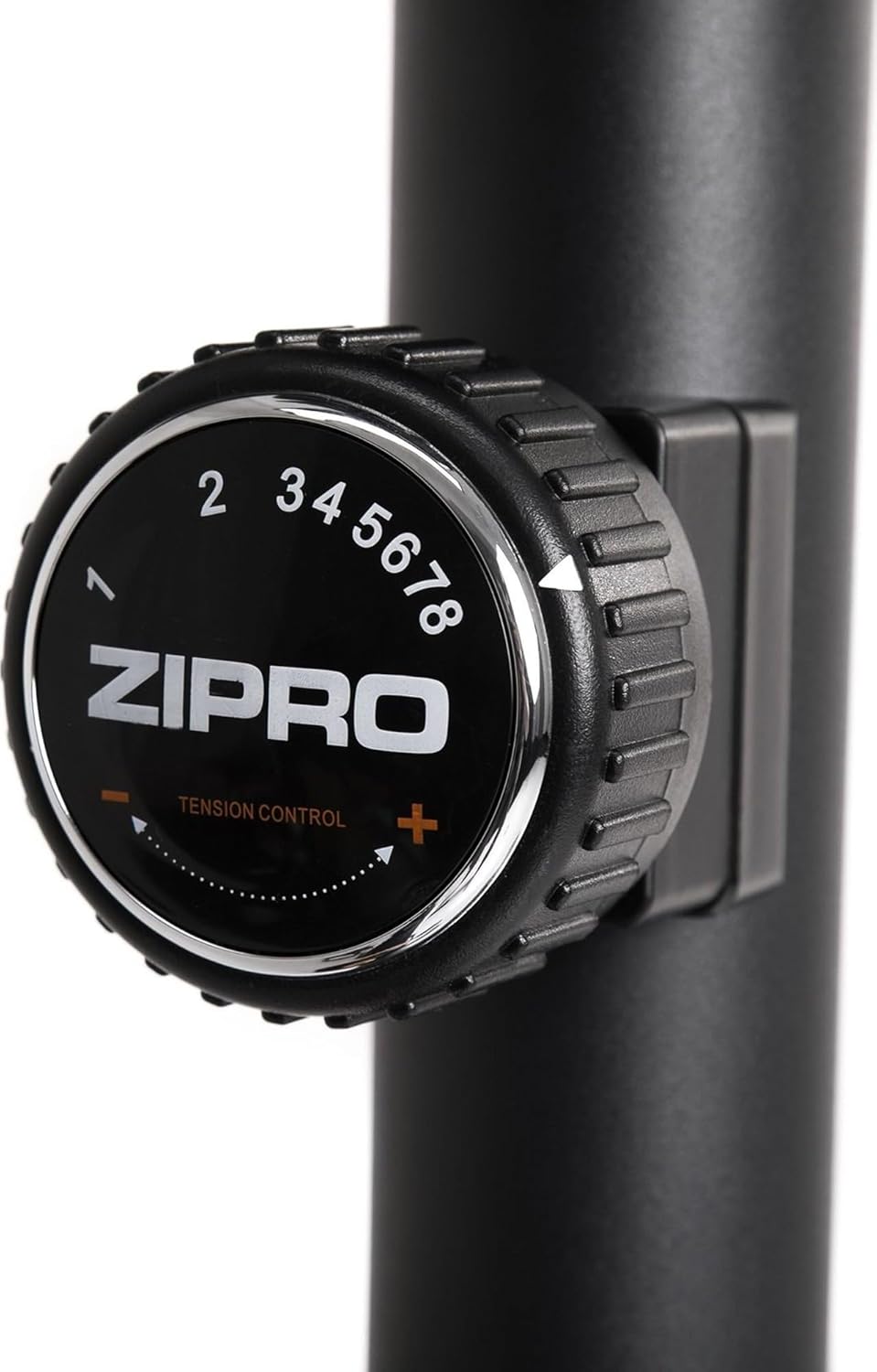
Figure 4.7: A practical water bottle holder ensures hydration is always within reach during your workout.
5. ຄໍາແນະນໍາການດໍາເນີນງານ
5.1. ການປັບຄວາມຕ້ານທານ
The ZIPRO Nitro Exercise Bike features 8 levels of magnetic resistance. To adjust the resistance, turn the tension control knob located below the console. Turn clockwise to increase resistance (harder) and counter-clockwise to decrease resistance (easier).

Figure 5.1: The resistance knob allows for easy adjustment of workout intensity across 8 levels.
5.2. ໜ້າທີ່ຂອງຄອນໂຊນ
The console displays various workout metrics. Use the buttons below the screen to navigate and reset data.
- ສະແກນ: Automatically cycles through display functions.
- ເວລາ: Displays workout duration.
- ຄວາມໄວ: ສະແດງຄວາມໄວໃນປະຈຸບັນ.
- ໄລຍະຫ່າງ: Tracks distance covered.
- ກາລະໂອກາດ: ປະເມີນແຄລໍຣີທີ່ເຜົາຜານ.
- ODOMETER (TOTAL DIST): ສະແດງໄລຍະທາງທີ່ສະສົມທັງໝົດ.
- PULSE: Shows heart rate when hands are on the pulse sensors.
- ຣີເຊັດ: Press to clear current workout data.
- ແບບ: Selects specific display functions.
- ກຳ ນົດ: Used for setting target values (e.g., time, distance, calories).
5.3. Adjusting Seat and Handlebars
For optimal comfort and effectiveness, adjust the seat and handlebars to your body size.
- ຄວາມສູງບ່ອນນັ່ງ: ຄາຍປຸ່ມປັບຢູ່ເທິງເສົາບ່ອນນັ່ງ, ຍົກ ຫຼື ຫຼຸດບ່ອນນັ່ງລົງຈົນກວ່າຂາຂອງທ່ານຈະມີການງໍເລັກນ້ອຍຢູ່ຫົວເຂົ່າເມື່ອຄັນເລັ່ງຢູ່ທີ່ຈຸດຕໍ່າສຸດ. ຂັນປຸ່ມໃຫ້ແໜ້ນ.
- Seat Horizontal Position: Loosen the knob under the seat, slide the seat forward or backward to find a comfortable position relative to the handlebars. Tighten the knob.
- ມຸມຂອງແຮນເບີ: Loosen the adjustment knob on the handlebar post to tilt the handlebars to a comfortable angle. Tighten the knob.
6. ບໍາລຸງຮັກສາ
ການບຳລຸງຮັກສາເປັນປະຈຳຮັບປະກັນອາຍຸການໃຊ້ງານທີ່ຍາວນານ ແລະ ປອດໄພຂອງລົດຖີບອອກກຳລັງກາຍຂອງທ່ານ.
- ທໍາຄວາມສະອາດ: ເຊັດລົດຖີບດ້ວຍການໂຄສະນາamp ຜ້າຫຼັງຈາກແຕ່ລະການນໍາໃຊ້ເພື່ອເອົາເຫື່ອແລະຝຸ່ນ. ຫຼີກລ້ຽງການເຮັດຄວາມສະອາດຂັດ.
- ການກວດກາ: ກວດສອບສະລັອດທັງໝົດ, ແກ່ນໝາກໄມ້, ແລະຊິ້ນສ່ວນເຄື່ອນຍ້າຍເປັນໄລຍະເພື່ອຄວາມແໜ້ນໜາ ແລະສວມ. ຮັດເຄື່ອງທີ່ວ່າງໃຫ້ແໜ້ນ.
- ການລະບາຍສີ: ລະບົບຕ້ານທານແມ່ເຫຼັກໂດຍທົ່ວໄປແລ້ວແມ່ນບໍ່ຕ້ອງມີການບຳລຸງຮັກສາ. ຢ່າງໃດກໍຕາມ, ຖ້າທ່ານສັງເກດເຫັນສຽງດັງຈາກຊິ້ນສ່ວນທີ່ເຄື່ອນທີ່ (ເຊັ່ນ: ເພົາຖີບ), ໃຫ້ໃຊ້ນ້ຳມັນຫລໍ່ລື່ນທີ່ມີສ່ວນປະກອບຂອງຊິລິໂຄນໜ້ອຍໜຶ່ງ.
- ການເກັບຮັກສາ: ເກັບຮັກສາລົດຖີບໄວ້ໃນບ່ອນແຫ້ງ, ເຢັນຫ່າງຈາກແສງແດດໂດຍກົງ ແລະ ອຸນຫະພູມທີ່ຮ້າຍກາດ.
7. ການແກ້ໄຂບັນຫາ
ພາກນີ້ເວົ້າເຖິງບັນຫາທົ່ວໄປທີ່ເຈົ້າອາດຈະພົບກັບລົດຖີບອອກກຳລັງກາຍຂອງເຈົ້າ.
| ບັນຫາ | ສາເຫດທີ່ເປັນໄປໄດ້ | ການແກ້ໄຂ |
|---|---|---|
| ສຽງດັງ ຫຼື ສຽງດັງ | Loose bolts; lack of lubrication; internal component issue. | Check and tighten all assembly bolts. Apply lubricant to moving joints if accessible. If noise persists, contact customer support. |
| ຄອນໂຊນບໍ່ສະແດງຂໍ້ມູນ | Batteries low or incorrectly installed; loose sensor cable connection. | Replace console batteries (battery operated). Check that the sensor cable from the main frame is securely connected to the console. |
| ຄວາມຕ້ານທານບໍ່ປ່ຽນແປງ | Resistance cable disconnected or damaged; magnetic mechanism issue. | Inspect the resistance cable connection. Ensure the knob turns freely. If the issue persists, contact customer support. |
| Bike wobbles during use | Uneven floor; loose stabilizers. | Adjust the leveling caps on the stabilizers to compensate for uneven surfaces. Ensure stabilizer bolts are tight. |
8. ຂໍ້ມູນຈໍາເພາະ
Key technical specifications for the ZIPRO Nitro Exercise Bike:
| ຄຸນສົມບັດ | ລາຍລະອຽດ |
|---|---|
| ຊື່ຕົວແບບ | ໄນໂຕຣ |
| ກົນໄກການຕໍ່ຕ້ານ | ແມ່ເຫຼັກ |
| ລະດັບຄວາມຕ້ານທານ | 8 |
| ນ້ໍາຫນັກຜູ້ໃຊ້ສູງສຸດ | 150 ກິໂລ (330 ປອນ) |
| ຂະໜາດສິນຄ້າ (L x W x H) | 92 x 60 x 143 ຊມ (36.2 x 23.6 x 56.3 ນິ້ວ) |
| ນ້ຳໜັກສິນຄ້າ | 28.6 ກິໂລ (63 ປອນ) |
| ແຫຼ່ງພະລັງງານ | Battery Operated (for console) |
| ວັດສະດຸ | ພາດສະຕິກ, ໂລຫະ |
| ສີ | ດຳ |

Figure 8.1: Detailed dimensions of the exercise bike, indicating length (115 cm), width (59 cm), and height (145 cm).
9. ການຮັບປະກັນແລະການສະຫນັບສະຫນູນ
ZIPRO products are designed for durability and performance. For warranty information and customer support, please refer to the warranty card included with your purchase or visit the official ZIPRO webເວັບໄຊ.
If you encounter any issues not covered in this manual or require further assistance, please contact ZIPRO customer service:
- ຜູ້ຜະລິດ: Morele.net Sp. z oo
- ຍີ່ຫໍ້: ZIPRO
- ໝາຍເລກຕົວແບບ: 5304090
- ASIN: B07T94XY4F
Please have your model number and purchase date ready when contacting support.


