ຄໍາແນະນໍາຄວາມປອດໄພທີ່ສໍາຄັນ
Please read this manual carefully before operating the fan and retain it for future reference. Failure to follow these instructions may result in electric shock, fire, or serious injury.
- ຮັບປະກັນການສະຫນອງພະລັງງານ voltage ກົງກັບປ້າຍການຈັດອັນດັບໃນພັດລົມ.
- ຢ່າເອົາພັດລົມ, ປລັກສຽບ ຫຼືສາຍໄຟໃສ່ໃນນໍ້າ ຫຼືຂອງແຫຼວອື່ນໆ.
- ຖອດພັດລົມອອກຈາກເຕົ້າສຽບໃນເວລາທີ່ບໍ່ໄດ້ໃຊ້, ເມື່ອຍ້າຍມັນຈາກບ່ອນຫນຶ່ງໄປຫາບ່ອນອື່ນ, ແລະກ່ອນທີ່ຈະເຮັດຄວາມສະອາດ.
- ຮັກສາພັດລົມໃຫ້ໄກຈາກເດັກນ້ອຍ ແລະສັດລ້ຽງ.
- ຢ່າໃຊ້ພັດລົມດ້ວຍສາຍໄຟ ຫຼືປລັກສຽບທີ່ເສຍຫາຍ.
- ຢ່າເອົານິ້ວມື ຫຼືສິ່ງຂອງອື່ນໆເຂົ້າໄປຜ່ານເຕົາໄຟເມື່ອພັດລົມເຮັດວຽກ.
- ວາງພັດລົມໃສ່ພື້ນທີ່ຄົງທີ່, ຮາບພຽງເພື່ອປ້ອງກັນບໍ່ໃຫ້ມັນລົ່ນ.
ສ່ວນປະກອບຂອງຜະລິດຕະພັນ
Familiarize yourself with the parts of your Midea FS40-15AR Pedestal Fan.

ຮູບພາບ: The Midea FS40-15AR Pedestal Fan, showing its main body, fan head, base, and the included remote control.
- ຫົວພັດລົມ: Includes front and rear grilles, fan blades, and motor housing.
- ກະດານຄວບຄຸມ: Located on the fan body, with LED display and control buttons.
- ຂາຕັ້ງສາມາດປັບໄດ້: ອະນຸຍາດໃຫ້ປັບຄວາມສູງ.
- ຖານ: ສະຫນອງຄວາມຫມັ້ນຄົງສໍາລັບພັດລົມ.
- ການຄວບຄຸມໄລຍະໄກ: ສໍາລັບການດໍາເນີນງານສະດວກຈາກໄລຍະໄກ.
ການຕິດຕັ້ງແລະການປະກອບ
Follow these steps to assemble your Midea FS40-15AR Pedestal Fan.
- ສະພາພື້ນຖານ: Attach the fan stand to the base. Ensure it is securely fastened.
- ການປັບຄວາມສູງ: The fan features an adjustable stand. Loosen the height adjustment knob, extend or retract the stand to the desired height, and then tighten the knob securely.

ຮູບພາບ: Illustration of the fan's adjustable height mechanism, showing arrows indicating upward and downward movement.
- ສະພາຫົວພັດລົມ: Secure the rear grille, fan blades, and front grille to the motor housing according to the diagrams in the full manual (not provided here). Ensure all components are correctly aligned and locked into place.
- ການຈັດວາງ: Place the assembled fan on a firm, level surface. Ensure there is adequate space around the fan for optimal airflow and oscillation.
- ການເຊື່ອມຕໍ່ພະລັງງານ: ສຽບສາຍໄຟເຂົ້າໄປໃນເຕົ້າສຽບໄຟຟ້າທີ່ເຫມາະສົມ (220-240V).
ຄໍາແນະນໍາການດໍາເນີນງານ
Your Midea FS40-15AR fan can be operated using the control panel on the unit or the included remote control.
ກະດານຄວບຄຸມ


ຮູບພາບ: Icons illustrating key features: 3 modes, 26 speeds, and a low noise level of 30 dB.
- ປຸ່ມເປີດປິດ: ກົດເພື່ອເປີດ ຫຼືປິດພັດລົມ.
- ການປັບຄວາມໄວ: Use the speed control buttons to select from 26 available speed settings. The current speed will be displayed on the LED screen.
- ປຸ່ມໂໝດ: Cycle through the available modes:
- ໂໝດປົກກະຕິ: Provides continuous airflow at the selected speed.
- ໂໝດທຳມະຊາດ: ຈຳລອງສາຍລົມທຳມະຊາດໂດຍການປ່ຽນຄວາມໄວພັດລົມ.
- ຮູບແບບການນອນ: Operates at a very low speed and noise level (as low as 27 dB) for quiet operation, ideal for sleeping.
- ໂModeດ ECO: Adjusts fan speed automatically based on room temperature to optimize energy consumption.
- ແກວ່ງປຸ່ມ: Press to activate or deactivate the 80-degree oscillation function, which distributes air across a wider area.
- ປຸ່ມຈັບເວລາ: Set the fan to automatically turn off after a specified period, up to 12 hours. Each press typically increases the timer by 1 hour.
ການຄວບຄຸມໄລຍະໄກ
The remote control allows for convenient operation of all fan functions from a distance.

ຮູບພາບ: The remote control for the Midea FS40-15AR fan, highlighting the power button and the 12-hour timer function.

ຮູບພາບ: A hand holding the remote control, pointing towards the Midea FS40-15AR fan, demonstrating wireless operation.
- Insert batteries into the remote control (type and orientation usually indicated inside the battery compartment).
- Point the remote control towards the fan's receiver for optimal response.
- ຟັງຊັນທັງໝົດທີ່ມີຢູ່ໃນແຜງຄວບຄຸມແມ່ນຍັງສາມາດເຂົ້າເຖິງໄດ້ໂດຍຜ່ານການຄວບຄຸມໄລຍະໄກ.
ບໍາລຸງຮັກສາ
ການທຳຄວາມສະອາດ ແລະ ການບຳລຸງຮັກສາເປັນປະຈຳຈະຮັບປະກັນປະສິດທິພາບທີ່ດີທີ່ສຸດ ແລະ ອາຍຸການໃຊ້ງານທີ່ຍາວນານຂອງພັດລົມຂອງທ່ານໄດ້.
- ທໍາຄວາມສະອາດພາຍນອກ:
- ຖອດພັດລົມອອກສະເໝີກ່ອນທຳຄວາມສະອາດ.
- ເຊັດພື້ນຜິວພາຍນອກດ້ວຍຜ້າອ່ອນໆ, ງamp ຜ້າ. ຢ່າໃຊ້ເຄື່ອງເຮັດຄວາມສະອາດຂັດຫຼືສານລະລາຍ.
- ໃຫ້ແນ່ໃຈວ່າບໍ່ມີນ້ໍາເຂົ້າໄປໃນທີ່ຢູ່ອາໄສຂອງມໍເຕີຫຼືອົງປະກອບໄຟຟ້າ.
- ການເຮັດຄວາມສະອາດກະจังໜ້າ ແລະ ໃບມີດ:
- Periodically remove the front grille (refer to assembly instructions for removal) to clean dust from the fan blades.
- Use a soft cloth or a vacuum cleaner with a brush attachment to remove dust.
- ໃຫ້ແນ່ໃຈວ່າທຸກພາກສ່ວນແຫ້ງຫມົດກ່ອນທີ່ຈະປະກອບໃຫມ່ແລະເປີດພັດລົມ.
- ການເກັບຮັກສາ:
- ຖ້າເກັບຮັກສາພັດລົມເປັນເວລາດົນ, ໃຫ້ເຮັດຄວາມສະອາດມັນຢ່າງລະອຽດ.
- Store it in its original packaging or cover it to protect it from dust.
- ເກັບຮັກສາໄວ້ໃນບ່ອນທີ່ເຢັນ, ແຫ້ງ.
ການແກ້ໄຂບັນຫາ
If you encounter any issues with your Midea FS40-15AR fan, refer to the following common problems and solutions.
| ບັນຫາ | ສາເຫດທີ່ເປັນໄປໄດ້ | ການແກ້ໄຂ |
|---|---|---|
| ພັດລົມບໍ່ເປີດ. | ບໍ່ມີການສະຫນອງພະລັງງານ. ສາຍໄຟບໍ່ໄດ້ສຽບຢ່າງຖືກຕ້ອງ. | ກວດເບິ່ງວ່າປລັກສຽບໄຟເຮັດວຽກຫຼືບໍ່. Ensure the power cord is securely plugged into the outlet and the fan. |
| ກະແສລົມອ່ອນແອ. | ຕັ້ງຄວາມໄວພັດລົມຕໍ່າເກີນໄປ. Grilles or blades are dusty. | ເພີ່ມຄວາມໄວຂອງພັດລົມ. Unplug the fan and clean the grilles and blades as per maintenance instructions. |
| ພັດລົມເຮັດໃຫ້ສຽງຜິດປົກກະຕິ. | ພາກສ່ວນວ່າງ. ການອຸດຕັນໃນໃບພັດລົມ. | Unplug the fan and check for any loose components or foreign objects. Ensure the fan is on a stable surface. |
| ການຄວບຄຸມໄລຍະໄກບໍ່ເຮັດວຽກ. | ໝໍ້ໄຟຕາຍ. ການຂັດຂວາງລະຫວ່າງຫ່າງໄກສອກຫຼີກແລະພັດລົມ. | ປ່ຽນແບັດໃນຣີໂມດຄວບຄຸມ. Ensure there is a clear line of sight between the remote and the fan's receiver. |
| Oscillation ບໍ່ເຮັດວຽກ. | ຟັງຊັນ Oscillation ປິດ. ການຂັດຂວາງກົນຈັກ. | ກົດປຸ່ມ oscillation ເພື່ອເປີດໃຊ້ມັນ. Check for any obstructions preventing the fan head from rotating. |
ຖ້າບັນຫາຍັງຄົງຢູ່ຫຼັງຈາກພະຍາຍາມແກ້ໄຂເຫຼົ່ານີ້, ກະລຸນາຕິດຕໍ່ຝ່າຍຊ່ວຍເຫຼືອລູກຄ້າ.
ຂໍ້ມູນຈໍາເພາະ
Technical details for the Midea FS40-15AR DC Pedestal Fan.
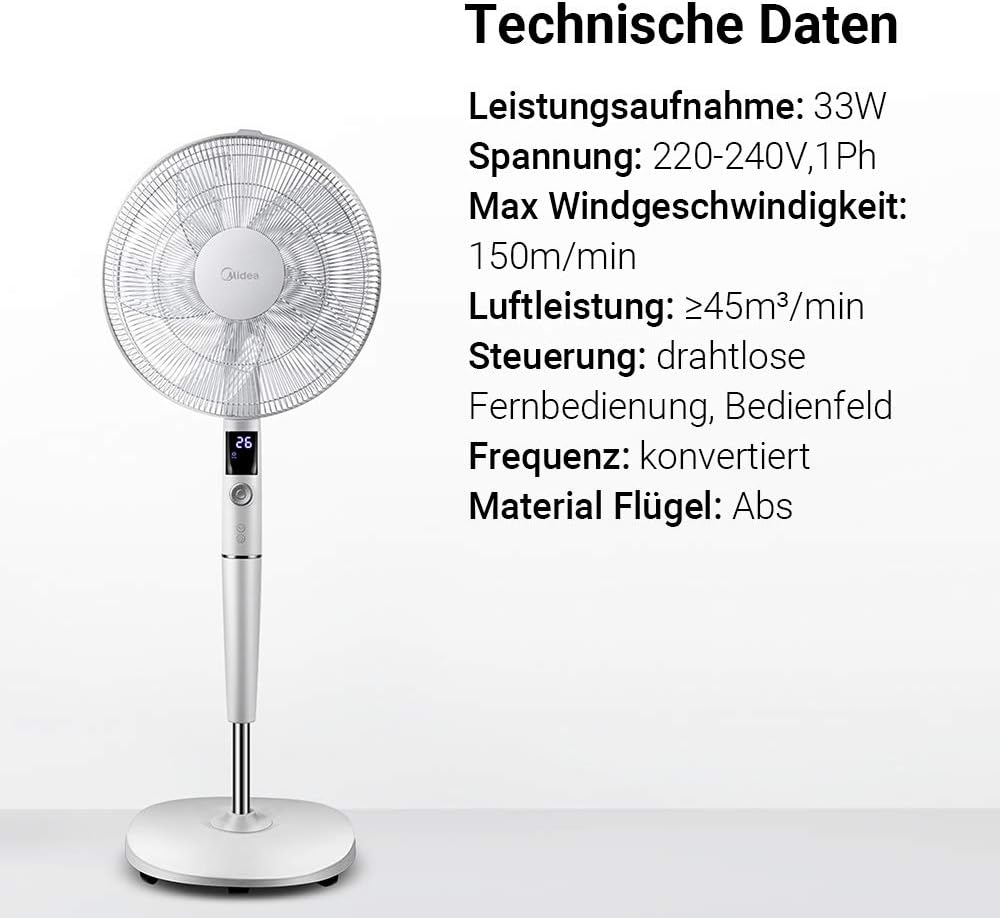
ຮູບພາບ: A visual representation of the Midea FS40-15AR fan alongside its technical data, including power consumption, voltage, and control methods.
| ຄຸນສົມບັດ | ລາຍລະອຽດ |
|---|---|
| ໝາຍເລກຕົວແບບ | FS40-15AR |
| ຍີ່ຫໍ້ | Midea |
| ປະເພດ | DC Pedestal ພັດລົມ |
| ການບໍລິໂພກພະລັງງານ | 30 ວັດ |
| ສະບັບtage | 220-240V |
| ຄວາມໄວລົມສູງສຸດ | 150 m / ນາທີ |
| ກະແສລົມ | ≥45 m³/min |
| ຈໍານວນຄວາມໄວ | 26 |
| ລະດັບສຽງ | 27 ເດຊີເບວ (ນາທີ) |
| ມຸມ Oscillation | 80 ອົງສາ |
| ຟັງຊັນຈັບເວລາ | ສູງສຸດ 12 ຊົ່ວໂມງ |
| ວິທີການຄວບຄຸມ | Wireless Remote Control, On-unit Control Panel |
| ວັດສະດຸ (ໃບມີດ) | ພາດສະຕິກ ABS |
| ຂະໜາດສິນຄ້າ (L x W x H) | 45.3 x 40 x 137 cm |
| ນ້ຳໜັກ | 7.8 ກິໂລ |
| ຄຸນນະສົມບັດພິເສດ | Adjustable Height, Tiltable Head, ECO Mode, Sleep Mode |
ການຮັບປະກັນແລະການສະຫນັບສະຫນູນ
ສໍາລັບຂໍ້ມູນການຮັບປະກັນແລະການຊ່ວຍເຫຼືອລູກຄ້າ, ກະລຸນາເບິ່ງບັດຮັບປະກັນທີ່ລວມຢູ່ໃນຜະລິດຕະພັນຂອງທ່ານຫຼືໄປຢ້ຽມຢາມ Midea ຢ່າງເປັນທາງການ webເວັບໄຊ. ຮັກສາໃບຮັບເງິນການຊື້ຂອງທ່ານໄວ້ເປັນຫຼັກຖານການຊື້.
For technical assistance or service inquiries, please contact Midea customer service through their official channels.
- ສະຫນັບສະຫນູນອອນໄລນ໌: www.midea.com/global/support
- ຂໍ້ມູນຕິດຕໍ່: Refer to your regional Midea webສະຖານທີ່ສໍາລັບລາຍລະອຽດການຕິດຕໍ່ທ້ອງຖິ່ນ.