ແນະນຳ
This user manual provides essential information for the safe and efficient operation, maintenance, and troubleshooting of your Parkside 12V Cordless Hammer Drill PBHA 12 A1. Please read this manual thoroughly before first use and keep it for future reference.
The Parkside 12V Cordless Hammer Drill PBHA 12 A1 is designed for powerful drilling and chiseling in concrete, stone, metal, or wood. It features two adjustable functions: hammer drilling (with impact mechanism) and screw or drilling (without impact mechanism).
ຄໍາແນະນໍາຄວາມປອດໄພ
ສັງເກດເບິ່ງຄວາມລະມັດລະວັງດ້ານຄວາມປອດໄພຂັ້ນພື້ນຖານສະເໝີເມື່ອໃຊ້ເຄື່ອງມືໄຟຟ້າເພື່ອຫຼຸດຜ່ອນຄວາມສ່ຽງຕໍ່ການເກີດອັກຄີໄພ, ໄຟຟ້າຊອດ ແລະ ການບາດເຈັບສ່ວນບຸກຄົນ.
- ໃສ່ອຸປະກອນປ້ອງກັນສ່ວນບຸກຄົນທີ່ເຫມາະສົມ (PPE) ເຊັ່ນ: ແວ່ນຕານິລະໄພ, ການປ້ອງກັນການໄດ້ຍິນ, ແລະຖົງມື.
- ໃຫ້ແນ່ໃຈວ່າພື້ນທີ່ເຮັດວຽກມີແສງສະຫວ່າງດີແລະຊັດເຈນຂອງສິ່ງກີດຂວາງ.
- ຮັກສາເດັກນ້ອຍ ແລະຜູ້ຢືນຢູ່ຫ່າງໆ ໃນຂະນະທີ່ໃຊ້ເຄື່ອງມື.
- ຫ້າມໃຊ້ເຄື່ອງມືໄຟຟ້າໃນບັນຍາກາດທີ່ລະເບີດ, ເຊັ່ນໃນທີ່ປະທັບຂອງຂອງແຫຼວ, ອາຍແກັສ, ຫຼືຂີ້ຝຸ່ນ.
- ຖອດແບັດເຕີລີທຸກຄັ້ງກ່ອນທີ່ຈະປັບປ່ຽນ, ປ່ຽນອຸປະກອນເສີມ, ຫຼືເກັບຮັກສາເຄື່ອງມື.
- ໃຊ້ສະເພາະຊຸດແບັດເຕີຣີ ແລະ ເຄື່ອງສາກໄຟທີ່ລະບຸໄວ້ໂດຍຜູ້ຜະລິດເທົ່ານັ້ນ.
- Maintain the tool with care. Check for misalignment or binding of moving parts, breakage of parts, and any other condition that may affect the tool's operation.
ເນື້ອໃນຊຸດ
ແກະກ່ອງສິນຄ້າທັງໝົດຢ່າງລະມັດລະວັງ ແລະ ກວດສອບຄວາມເສຍຫາຍ. ໃຫ້ແນ່ໃຈວ່າມີສ່ວນປະກອບທັງໝົດຢູ່ກ່ອນຖິ້ມວັດສະດຸຫຸ້ມຫໍ່.
- Parkside 12V Cordless Hammer Drill PBHA 12 A1
- 12V Li-ion Battery (2.0 Ah) PAPK 12 A2
- 60-minute Quick Charger PLGK 12 A1
- Keyless round axis drill chuck
- 2 SDS concrete drill bits (6mm / 8mm)
- 2 round drill bits (3mm / 5mm)
- 4 screw bits 50mm (S2 / PH2 / PH1 / TX25)
- ຕູ້ເກັບມ້ຽນ
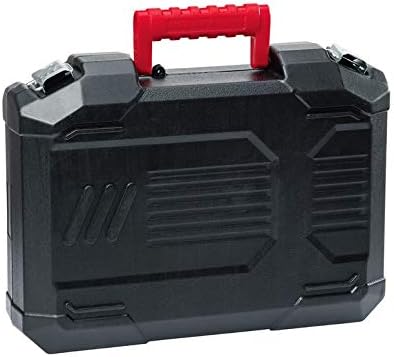
Image: The included storage case for the drill and accessories.
ສິນຄ້າເກີນview
Familiarize yourself with the components of your Parkside Cordless Hammer Drill.

ຮູບພາບ: ທາງຫນ້າ view of the Parkside 12V Cordless Hammer Drill PBHA 12 A1 with a drill bit attached, showing the main body, handle, and chuck.

ຮູບພາບ: ມຸມ view of the Parkside 12V Cordless Hammer Drill PBHA 12 A1, highlighting the ergonomic handle and control switches.

Image: A collection of accessories for the Parkside 12V Cordless Hammer Drill, including the charger, keyless chuck, SDS concrete drill bits, round drill bits, and screw bits.
ຕັ້ງຄ່າ
ກຳລັງສາກແບັດເຕີຣີ
- Insert the 12V Li-ion Battery (PAPK 12 A2) into the 60-minute Quick Charger (PLGK 12 A1).
- ສຽບສາຍສາກເຂົ້າໄປໃນປລັກສຽບໄຟທີ່ເຫມາະສົມ.
- The charger has an automatic charging power-off feature. The 3-stage battery status indicator on the battery will show charging progress.
- ເມື່ອສາກເຕັມແລ້ວ, ໃຫ້ຖອດສາຍສາກອອກຈາກປລັກສຽບໄຟ ແລະຖອດແບັດເຕີຣີອອກ.
ການຕິດອຸປະກອນເສີມ
- SDS-plus Drill Bits: Insert SDS-plus drill bits directly into the SDS-plus chuck until they click into place. Pull on the bit to ensure it is securely locked.
- Round Shank Drill Bits/Screw Bits: Attach the keyless chuck for round drill holes to the SDS-plus chuck. Then, insert round shank drill bits or screw bits into the keyless chuck and tighten securely.
ຄໍາແນະນໍາການດໍາເນີນງານ
ເລືອກຮູບແບບການປະຕິບັດ
The tool features two adjustable functions:
- ການເຈາະດ້ວຍຄ້ອນ: For drilling in concrete and stone. This mode engages the impact mechanism.
- Screw or Drilling: For drilling in wood, metal, or for screwdriving. This mode operates without the impact mechanism.
Use the mode selector switch on the side of the tool to choose the desired function.
Adjusting Rotation Speed
The tool features an adjustable rotation speed. Press the trigger switch to start the tool. The speed can be varied by the amount of pressure applied to the trigger. For precise control, start with a lower speed and increase as needed.
Right/Left Rotation
A switch near the trigger allows you to select between right (forward) and left (reverse) rotation. Use right rotation for drilling and screwdriving, and left rotation for removing screws or freeing jammed drill bits.
ປະສົມປະສານ LED ເຮັດວຽກ
The integrated LED work light illuminates the work area for improved visibility, especially in dimly lit conditions. It activates automatically when the trigger is pressed.
ບໍາລຸງຮັກສາ
ການບໍາລຸງຮັກສາເປັນປົກກະຕິຮັບປະກັນອາຍຸຍືນແລະການປະຕິບັດທີ່ດີທີ່ສຸດຂອງເຄື່ອງມືຂອງທ່ານ.
- ທໍາຄວາມສະອາດ: After each use, clean the tool's ventilation slots and housing with a soft, damp ຜ້າ. ຫ້າມໃຊ້ສານລະລາຍ ຫຼືເຄື່ອງຂັດຂັດ.
- ການບໍາລຸງຮັກສາ Chuck: Keep the chuck clean and free of dust and debris to ensure proper bit insertion and removal.
- ການດູແລຫມໍ້ໄຟ: Store the battery in a cool, dry place away from direct sunlight. Do not store fully discharged batteries for extended periods. Charge the battery periodically if not in use.
- ການກວດກາ: Periodically inspect the tool for any signs of damage, loose screws, or worn parts. If damage is found, have the tool repaired by a qualified service technician.
ການແກ້ໄຂບັນຫາ
| ບັນຫາ | ສາເຫດທີ່ເປັນໄປໄດ້ | ການແກ້ໄຂ |
|---|---|---|
| ເຄື່ອງມືບໍ່ເລີ່ມຕົ້ນ | ແບັດເຕີຣີບໍ່ໄດ້ສາກ ຫຼືໃສ່ເຂົ້າບໍ່ຖືກຕ້ອງ. | Charge the battery. Ensure the battery is fully inserted and locked into place. |
| ພະລັງງານຫຼືປະສິດທິພາບຫຼຸດລົງ | Battery charge is low. Incorrect mode selected for material. | Recharge the battery. Select the appropriate operating mode (e.g., Hammer Drilling for concrete). |
| Drill bit not holding securely | Chuck is dirty or damaged. Bit not inserted correctly. | Clean the chuck. Ensure the bit is fully inserted and locked. If using the keyless chuck, ensure it is tightened properly. |
| ຮ້ອນເກີນໄປ | ການນໍາໃຊ້ຢ່າງຮຸນແຮງຢ່າງຕໍ່ເນື່ອງ. ບລັອກຊ່ອງລະບາຍອາກາດ. | Allow the tool to cool down. Clear any obstructions from the ventilation slots. Avoid prolonged heavy use. |
ຂໍ້ມູນຈໍາເພາະ
- ຕົວແບບ: PBHA 12 A1
- ແບັດເຕີຣີ: 12 V Li-Ion (2.0 Ah)
- ຄວາມໄວການຫມຸນທີ່ບໍ່ມີການໂຫຼດ: 0-900 rpm
- ພະລັງງານຜົນກະທົບ: 1 ຈູນ
- Chuck clampຊ່ວງໃນ: ສູງເຖິງ 10 ມມ
- Max. Bore diameter:
- 10 mm in concrete, stone, and wood
- 8 mm in steel
- ເຄື່ອງສາກ: 60 minute quick charger with automatic charging power off
- ຂະໜາດຜະລິດຕະພັນ: 37.5 x 29.6 x 10 cm
- ນ້ຳໜັກ: 2.98 ກິໂລ (ລວມທັງຫມໍ້ໄຟ)
- ວັດສະດຸ: ໂລຫະ
- ສີ: ສີດໍາ, ສີຂຽວ
ການຮັບປະກັນແລະການສະຫນັບສະຫນູນ
For warranty information and customer support, please refer to the documentation provided with your purchase or contact Lidl customer service. Keep your proof of purchase for any warranty claims.
ຜູ້ຜະລິດ: Lidl


