ແນະນຳ
The Amazon Echo Show 8 (1st Gen, 2019 release) is a smart display designed to enhance your daily life with Alexa. Featuring an 8-inch HD screen and stereo sound, it allows you to manage your day, connect with loved ones through video calls, enjoy entertainment, control smart home devices, and personalize your experience. This manual provides detailed instructions to help you get the most out of your device.
ແມ່ນຫຍັງຢູ່ໃນກ່ອງ
Upon unboxing your Echo Show 8, ensure all components are present:
- Echo Show 8 ອຸປະກອນ
- Power adapter (30W) with cable (4.9 ft.)
- ຄູ່ມືເລີ່ມຕົ້ນໄວ
ຕັ້ງຄ່າ
Setting up your Echo Show 8 is a straightforward process, often simplified by Amazon Wi-Fi simple setup technology.
- ເປີດ: Connect the power adapter to your Echo Show 8 and plug it into a wall outlet. The device will power on automatically.
- ການເລືອກພາສາ: ປະຕິບັດຕາມການເຕືອນໃນຫນ້າຈໍເພື່ອເລືອກພາສາທີ່ທ່ານຕ້ອງການ.
- ການເຊື່ອມຕໍ່ Wi-Fi: Select your Wi-Fi network from the list and enter the password. The Echo Show 8 supports dual-band Wi-Fi (802.11a/b/g/n/ac).
- ເຂົ້າສູ່ລະບົບບັນຊີ Amazon: ເຂົ້າສູ່ລະບົບດ້ວຍບັນຊີ Amazon ຂອງທ່ານ. ຖ້າເຈົ້າບໍ່ມີ, ເຈົ້າຈະຖືກເຕືອນໃຫ້ສ້າງອັນໜຶ່ງ.
- ການລົງທະບຽນອຸປະກອນ: Your device will register to your Amazon account.
- ເຂດເວລາ ແລະສະຖານທີ່: ຢືນຢັນເຂດເວລາ ແລະການຕັ້ງຄ່າສະຖານທີ່ຂອງທ່ານ.
- ບົດຮຽນ: The device may offer a brief tutorial on how to navigate and use its features.
The Alexa app is compatible with Fire OS, Android, and iOS devices and is also accessible via your web browser for further management and customization.
ການປະຕິບັດງານ Echo Show ຂອງທ່ານ 8
The Echo Show 8 can be operated using voice commands with Alexa or through its touch screen interface.
Voice Commands (Alexa)
ພຽງແຕ່ເວົ້າວ່າ "Alexa" ປະຕິບັດຕາມຄໍາສັ່ງຂອງທ່ານ. ຕົວຢ່າງamples ປະກອບມີ:
- "Alexa, ອາກາດເປັນແນວໃດ?"
- "Alexa, ຫຼິ້ນດົນຕີ."
- "Alexa, call [contact name]."
- "Alexa, show me my photos."
- "Alexa, ປິດໄຟ."

Image: Echo Show 8 displaying current weather conditions, demonstrating its ability to provide glanceable information.
ການນຳທາງໜ້າຈໍສຳຜັດ
Swipe down from the top of the screen to access quick settings and the home menu. Swipe left from the right edge to view cards with suggestions and information. Tap on icons and options to interact with the device.
ຄຸນສົມບັດ
The Echo Show 8 offers a wide range of features to simplify and enrich your daily routines:
- Video Calling & Messaging: Connect with friends and family who have the Alexa app or an Echo device with a screen. Make announcements to other devices in your home.

Image: A user making a video call on the Echo Show 8, highlighting its communication capabilities.
- ບັນເທີງ: Ask Alexa to show you movie trailers, TV shows, movies, or the news. Listen to radio stations, podcasts, and audiobooks.
- ການຄວບຄຸມເຮືອນອັດສະລິຍະ: Voice control compatible devices or manage them on the easy-to-use display. Ask Alexa to show you security cameras, control lights, and adjust thermostats.

Image: The Echo Show 8 displaying a live feed from a nursery camera, illustrating its smart home monitoring feature.
- ການປັບແຕ່ງສ່ວນຕົວ: Show off your albums from Amazon Photos. Customize your home screen. Create morning routines to start your day.
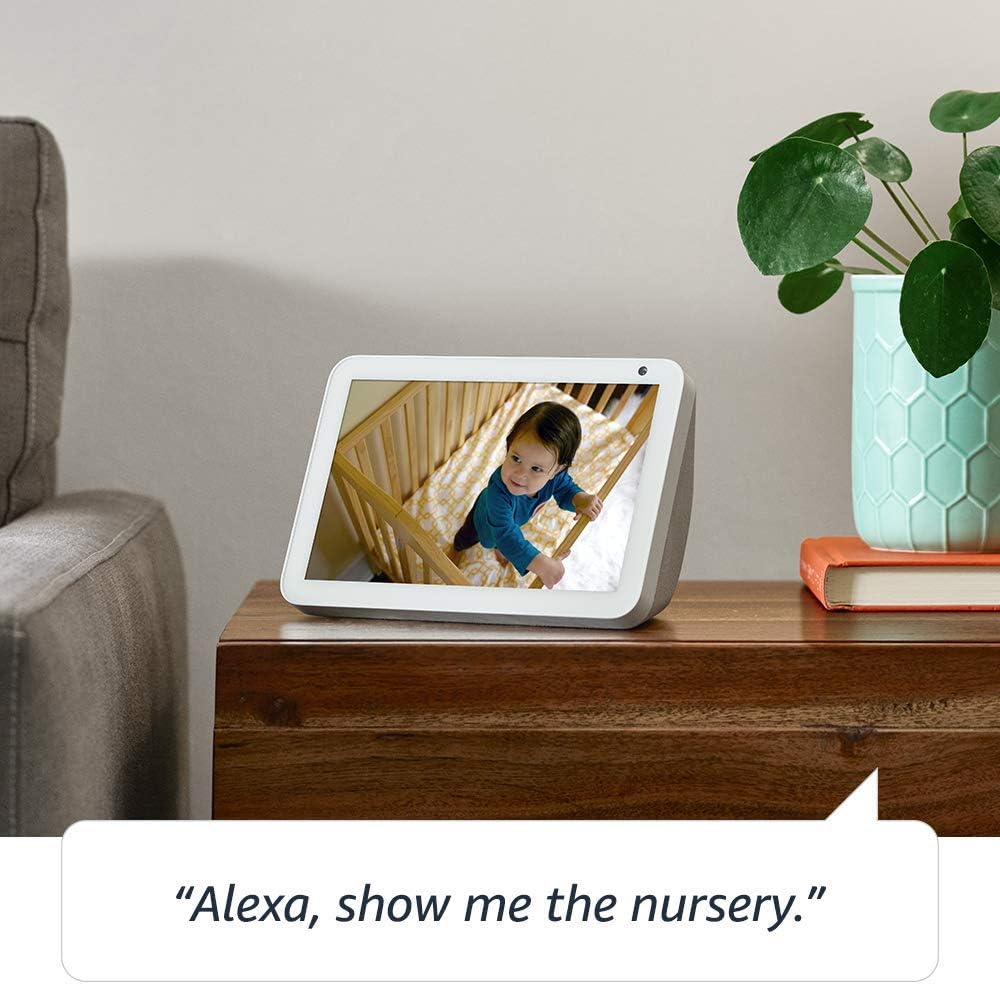
Image: The Echo Show 8 displaying a scenic photo from a user's Amazon Photos album, demonstrating its personalization options.
- Daily Assistance: Cook along to step-by-step recipes. Easily update to-do lists and calendars. Glance at weather and traffic on your way out.
ຄຸນສົມບັດຄວາມເປັນສ່ວນຕົວ
The Echo Show 8 is designed with privacy in mind, offering several controls:
- ປຸ່ມປິດໄມໂຄຣໂຟນ/ກ້ອງ: Electronically disconnect the microphones and camera with one press of a button.
- Shutter ກ້ອງຖ່າຍຮູບໃນຕົວ: Slide the built-in shutter to physically cover the camera lens.

Image: A finger activating the physical camera shutter on the Echo Show 8, demonstrating a privacy control feature.
- ເຕັກໂນໂລຊີ Wake Word: Alexa devices are designed to detect only your chosen wake word (e.g., "Alexa").
- ຕົວຊີ້ບອກການຖ່າຍທອດ: Visual indicators show when Alexa is streaming your request to the cloud.
- ການຈັດການການບັນທຶກສຽງ: ຄວາມສາມາດໃນການ view and delete your voice recordings through the Alexa app or Alexa Privacy Hub.
For more information, visit the Alexa Privacy Hub.
ບໍາລຸງຮັກສາ
ເພື່ອຮັບປະກັນອາຍຸຍືນແລະປະສິດທິພາບທີ່ດີທີ່ສຸດຂອງ Echo Show 8 ຂອງທ່ານ, ປະຕິບັດຕາມຄໍາແນະນໍາການບໍາລຸງຮັກສາເຫຼົ່ານີ້:
- ທໍາຄວາມສະອາດ: ໃຊ້ຜ້າແພທີ່ອ່ອນນຸ່ມ, ບໍ່ມີສານດ່າງເພື່ອເຮັດຄວາມສະອາດໜ້າຈໍ ແລະ ພາຍນອກ. ຫຼີກເວັ້ນການຂັດຂັດ ຫຼືສີດພົ່ນໂດຍກົງໃສ່ອຸປະກອນ.
- ການຈັດວາງ: Place the device on a stable, flat surface away from direct sunlight, heat sources, and moisture. Ensure proper ventilation.
- ອັບເດດຊອບແວ: The device automatically receives software updates. Ensure it is connected to Wi-Fi to receive these updates, which improve performance and add new features.
ການແກ້ໄຂບັນຫາ
ຖ້າທ່ານພົບບັນຫາກັບ Echo Show 8 ຂອງທ່ານ, ລອງເຮັດຕາມຂັ້ນຕອນຕໍ່ໄປນີ້:
- ບໍ່ມີພະລັງງານ:
- ໃຫ້ແນ່ໃຈວ່າອະແດັບເຕີໄຟເຊື່ອມຕໍ່ຢ່າງປອດໄພກັບທັງອຸປະກອນ ແລະປລັກສຽບໄຟທີ່ເຮັດວຽກ.
- ລອງປລັກສຽບໄຟອື່ນ.
- ບັນຫາການເຊື່ອມຕໍ່ Wi-Fi:
- ກວດສອບລະຫັດຜ່ານ Wi-Fi ຂອງທ່ານແມ່ນຖືກຕ້ອງ.
- ຣີສະຕາດເລົາເຕີ Wi-Fi ແລະໂມເດັມຂອງທ່ານ.
- ຍ້າຍ Echo Show 8 ເຂົ້າໄປໃກ້ເຣົາເຕີ Wi-Fi ຂອງທ່ານ.
- Alexa ບໍ່ຕອບສະໜອງ:
- Ensure the microphone is not muted (check the microphone/camera off button).
- ເວົ້າຢ່າງຈະແຈ້ງ ແລະໃນລະດັບສຽງປົກກະຕິ.
- Try restarting the device by unplugging it for a few seconds and plugging it back in.
- ບັນຫາໜ້າຈໍ:
- ຖ້າໜ້າຈໍບໍ່ຕອບສະໜອງ, ລອງຣີສະຕາດອຸປະກອນ.
- Ensure the screen is clean and free of smudges.
- ປັບຄ່າໂຮງງານ: As a last resort, you can perform a factory reset. This will erase all your personal data and settings. To do this, go to Settings > Device Options > Reset to Factory Defaults.
ຂໍ້ມູນຈໍາເພາະ
| ຄຸນສົມບັດ | ລາຍລະອຽດ |
|---|---|
| ຂະໜາດ | 7.9”x 5.4”x 3.9” (200mm x 135mm x 99mm) |
| ນ້ຳໜັກ | 36.6 ອໍ (1037 ກຣາມ) |
| ຈໍສະແດງຜົນ | ໜ້າ ຈໍ ສຳ ພັດ 8.0” |
| ກ້ອງຖ່າຍຮູບ | 1MP camera with built-in shutter |
| ການເຊື່ອມຕໍ່ Wi-Fi | Dual-band Wi-Fi ຮອງຮັບ 802.11a/b/g/n/ac ເຄືອຂ່າຍ Wi-Fi. ບໍ່ຮອງຮັບການເຊື່ອມຕໍ່ກັບເຄືອຂ່າຍ Wi-Fi ad-hoc (ຫຼື peer-to-peer). |
| ການເຊື່ອມຕໍ່ Bluetooth | Pro ການກະຈາຍສຽງຂັ້ນສູງfile (A2DP) ຮອງຮັບການຖ່າຍທອດສຽງຈາກອຸປະກອນມືຖືຂອງທ່ານໄປຫາ Echo Show 8 ຫຼືຈາກ Echo Show 8 ໄປຫາລຳໂພງ Bluetooth ຂອງທ່ານ. ສຽງ / ວິດີໂອການຄວບຄຸມໄລຍະໄກ Profile (AVRCP) ສໍາລັບການຄວບຄຸມສຽງຂອງອຸປະກອນມືຖືທີ່ເຊື່ອມຕໍ່. ການຄວບຄຸມສຽງແບບແຮນຟຣີບໍ່ຖືກຮອງຮັບສໍາລັບອຸປະກອນ Mac OS X. ບໍ່ຮອງຮັບລຳໂພງ Bluetooth ທີ່ຕ້ອງການລະຫັດ PIN. |
| ສຽງ | 2.0” (52 mm) neodymium speakers with passive bass radiator |
| ຄວາມຕ້ອງການລະບົບ | Echo Show 8 comes ready to connect to your WiFi. The Alexa app is compatible with Fire OS, Android, and iOS devices and also accessible via your web browser. Supported operating systems. Certain skills and services may require subscription or other fees. |
| ໂຮງງານຜະລິດ | MediaTek MT 8163 |
| ພາສາ | Alexa ເວົ້າພາສາອັງກິດແລະແອສປາໂຍນ |
ຄຸນນະສົມບັດການເຂົ້າເຖິງ
Echo Show 8 ປະກອບມີຄຸນສົມບັດການຊ່ວຍເຂົ້າເຖິງຕ່າງໆເພື່ອປັບແຕ່ງ Alexa ໃຫ້ກັບຄວາມສາມາດຂອງທ່ານ:
- ແຕະໃສ່ Alexa: ເຂົ້າເຖິງ Alexa ດ້ວຍການສຳຜັດຜ່ານແຜ່ນເທິງໜ້າຈໍ ຫຼືແປ້ນພິມ.
- ການຟັງແບບປັບຕົວ: ໃຫ້ເວລາຫຼາຍກວ່າທີ່ຈະເວົ້າໃຫ້ຈົບກ່ອນທີ່ Alexa ຈະຕອບ.
- ອັດຕາການເວົ້າທີ່ຕ້ອງການ: ຄວບຄຸມວ່າ Alexa ເວົ້າໄວ ຫຼືຊ້າປານໃດ.
- ຄຳບັນຍາຍ Alexa, ຄຳບັນຍາຍການໂທ, ຄຳບັນຍາຍປິດ: ໃຫ້ຄຳບັນຍາຍຂໍ້ຄວາມສຳລັບເນື້ອຫາທີ່ຮອງຮັບ.
- ສະແດງ ແລະບອກ: Helps customers who are blind or visually impaired identify products by saying “Alexa, what am I holding.”
- ສຽງView ຕົວອ່ານໜ້າຈໍ: ເປີດໃຊ້ການເຂົ້າເຖິງສໍາລັບລູກຄ້າທີ່ຕາບອດຫຼືພິການທາງສາຍຕາ.
- ຕົວຂະຫຍາຍໜ້າຈໍ: Enables zooming in/out and panning around the screen.
- ແຈ້ງເຕືອນເມື່ອຢູ່ໃກ້: Plays notification sounds when you’re detected near your Echo device.
- Kindle ອ່ານດັງໆ: Alexa ສາມາດອ່ານປຶ້ມ Kindle ຂອງທ່ານດັງໆ.
- ຂໍ້ຄວາມເວລາຈິງ: ເປີດໃຊ້ການພິມຂໍ້ຄວາມສົດໃນການໂທວິດີໂອ.
- Additional settings include Color Inversion, Color Correction, Request Sound, and more.
To enable these features, go to Settings → Accessibility on your Echo Show 8.
ການຮັບປະກັນແລະການສະຫນັບສະຫນູນ
Your Certified Refurbished Echo Show 8 comes with a 1-year limited warranty and service, similar to a new device. Use of Echo Show 8 is subject to Amazon's terms and conditions.
ສໍາລັບການຊ່ວຍເຫຼືອເພີ່ມເຕີມ, ເຂົ້າເບິ່ງຫນ້າສະຫນັບສະຫນູນອຸປະກອນ Amazon ຫຼືຕິດຕໍ່ຫາບໍລິການລູກຄ້າ Amazon.


