1. ບົດແນະນຳ
This manual provides detailed instructions for the installation, operation, and maintenance of your Dynavin N7-VT7 PRO Radio Navigation System. This system is designed as a direct replacement for the factory radio in VW Touareg models from 2003 to 2009, integrating seamlessly with your vehicle's existing systems.
ຄຸນນະສົມບັດທີ່ສໍາຄັນປະກອບມີ:
- 7-inch capacitive LCD touch screen display (1024 x 600 resolution)
- Integrated GPS navigation with maps for North America, Europe, or Australia
- Bluetooth ສໍາລັບການໂທແບບບໍ່ໃຊ້ມື ແລະການຖ່າຍທອດສຽງ
- Apple CarPlay and Android Auto compatibility via USB
- USB and Micro SD card media playback
- AM/FM radio tuner
- Backup camera readiness
- Integration with vehicle's DSP processor (if equipped)
2. ຂໍ້ມູນຄວາມປອດໄພ
ຂໍ້ປະຕິເສດຄວາມຮັບຜິດຊອບທາງກົດໝາຍທີ່ສຳຄັນ:
- Installation must be performed by a trained specialist.
- Ensure the vehicle is de-energized before beginning installation.
- In some cases, the vehicle battery may need to be disconnected. Consult your vehicle manufacturer's guidelines.
- Modifying vehicle electronics may affect manufacturer warranty.
Always prioritize safety during installation and operation. Avoid operating the system's complex functions while driving to prevent distractions.
3. ການຕິດຕັ້ງແລະການຕິດຕັ້ງ
The Dynavin N7-VT7 PRO is designed for plug-and-play installation, integrating with your vehicle's factory wiring and controls. Professional installation is highly recommended to ensure proper functionality and to avoid damage to the unit or vehicle.
3.1 ເນື້ອໃນຊຸດ
ກວດສອບວ່າອົງປະກອບທັງໝົດມີຢູ່ໃນຊຸດ:
- Dynavin N7-VT7 PRO Head Unit
- GPS Antenna
- ສາຍ USB
- Wiring Harnesses (vehicle-specific)
- ຄູ່ມືຜູ້ໃຊ້ (ເອກະສານນີ້)
- ໄມໂຄຣໂຟນພາຍນອກ (ຖ້າມີ)
3.2 ການຕິດຕັ້ງຫຼາຍກວ່າview
The unit replaces the existing factory radio. Specific steps for removal of the old unit and installation of the new Dynavin system will vary slightly depending on your vehicle's trim. Refer to a qualified installer or vehicle-specific guides for detailed instructions.

ຮູບທີ 3.1: The Dynavin N7-VT7 PRO unit seamlessly integrated into a Volkswagen Touareg dashboard, demonstrating its OEM-look design.
After physical installation, connect all wiring harnesses, the GPS antenna, and any external accessories like a backup camera or SiriusXM tuner (sold separately).
4. ຄໍາແນະນໍາການດໍາເນີນງານ
The Dynavin N7-VT7 PRO features an intuitive touchscreen interface. Most functions are accessible via the main menu or dedicated physical buttons.
4.1 Main Interface Overview
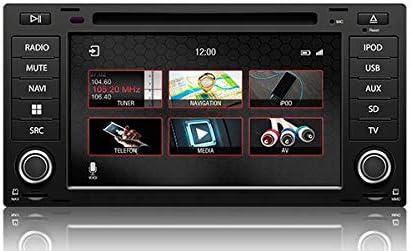
ຮູບທີ 4.1: The main menu screen displaying various function icons such as Radio, Navigation, Telephone, Media, and AV input.
From the main screen, tap on the desired icon to access functions like Radio, Navigation, Bluetooth (Telefon), Media (USB/SD), and AV input.
4.2 ການດໍາເນີນງານວິທະຍຸ
Tap the "Radio" icon from the main menu or press the physical "RADIO" button. You can tune to AM/FM stations, save presets, and access features like RDS (Radio Data System) where available.

ຮູບທີ 4.2: The radio interface showing station presets and current frequency. Users can navigate between stations using the on-screen arrows or physical controls.
For SiriusXM compatibility, an SXV300 Tuner (sold separately) is required. Once installed, access SiriusXM through the dedicated icon or source selection.

ຮູບທີ 4.3: The SiriusXM interface displaying channel information and presets, allowing access to satellite radio content.
4.3 ລະບົບນໍາທາງ
Tap the "Navigation" icon to launch the integrated GPS navigation software. The system comes pre-loaded with maps for North America, Europe, or Australia, depending on your region.
- ລາຍການປາຍທາງ: Enter addresses, points of interest, or coordinates.
- ຄຳແນະນຳເສັ້ນທາງ: Follow turn-by-turn voice prompts and on-screen directions.
- ແຜນທີ່ View: ສະຫຼັບລະຫວ່າງ 2D ແລະ 3D views, adjust zoom levels.
4.4 ການເຊື່ອມຕໍ່ Bluetooth
ຈັບຄູ່ສະມາດໂຟນຂອງທ່ານຜ່ານ Bluetooth ສໍາລັບການໂທແບບບໍ່ໃຊ້ມື ແລະການຖ່າຍທອດສຽງ.
- Go to the "Telefon" (Bluetooth) menu.
- ເປີດໃຊ້ Bluetooth ໃນໂທລະສັບສະຫຼາດຂອງທ່ານແລະຊອກຫາອຸປະກອນທີ່ມີຢູ່.
- Select "Dynavin" from the list on your phone and confirm the pairing code.
- ເມື່ອຈັບຄູ່ແລ້ວ, ທ່ານສາມາດໂທອອກ/ຮັບສາຍ ແລະ ຟັງເພງໄດ້.
4.5 Apple CarPlay & Android Auto
Connect your compatible smartphone via USB to use Apple CarPlay or Android Auto. This allows you to access select phone apps directly on the Dynavin display.

ຮູບທີ 4.4: The Apple CarPlay interface displaying common applications like Phone, Music, Maps, and Messages, integrated with the Dynavin unit.
Ensure your phone's operating system is up to date for optimal performance with CarPlay or Android Auto.
4.6 ການຫຼິ້ນສື່ (USB/SD)
Insert a USB drive or Micro SD card into the designated ports. The system supports various audio and video formats. Tap the "Media" icon to browse and play content.
4.7 ການຕັ້ງຄ່າສຽງ
Access the sound settings to adjust audio output, equalizer, and balance/fader controls. The system integrates with your vehicle's DSP processor if equipped.

ຮູບທີ 4.5: The sound settings interface, allowing users to adjust audio parameters such as balance, fader, and specific sound profiles within the vehicle cabin.
Additional sound options may include confirmation tones, PDC (Park Distance Control) and warning tones, and settings for factory ampຜູ້ຊ່ວຍຊີວິດ.
4.8 ການຕັ້ງຄ່າລະບົບ
The system settings menu allows you to configure various aspects of the unit, including:
- ພາກພື້ນ: Set the geographical region for radio and navigation.
- ສີ: Adjust display color schemes.
- ກ້ອງຖ່າຍຮູບ: Configure backup camera settings.
- ຄວາມສະຫວ່າງ: Manually adjust screen brightness.
- ເຂດເວລາ: ຕັ້ງເຂດເວລາທີ່ຖືກຕ້ອງ.
- ປີ້ນກັບ: Configure reverse camera and PDC integration.

ຮູບທີ 4.6: The system settings interface, showing options for region, display color, camera settings, brightness adjustment, time zone, and reverse camera configuration.
5. ບໍາລຸງຮັກສາ
5.1 ການເຮັດຄວາມສະອາດຈໍສະແດງຜົນ
ໃຊ້ຜ້າແພທີ່ອ່ອນນຸ່ມ, ບໍ່ມີສານດ່າງເພື່ອເຊັດໜ້າຈໍສຳຜັດຄ່ອຍໆ. ສໍາລັບ smudges stubborn, ເລັກນ້ອຍ dampໃສ່ຜ້າດ້ວຍນ້ໍາຫຼືເຄື່ອງເຮັດຄວາມສະອາດຫນ້າຈໍທີ່ປອດໄພ. ຫຼີກລ້ຽງການວັດສະດຸຂັດຫຼືສານເຄມີທີ່ຮ້າຍແຮງ.
5.2 ການອັບເດດເຟີມແວ
Periodic firmware updates may be released to improve performance, add features, or address issues. Check the official Dynavin website or contact your distributor for information on available updates and instructions for installation.
6. ການແກ້ໄຂບັນຫາ
If you encounter issues with your Dynavin N7-VT7 PRO, refer to the following common solutions:
- ບໍ່ມີພະລັງງານ: Check all wiring connections and vehicle fuses. Ensure the vehicle battery is properly connected.
- ບໍ່ມີສຽງ: ຢືນຢັນການເຊື່ອມຕໍ່ລໍາໂພງ. ກວດເບິ່ງລະດັບສຽງ ແລະການຕັ້ງຄ່າປິດສຽງ. ໃຫ້ແນ່ໃຈວ່າເລືອກແຫຼ່ງສຽງທີ່ຖືກຕ້ອງ.
- ການສູນເສຍສັນຍານ GPS: ໃຫ້ແນ່ໃຈວ່າເສົາອາກາດ GPS ຖືກຕິດຕັ້ງຢ່າງຖືກຕ້ອງແລະມີຄວາມຊັດເຈນ view ຂອງທ້ອງຟ້າ.
- ບັນຫາການຈັບຄູ່ Bluetooth: Delete previous pairings from both the unit and your phone. Restart both devices and attempt pairing again.
- ໜ້າຈໍສໍາຜັດບໍ່ຕອບສະໜອງ: Perform a soft reset (refer to specific instructions from Dynavin support if available).
- Apple CarPlay/Android Auto ບໍ່ເຊື່ອມຕໍ່: Ensure your phone is compatible and its operating system is updated. Try a different USB cable.
For persistent issues, contact Dynavin customer support or your authorized dealer for assistance.
7. ຂໍ້ມູນຈໍາເພາະ
| ຄຸນສົມບັດ | ຂໍ້ມູນຈໍາເພາະ |
|---|---|
| ໝາຍເລກຕົວແບບ | N7-VWTG-PRO |
| ຂະຫນາດຈໍສະແດງຜົນ | 7 ນິ້ວ |
| ຄວາມລະອຽດການສະແດງ | 1024 x 600 |
| ປະເພດການສະແດງ | Capacitive LCD, Anti-glare Touchscreen |
| ລະບົບປະຕິບັດການ | DynOS |
| ການເຊື່ອມຕໍ່ | USB, Bluetooth |
| ປະເພດແຜນທີ່ | North America, Europe, or Australia (region-specific) |
| ປະເພດການບໍລິການພາຫະນະ | Car (VW Touareg 2003-2009) |
| ຂະໜາດແພັກເກັດ | 13 x 11 x 9 ນິ້ວ |
8. ການຮັບປະກັນແລະການສະຫນັບສະຫນູນ
For warranty information, please refer to the documentation provided with your purchase or contact your authorized Dynavin dealer. J&T Distributing is the official distributor of Dynavin in North America and can provide support for products purchased through their channels.
For technical assistance, troubleshooting, or inquiries regarding firmware updates, please visit the official Dynavin webເວັບໄຊທ໌ຫຼືຕິດຕໍ່ສະຫນັບສະຫນູນລູກຄ້າຂອງພວກເຂົາ.


