ແນະນຳ
Thank you for choosing the Angetube Streaming 1080P HD Webcam 967. This manual provides essential information for setting up, operating, and maintaining your webcam to ensure optimal performance for streaming, video conferencing, and content creation.
ແມ່ນຫຍັງຢູ່ໃນກ່ອງ
- 1080p Webກ້ອງ x 1
- ຄູ່ມືຜູ້ໃຊ້ x 1
ຄຸນສົມບັດຜະລິດຕະພັນ
- Adjustable Ring Fill Light: ໄດ້ webcam features an integrated ring light with three adjustable brightness levels to meet various lighting requirements for video chatting or streaming. This helps reduce visual noise and enhances detail in low-light environments.
- ມືອາຊີບ Webcam for Streaming: Designed for compatibility with live streaming software such as OBS, Xsplit, and Mixer. It supports background replacement powered by Chromacam, allowing for customized backgrounds during games or presentations.
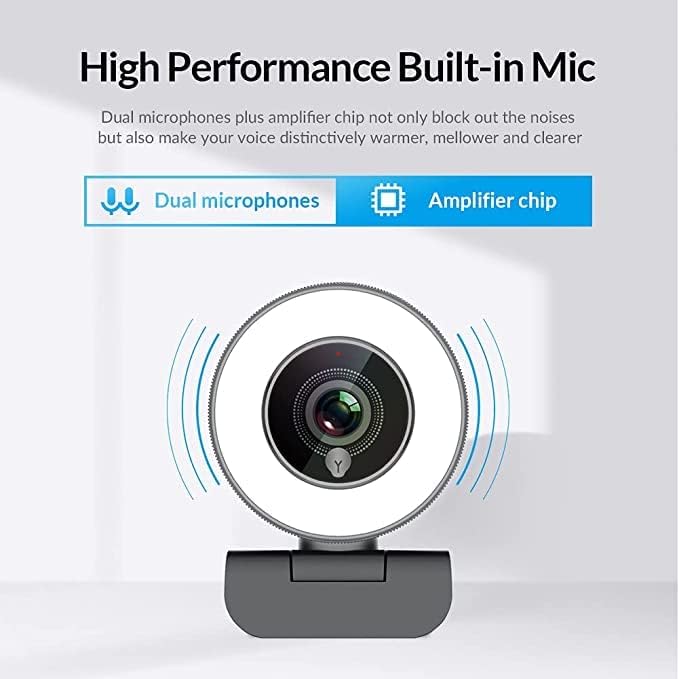
- Dual Noise-Canceling Microphones with Ampຊິບ Lifier: Equipped with superior microphones and an amplifier chip to enhance speech quality, providing clear audio. Background noise is filtered out, ensuring your voice is heard distinctly. The microphone can pick up sound from up to 3 meters away.
- Fast and Accurate Autofocus: The autofocus function eliminates the need for manual adjustments, keeping you consistently in focus during video calls or streams.
- High Quality, Low Bandwidth (H.264 Compression): Utilizes H.264 compression encoding for clearer and smoother video recording, video conferencing, and live broadcasts, optimizing bandwidth usage.
ຕັ້ງຄ່າ
- Unpack ໄດ້ Webກ້ອງ: ລະມັດລະວັງເອົາ webກ້ອງວົງຈອນປິດ ແລະ ອຸປະກອນເສີມຂອງມັນຈາກການຫຸ້ມຫໍ່.
- ການຕິດຕັ້ງ Webກ້ອງ: ໄດ້ webcam features a versatile clip that can be securely attached to the top of your monitor or laptop screen. Adjust the clip to ensure a stable fit. Alternatively, the base includes a standard tripod thread for mounting on a tripod (not included).
- ເຊື່ອມຕໍ່ກັບຄອມພິວເຕີ: ສຽບສາຍ USB ຈາກ webສຽບເຂົ້າໄປໃນພອດ USB ທີ່ມີຢູ່ໃນຄອມພິວເຕີຂອງທ່ານ. webcam is plug-and-play, meaning it should be automatically recognized by most operating systems (Windows 7/8/10 or above, Mac OS 10.6 or above, Android V5.0 or above, Chrome OS 29.0.1547.70 or above, Ubuntu 2.6.24 or above) without requiring additional drivers.
- ການຮັບຮູ້ຊອບແວ: Open your preferred video conferencing or streaming application (e.g., Zoom, Skype, OBS, YouTube Live, Google Meet). Select the Angetube 967 Webcam as your video and audio input device in the application's settings.
ຄໍາແນະນໍາການດໍາເນີນງານ
Adjusting the Ring Light
The Angetube 967 Webcam includes an integrated ring light to provide optimal illumination. To adjust the brightness:
- Locate the touch-sensitive button on the front of the webcam, just below the lens.
- Tap the button to cycle through three brightness levels: Low Light, Medium Light, and High Light.
- Tap a fourth time to turn the ring light off.

Autofocus Functionality
ໄດ້ webcam features automatic autofocus. This means the camera will continuously adjust its focus to keep your face clear and sharp without manual intervention. This is particularly useful for dynamic presentations or active streaming sessions.

ການນຳໃຊ້ໄມໂຄຣໂຟນ
The integrated dual noise-canceling microphones are designed to capture clear audio while minimizing background distractions. Ensure the webcam is positioned appropriately to optimize sound pickup, ideally within 3 meters for best results.
ຄວາມເຂົ້າກັນໄດ້
The Angetube 967 Webcam is widely compatible with various operating systems and applications, including:
- ລະບົບປະຕິບັດການ: Windows 7/8/10 or above, Mac OS 10.6 or above, Android V5.0 or above, Chrome OS 29.0.1547.70 or above, Ubuntu 2.6.24 or above.
- ແອັບພລິເຄຊັນ: OBS, Xsplit, Mixer, Zoom, Skype, Google Meet, YouTube Live, Facebook Live, and other video conferencing/streaming platforms.

ບໍາລຸງຮັກສາ
- ທໍາຄວາມສະອາດ Lens: Use a soft, dry, lint-free cloth to gently wipe the webcam lens. Avoid using harsh chemicals or abrasive materials that could scratch the lens.
- ການເກັບຮັກສາ: ເມື່ອບໍ່ໄດ້ໃຊ້, ເກັບມ້ຽນ webເກັບຮັກສາກ້ອງຖ່າຍຮູບໄວ້ໃນບ່ອນທີ່ສະອາດ, ແຫ້ງ ແລະ ຫ່າງຈາກອຸນຫະພູມສູງສຸດ ແລະ ແສງແດດໂດຍກົງ.
- ການດູແລສາຍໄຟ: ຫຼີກເວັ້ນການງໍຫຼືບິດສາຍ USB ຫຼາຍເກີນໄປເພື່ອປ້ອງກັນຄວາມເສຍຫາຍ.
ການແກ້ໄຂບັນຫາ
- Webກວດບໍ່ພົບກ້ອງ:
- ໃຫ້ແນ່ໃຈວ່າສາຍ USB ໄດ້ເຊື່ອມຕໍ່ຢ່າງປອດໄພກັບທັງສອງ webcam ແລະຄອມພິວເຕີຂອງທ່ານ.
- ລອງສຽບ webcam ເຂົ້າໄປໃນທີ່ Port USB ທີ່ແຕກຕ່າງກັນ.
- ປິດເປີດຄອມພິວເຕີຂອງທ່ານຄືນໃໝ່.
- ກວດສອບຕົວຈັດການອຸປະກອນຂອງລະບົບປະຕິບັດການຂອງທ່ານເພື່ອເບິ່ງວ່າ webແຄມຖືກລະບຸໄວ້ ແລະ ຮັບຮູ້ແລ້ວ.
- ບໍ່ມີວິດີໂອ/ໜ້າຈໍດຳ:
- ຮັບປະກັນ webcam is selected as the primary video input device in your application's settings.
- Check if any privacy settings on your operating system are blocking webcam access for the application.
- ປິດ ແລະເປີດແອັບພລິເຄຊັນຄືນໃໝ່.
- ບໍ່ມີສຽງ / ຄຸນນະພາບສຽງບໍ່ດີ:
- Verify that the Angetube 967 Webໄມໂຄຣໂຟນຂອງກ້ອງຖ່າຍຮູບຖືກເລືອກເປັນອຸປະກອນປ້ອນຂໍ້ມູນສຽງໃນການຕັ້ງຄ່າແອັບພລິເຄຊັນຂອງທ່ານ.
- ກວດສອບການຕັ້ງຄ່າສຽງຂອງຄອມພິວເຕີຂອງທ່ານເພື່ອຮັບປະກັນວ່າໄມໂຄຣໂຟນຖືກເປີດໃຊ້ງານແລ້ວ ແລະ ບໍ່ໄດ້ປິດສຽງໄວ້.
- ຮັບປະກັນ webcam is positioned within optimal range (up to 3 meters) for sound pickup.
- Ring Light Not Working:
- Gently tap the touch-sensitive button below the lens to cycle through brightness levels.
- ຮັບປະກັນ webcam is properly connected via USB, as the light draws power from the connection.
ຂໍ້ມູນຈໍາເພາະ
| ຂະໜາດສິນຄ້າ | 5.3 x 6.6 x 7.6 ນິ້ວ |
| ນ້ໍາຫນັກລາຍການ | 5.3 ອອນ |
| ໝາຍເລກຕົວແບບ | 967 |
| ເທັກໂນໂລຍີເຊັນເຊີຮູບພາບ | CMOS |
| ຄວາມລະອຽດການຖ່າຍວິດີໂອ | 1080p |
| ຄວາມຍາວໂຟກັສສູງສຸດ | 3 |
| ຮູຮັບແສງສູງສຸດ | 2.1 f |
| ຮູບແບບການຖ່າຍຮູບວິດີໂອ | MP4 |
| ຮູບແບບສຽງທີ່ຮອງຮັບ | AAC, MP3 |
| ເຕັກໂນໂລຊີການເຊື່ອມຕໍ່ | USB |
| ວັນທີທໍາອິດທີ່ມີ | ວັນທີ 22 ພຶດສະພາ 2019 |
ການຮັບປະກັນແລະການສະຫນັບສະຫນູນ
- ການຊ່ວຍເຫຼືອລູກຄ້າ: Angetube offers lifetime technical customer support for this product.
- ເວລາຕອບສະໜອງ: Expect a quick response to inquiries, typically within 24 hours.
- ຜົນຕອບແທນ/ແລກປ່ຽນ: Returns for an exchange or refund are accepted within 30 days of purchase.
- ຜູ້ຜະລິດ: XZC
- ຜູ້ຂາຍ: Angetube Store


