Wavel Ultra Mini GF-07 GPS Tracker User Manual
Model: GF-07
1. ຜະລິດຕະພັນເກີນview
The Wavel Ultra Mini GF-07 is a compact and lightweight GPS tracking device designed for tracking vehicles, individuals, or assets. It features a magnetic back for easy attachment and operates by inserting a working SIM card (not included) to enable real-time tracking and voice monitoring capabilities. Please note that this device primarily supports 2G GSM networks.
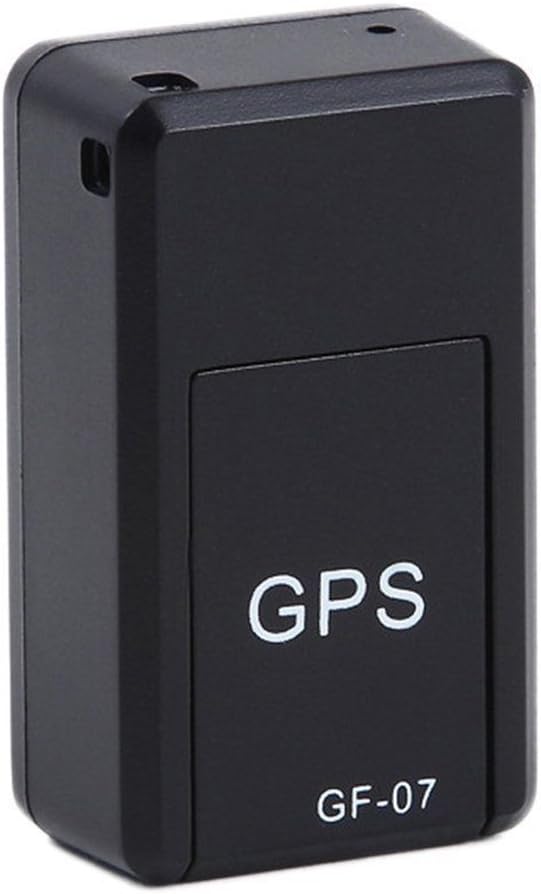
ຮູບທີ 1: ດ້ານໜ້າ view of the Wavel GF-07 GPS tracker, showing the 'GPS' and 'GF-07' labels.
ຄຸນນະສົມບັດທີ່ສໍາຄັນ:
- ການອອກແບບກະທັດຮັດ: Small size (approximately 42x25x20mm) and lightweight for discreet placement.
- ໄຟລ໌ແນບແມ່ເຫຼັກ: Equipped with powerful magnets for secure installation on metallic surfaces.
- ການຕິດຕາມເວລາຈິງ: Utilizes a SIM card (not included) for location tracking via Google Maps over the internet.
- ການຕິດຕາມສຽງ: Dialing the SIM card number allows for silent audio monitoring around the device.
- ການບັນທຶກສຽງ: Supports voice recording by sending a specific SMS command. Requires a TF card (not included).
- ສະແຕນບາຍດົນ: Features a 3.7V 300mA lithium battery with approximately 100 hours of standby time.
2. ເນື້ອໃນຊຸດ
ໃຫ້ແນ່ໃຈວ່າທຸກລາຍການຢູ່ໃນຊຸດ:
- 1 x Wavel Ultra Mini GF-07 GPS Tracker
- 1 x ສາຍສາກ USB
- 1 x ຄູ່ມືຜູ້ໃຊ້ (ເອກະສານນີ້)
Note: A working 2G GSM SIM card and a TF (microSD) card are required for full functionality and are NOT included.
3. ຄູ່ມືການຕິດຕັ້ງ
3.1. Inserting SIM Card and TF Card
- Locate the SIM card slot and TF card slot on the device. These are typically found by sliding open a cover or removing a small panel.
- Insert a working 2G GSM SIM card into the SIM card slot. Ensure the SIM card is active and has sufficient balance for calls and SMS. (Important: This device primarily supports 2G GSM networks. Compatibility with 3G/4G/5G networks for data transmission may vary or be limited, and 2G networks are being phased out in some regions.)
- Insert a TF (microSD) card into the TF card slot for voice recording functionality.
- ປິດຝາປິດຢ່າງປອດໄພ.

ຮູບທີ 2: View of the GF-07 tracker with the cover removed, showing the SIM card and TF card slots.
3.2. ການສາກອຸປະກອນ
ກ່ອນທີ່ຈະໃຊ້ຄັ້ງທໍາອິດ, ສາກອຸປະກອນໃຫ້ເຕັມ.
- Connect the provided USB cable to the charging port on the GF-07 tracker.
- ເຊື່ອມຕໍ່ປາຍອີກດ້ານໜຶ່ງຂອງສາຍ USB ເຂົ້າກັບອະແດບເຕີໄຟ USB ມາດຕະຖານ (ເຊັ່ນ: ທີ່ສາກໂທລະສັບ, ພອດ USB ຂອງຄອມພິວເຕີ).
- The device will indicate charging status (e.g., an indicator light). Charge until the light indicates full charge or turns off.

ຮູບທີ 3: ຂ້າງ view of the GF-07 tracker, highlighting the micro USB charging port.
4. ຄໍາແນະນໍາການດໍາເນີນງານ
4.1. ເປີດ / ປິດພະລັງງານ
The device typically powers on automatically when a SIM card is inserted and it has power. There is no explicit power button.
- ເປີດ: Insert a charged battery and a SIM card. The device should power on automatically.
- ປິດພະລັງງານ: Remove the SIM card and/or disconnect the battery.
4.2. Real-time Tracking (Google Maps)
To track the device's location:
- Ensure the SIM card in the device has an active data plan.
- From your mobile phone, send a specific SMS command to the SIM card number in the GF-07 tracker. The manual states "track and map (with Google Maps) in real-time over the Internet" but doesn't specify the SMS command for this. (Common commands for similar devices might be "URL" or "GPS", but refer to the original small manual for exact command if available. If not, this functionality might be app-based or require a specific platform.)
- The device should reply with a Google Maps link showing its current location. Click the link to view the location on Google Maps.
4.3. Voice Monitoring
To listen to the surroundings of the device:
- Dial the phone number of the SIM card inserted into the GF-07 tracker from your mobile phone.
- The device will automatically answer the call silently, allowing you to hear sounds around it. There will be no light or noise from the tracker during this process.
4.4. Voice Recording Function
To initiate voice recording:
- Ensure a TF (microSD) card is properly inserted into the device.
- Send the text message "555" to the SIM card number in the GF-07 tracker.
- The device will reply with a message "Snd" to confirm that recording has started.
- Recordings will be saved to the TF card. To stop recording, send "666" (common for similar devices, not specified in input, but logical). To retrieve recordings, you would typically need to remove the TF card and access it via a computer.
5. ການບໍາລຸງຮັກສາແລະການດູແລ
- ທໍາຄວາມສະອາດ: ເຊັດອຸປະກອນດ້ວຍຜ້າອ່ອນໆ, ແຫ້ງ. ຢ່າໃຊ້ເຄື່ອງເຮັດຄວາມສະອາດຂອງແຫຼວຫຼື aerosols.
- ອຸນຫະພູມ: ຫຼີກເວັ້ນການເປີດເຜີຍອຸປະກອນກັບອຸນຫະພູມທີ່ຮຸນແຮງ (ຮ້ອນຫຼືເຢັນ).
- ການເປີດເຜີຍນ້ໍາ: ອຸປະກອນບໍ່ກັນນ້ໍາ. ຮັກສາມັນໄວ້ຫ່າງຈາກນ້ໍາແລະຄວາມຊຸ່ມຊື່ນສູງ.
- ການເກັບຮັກສາ: If storing for an extended period, ensure the battery is partially charged (around 50%) and store in a cool, dry place.
- ຊີວິດຫມໍ້ໄຟ: Battery working time is approximately 100 hours on standby. Actual usage time will vary based on tracking frequency and network conditions.
6. ການແກ້ໄຂບັນຫາ
| ບັນຫາ | ສາເຫດທີ່ເປັນໄປໄດ້ | ການແກ້ໄຂ |
|---|---|---|
| ອຸປະກອນບໍ່ເປີດ. | Low battery; SIM card not inserted correctly; faulty device. | Charge the device fully. Re-insert the SIM card. If problem persists, contact support. |
| Cannot get location reply. | No network signal; SIM card has no data/balance; incorrect SMS command; device not powered on. | Check network coverage. Ensure SIM card is active and has data. Verify SMS command. Confirm device is powered on. |
| Voice monitoring not working. | SIM card has no call balance; device out of range; SIM card not inserted correctly. | Check SIM card balance. Ensure device is in an area with network coverage. Re-insert SIM card. |
| ການບັນທຶກສຽງບໍ່ໄດ້ເຮັດວຽກ. | TF card not inserted; TF card full; incorrect SMS command. | Insert a TF card. Check TF card storage. Verify SMS command "555". |
| ອຸປະກອນບໍ່ໄດ້ສາກໄຟ. | Faulty cable/adapter; charging port damage. | Try a different USB cable and adapter. Inspect charging port for damage. |
| Inaccurate GPS location. | Weak GPS signal (indoors, dense areas); environmental interference. | Move the device to an open area with clear sky view. GPS accuracy is approximately 100m. |
7. ຂໍ້ມູນຈໍາເພາະ
| ຄຸນສົມບັດ | ລາຍລະອຽດ |
|---|---|
| ຕົວແບບ | ກຊກ -៧ |
| ສີ | ດຳ |
| ຂະໜາດ (L x W x H) | ປະມານ 42mm x 25mm x 20mm |
| ວັດສະດຸ | ABS (Acrylonitrile Butadiene Styrene) |
| ປະເພດເສົາອາກາດ | GSM |
| ຄວາມຖືກຕ້ອງຂອງການຈັດຕໍາແຫນ່ງ GPS | ປະມານ 100 ແມັດ |
| ແບັດເຕີຣີ | ແບດເຕີຣີ້ມາດຕະຖານ Lithium 3.7V 300mA |
| Battery Working Time (Standby) | ປະມານ 100 ຊົ່ວໂມງ |
| ບັດທີ່ຮອງຮັບ | SIM Card (2G GSM), TF (microSD) Card |
| ເຕັກໂນໂລຊີການເຊື່ອມຕໍ່ | ໂທລະສັບມືຖື |
| ຄຸນນະສົມບັດພິເສດ | ການຍຶດຕິດແມ່ເຫຼັກ |

ຮູບທີ 4: Dimensions of the GF-07 tracker: 42mm length, 25mm width, 20mm height.


