1. ເກີນview
The Rollei Compactline Pocket Digital Camera is designed for ease of use and portability, allowing you to capture high-quality photos and videos on the go. Featuring a 50-megapixel sensor and 16x digital zoom, it delivers clear and vibrant images. Its compact design makes it an ideal companion for travel and everyday moments, ensuring you are always ready to capture memories in 2.7K video resolution.
2. ສິ່ງທີ່ຢູ່ໃນກ່ອງ
Carefully unpack your Rollei Compactline Pocket Digital Camera and ensure all items are present. If any items are missing or damaged, please contact customer support.
- Rollei Compactline Pocket Camera
- ຫມໍ້ໄຟ Lithium-ion
- ສາຍແຂນ
- ສາຍ USB-C
- ກະເປົາຖື
- ຄູ່ມືຜູ້ໃຊ້

Image: Contents of the Rollei Compactline Pocket package, including the camera, battery, USB-C cable, wrist strap, and carrying pouch.
3. ພາກສ່ວນກ້ອງຖ່າຍຮູບ ແລະການຄວບຄຸມ
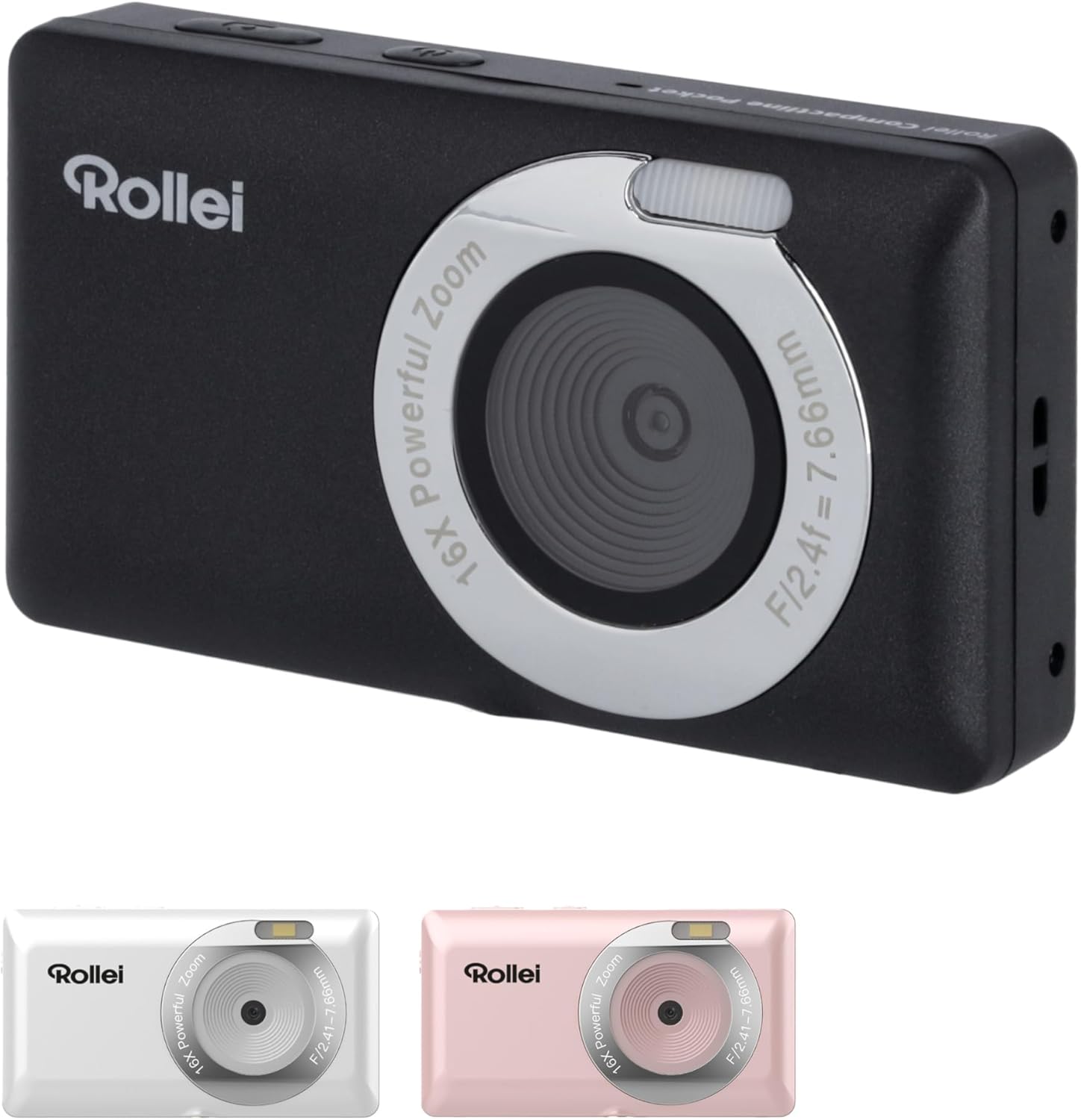
ດ້ານໜ້າ View

ຮູບພາບ: ທາງຫນ້າ view of the Rollei Compactline Pocket camera, showing the lens, flash, and Rollei branding.
- ເລນ: ຈັບພາບແລະວິດີໂອ.
- Flash: ສະຫນອງແສງສະຫວ່າງໃນສະພາບແສງສະຫວ່າງຕ່ໍາ.
- ໄມໂຄຣໂຟນ: ບັນທຶກສຽງໃນລະຫວ່າງການຖ່າຍວິດີໂອ.
ຫລັງ View
ຮູບພາບ: ດ້ານຫລັງ view of the Rollei Compactline Pocket camera, displaying the 2.4-inch IPS screen and control buttons.
- ຈໍສະແດງຜົນ IPS ຂະໜາດ 2.4 ນິ້ວ: ສໍາລັບ viewing live images, playback, and menu navigation.
- ປຸ່ມເປີດປິດ: ເປີດ ຫຼື ປິດກ້ອງຖ່າຍຮູບ.
- ປຸ່ມຊັດເຕີ: ຖ່າຍຮູບ ຫຼື ເລີ່ມ/ຢຸດການບັນທຶກວິດີໂອ.
- ປຸ່ມຊູມ (W/T): Controls digital zoom (Wide/Telephoto).
- Directional Pad (Up/Down/Left/Right) with OK Button: ນຳທາງເມນູ ແລະຢືນຢັນການເລືອກ.
- ປຸ່ມເມນູ: ເຂົ້າເຖິງການຕັ້ງຄ່າກ້ອງຖ່າຍຮູບ.
- ປຸ່ມ DISP: ການປ່ຽນແປງສະແດງຂໍ້ມູນ.
- ປຸ່ມຫຼິ້ນ: ເຂົ້າສູ່ຮູບແບບການຫຼິ້ນກັບ view ຮູບພາບແລະວິດີໂອ.
4. ຕັ້ງຄ່າ
4.1. ການຕິດຕັ້ງຫມໍ້ໄຟ
- ຊອກຫາຝາປິດຊ່ອງໃສ່ຫມໍ້ໄຟຢູ່ດ້ານລຸ່ມຂອງກ້ອງຖ່າຍຮູບ.
- ເລື່ອນສະລັກເພື່ອເປີດຝາປິດ.
- Insert the Lithium-ion battery according to the polarity indicators (+/-).
- Close the battery compartment cover until it clicks securely.
4.2. ການຕິດຕັ້ງກາດຫນ່ວຍຄວາມຈໍາ
A microSD card (not included) is required to store photos and videos.
- ເປີດຝາປິດຊ່ອງໃສ່ຫມໍ້ໄຟ.
- ຊອກຫາຊ່ອງສຽບກາດ microSD.
- Insert the microSD card with the metal contacts facing down until it clicks into place.
- ປິດຝາປິດຊ່ອງໃສ່ຫມໍ້ໄຟ.
4.3. ການສາກແບັດເຕີຣີ
- Connect the small end of the USB-C cable to the camera's USB-C port.
- Connect the large end of the USB-C cable to a USB power adapter (not included) or a computer's USB port.
- ໄຟຕົວຊີ້ວັດການສາກໄຟຈະສະຫວ່າງ. ມັນຈະປິດ ຫຼືປ່ຽນສີເມື່ອສາກເຕັມ.
5. ປະຕິບັດການກ້ອງຖ່າຍຮູບ
5.1. ເປີດ/ປິດ
- ເພື່ອເປີດເຄື່ອງ: ກົດປຸ່ມເປີດປິດຄ້າງໄວ້ຈົນກວ່າໜ້າຈໍຈະສະຫວ່າງ.
- ປິດເຄື່ອງ: ກົດປຸ່ມເປີດປິດຄ້າງໄວ້ຈົນກວ່າໜ້າຈໍຈະປິດ.
5.2. ຖ່າຍຮູບ
- ເປີດກ້ອງຖ່າຍຮູບ. ໂດຍປົກກະຕິແລ້ວມັນຈະເລີ່ມຕົ້ນໃນໂໝດຖ່າຍຮູບ.
- Frame your shot using the 2.4-inch IPS display.
- Press the Shutter button halfway down to focus. The focus indicator will confirm when focus is achieved.
- ກົດປຸ່ມຊັດເຕີລົງໃຫ້ສຸດເພື່ອຖ່າຍຮູບ.
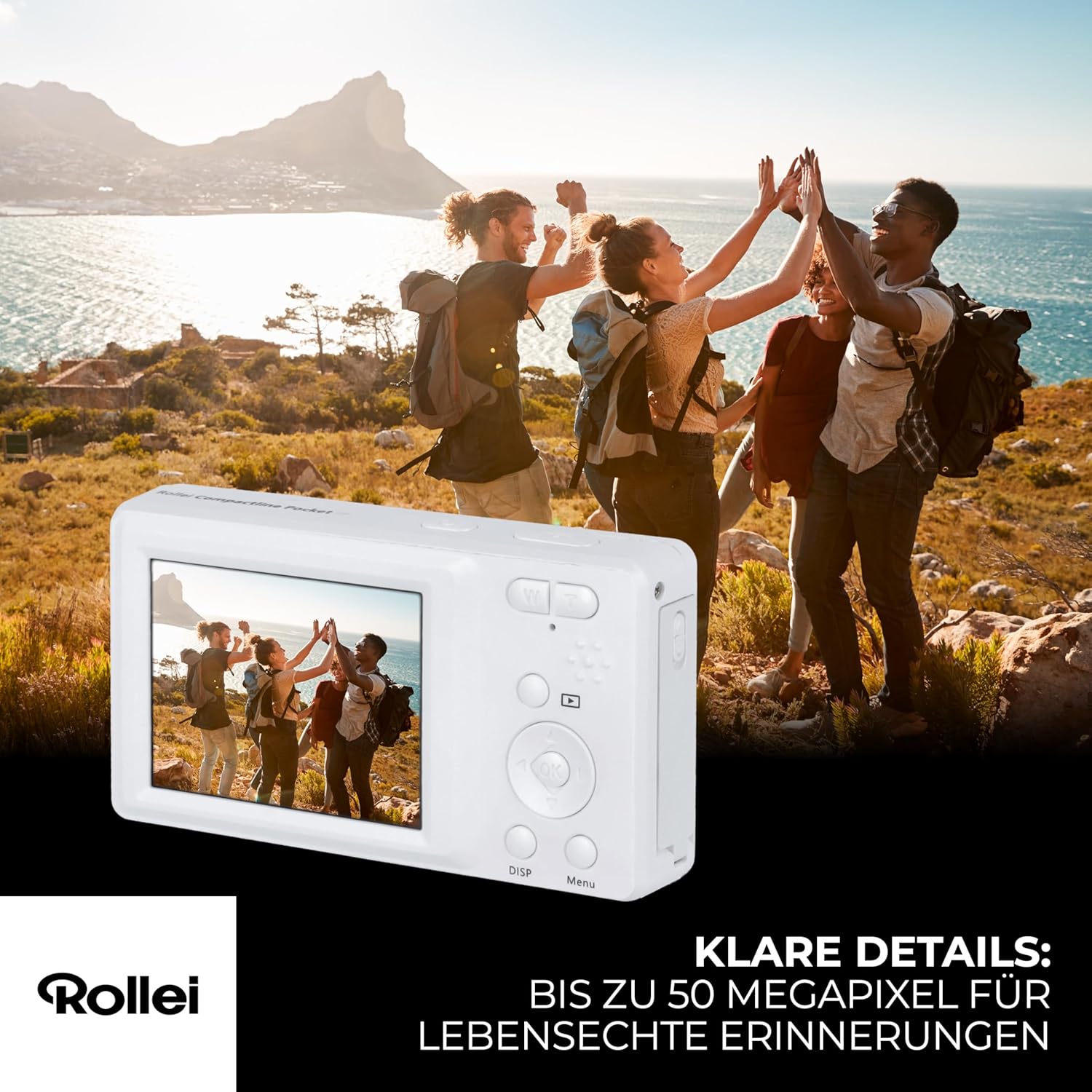
Image: A person holding the Rollei Compactline Pocket camera, demonstrating how to frame a shot for photography.
5.3. ການບັນທຶກວິດີໂອ
- ເປີດກ້ອງຖ່າຍຮູບ.
- Switch to video mode (refer to the camera's on-screen menu or a dedicated button if available).
- Frame your video.
- ກົດປຸ່ມ Shutter ເພື່ອເລີ່ມຕົ້ນການບັນທຶກ. ໂມງຈັບເວລາຫຼືຕົວຊີ້ວັດຈະປາກົດຢູ່ໃນຫນ້າຈໍ.
- ກົດປຸ່ມ Shutter ອີກຄັ້ງເພື່ອຢຸດການບັນທຶກສຽງ.

Image: The Rollei Compactline Pocket camera's screen showing a vibrant video scene of people enjoying a beach, illustrating video recording capability.
5.4. ການຫວນຄືນ
- ກົດປຸ່ມຫຼິ້ນເພື່ອເຂົ້າສູ່ໂໝດຫຼິ້ນຄືນ.
- Use the Left/Right directional buttons to navigate through your photos and videos.
- ກົດປຸ່ມ OK ເພື່ອ view ວິດີໂອ ຫຼືຊູມເຂົ້າໄປໃນຮູບ.
- ກົດປຸ່ມຫຼິ້ນອີກຄັ້ງເພື່ອອອກຈາກໂໝດຫຼິ້ນຄືນ.
5.5. ເມນູນໍາທາງ
- Press the Menu button to access camera settings.
- Use the Up/Down directional buttons to scroll through menu options.
- Use the Left/Right directional buttons to change settings within an option.
- ກົດປຸ່ມ OK ເພື່ອຢືນຢັນການເລືອກ.
- ກົດປຸ່ມເມນູອີກຄັ້ງເພື່ອອອກຈາກເມນູ.
5.6. ການເຊື່ອມຕໍ່ກັບຄອມພິວເຕີ
- ໃຫ້ແນ່ໃຈວ່າກ້ອງຖ່າຍຮູບປິດຢູ່.
- ເຊື່ອມຕໍ່ກ້ອງຖ່າຍຮູບກັບຄອມພິວເຕີຂອງທ່ານໂດຍໃຊ້ສາຍ USB-C ທີ່ສະໜອງໃຫ້.
- Power on the camera. It should appear as a removable disk drive on your computer.
- ດຽວນີ້ທ່ານສາມາດໂອນຮູບພາບ ແລະ ວິດີໂອໄປຍັງຄອມພິວເຕີຂອງທ່ານໄດ້ແລ້ວ.
6. ບໍາລຸງຮັກສາ
- ທໍາຄວາມສະອາດ Lens: Use a soft, lint-free cloth specifically designed for camera lenses. Do not use harsh chemicals.
- ທໍາຄວາມສະອາດຮ່າງກາຍ: ເຊັດຕົວກ້ອງຖ່າຍຮູບດ້ວຍຜ້າອ່ອນ, ແຫ້ງ. ສໍາລັບຝຸ່ນ stubborn, ເລັກນ້ອຍ dampen ຜ້າທີ່ມີນ້ໍາ.
- ການເກັບຮັກສາ: ເກັບຮັກສາກ້ອງຖ່າຍຮູບໄວ້ໃນບ່ອນທີ່ເຢັນ, ແຫ້ງ, ຫ່າງຈາກແສງແດດໂດຍກົງ ແລະອຸນຫະພູມທີ່ຮຸນແຮງ. ເອົາແບດເຕີລີ່ອອກຖ້າເກັບຮັກສາໄວ້ເປັນເວລາດົນ.
- ຄວາມຕ້ານທານນ້ໍາ: This camera is not waterproof. Avoid exposure to water or high humidity.
7. ການແກ້ໄຂບັນຫາ
Camera Will Not Turn On
- ກວດໃຫ້ແນ່ໃຈວ່າໃສ່ແບັດເຕີຣີຢ່າງຖືກຕ້ອງ ແລະສາກເຕັມແລ້ວ.
- Try charging the battery for at least 30 minutes.
ຄຸນນະພາບຮູບພາບທີ່ບໍ່ດີ
- ກວດສອບວ່າເລນສະອາດ ແລະ ບໍ່ມີຮອຍເປື້ອນ ຫຼື ຝຸ່ນ.
- Ensure there is adequate lighting for your shot.
- Avoid excessive digital zoom, which can reduce image clarity.
ກາດຄວາມຈຳຜິດພາດ
- ກວດໃຫ້ແນ່ໃຈວ່າໄດ້ໃສ່ແຜ່ນຄວາມຈຳຢ່າງຖືກຕ້ອງແລ້ວ.
- ລອງຟໍແມັດກາດໜ່ວຍຄວາມຈຳ (ອັນນີ້ຈະລຶບຂໍ້ມູນທັງໝົດ, ສະນັ້ນ ໃຫ້ສຳຮອງຂໍ້ມູນກ່ອນ).
- ທົດສອບດ້ວຍກາດ microSD ອື່ນທີ່ເຂົ້າກັນໄດ້.
ແບັດເຕີຣີບໍ່ໄດ້ສາກ
- Verify the USB-C cable is securely connected to both the camera and the power source.
- Try using a different USB power adapter or computer USB port.
- Ensure the battery is not damaged.
8. ຂໍ້ມູນຈໍາເພາະ
| ຄຸນສົມບັດ | ຂໍ້ມູນຈໍາເພາະ |
|---|---|
| ຍີ່ຫໍ້ | ມ້ວນ |
| ຊື່ຕົວແບບ | ກະເປົ໋າກະເປົ໋າ |
| ໝາຍເລກຕົວແບບ | 10858 |
| ການແກ້ໄຂປະສິດທິພາບ | 52 ລ້ານພິກເຊລ |
| ຄວາມລະອຽດວິດີໂອ | 2160p (2.7K) |
| ຊູມດິຈິຕອລ | 16x |
| Optical Zoom | 1x (Fixed Lens) |
| ຈໍສະແດງຜົນ | ໜ້າຈໍ IPS ຂະໜາດ 2.4 ນິ້ວ |
| ຮູຮັບແສງ | F2.8 |
| ຄວາມຍາວໂຟກັສ | 16ມມ |
| ຊ່ວງ ISO | 100 ຫາ 6400 |
| ສະຖຽນລະພາບຮູບພາບ | ແມ່ນແລ້ວ |
| ປະເພດຫມໍ້ໄຟ | ລິດທຽມ-ໄອອອນ |
| ການເຊື່ອມຕໍ່ | USB |
| ນ້ໍາຫນັກລາຍການ | 100 ກຣາມ |
| ຂະໜາດສິນຄ້າ (L x W x H) | 11 x 9 x 7 cm |
| ລະດັບຄວາມຕ້ານທານນ້ໍາ | ບໍ່ກັນນ້ຳ |
9. ການຮັບປະກັນແລະການສະຫນັບສະຫນູນ
ຂໍ້ມູນການຮັບປະກັນ
The Rollei Compactline Pocket Digital Camera comes with a 24-Month Exchange Guarantee ຈາກວັນທີ່ຊື້. ກະລຸນາຮັກສາຫຼັກຖານການຊື້ຂອງທ່ານສໍາລັບການຮຽກຮ້ອງການຮັບປະກັນ.
ການຊ່ວຍເຫຼືອລູກຄ້າ
Our experts are available to assist you with any questions or issues you may encounter.
- ສະຫນັບສະຫນູນໂທລະສັບ: +49 40 270 750 277
- ຊົ່ວໂມງເຮັດວຽກ: Monday to Friday, 10:00 AM to 4:00 PM (CET)


