ແນະນຳ
This manual provides essential information for the safe and efficient operation of your HH Electronics Tessen TNP-1201 Speaker Cabinet. Please read this manual thoroughly before using the product to ensure proper setup, operation, and maintenance. Retain this manual for future reference.

ຮູບພາບ 1: ດ້ານຫນ້າ view of the HH Electronics Tessen TNP-1201 Speaker Cabinet, showcasing the protective grille and HH logo.
ຄໍາແນະນໍາຄວາມປອດໄພທີ່ສໍາຄັນ
- ອ່ານຄໍາແນະນໍາ: ອ່ານແລະເຂົ້າໃຈຄໍາແນະນໍາຄວາມປອດໄພແລະການດໍາເນີນງານທັງຫມົດກ່ອນທີ່ຈະນໍາໃຊ້ຜະລິດຕະພັນນີ້.
- ຮັກສາຄໍາແນະນໍາ: ຮັກສາຄໍາແນະນໍາເຫຼົ່ານີ້ສໍາລັບການອ້າງອີງໃນອະນາຄົດ.
- ຄຳເຕືອນໃຫ້ລະວັງ: ປະຕິບັດຕາມຄໍາເຕືອນທັງຫມົດກ່ຽວກັບຜະລິດຕະພັນແລະໃນຄໍາແນະນໍາການດໍາເນີນງານ.
- ປະຕິບັດຕາມຄໍາແນະນໍາ: ປະຕິບັດຕາມຄໍາແນະນໍາການປະຕິບັດແລະການນໍາໃຊ້ທັງຫມົດ.
- ນ້ໍາແລະຄວາມຊຸ່ມ: ຢ່າໃຊ້ອຸປະກອນນີ້ຢູ່ໃກ້ກັບນ້ໍາ.
- ທໍາຄວາມສະອາດ: ເຮັດຄວາມສະອາດດ້ວຍຜ້າແຫ້ງເທົ່ານັ້ນ.
- ການລະບາຍອາກາດ: ຫ້າມປິດຊ່ອງລະບາຍອາກາດໃດໆ. ຕິດຕັ້ງຕາມຄໍາແນະນໍາຂອງຜູ້ຜະລິດ.
- ຄວາມຮ້ອນ: ຫ້າມຕິດຕັ້ງໃກ້ກັບແຫຼ່ງຄວາມຮ້ອນເຊັ່ນລັງສີ, ເຄື່ອງບັນທຶກຄວາມຮ້ອນ, ເຕົາຫຼືອຸປະກອນອື່ນໆ (ລວມທັງ. amplifiers) ທີ່ຜະລິດຄວາມຮ້ອນ.
- ການປົກປ້ອງສາຍໄຟ: ປົກປ້ອງສາຍໄຟຈາກການຖືກສຽບ ຫຼື ສຽບ, ໂດຍສະເພາະຢູ່ປລັກສຽບ, ກ່ອງຮັບສະດວກ, ແລະຈຸດທີ່ພວກມັນອອກຈາກອຸປະກອນ.
- ໄຟລ໌ແນບ: ໃຊ້ພຽງແຕ່ໄຟລ໌ແນບ/ອຸປະກອນເສີມທີ່ລະບຸໂດຍຜູ້ຜະລິດ.
- ການຕິດຕັ້ງ: ໃຊ້ກັບລົດເຂັນ, ຂາຕັ້ງ, ຂາຕັ້ງ, ວົງເລັບ, ຫຼືຕາຕະລາງທີ່ລະບຸໂດຍຜູ້ຜະລິດ, ຫຼືຂາຍດ້ວຍອຸປະກອນ. ເມື່ອລົດເຂັນຖືກນຳໃຊ້, ໃຫ້ໃຊ້ຄວາມລະມັດລະວັງໃນເວລາເຄື່ອນຍ້າຍເຄື່ອງພ້ອມໆກັນຂອງລົດເຂັນ/ອຸປະກອນເພື່ອຫຼີກລ່ຽງການບາດເຈັບຈາກການປີ້ນ.
- ຖອດປລັກ: ຖອດອຸປະກອນນີ້ອອກໃນລະຫວ່າງການມີພາຍຸຟ້າຜ່າ ຫຼືເມື່ອບໍ່ໄດ້ໃຊ້ເປັນເວລາດົນນານ.
- ການບໍລິການ: ອ້າງອີງການບໍລິການທັງໝົດໃຫ້ກັບພະນັກງານບໍລິການທີ່ມີຄຸນວຸດທິ. ການບໍລິການແມ່ນຕ້ອງການເມື່ອອຸປະກອນໄດ້ຮັບຄວາມເສຍຫາຍໃນທາງໃດກໍ່ຕາມເຊັ່ນ: ສາຍໄຟຫຼືປລັກສຽບຖືກເສຍຫາຍ, ແຫຼວຮົ່ວໄຫຼຫຼືສິ່ງຂອງຕົກເຂົ້າໄປໃນອຸປະກອນ, ອຸປະກອນຖືກຝົນຫຼືຄວາມຊຸ່ມຊື່ນ, ບໍ່ເຮັດວຽກຕາມປົກກະຕິ. , ຫຼືໄດ້ຖືກຫຼຸດລົງ.
ສິນຄ້າເກີນview
The HH Electronics Tessen TNP-1201 is a high-performance speaker cabinet designed for live sound and stage applications. It features robust construction and advanced audio components to deliver clear and powerful sound reproduction.
ຄຸນນະສົມບັດທີ່ສໍາຄັນ:
- 1 x 12” Precision engineered high efficiency HH woofer with Kevlar fiber reinforced cones, highly detailed mid range for vocal clarity.
- Italian designed LaVoce 1” throat compression drivers, high open area steel grille with acoustic foam backing for maximum protection of drivers without compromising sound.
- High power handling without compression for dynamic performance, High quality, High power passive x-overs, with bi-amp bypass switch.
- 35 mm pole mount, 35° monitor angle, asymmetric profile to prevent standing wave distortion.
- High open area steel grille with acoustic foam backing for maximum protection of drivers without compromising sound.
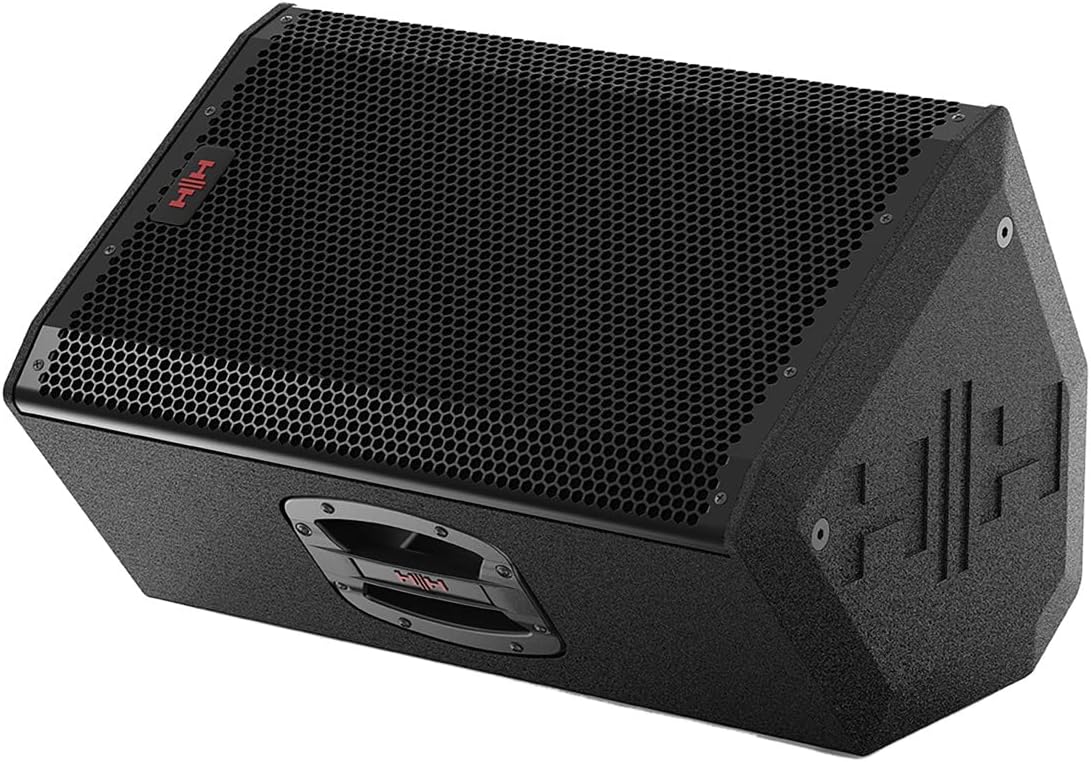
ຮູບພາບ 2: ດ້ານໜ້າເປັນມຸມ view of the Tessen TNP-1201 speaker, highlighting its robust grille and cabinet design.
ການຕັ້ງຄ່າແລະການເຊື່ອມຕໍ່
Follow these steps to properly set up your Tessen TNP-1201 speaker cabinet:
- ການຈັດວາງ: Position the speaker on a stable, flat surface or mount it using a compatible 35mm pole mount. Ensure adequate ventilation around the unit. The asymmetric profile allows for a 35° monitor angle when placed on its side.
- ການເຊື່ອມຕໍ່ພະລັງງານ: Connect the power cord to the AC inlet on the rear panel of the speaker and then to a suitable power outlet. Ensure the power switch is in the OFF position before connecting.
- ການປ້ອນຂໍ້ມູນສຽງ: Connect your audio source (e.g., mixer, instrument) to the input connectors on the rear panel. The TNP-1201 typically uses standard XLR or 1/4" TRS connectors for audio input.
- Output (if applicable): If linking multiple speakers, use the output connectors to send the audio signal to another speaker.
- ການເປີດເຄື່ອງເບື້ອງຕົ້ນ: Once all connections are secure, switch the power ON. Start with volume levels at minimum and gradually increase to the desired level.

ຮູບພາບ 3: ດ້ານຫລັງ view of the Tessen TNP-1201, detailing the input/output panel, power connection, and integrated handles.
ຄໍາແນະນໍາການດໍາເນີນງານ
The Tessen TNP-1201 is designed for straightforward operation. Familiarize yourself with the controls on the rear panel:
- ການຄວບຄຸມລະດັບການປ້ອນຂໍ້ມູນ: Adjusts the overall input sensitivity of the speaker. Start low and increase gradually to avoid distortion.
- EQ Controls (if present): Some models may include basic EQ adjustments (e.g., Bass, Treble) to fine-tune the sound to your environment.
- ສອງ -Amp ສະຫຼັບຂ້າມ: This speaker features a high-quality passive crossover with a bi-amp bypass switch. Consult advanced audio guides if you intend to use bi-amplification. For standard operation, ensure it is set correctly for passive mode.
- ຕົວຊີ້ບອກພະລັງງານ: An LED indicator typically illuminates when the unit is powered on.
- Clip/Limit Indicator: This LED illuminates when the input signal is too high, indicating potential distortion. Reduce the input level if this light frequently activates.
Always ensure that the input signal is clean and not overdriven from your source device to achieve optimal sound quality and prevent damage to the speaker.
ການບໍາລຸງຮັກສາແລະການດູແລ
Proper maintenance ensures the longevity and performance of your Tessen TNP-1201 speaker cabinet.
- ທໍາຄວາມສະອາດ: Clean the exterior of the cabinet with a soft, dry cloth. Do not use abrasive cleaners, solvents, or waxes. Avoid spraying liquids directly onto the speaker.
- Grille Care: The steel grille with acoustic foam backing protects the drivers. Ensure it remains free of dust and debris. Do not attempt to remove the grille unless necessary for servicing by qualified personnel.
- ການເກັບຮັກສາ: When not in use for extended periods, store the speaker in a dry, temperature-controlled environment, away from direct sunlight and extreme temperatures.
- ການກວດກາ: Periodically inspect the power cord and all cables for any signs of damage. Replace damaged cables immediately.

ຮູບພາບ 4: ຂ້າງ view of the Tessen TNP-1201, illustrating its asymmetric cabinet profile designed to prevent standing wave distortion and allow for monitor use.
ການແກ້ໄຂບັນຫາ
If you encounter issues with your Tessen TNP-1201, refer to the following common problems and solutions:
| ບັນຫາ | ສາເຫດທີ່ເປັນໄປໄດ້ | ການແກ້ໄຂ |
|---|---|---|
| ບໍ່ມີສຽງ |
|
|
| ສຽງບິດເບືອນ |
|
|
| Hum ຫຼື Buzz |
|
|
If the problem persists after attempting these solutions, please contact HH Electronics customer support or a qualified service technician.
ຂໍ້ມູນຈໍາເພາະ
Detailed technical specifications for the HH Electronics Tessen TNP-1201 Speaker Cabinet:
| ຄຸນສົມບັດ | ລາຍລະອຽດ |
|---|---|
| ຍີ່ຫໍ້ | HH ເອເລັກໂຕຣນິກ |
| ຊື່ຕົວແບບ | TNP-1201 |
| ປະເພດລຳໂພງ | ວອດເຟີ |
| ຂະຫນາດລໍາໂພງ | 12 ນິ້ວ |
| ລໍາໂພງ Ampປະເພດການຢັ້ງຢືນ | Passive (with bi-amp bypass switch) |
| ຜົນຜະລິດວັດtage | 800 Watts (Power Handling) |
| ແຫຼ່ງພະລັງງານ | ໄຟຟ້າສາຍ |
| ປະເພດການຕິດຕັ້ງ | Floor Standing, 35 mm Pole Mount |
| ນ້ໍາຫນັກລາຍການ | 33 ປອນ |
| ຂະໜາດແພັກເກັດ | 23 x 15 x 14 ນິ້ວ |
| ຜູ້ຜະລິດ | HH ເອເລັກໂຕຣນິກ |
| ASIN | B07RTSFYG4 |
| ວັນທີທໍາອິດທີ່ມີ | ວັນທີ 12 ພຶດສະພາ 2019 |
| ແມ່ນກັນນ້ໍາ | ຜິດ |
ຂໍ້ມູນການຮັບປະກັນ
HH Electronics products are manufactured to high standards and are warranted against manufacturing defects. Specific warranty terms and conditions may vary by region and retailer. Please retain your proof of purchase. For detailed warranty information, please refer to the official HH Electronics webເວັບໄຊ ຫຼືຕິດຕໍ່ຕົວແທນຈໍາໜ່າຍທີ່ໄດ້ຮັບອະນຸຍາດຂອງທ່ານ.
ການຊ່ວຍເຫຼືອລູກຄ້າ
For technical assistance, service inquiries, or further information regarding your HH Electronics Tessen TNP-1201 Speaker Cabinet, please visit the official HH Electronics webເວັບໄຊທ໌ ຫຼື ຕິດຕໍ່ພະແນກສະໜັບສະໜູນລູກຄ້າຂອງເຂົາເຈົ້າ. ໂດຍປົກກະຕິແລ້ວ ລາຍລະອຽດການຕິດຕໍ່ສາມາດພົບໄດ້ໃນເວັບໄຊທ໌ຂອງຜູ້ຜະລິດ webສະຖານທີ່ຫຼືຢູ່ໃນການຫຸ້ມຫໍ່ຜະລິດຕະພັນ.


