ແນະນຳ
Thank you for choosing Obbug True Wireless Earbuds. These earbuds are designed for comfort, durability, and high-quality audio, featuring an ergonomic design, IPX7 waterproof rating, and advanced Bluetooth 5.1 technology for stable connections and long battery life. This manual provides essential information for setup, operation, maintenance, and troubleshooting to ensure you get the best experience from your new earbuds.
ແມ່ນຫຍັງຢູ່ໃນກ່ອງ
- 1 x Pair of Wireless Earbuds
- 1 x ກ່ອງສາກແບບພົກພາ
- 1 x ສາຍ Type-C
- 4 x ຫູຫູ (ຂະໜາດຕ່າງໆ)
- 1 x ຄູ່ມືການນຳໃຊ້
ສິນຄ້າເກີນview

The Obbug True Wireless Earbuds come with a sleek, portable charging case. The earbuds feature a compact design for a comfortable and secure fit.

ຫູຟັງເອຍບັດຖືກອອກແບບມາສຳລັບການຈັບຄູ່ໃນຂັ້ນຕອນດຽວ, ໂດຍຈະເຊື່ອມຕໍ່ກັບອຸປະກອນຂອງທ່ານໂດຍອັດຕະໂນມັດເມື່ອຖອດອອກຈາກກ່ອງສາກໄຟ.

Weighing only 4g each, these earbuds offer a super lightweight design for hassle-free listening and extended comfort.
ຕັ້ງຄ່າ
ກຳລັງສາກຫູຟັງ
Before first use, fully charge the earbuds and the charging case. Place the earbuds into their respective slots in the charging case. The indicator lights on the case will show the charging status. Connect the Type-C cable to the charging case and a USB power source.

The charging case provides up to 120 hours of standby time and can fully recharge the earbuds 2-3 times, offering up to 5 hours of talk/play time per charge.
Official product video demonstrating the charging case and earbuds. This video highlights the design and charging functionality of the pink wireless earbuds.
ວິດີໂອຜະລິດຕະພັນຢ່າງເປັນທາງການ showcasing the Mini Wireless Earbuds and their TWS Bluetooth Headset Charging Case. This video provides a visual guide to the product's features and charging capabilities.
ຈັບຄູ່ກັບອຸປະກອນຂອງທ່ານ
- ເປີດກ່ອງສາກໄຟ. ຫູຟັງເອຍບັດຈະເປີດເຄື່ອງອັດຕະໂນມັດ ແລະເຂົ້າສູ່ໂໝດຈັບຄູ່.
- ໃນອຸປະກອນຂອງທ່ານ (ໂທລະສັບສະຫຼາດ, ແທັບເລັດ, ແລະອື່ນໆ), ເປີດໃຊ້ Bluetooth.
- ຊອກຫາ "Q13S TWS" in the list of available Bluetooth devices and select it to connect.
- Once connected, you will hear a confirmation prompt, and the earbuds' indicator lights will change.
The earbuds offer one-step pairing, compatible with iOS, Android, and Windows devices for seamless connection.
Selecting the Right Ear Tips
The earbuds come with three different sizes of ear tips to ensure a comfortable and secure fit. Experiment with the different sizes to find the best fit for your ears. A proper fit enhances sound quality and noise isolation.
The ergonomic design and lightweight nature of the earbuds ensure a snug and comfortable fit for various activities, including sports and exercise.
ຄໍາແນະນໍາການດໍາເນີນງານ
ການຄວບຄຸມພື້ນຖານ
The Obbug True Wireless Earbuds feature intuitive touch controls for easy management of your audio and calls.

Control your music and calls with simple finger taps on the earbuds.
| ຟັງຊັນ | ການປະຕິບັດ |
|---|---|
| ຫຼິ້ນ/ຢຸດຊົ່ວຄາວ | ແຕະເທື່ອດຽວໃສ່ຫູຟັງຫູຟັງ |
| ປະລິມານ + | ແຕະຫູຟັງຂວາຄ້າງໄວ້ |
| ປະລິມານ - | ແຕະຫູຟັງຂ້າງຊ້າຍຄ້າງໄວ້ |
| ຕິດຕາມຕໍ່ໄປ | ແຕະສອງເທື່ອໃສ່ຫູຟັງຫູຟັງເບື້ອງຂວາ |
| ເພງກ່ອນໜ້າ | ແຕະສອງເທື່ອໃສ່ຫູຟັງທາງຊ້າຍ |
| ຕອບ/ວາງສາຍ | ແຕະເທື່ອດຽວໃສ່ຫູຟັງຫູຟັງ |
| Hang Up ໂທ | ແຕະໃສ່ຫູຟັງອັນໃດອັນໜຶ່ງຄ້າງໄວ້ |
| ຜູ້ຊ່ວຍສຽງ | ແຕະສາມເທື່ອໃສ່ຫູຟັງຫູຟັງ |
ແບບຫູຫູດຽວ
Both earbuds can be used independently. Simply take one earbud out of the charging case, and it will automatically connect to your device. This allows for flexible usage, such as sharing one earbud with a friend or using one while the other charges.

Each earbud can be used independently, offering flexibility for various listening scenarios.
ບໍາລຸງຮັກສາ
ທໍາຄວາມສະອາດ
To maintain optimal performance and hygiene, regularly clean your earbuds and charging case. Use a soft, dry, lint-free cloth to wipe down the surfaces. For ear tips, remove them and clean with a mild soap solution, then rinse thoroughly and dry completely before reattaching. Avoid using harsh chemicals or abrasive materials.
ການຕໍ່ຕ້ານນ້ໍາ
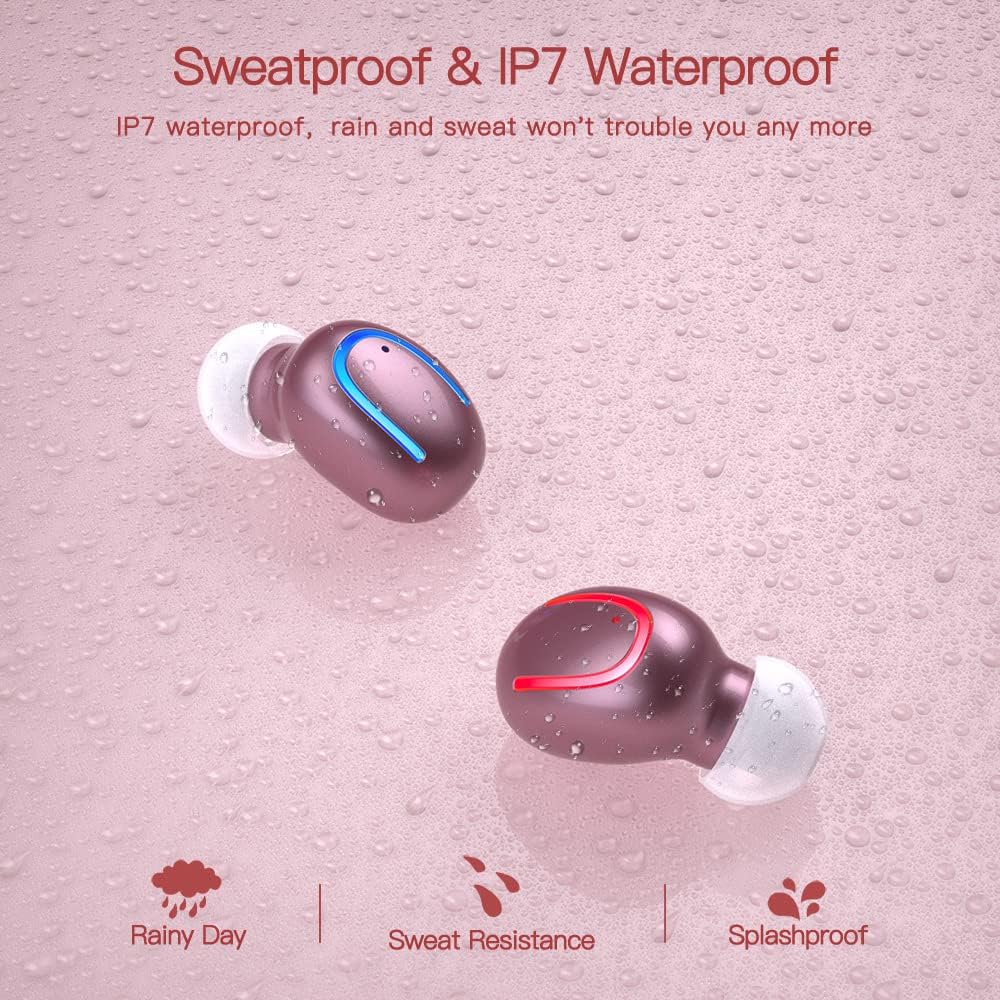
The earbuds are IPX7 waterproof, meaning they can withstand heavy rain and sweat during intense workouts. This protection is ideal for sports and all-weather conditions. ໝາຍເຫດ: ກ່ອງສາກໄຟບໍ່ສາມາດກັນນ້ຳໄດ້. Avoid submerging the charging case in water.

IPX7 water and sweat resistant nano-coating protects the earbuds from heavy rain or sweat during intense workouts.
ການແກ້ໄຂບັນຫາ
- ຫູຟັງບໍ່ຈັບຄູ່: Ensure both earbuds are charged and removed from the case. Turn off and on your device's Bluetooth. If issues persist, try resetting the earbuds (refer to the full manual for specific reset instructions if available).
- ບໍ່ມີສຽງ ຫຼືສຽງຕໍ່າ: Check the volume levels on both your device and the earbuds. Ensure the earbuds are properly seated in your ears and that the ear tips are clean and correctly sized.
- ບັນຫາການຕັດການເຊື່ອມຕໍ່: Ensure your device is within the 12-meter Bluetooth range. Avoid obstacles that may interfere with the signal.
- ບັນຫາການສາກໄຟ: Verify the Type-C cable is securely connected to both the case and the power source. Check if the charging indicators on the case are active.
- ໄມໂຄຣໂຟນບໍ່ເຮັດວຽກ: Ensure the earbuds are properly connected and selected as the audio input device on your phone during calls.
For further assistance, please consult the customer service for 24-hour after-sales support.
ຂໍ້ມູນຈໍາເພາະ
| ຄຸນສົມບັດ | ລາຍລະອຽດ |
|---|---|
| ຍີ່ຫໍ້ | Obbug |
| ຊື່ຕົວແບບ | Obbq13 / Q13S TWS |
| ເຕັກໂນໂລຊີການເຊື່ອມຕໍ່ | ໄຮ້ສາຍ (Bluetooth 5.1) |
| ລະດັບຄວາມຕ້ານທານນ້ໍາ | ກັນນໍ້າ IPX7 |
| ອາຍຸແບັດເຕີຣີ (ຫູຟັງ) | Up to 5 hours talk/play time |
| ອາຍຸແບັດເຕີຣີ (ພ້ອມກ່ອງ) | ເວລາຫຼິ້ນທັງໝົດເຖິງ 20 ຊົ່ວໂມງ |
| ເວລາສາກໄຟ | ປະມານ 1-2 ຊົ່ວໂມງ |
| ຄວາມອາດສາມາດສາກໄຟໄດ້ | 600mAh |
| ປະເພດການຄວບຄຸມ | ແຕະການຄວບຄຸມ |
| ການຈັດວາງຫູ | ໃນຫູ |
| ນ້ໍາຫນັກລາຍການ | 0.64 ອອນ |
| ວັດສະດຸ | ພາດສະຕິກ |
| ອຸປະກອນທີ່ເຂົ້າກັນໄດ້ | Android, iPhone, iPad, Samsung Galaxy, iPod Nano, Laptops & Tablets, etc. |
ການຮັບປະກັນແລະການສະຫນັບສະຫນູນ
Obbug products are manufactured with high-quality standards. For any product-related inquiries, technical support, or warranty claims, please contact Obbug customer service. Refer to your purchase documentation for specific warranty terms and contact information.
Customer service is available for 24 hours after-sales support to assist you with any concerns or issues you may encounter.


