1. ບົດແນະນຳ
This manual provides essential information for the safe and efficient operation of your Muse M-1990 DJ Bluetooth Party Speaker. Please read these instructions thoroughly before using the device and retain them for future reference.
The Muse M-1990 DJ is a powerful party speaker designed to deliver high-quality audio with dynamic light effects. It features multiple connectivity options including Bluetooth, CD player, USB, and AUX inputs, making it versatile for various audio sources.

Image 1.1: The Muse M-1990 DJ Bluetooth Party Speaker showcasing ຜົນກະທົບແສງສະຫວ່າງປະສົມປະສານຂອງມັນ.
2. ຂໍ້ມູນຄວາມປອດໄພ
ປະຕິບັດຕາມຂໍ້ຄວນລະວັງດ້ານຄວາມປອດໄພຕໍ່ໄປນີ້ເພື່ອປ້ອງກັນໄຟຟ້າຊັອດ, ໄຟໄໝ້, ຫຼືຄວາມເສຍຫາຍຕໍ່ໜ່ວຍ:
- ຫ້າມບໍ່ໃຫ້ອຸປະກອນຖືກຝົນ ຫຼື ຄວາມຊຸ່ມຊື່ນ.
- ຫ້າມເປີດຄasing. ອ້າງອີງການບໍລິການທັງໝົດໃຫ້ກັບບຸກຄະລາກອນທີ່ມີຄຸນວຸດທິ.
- ຮັບປະກັນການສະຫນອງພະລັງງານ voltage ກົງກັບປ້າຍການຈັດອັນດັບເທິງຫນ່ວຍ.
- ຮັກສາເຄື່ອງໃຫ້ຫ່າງຈາກແສງແດດໂດຍກົງ, ແຫຼ່ງຄວາມຮ້ອນ, ແລະຂີ້ຝຸ່ນຫຼາຍເກີນໄປ.
- ຮັບປະກັນການລະບາຍອາກາດທີ່ພຽງພໍຢູ່ອ້ອມໜ່ວຍ.
- ຫ້າມວາງວັດຖຸໜັກໃສ່ເຄື່ອງ.
- ຖອດປລັກເຄື່ອງໃນເວລາມີພາຍຸຟ້າຜ່າ ຫຼືເມື່ອບໍ່ໄດ້ໃຊ້ເປັນເວລາດົນນານ.
3. ເນື້ອໃນຊຸດ
ກວດສອບວ່າລາຍການທັງຫມົດແມ່ນມີຢູ່ໃນການຫຸ້ມຫໍ່:
- Muse M-1990 DJ Party Speaker Unit
- Remote Control (requires 2 AA batteries, included)
- ໄມໂຄຣໂຟນທີ່ມີສາຍ
- AUX IN Cable (3.5mm jack)
- ສາຍໄຟ (AC 100-240V, 50/60Hz)

Image 3.1: Included accessories: remote control, wired microphone, and AUX cable.
4. ຜະລິດຕະພັນເກີນview
Familiarize yourself with the main components and controls of your M-1990 DJ speaker.
4.1 ແຜງຄວບຄຸມດ້ານເທິງ
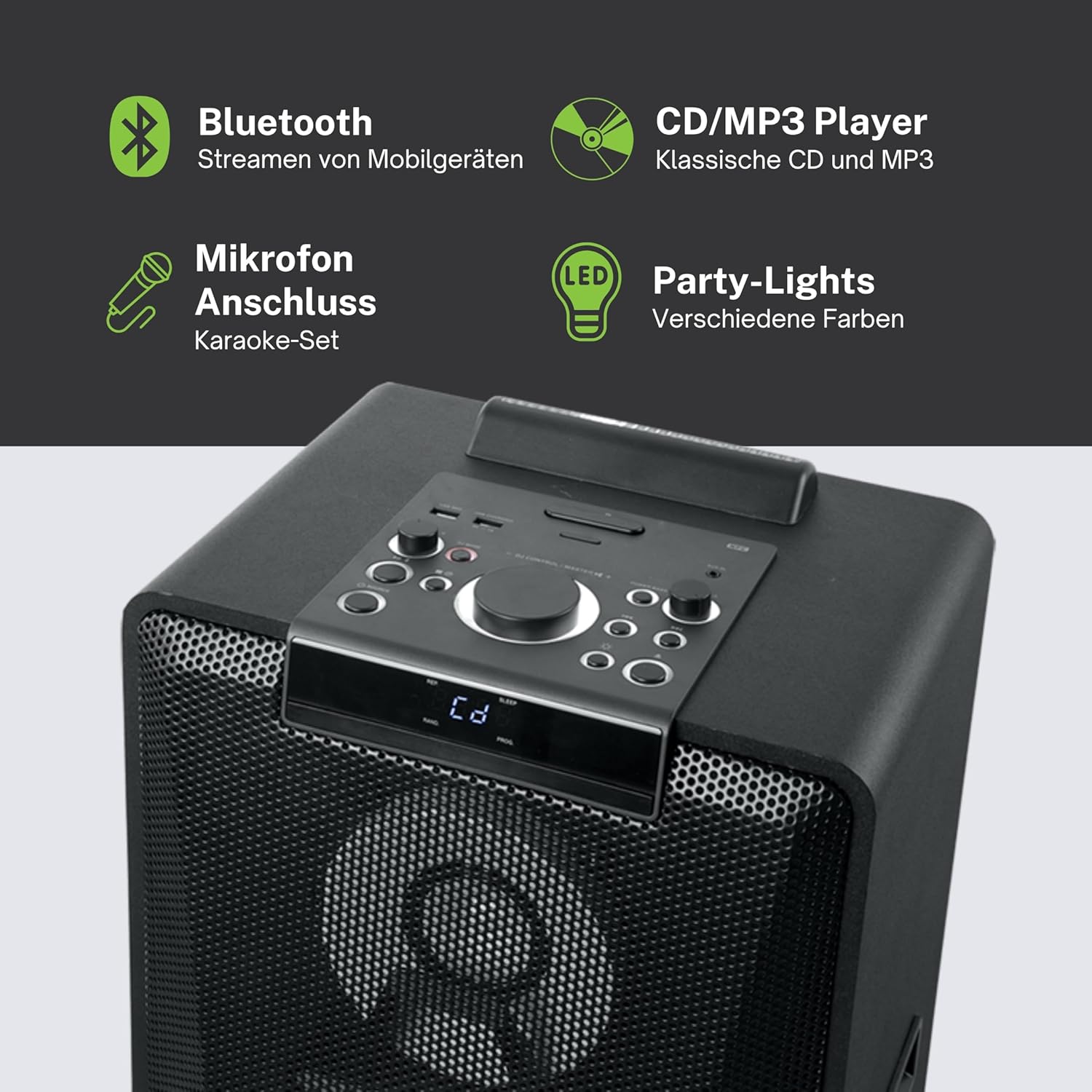
ຮູບພາບ 4.1: ລາຍລະອຽດ view of the top control panel, showing various buttons and the LED display.
The top panel features controls for power, volume, source selection, playback, light effects, and a white LED display. It also includes a built-in cradle for a tablet or smartphone.
4.2 Rear Connectivity Ports
ແຜງດ້ານຫຼັງມີຕົວເລືອກການປ້ອນຂໍ້ມູນ ແລະ ຜົນຜະລິດຕ່າງໆ:
- USB 2.0 Port (for MP3 playback and charging)
- AUX IN 1 (2 x RCA jacks)
- AUX IN 2 (3.5mm jack)
- Microphone Inputs (2 jacks)
- Guitar Input (1 jack)
- AC Power Input (100-240V, 50/60Hz)
5. ຕັ້ງຄ່າ
5.1 ການຈັດວາງ
Place the speaker on a stable, flat surface. Ensure there is adequate space around the unit for ventilation. The unit is designed for floor mounting.
5.2 ການເຊື່ອມຕໍ່ພະລັງງານ
- Connect the supplied power cable to the AC power input on the rear of the speaker.
- Plug the other end of the power cable into a standard wall outlet (AC 100-240V, 50/60Hz).
- The unit does not contain a rechargeable battery and must be connected to a power source for operation.
6. ຄໍາແນະນໍາການດໍາເນີນງານ
6.1 ເປີດ/ປິດ
Press the Power button on the top control panel or the remote control to turn the unit on or off.
6.2 ການຈັບຄູ່ Bluetooth
- Press the Source button to select Bluetooth mode. The LED display will show 'BT' and the Bluetooth indicator will flash.
- ເປີດໃຊ້ Bluetooth ໃນໂທລະສັບສະຫຼາດ, ແທັບເລັດ, ຫຼືອຸປະກອນອື່ນໆທີ່ເຂົ້າກັນໄດ້ຂອງທ່ານ.
- ຊອກຫາ 'M-1990 DJ' in your device's Bluetooth list and select it to pair.
- Once paired, the Bluetooth indicator will stop flashing, and you can begin streaming audio.
- For NFC-enabled devices, simply tap your device on the NFC area of the speaker for automatic pairing.
6.3 ການຫຼິ້ນ CD
- ກົດປຸ່ມແຫຼ່ງເພື່ອເລືອກຮູບແບບ CD.
- Open the CD tray and place a CD (CD, CD-R/RW, MP3 compatible) with the label side up.
- Close the CD tray. Playback will start automatically or can be initiated using the Play/Pause button.
6.4 ການຫຼິ້ນ USB
- ໃສ່ USB flash drive ທີ່ບັນຈຸ MP3 files into the USB 2.0 port.
- Press the Source button to select USB mode.
- Playback will start automatically or can be controlled using the playback buttons.
- The USB port also functions as a charging port for external devices.
6.5 AUX Input
- Connect your external audio device to either the AUX IN 1 (RCA jacks) or AUX IN 2 (3.5mm jack) using the appropriate cable.
- Press the Source button to select the corresponding AUX input.
- ຄວບຄຸມການຫຼິ້ນຄືນຈາກອຸປະກອນທີ່ເຊື່ອມຕໍ່ຂອງທ່ານ.
6.6 ໄມໂຄຣໂຟນ ແລະ ອິນພຸດກີຕ້າ
- Plug your microphone(s) into the Microphone input jacks.
- Plug your guitar into the Guitar input jack.
- Adjust the microphone/guitar volume using the dedicated controls on the top panel.
6.7 ຜົນກະທົບແສງສະຫວ່າງ
The M-1990 DJ features color-changing lights and strobe effects. Use the dedicated Light Effects button on the control panel or remote to cycle through different modes or turn the lights off.
6.8 Stereo Pairing (Dual Bluetooth)
If you have two M-1990 DJ units, you can pair them wirelessly for a stereo sound experience. Refer to the specific instructions for stereo pairing in the full manual (if provided by manufacturer) or on the manufacturer's webເວັບໄຊ.
7. ບໍາລຸງຮັກສາ
7.1 ການທໍາຄວາມສະອາດ
- ຖອດປລັກເຄື່ອງອອກຈາກປລັກສຽບໄຟກ່ອນທຳຄວາມສະອາດທຸກຄັ້ງ.
- ໃຊ້ຜ້າປຽກອ່ອນໆເພື່ອເຮັດຄວາມສະອາດດ້ານນອກ.
- ຢ່າໃຊ້ເຄື່ອງເຮັດຄວາມສະອາດຂັດ, ຂີ້ເຜີ້ງ, ຫຼືສານລະລາຍເພາະວ່າພວກມັນອາດຈະທໍາລາຍການສໍາເລັດຮູບ.
7.2 ການເກັບຮັກສາ
ເມື່ອບໍ່ໄດ້ໃຊ້ເປັນເວລາດົນ, ໃຫ້ເກັບຮັກສາລຳໂພງໄວ້ໃນບ່ອນເຢັນ, ແຫ້ງ, ຫ່າງຈາກແສງແດດໂດຍກົງ ແລະ ອຸນຫະພູມທີ່ຮ້າຍກາດ.
8. ການແກ້ໄຂບັນຫາ
If you encounter issues with your M-1990 DJ speaker, refer to the following common problems and solutions:
| ບັນຫາ | ສາເຫດທີ່ເປັນໄປໄດ້ | ການແກ້ໄຂ |
|---|---|---|
| ບໍ່ມີພະລັງງານ | ສາຍໄຟບໍ່ໄດ້ເຊື່ອມຕໍ່; ປລັກສຽບໄຟບໍ່ເຮັດວຽກ | ໃຫ້ແນ່ໃຈວ່າສາຍໄຟໄດ້ເຊື່ອມຕໍ່ຢ່າງແໜ້ນໜາແລ້ວ; ລອງໃຊ້ປລັກສຽບອື່ນ |
| ບໍ່ມີສຽງ | Volume too low; Incorrect source selected; Audio cable not connected | Increase volume; Select correct input source; Check audio cable connections |
| Bluetooth ບໍ່ໄດ້ຈັບຄູ່ | ລຳໂພງບໍ່ໄດ້ຢູ່ໃນໂໝດຈັບຄູ່; Bluetooth ຂອງອຸປະກອນປິດຢູ່; ອຸປະກອນຢູ່ໄກເກີນໄປ | Ensure speaker is in BT mode and flashing; Enable Bluetooth on device; Move device closer (within 10m) |
| CD ບໍ່ໄດ້ຫຼິ້ນ | CD inserted incorrectly; CD scratched/dirty; Incorrect format | Reinsert CD correctly; Clean CD; Ensure CD is audio CD or MP3 compatible |
| USB ບໍ່ຫຼີ້ນ | ໄດຣຟ໌ USB ບໍ່ໄດ້ສຽບຢ່າງຖືກຕ້ອງ; Files not MP3 format; USB drive corrupted | ໃສ່ໄດຣຟ໌ USB ຄືນໃໝ່; ໃຫ້ແນ່ໃຈວ່າ files are MP3; Try a different USB drive |
ຖ້າບັນຫາຍັງຄົງຢູ່ຫຼັງຈາກພະຍາຍາມແກ້ໄຂເຫຼົ່ານີ້, ກະລຸນາຕິດຕໍ່ຝ່າຍຊ່ວຍເຫຼືອລູກຄ້າ.
9. ຂໍ້ມູນຈໍາເພາະ
Detailed technical specifications for the Muse M-1990 DJ Party Speaker:
- ໝາຍເລກຕົວແບບ: M-1990 DJ
- ຍີ່ຫໍ້: MUSE
- ພະລັງງານອອກ: 1000 ວັດ
- ຈຳນວນຊ່ອງ: 2
- ເຕັກໂນໂລຍີການເຊື່ອມຕໍ່: Bluetooth V4.2
- ອຸປະກອນທີ່ເຂົ້າກັນໄດ້: ໂທລະສັບສະຫຼາດ, ແທັບເລັດ
- ການປ້ອນຂໍ້ມູນສຽງ: 2 x Microphone jacks, 1 x Guitar jack, 2 x RCA AUX IN, 1 x 3.5mm AUX IN
- ພອດ USB: 1 x USB 2.0 (for MP3 playback and charging)
- ເຄື່ອງຫຼີ້ນ CD: CD, CD-R/RW, MP3 compatible
- ຜົນກະທົບແສງສະຫວ່າງ: Color changing lights, Strobe effects, Light projection
- ແຫຼ່ງພະລັງງານ: AC 100-240V, 50/60Hz (Electric Cable)
- ແບັດເຕີຣີທີ່ສາມາດສາກໄດ້: ບໍ່
- ວັດສະດຸ: Wood (cabinet)
- ສີ: ດຳ
- ນ້ໍາຫນັກລາຍການ: 17.9 ກິໂລກຣາມ
- ຂະໜາດ (L x W x H): 35.6 x 34.8 x 105.7 ຊັງຕີແມັດ
- ການນໍາໃຊ້ທີ່ແນະນໍາ: Party and entertainment
- ປະເພດການຕິດຕັ້ງ: ຊັ້ນເທິງ
- ແບດເຕີຣີທີ່ປະກອບມີ: 2 AA (for remote control)

Image 9.1: Dimensional drawing of the Muse M-1990 DJ speaker.
10. ການຮັບປະກັນແລະການສະຫນັບສະຫນູນ
10.1 ຂໍ້ມູນການຮັບປະກັນ
Warranty terms and conditions for the Muse M-1990 DJ speaker are typically provided with the product packaging or can be found on the official Muse webເວັບໄຊ. ກະລຸນາຮັກສາຫຼັກຖານການຊື້ຂອງທ່ານສໍາລັບການຮຽກຮ້ອງການຮັບປະກັນໃດໆ.
10.2 ສະຫນັບສະຫນູນລູກຄ້າ
For further assistance, technical support, or service inquiries, please refer to the contact information provided in your product documentation or visit the official Muse customer support webເວັບໄຊ.


