1. ບົດແນະນຳ
The Behringer Composer Pro-XL MDX2600 V2 is a reference-class 2-channel expander/gate, compressor, peak limiter, and de-esser designed for professional audio applications. This versatile dynamics processor offers comprehensive control over audio signals, enhancing clarity, controlling dynamics, and protecting against clipping. Key features include an integrated de-esser, dynamic enhancer, and tube simulation circuitry, providing a wide range of sonic possibilities for studio recording, live sound, and broadcast environments.
2. ຄໍາແນະນໍາຄວາມປອດໄພ
Please read and follow these safety instructions carefully to ensure safe operation and prevent damage to the unit or injury to yourself.
- ການສະຫນອງພະລັງງານ: ເຊື່ອມຕໍ່ເຄື່ອງເຂົ້າກັບແຮງດັນໄຟຟ້າຫຼັກທີ່ລະບຸໄວ້ເທົ່ານັ້ນtagອ. ຮັບປະກັນວ່າສາຍໄຟບໍ່ເສຍຫາຍ ແລະ ໄດ້ຕໍ່ສາຍດິນຢ່າງຖືກຕ້ອງ.
- ຄວາມຊຸ່ມ: Do not expose the unit to rain or moisture. Avoid placing objects filled with liquids on the unit.
- ການລະບາຍອາກາດ: Ensure adequate ventilation. Do not block ventilation openings. Install the unit in a well-ventilated area.
- ຄວາມຮ້ອນ: ຫ້າມວາງເຄື່ອງໄວ້ໃກ້ແຫຼ່ງຄວາມຮ້ອນເຊັ່ນ: ລັງສີ, ເຄື່ອງບັນທຶກຄວາມຮ້ອນ, ເຕົາ ຫຼື ອຸປະກອນອື່ນໆທີ່ຜະລິດຄວາມຮ້ອນ.
- ການບໍລິການ: ຢ່າພະຍາຍາມໃຫ້ບໍລິການຫນ່ວຍງານດ້ວຍຕົວເອງ. ອ້າງອີງການບໍລິການທັງໝົດໃຫ້ກັບພະນັກງານບໍລິການທີ່ມີຄຸນວຸດທິ.
- ທໍາຄວາມສະອາດ: ເຮັດຄວາມສະອາດດ້ວຍຜ້າແຫ້ງເທົ່ານັ້ນ.
3. ຕັ້ງຄ່າ
3.1 ການຫຸ້ມຫໍ່
Carefully unpack the MDX2600 V2 and inspect it for any signs of damage during transit. Retain the original packaging for future transport or storage.
3.2 ການຕິດຕັ້ງ Rack
The MDX2600 V2 is designed for standard 19-inch rack mounting. Secure the unit using four rack screws (not included) to prevent movement and ensure proper ventilation.
3.3 ການເຊື່ອມຕໍ່ສຽງ
The unit features balanced XLR and 1/4-inch TRS inputs and outputs for each of its two channels. Connect your audio source (e.g., mixer insert send, microphone preamplifier output) to the input and the destination (e.g., mixer insert return, recorder input) to the output.
ການເຊື່ອມຕໍ່ແຜງດ້ານຫຼັງ:
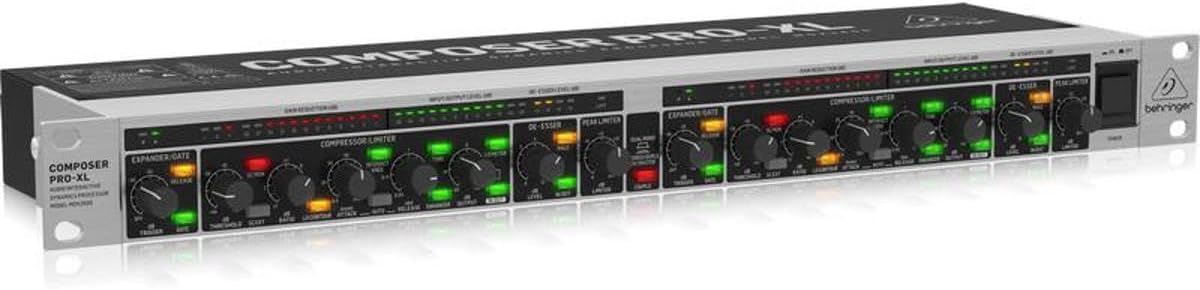
ຮູບທີ 1: ມຸມ view of the Behringer MDX2600 V2, showing the front panel controls and a glimpse of the rear panel connections. The rear panel typically includes XLR and TRS input/output jacks for each channel, along with the power input.
3.4 ການເຊື່ອມຕໍ່ພະລັງງານ
Connect the supplied AC power cable to the rear panel power inlet and then to a suitable mains outlet. Ensure the power switch on the front panel is in the 'OFF' position before connecting power.
4. ຄໍາແນະນໍາການດໍາເນີນງານ
The MDX2600 V2 offers two independent channels, each with an expander/gate, compressor/limiter, de-esser, and peak limiter. The unit can operate in dual mono or stereo link mode.

Figure 2: Front panel of the Behringer MDX2600 V2, displaying all controls and metering for both channels. This includes the Expander/Gate, Compressor/Limiter, De-Esser, and Peak Limiter sections, along with input/output level meters and gain reduction indicators.
4.1 Expander/Gate Section
- ເກນ: Sets the level below which the gate will close or the expander will reduce gain.
- ປ່ອຍ: Controls how quickly the gate opens after the signal exceeds the threshold.
- ຖື: Determines the minimum time the gate remains open after the signal drops below the threshold.
- ອັດຕາສ່ວນ: Adjusts the amount of gain reduction applied by the expander.
- ກະຕຸ້ນ: Selects the sidechain source for the gate.
- KEY LISTEN: Allows monitoring of the sidechain signal.
4.2 Compressor/Limiter Section
- ເກນ: Sets the level above which compression begins.
- ອັດຕາສ່ວນ: Determines the amount of compression applied (e.g., 2:1, 4:1, ∞:1 for limiting).
- ການໂຈມຕີ: ຄວບຄຸມຄວາມໄວຂອງເຄື່ອງອັດອາກາດຕອບສະໜອງຕໍ່ສັນຍານທີ່ເກີນຂອບເຂດ.
- ປ່ອຍ: Adjusts how quickly the compressor returns to its normal state after the signal drops below the threshold.
- ຂາອອກ: Provides makeup gain to compensate for gain reduction.
- ອັດຕະໂນມັດ: Engages automatic attack and release times.
- INTERACTIVE KNEE: Provides a softer, more musical compression curve.
- TUBE SIMULATION: Adds harmonic richness and warmth characteristic of tube circuitry.
- DYNAMIC ENHANCER: Restores high-frequency content lost during heavy compression.
4.3 De-Esser Section
- ເກນ: Sets the level at which de-essing begins.
- ຄວາມຖີ່: Selects the frequency range where sibilance is most prominent.
- MALE/FEMALE: Optimizes de-essing for male or female vocals.
4.4 Peak Limiter Section
- ລະດັບ: Sets the absolute maximum output level, preventing digital clipping.
4.5 Stereo Link
Pressing the STEREO LINK button links the controls of both channels, allowing for stereo processing where settings applied to Channel 1 affect Channel 2 identically. This is crucial for maintaining a stable stereo image.
5. ບໍາລຸງຮັກສາ
5.1 ການທໍາຄວາມສະອາດ
To clean the unit, use a soft, dry cloth. Do not use any liquid cleaners or solvents, as these may damage the finish or internal components.
5.2 ການເກັບຮັກສາ
When not in use for extended periods, store the MDX2600 V2 in a cool, dry place, away from direct sunlight and extreme temperatures. It is recommended to use the original packaging for protection.
6. ການແກ້ໄຂບັນຫາ
| ບັນຫາ | ສາເຫດທີ່ເປັນໄປໄດ້ | ການແກ້ໄຂ |
|---|---|---|
| ບໍ່ມີສຽງອອກ | Incorrect cabling, unit not powered, extreme gate/compressor settings. | Check all audio connections. Ensure unit is powered on. Verify gate threshold is not too high or compressor ratio/threshold too aggressive. |
| ສຽງບິດເບືອນ | Input level too high, output level too high, peak limiter set too low. | Reduce input or output levels. Adjust peak limiter level upwards. Check source signal for distortion. |
| Excessive noise/hiss | ການໄດ້ຮັບທີ່ບໍ່ເໝາະສົມtaging, ground loop, faulty cables. | Optimize gain staging throughout your signal chain. Use balanced cables. Check for ground loops. |
| De-esser not working effectively | Incorrect frequency or threshold setting. | Adjust the FREQUENCY control to target the sibilance. Lower the THRESHOLD until de-essing is audible. |
7. ຂໍ້ມູນຈໍາເພາະ
- ຕົວແບບ: MDX2600V2
- ຊ່ອງ: 2
- ຟັງຊັນ: Expander/Gate, Compressor/Limiter, De-Esser, Peak Limiter, Dynamic Enhancer, Tube Simulation
- Input/Output Connectors: XLR and 1/4-inch TRS, balanced
- ແຫຼ່ງພະລັງງານ: ໄຟຟ້າສາຍ
- ສະບັບtage: 100 ໂວນ (AC)
- ຂະໜາດ (L x W x H): 16.65" x 5.16" x 1.5" (423mm x 131mm x 38mm)
- ນ້ໍາຫນັກລາຍການ: 4.68 lbs (2.12 ກິໂລ)
- ສີ: ສີເທົາ
- ວັດສະດຸ: ໂລຫະ, ພາດສະຕິກ
- ອົງປະກອບລວມ: Behringer Composer Pro-XL MDX2600 2-Channel Expander/Gate/Compressor/Peak Limiter with Integrated De-Esser
- ວັນທີທໍາອິດທີ່ມີ: ວັນທີ 8 ມີນາ 2019
8. ການຮັບປະກັນແລະການສະຫນັບສະຫນູນ
ສໍາລັບຂໍ້ມູນການຮັບປະກັນລາຍລະອຽດ ແລະການຊ່ວຍເຫຼືອດ້ານວິຊາການ, ກະລຸນາອ້າງອີງເຖິງ Behringer ຢ່າງເປັນທາງການ webສະຖານທີ່ຫຼືຕິດຕໍ່ຜູ້ຈັດຈໍາຫນ່າຍ Behringer ທ້ອງຖິ່ນຂອງທ່ານ. ຮັກສາໃບຮັບເງິນການຊື້ຂອງທ່ານໄວ້ເປັນຫຼັກຖານການຊື້ສໍາລັບການຮຽກຮ້ອງການຮັບປະກັນໃດໆ.
ຊັບພະຍາກອນອອນໄລນ໌:
- ການລົງທະບຽນຜະລິດຕະພັນ
- FAQs and knowledge base
- Software and driver downloads (if applicable)


