1. ບົດແນະນຳ
This manual provides comprehensive instructions for the setup, operation, and maintenance of your Xprinter XP-360B Thermal Label Barcode Printer. Please read this manual thoroughly before using the printer to ensure proper functionality and to prevent damage.
The XP-360B is a high-speed thermal label printer designed for various applications, including barcode printing, shipping labels, and receipt printing. It supports label widths from 20mm to 80mm and offers a maximum print speed of 200mm per second.

Figure 1.1: Xprinter XP-360B Thermal Label Barcode Printer. This image shows the printer from a front-right angle, with labels being fed out of the front slot.
2. ຂໍ້ມູນຄວາມປອດໄພ
To ensure safe operation and prolong the life of your printer, please observe the following safety precautions:
- ຢ່າເຮັດໃຫ້ເຄື່ອງພິມຖືກນໍ້າ ຫຼືມີຄວາມຊຸ່ມຊື່ນຫຼາຍເກີນໄປ.
- ຫຼີກເວັ້ນການວາງເຄື່ອງພິມຢູ່ໃນແສງແດດໂດຍກົງ ຫຼືຢູ່ໃກ້ກັບແຫຼ່ງຄວາມຮ້ອນ.
- ໃຊ້ອະແດບເຕີໄຟຟ້າທີ່ມາພ້ອມກັບເຄື່ອງພິມເທົ່ານັ້ນ.
- ຢ່າພະຍາຍາມຖອດປະກອບ ຫຼື ສ້ອມແປງເຄື່ອງພິມດ້ວຍຕົນເອງ. ໃຫ້ປຶກສາພະນັກງານບໍລິການທີ່ມີຄຸນວຸດທິ.
- ຮັກສາເຄື່ອງພິມຢູ່ຫ່າງຈາກຂີ້ຝຸ່ນ ແລະສິ່ງເສດເຫຼືອ.
- ໃຫ້ແນ່ໃຈວ່າເຄື່ອງພິມຖືກວາງໄວ້ເທິງພື້ນຜິວທີ່ໝັ້ນຄົງ ແລະ ຮາບພຽງ.
- ຖອດປລັກເຄື່ອງພິມອອກຈາກປລັກໄຟກ່ອນທຳຄວາມສະອາດ ຫຼື ເມື່ອບໍ່ໄດ້ໃຊ້ງານເປັນເວລາດົນ.
3. ເນື້ອໃນຊຸດ
ກວດສອບວ່າລາຍການທັງຫມົດແມ່ນມີຢູ່ໃນຊຸດ:
- Xprinter XP-360B Thermal Label Barcode Printer
- Power Adapter
- ສາຍ USB
- ຄູ່ມືຜູ້ໃຊ້ (ເອກະສານນີ້)
- CD ໄດເວີ (ຫຼືການເຊື່ອມຕໍ່ເພື່ອດາວໂຫລດໄດເວີ)
4. ຜະລິດຕະພັນເກີນview
4.1. ດ້ານໜ້າ View

ຮູບ 4.1: ດ້ານຫນ້າ view of the XP-360B printer, showing the label output slot and control buttons.
- Label Output Slot: Where printed labels exit the printer.
- ປຸ່ມຄວບຄຸມ:
- ພະລັງງານ: ຕົວຊີ້ວັດພະລັງງານ.
- ຂໍ້ຜິດພາດ: Error indicator.
- ຢຸດຊົ່ວຄາວ: Pauses or resumes printing.
- ອາຫານ: Feeds a blank label.
4.2. ຂ້າງ View
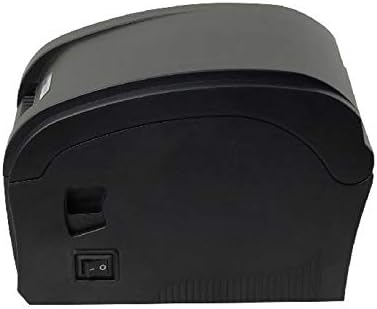
ຮູບ 4.2: ຂ້າງ view of the XP-360B printer, highlighting the power switch.
- ສັບປ່ຽນພະລັງງານ: ເປີດ ຫຼືປິດເຄື່ອງພິມ.
4.3. ພາຍໃນ View (Cover Open)

ຮູບທີ 4.3: ພາຍໃນ view of the XP-360B printer with the top cover open, showing the label roll compartment and print head assembly.
- Print Head Assembly: Contains the thermal print head.
- Label Roll Compartment: Area for loading the label roll.
- Adjustable Paper Guides: Guides to align the label roll.
5. ຕັ້ງຄ່າ
5.1. ການຫຸ້ມຫໍ່ແລະການຈັດວາງ
- ເອົາເຄື່ອງພິມ ແລະອຸປະກອນເສີມທັງໝົດອອກຈາກເຄື່ອງຫຸ້ມຫໍ່ຢ່າງລະມັດລະວັງ.
- ວາງເຄື່ອງພິມໄວ້ເທິງພື້ນທີ່ຄົງທີ່, ຮາບພຽງທີ່ມີລະບາຍອາກາດທີ່ພຽງພໍ.
- Ensure there is enough space around the printer for proper operation and maintenance.
5.2. ການເຊື່ອມຕໍ່ເຄື່ອງພິມ
- ເຊື່ອມຕໍ່ອະແດບເຕີໄຟຟ້າເຂົ້າກັບພອດພະລັງງານເຂົ້າຂອງເຄື່ອງພິມ.
- ສຽບອະແດບເຕີໄຟເຂົ້າໄປໃນບ່ອນສຽບໄຟຟ້າທີ່ເຫມາະສົມ.
- ເຊື່ອມຕໍ່ປາຍໜຶ່ງຂອງສາຍ USB ກັບພອດ USB ຂອງເຄື່ອງພິມ.
- ເຊື່ອມຕໍ່ສົ້ນອື່ນຂອງສາຍ USB ກັບພອດ USB ທີ່ມີຢູ່ໃນຄອມພິວເຕີຂອງທ່ານ.
5.3. ກຳລັງໂຫລດປ້າຍ
- ໃຫ້ແນ່ໃຈວ່າເຄື່ອງພິມຖືກປິດ.
- ເປີດຝາດ້ານເທິງຂອງເຄື່ອງພິມ.
- Place the label roll into the label compartment, ensuring the labels feed from the bottom of the roll towards the front of the printer.
- Adjust the movable paper guides to fit the width of your label roll snugly, without being too tight.
- Pull a few labels out past the print head and through the label output slot.
- ປິດຝາປິດດ້ານເທິງໃຫ້ແໜ້ນຈົນກວ່າມັນຈະຄລິກເຂົ້າທີ່.

Figure 5.1: Loading a roll of thermal labels into the XP-360B printer's internal compartment.
5.4. ການຕິດຕັ້ງໄດເວີ
Before using the printer, you must install the appropriate drivers on your computer. Drivers are typically provided on a CD or can be downloaded from the manufacturer's official webເວັບໄຊ.
- Insert the driver CD into your computer's CD-ROM drive, or navigate to the official Xprinter support website to download the XP-360B drivers.
- ປະຕິບັດຕາມຄໍາແນະນໍາໃນຫນ້າຈໍເພື່ອສໍາເລັດການຕິດຕັ້ງໄດເວີ.
- ຫຼັງຈາກຕິດຕັ້ງແລ້ວ, ແນະນຳໃຫ້ຣີສະຕາດຄອມພິວເຕີຂອງທ່ານ.
6. ຄໍາແນະນໍາການດໍາເນີນງານ
6.1. ເປີດ / ປິດພະລັງງານ
- To turn on the printer, flip the power switch located on the side of the printer to the 'ON' position. The POWER indicator light will illuminate.
- To turn off the printer, flip the power switch to the 'OFF' position.
6.2. ການພິມພື້ນຖານ
- ກວດໃຫ້ແນ່ໃຈວ່າເຄື່ອງພິມເຊື່ອມຕໍ່ກັບຄອມພິວເຕີຂອງທ່ານ ແລະເປີດເຄື່ອງ.
- Open the document or application from which you wish to print labels (e.g., label design software, shipping platform).
- Go to the print settings (File > ພິມ).
- Select "Xprinter XP-360B" as your printer.
- Adjust the paper size and orientation settings to match your labels (e.g., 4x6 inch, portrait/landscape).
- Click "Print". The printer will automatically detect the label gaps and print accordingly.
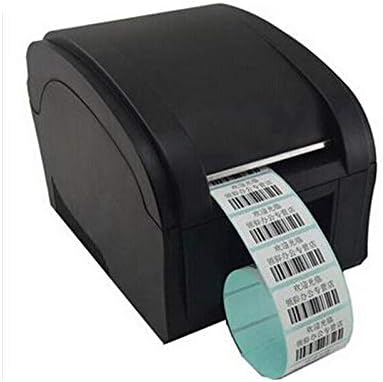
Figure 6.1: The XP-360B printer in operation, feeding out a continuous roll of printed labels.
6.3. ການໃຊ້ປຸ່ມຄວບຄຸມ
- ປຸ່ມອາຫານ: Press this button once to feed a single blank label. This is useful for testing label alignment or advancing to the next label.
- ປຸ່ມຢຸດຊົ່ວຄາວ: Press this button to temporarily pause a print job. Press it again to resume printing.
7. ບໍາລຸງຮັກສາ
ການບຳລຸງຮັກສາເປັນປະຈຳຮັບປະກັນປະສິດທິພາບທີ່ດີທີ່ສຸດ ແລະ ຍືດອາຍຸການໃຊ້ງານຂອງເຄື່ອງພິມຂອງທ່ານ.
7.1. ການເຮັດຄວາມສະອາດຫົວພິມ
The print head should be cleaned regularly, especially if print quality degrades or after printing a large volume of labels.
- ປິດເຄື່ອງພິມ ແລະຖອດມັນອອກຈາກປລັກສຽບໄຟ.
- ເປີດຝາດ້ານເທິງຂອງເຄື່ອງພິມ.
- Wait a few minutes for the print head to cool down if the printer has been recently used.
- Gently wipe the thermal print head surface with an alcohol swab or a lint-free cloth lightly dampປະກອບດ້ວຍເຫຼົ້າ isopropyl.
- ປະໄວ້ໃຫ້ຫົວພິມແຫ້ງສະນິດກ່ອນທີ່ຈະປິດຝາປິດ ແລະ ເປີດເຄື່ອງພິມ.
7.2. ການເຮັດຄວາມສະອາດລູກກິ້ງແຜ່ນ
The platen roller helps feed the labels smoothly. Clean it if you notice feeding issues.
- Follow steps 1-3 from "Cleaning the Print Head".
- Rotate the platen roller manually and wipe its surface with an alcohol swab or a lint-free cloth lightly dampປະກອບດ້ວຍເຫຼົ້າ isopropyl.
- Allow it to dry completely before closing the cover.
8. ການແກ້ໄຂບັນຫາ
This section addresses common issues you might encounter with your XP-360B printer.
| ບັນຫາ | ສາເຫດທີ່ເປັນໄປໄດ້ | ການແກ້ໄຂ |
|---|---|---|
| ເຄື່ອງພິມບໍ່ເປີດ | Power cable loose; Power outlet faulty; Printer fault | Check power cable connection; Try a different outlet; Contact support if problem persists. |
| No printing / Printer offline | USB cable loose; Driver not installed; Printer offline in OS | Check USB connection; Install drivers; Check printer status in computer settings. |
| ຄຸນນະພາບການພິມບໍ່ດີ / ການພິມຈືດໆ | Dirty print head; Low quality labels; Incorrect print density settings | Clean the print head (see Section 7.1); Use high-quality thermal labels; Adjust print density in driver settings. |
| ປ້າຍກຳກັບບໍ່ຖືກຕ້ອງ | Labels loaded incorrectly; Paper guides not adjusted; Dirty platen roller | Re-load labels correctly; Adjust paper guides; Clean platen roller (see Section 7.2). |
| ໄຟ ERROR ເປີດຢູ່ | Paper jam; Cover open; Print head overheating | Clear any paper jams; Ensure cover is closed properly; Turn off printer and let it cool down. |
9. ຂໍ້ມູນຈໍາເພາະ
| ຄຸນສົມບັດ | ລາຍລະອຽດ |
|---|---|
| ຕົວແບບ | XP-360B |
| ວິທີການພິມ | ຄວາມຮ້ອນໂດຍກົງ |
| ການໂຕ້ຕອບ | USB |
| ຄວາມໄວພິມ | ສູງເຖິງ 200 ມມ / ວິນາທີ |
| ຄວາມກວ້າງເຈ້ຍສູງສຸດ | 80mm (adjustable from 20mm) |
| ຮູບແບບການປ້ອນເຈ້ຍ | ອັດຕະໂນມັດ |
| ການພິມເຄືອຂ່າຍ | ມີສາຍ |
| ການພິມສອງຊັ້ນ | ບໍ່ |
| ຂະໜາດ | 25 x 22 x 21 cm |
| ນ້ຳໜັກ | 2 ກິໂລ |
10. ການຮັບປະກັນແລະການສະຫນັບສະຫນູນ
Xprinter products are designed for reliability and performance. For specific warranty terms and conditions, please refer to the warranty card included with your product or visit the official Xprinter webເວັບໄຊ.
If you encounter any issues that cannot be resolved using the troubleshooting guide, or if you require technical assistance, please contact Xprinter customer support through their official webເວັບໄຊ ຫຼືຂໍ້ມູນຕິດຕໍ່ທີ່ສະໜອງໃຫ້ຢູ່ໃນເອກະສານຜະລິດຕະພັນຂອງທ່ານ.
Please have your model number (XP-360B) and purchase information ready when contacting support.


