ແນະນຳ
Thank you for choosing the aigo Aurora C5 Pro Case Fan. This manual provides essential information for the proper installation, operation, and maintenance of your new computer cooling fans. Please read this manual thoroughly before installation and retain it for future reference.

Image: The aigo Aurora C5 Pro 5-pack case fans and their retail packaging, highlighting the RGB lighting and controller.
ຄຸນສົມບັດຜະລິດຕະພັນ
- High Airflow and Quiet Operation: Designed for efficient cooling with a fast cooling speed, reducing temperatures by 10-15 degrees rapidly. Features 8 unique double silicone shock absorber pads per fan to minimize noise, ensuring silent operation.
- Vivid RGB LED Lighting: Offers over 50 LED light modes with dual aurora aura light effects, providing superior illumination even in daylight.
- ຕົວຄວບຄຸມປະສົມປະສານ: The included controller allows for adjustment of both fan speed and LED light speed with a single key.
- Motherboard RGB Sync: Supports RGB synchronization with compatible motherboards, including ASUS Aura Sync and GIGABYTE RGB Fusion.
- ຄວາມເຂົ້າກັນໄດ້ຢ່າງກວ້າງຂວາງ: Compatible with various computer chassis types, ensuring broad applicability.
- Durable Hydro Bearing: Equipped with a Hydro Bearing for a long operational lifespan of up to 20,000 hours.
ເນື້ອໃນຊຸດ
ກວດສອບວ່າລາຍການທັງຫມົດແມ່ນມີຢູ່ໃນຊຸດຂອງທ່ານ:
- 5 x aigo RGB LED Case Fans
- 1 x RGB Controller
- 20 x ການຕິດຕັ້ງ screws
ການຕິດຕັ້ງແລະການຕິດຕັ້ງ
Follow these steps for proper installation of your aigo Aurora C5 Pro fans:
- ການຕິດຕັ້ງພັດລົມໄດ້: Securely attach each fan to your computer chassis using the provided screws. Ensure the airflow direction is appropriate for your system's cooling needs.
- Connecting Fans to the Controller: Connect the aigo RGB PC case fans to the included RGB controller. It is crucial to connect them in sequential order, from Fan 1 to Fan 10, as indicated on the controller.
- Controller Power Connection: Connect the D-type 4-pin connector from the RGB controller to your PC's power supply unit (PSU). Ensure this connection is correct and secure to prevent damage to the LED lamps.
- Motherboard RGB Sync (Optional): If your motherboard supports RGB synchronization (e.g., ASUS Aura Sync, GIGABYTE RGB Fusion), connect the appropriate sync cable from the controller to the 5V RGB header on your motherboard. Note that the fans operate at 12V, but the sync signal is 5V.

Image: A visual representation of the aigo Aurora C5 Pro fans alongside a motherboard, illustrating compatibility with motherboard RGB sync technologies like ASUS Aura Sync and GIGABYTE RGB Fusion.

Image: A detailed diagram of the aigo RGB controller, showing its various ports for power, fan connections (Fan 1-8), light strip, control, and programmable RGB (5V) motherboard sync.
ປະກາດສຳຄັນ:
- aigo RGB PC case fans must be connected to the controller in the specified order (Fan 1 to Fan 10).
- Ensure the D-type 4-pin connector is correctly connected to the PC power supply to prevent damage to the LED lamps.
- The aigo RGB controller is designed for aigo brand fans and is not compatible with fans from other manufacturers.
ຄໍາແນະນໍາການດໍາເນີນງານ
Control your aigo Aurora C5 Pro fans and lighting effects using the included RF Wireless Remote Controller.
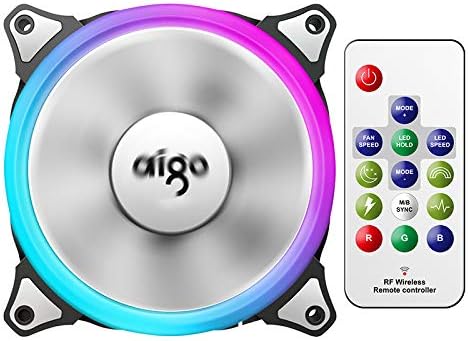
Image: A single aigo Aurora C5 Pro fan displayed next to its RF wireless remote controller, demonstrating the control interface.
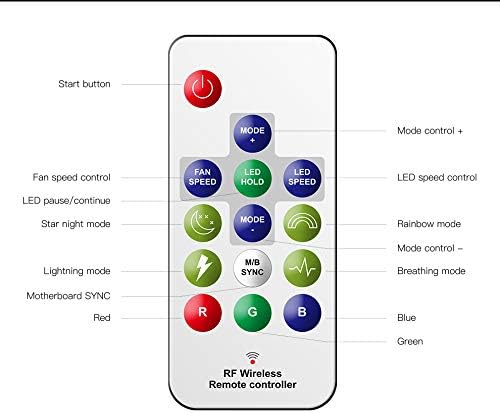
Image: A detailed diagram of the RF wireless remote controller, labeling each button for functions such as power, mode control, fan speed control, LED speed control, LED pause/continue, motherboard sync, and direct color selection (Red, Green, Blue).
ຟັງຊັນການຄວບຄຸມໄລຍະໄກ:
- ປຸ່ມເລີ່ມຕົ້ນ: Powers on/off the fan and LED lighting.
- ໂໝດ +/-: Cycles through over 50 different LED lighting effects.
- ຄວາມໄວຂອງພັດລົມ: Adjusts the fan speed between available settings (e.g., High/Low).
- LED SPEED: Adjusts the speed of the current LED lighting effect.
- LED HOLD: Pauses or resumes the current LED lighting effect.
- M/B SYNC: Toggles motherboard RGB synchronization mode (if connected).
- ປຸ່ມ R, G, B: Selects static Red, Green, or Blue colors directly.
- ໂໝດພິເສດ: Includes buttons for 'Star Night mode', 'Lightning mode', 'Rainbow mode', and 'Breathing mode'.
ບໍາລຸງຮັກສາ
ການບຳລຸງຮັກສາເປັນປະຈຳຮັບປະກັນປະສິດທິພາບທີ່ດີທີ່ສຸດ ແລະ ອາຍຸການໃຊ້ງານທີ່ຍາວນານຂອງພັດລົມຂອງທ່ານ:
- ທໍາຄວາມສະອາດ: Periodically clean the fan blades and housing to remove dust accumulation. Use a soft brush or compressed air. Ensure the PC is powered off before cleaning.
- ອຸປະສັກ: Ensure that no cables or other components obstruct the fan blades, which can lead to reduced performance or damage.
- ການກວດກາ: Occasionally inspect fan cables for any signs of wear or damage.
ການແກ້ໄຂບັນຫາ
If you encounter issues with your aigo Aurora C5 Pro fans, refer to the following common solutions:
- ພັດລົມບໍ່ໝຸນ:
- Verify that the D-type 4-pin connector from the controller is securely connected to the PC's power supply.
- Ensure all fans are connected to the controller in the correct sequential order (Fan 1 to Fan 10).
- LEDs Not Lighting Up:
- Check the D-type 4-pin power connection to the controller.
- Confirm that fans are connected to the controller in the correct order.
- If using motherboard sync, ensure the 5V RGB header connection is correct and your motherboard's software is configured properly.
- Remote Controller Not Responding:
- ກວດໃຫ້ແນ່ໃຈວ່າໄດ້ເປີດເຄື່ອງຄວບຄຸມແລ້ວ.
- Check if the remote's battery needs replacement.
- Incompatibility with Other Brands: The aigo RGB controller is designed exclusively for aigo brand fans. It will not function correctly with fans from other manufacturers.
ຂໍ້ມູນຈໍາເພາະ

Image: A diagram illustrating the physical dimensions of the aigo Aurora C5 Pro fan (120x120x25mm) and a table summarizing its key technical specifications.
| ຂໍ້ມູນຈໍາເພາະ | ມູນຄ່າ |
|---|---|
| ຂະໜາດ | 120 x 120 x 25 ມມ |
| ຄວາມໄວພັດລົມ | 1300 (± 10%) RPM |
| ລະດັບສຽງ | 23.5 dBA |
| ປະລິມານອາກາດ | 33 CFM |
| ປະເພດລູກປືນ | Hydro Bearing |
| ປະຈຸບັນ | 0.35 ກ |
| ສະບັບtage | 12 ວ |
| ລະດັບພະລັງງານ | 4.2 ວ |
| ໄລຍະຊີວິດ | 20,000 ຊົ່ວໂມງ |
| ປະເພດເຊື່ອມຕໍ່ໄຟຟ້າ | 4-Pin |
| ວິທີການເຮັດຄວາມເຢັນ | ອາກາດ |
| ອຸປະກອນທີ່ເຂົ້າກັນໄດ້ | ເດັສທັອບ |
ການຮັບປະກັນແລະການສະຫນັບສະຫນູນ
Specific warranty details for the aigo Aurora C5 Pro Case Fan are not provided in this manual. For warranty information, please refer to the product packaging or contact your retailer or the manufacturer directly.
For technical support or further assistance, please contact the aigo customer service department or your product vendor. Provide your product model number (Aurora C5 Pro) and purchase details when seeking support.


