ແນະນຳ
This manual provides essential instructions for the setup, operation, and maintenance of your KOAMTAC KDC470Ci-BLE 2D Imager Barcode Sled Scanner combined with the Apple iPhone 7/8Plus SmartSled Charging Case. Please read this manual thoroughly before using the device to ensure proper functionality and to prevent damage.
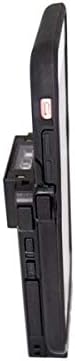
Image: The KOAMTAC KDC470Ci-BLE 2D Imager Barcode Sled Scanner integrated with an Apple iPhone 7/8Plus via the SmartSled Charging Case. This side view highlights the compact design and the connection points between the scanner and the smartphone case.
ສິນຄ້າເກີນview
The KOAMTAC KDC470Ci-BLE is a robust 2D CMOS Imager Barcode Sled Scanner designed for mobile data collection. When paired with the Apple iPhone 7/8Plus SmartSled Charging Case, it transforms your smartphone into a comprehensive barcode scanning solution. Key features include:
- 2D CMOS Imager: Capable of reading various 2D barcodes.
- SmartSled Design: Allows for easy integration and removal of the iPhone 7/8Plus.
- ການສາກໄຟພ້ອມໆກັນ: The SmartSled case enables simultaneous charging of both the KDC470Ci-BLE scanner and the iPhone 7/8Plus via a Micro USB cable or charging cradle.
- ການກໍ່ສ້າງທົນທານ: IP65-rated for dust and water resistance, with a 5-foot drop specification.
- ອາຍຸແບັດເຕີຣີທີ່ຂະຫຍາຍອອກ: Advanced power management features, including a hibernation mode, extend battery life beyond an average work shift. The built-in rechargeable battery can also serve as an external power source for the iPhone.
- ຄວາມເຂົ້າກັນໄດ້ຂອງຊອບແວ: Includes KT Sync keyboard wedging software and an SDK for Android, Blackberry, iOS, and Windows platforms.
ຄໍາແນະນໍາການຕິດຕັ້ງ
- ການຫຸ້ມຫໍ່: Carefully remove all components from the packaging. Verify that you have the KDC470Ci-BLE scanner, the Apple iPhone 7/8Plus SmartSled Charging Case, and any included cables or accessories.
- Insert iPhone: Gently slide your Apple iPhone 7/8Plus into the SmartSled Charging Case until it is securely seated. Ensure all connectors align properly.
- Attach Scanner: Connect the KDC470Ci-BLE scanner to the SmartSled Charging Case. The scanner is designed to seamlessly attach to the back of the case, forming a single integrated unit.
- ຄ່າ ທຳ ນຽມ: Before first use, fully charge the integrated unit. Connect the Micro USB cable to the SmartSled Charging Case and then to a power source. The scanner and iPhone will charge simultaneously.
- ການຕິດຕັ້ງຊອບແວ:
- For basic keyboard wedging functionality, install the KT Sync software on your host device (e.g., iPhone).
- For custom application development, utilize the provided SDK for your specific operating system (iOS in this case).
- Bluetooth Pairing (if not using direct connection):
- Power on the KDC470Ci-BLE scanner.
- On your iPhone, navigate to Bluetooth settings and search for available devices.
- Select the KDC470Ci-BLE from the list to pair. Follow any on-screen prompts.
ຄໍາແນະນໍາການດໍາເນີນງານ
ສະແກນບາໂຄດ
- ເປີດ: Ensure the KDC470Ci-BLE scanner is powered on.
- Target Barcode: Point the scanner's imager window at the barcode you wish to scan.
- Activate Scan: Press the scan button located on the side of the KDC470Ci-BLE. A red aiming beam will appear.
- ຢືນຢັນການສະແກນ: Once the barcode is successfully read, the scanner will typically emit an audible beep and/or vibrate, and the data will be transmitted to your connected iPhone application.
ກຳລັງສາກອຸປະກອນ
The SmartSled Charging Case allows for convenient charging of both the KDC470Ci-BLE scanner and the iPhone 7/8Plus simultaneously.
- Connect a Micro USB cable to the charging port on the SmartSled case.
- ເຊື່ອມຕໍ່ປາຍອີກດ້ານໜຶ່ງຂອງສາຍ USB ເຂົ້າກັບອະແດບເຕີໄຟ USB ທີ່ເຂົ້າກັນໄດ້ ຫຼື ພອດ USB ຂອງຄອມພິວເຕີ.
- Alternatively, place the SmartSled unit into a compatible KOAMTAC charging cradle (sold separately) for simultaneous charging.
ການຄຸ້ມຄອງພະລັງງານ
The KDC470Ci-BLE features advanced power management to conserve battery life. When not actively in use, the scanner enters a "hibernation mode" to extend operational time. To reactivate, simply press the scan button or interact with the device via your iPhone application.
ບໍາລຸງຮັກສາ
- ທໍາຄວາມສະອາດ: ໃຊ້ຜ້າແພທີ່ອ່ອນໆ ທີ່ບໍ່ມີເສັ້ນດ່າງ dampened with water or a mild cleaning solution to clean the exterior of the scanner and case. Avoid harsh chemicals or abrasive materials. Do not spray liquids directly onto the device.
- ການເກັບຮັກສາ: ເກັບຮັກສາອຸປະກອນໄວ້ໃນບ່ອນທີ່ເຢັນ, ແຫ້ງ, ຫ່າງຈາກແສງແດດໂດຍກົງ ແລະອຸນຫະພູມທີ່ຮ້າຍກາດ.
- ການດູແລຫມໍ້ໄຟ: To prolong battery life, avoid fully discharging the battery frequently. If storing for an extended period, ensure the battery is charged to approximately 50%.
- ການອັບເດດເຟີມແວ: Periodically check the KOAMTAC website for firmware updates for your KDC470Ci-BLE scanner. Keeping the firmware updated ensures optimal performance and access to new features.
ການແກ້ໄຂບັນຫາ
| ບັນຫາ | ສາເຫດທີ່ເປັນໄປໄດ້ | ການແກ້ໄຂ |
|---|---|---|
| ເຄື່ອງສະແກນບໍ່ໄດ້ເປີດ. | ແບັດເຕີຣີເຫຼືອໜ້ອຍ ຫຼືໝົດແລ້ວ. | Charge the device using the Micro USB cable or charging cradle. |
| Unable to scan barcodes. | Barcode damaged or unreadable; scanner not aimed correctly; incorrect symbology settings. | Ensure the barcode is clear. Aim the red beam directly across the barcode. Check scanner settings for supported symbologies. |
| No data transmitted to iPhone. | Bluetooth connection lost; application not configured correctly; iPhone not securely seated in SmartSled. | Verify Bluetooth connection. Restart the scanning application. Re-seat the iPhone in the SmartSled case. |
| ອຸປະກອນບໍ່ໄດ້ສາກໄຟ. | Faulty cable or power adapter; charging port obstruction; iPhone not properly connected. | Try a different Micro USB cable and power adapter. Inspect the charging port for debris. Ensure the iPhone is fully seated in the SmartSled. |
ຂໍ້ມູນຈໍາເພາະ
- ໝາຍເລກຕົວແບບ: 381150 (KDC470Ci-BLE)
- ປະເພດເຄື່ອງສະແກນ: 2D CMOS Imager
- ຄວາມເຂົ້າກັນໄດ້: Apple iPhone 7/8Plus (with SmartSled Case), Desktop, Laptop, Smartphone
- ການເຊື່ອມຕໍ່: Bluetooth Low Energy (BLE), USB Cable
- ແຫຼ່ງພະລັງງານ: Battery Powered, USB Cable
- ການຈັດອັນດັບສິ່ງແວດລ້ອມ: IP65
- ຂໍ້ກໍານົດຫຼຸດລົງ: 5 ຟຸດ (1.5 ແມັດ)
- ນ້ໍາຫນັກລາຍການ: 8.8 ອອນສ໌ (ປະມານ 249 ກຣາມ)
- ຂະໜາດແພັກເກດ: 6.1 x 4.2 x 1.5 ນິ້ວ (ປະມານ 15.5 x 10.7 x 3.8 ຊມ)
- ຜູ້ຜະລິດ: KOAMTAC
- ທໍາອິດທີ່ມີຢູ່: ວັນທີ 13 ພະຈິກ 2018
ການຮັບປະກັນແລະການສະຫນັບສະຫນູນ
ສຳລັບຂໍ້ມູນການຮັບປະກັນ ແລະ ການຊ່ວຍເຫຼືອດ້ານເຕັກນິກ, ກະລຸນາອ້າງອີງເຖິງ KOAMTAC ຢ່າງເປັນທາງການ website or contact KOAMTAC customer service directly. Keep your purchase receipt as proof of purchase for warranty claims.
- ຜູ້ຜະລິດ: KOAMTAC
- Webເວັບໄຊ: www.koamtac.com
- ຕິດຕໍ່: Refer to the KOAMTAC webເວັບໄຊທ໌ສຳລັບລາຍລະອຽດການຕິດຕໍ່ ແລະ ຊັບພະຍາກອນສະໜັບສະໜູນ.