1. ການແນະນໍາ ແລະຫຼາຍກວ່າview
The ARGO Milo Plus is a versatile portable air conditioner designed to provide optimal climate control for your indoor spaces. Featuring both cooling and heating capabilities, along with ventilation and dehumidification modes, it ensures comfort throughout the year. Its compact design, multi-directional wheels, and integrated Wi-Fi connectivity make it a convenient and efficient solution for various environments. This manual provides essential information for safe operation, installation, maintenance, and troubleshooting.
2. ຂໍ້ມູນຄວາມປອດໄພ
Before operating the ARGO Milo Plus, carefully read all safety instructions to prevent injury or damage. Keep this manual for future reference.
- ໃຫ້ແນ່ໃຈວ່າເຄື່ອງໄດ້ຖືກວາງຢູ່ເທິງພື້ນຜິວທີ່ມີລະດັບຄວາມຫມັ້ນຄົງ.
- Do not block air inlets or outlets. Maintain at least 30 cm of clear space around the unit.
- Always unplug the unit from the power outlet before cleaning, maintenance, or moving.
- Do not operate the unit with a damaged cord or plug. Contact qualified service personnel for repairs.
- Keep out of reach of children and pets. This appliance is not intended for use by persons with reduced physical, sensory or mental capabilities unless supervised.
- ໃຊ້ສະເພາະກັບ voltage (230V).
- ຢ່າເອົາສິ່ງຂອງເຂົ້າໄປໃນຊ່ອງລະບາຍອາກາດ.
- ຫ້າມໃຊ້ເຄື່ອງໃນສະພາບແວດລ້ອມທີ່ປຽກ ຫຼື ໃກ້ນໍ້າ.
- The unit contains R290 refrigerant. Do not attempt to service the refrigerant circuit yourself.
3. ອົງປະກອບຂອງຜະລິດຕະພັນ
The ARGO Milo Plus package includes the following components:
- ARGO Milo Plus Main Unit
- ທໍ່ລະບາຍອາກາດທີ່ມີຄວາມຍືດຫຍຸ່ນ
- ອະແດບເຕີປ່ອງຢ້ຽມ
- Kit for Fixed Glass Installation
- Multifunction Remote Control with LED Display
- ຄູ່ມືຜູ້ໃຊ້ (ເອກະສານນີ້)

ຮູບ 3.1: ດ້ານຫນ້າ view of the ARGO Milo Plus portable air conditioner.

Figure 3.2: ARGO Milo Plus highlighting key features such as Wi-Fi connectivity, memory function, sleep mode, timer, remote control, energy efficiency, and cooling/heating capacity.

ຮູບ 3.3: ຂ້າງ view of the unit, illustrating the air intake and exhaust grilles.

Figure 3.4: Close-up of the digital control panel on the top of the unit.

Figure 3.5: Included accessories: exhaust hose, window kit components, and remote control.
4. ການຕິດຕັ້ງແລະການຕິດຕັ້ງ
Proper setup is crucial for the efficient operation of your ARGO Milo Plus.
4.1 ການຫຸ້ມຫໍ່ແລະການຈັດວາງ
- ເອົາຫົວຫນ່ວຍແລະອຸປະກອນເສີມທັງຫມົດອອກຈາກການຫຸ້ມຫໍ່ຢ່າງລະມັດລະວັງ.
- Position the air conditioner on a flat, stable surface, ensuring at least 30 cm of clear space around the unit for proper airflow. The unit is equipped with multi-directional wheels for easy movement.
4.2 ການຕິດຕັ້ງທໍ່ລະບາຍອາກາດ
The exhaust hose expels hot air (during cooling) or cold air (during heating) from the room. Proper installation is essential for efficiency.
- Connect one end of the flexible exhaust hose to the air outlet on the rear of the main unit. Twist clockwise until secure.
- Attach the window adapter or the fixed installation kit components to the other end of the exhaust hose.
- Extend the hose to the nearest window or pre-installed vent. Use the provided window adapter or fixed installation kit to seal the opening and prevent hot air (or cold air in heating mode) from re-entering the room.
- Ensure the hose is as straight and short as possible to maximize efficiency. Avoid sharp bends or kinks, as this can reduce performance and potentially damage the unit.

ຮູບທີ 4.1: ຕົວຢ່າງample placement of the ARGO Milo Plus in a room.

Figure 4.2: Dimensional diagram of the unit.

Figure 4.3: Unit dimensions in centimeters.
5. ຄໍາແນະນໍາການດໍາເນີນງານ
Your ARGO Milo Plus can be operated via the control panel on the unit, the remote control, or through the dedicated Wi-Fi app.
5.1 ກະດານຄວບຄຸມແລະການຄວບຄຸມໄລຍະໄກ
The control panel on the top of the unit and the remote control share similar functions.
- ປຸ່ມເປີດ/ປິດ: ກົດເພື່ອເປີດ ຫຼືປິດເຄື່ອງ.
- ປຸ່ມໂໝດ: Cycle through operating modes: Cooling (Cool), Heating (Heat), Fan (Ventilation), Dehumidification (Dry), and Auto.
- ການປັບອຸນຫະພູມ (+/-): ປັບການຕັ້ງຄ່າອຸນຫະພູມທີ່ຕ້ອງການ.
- ປຸ່ມຄວາມໄວພັດລົມ: Select fan speed (Low, Medium, High, Auto).
- ປຸ່ມ Swing: Activates or deactivates the automatic oscillation of the upper air flap.
- ປຸ່ມຈັບເວລາ: Set a 24-hour timer for automatic power on or off.
- ຟັງຊັນນອນ: ເພີ່ມປະສິດທິພາບການເຮັດວຽກສຳລັບການໃຊ້ງານໃນຕອນກາງຄືນທີ່ງຽບສະຫງົບ.
- ຟັງຊັນຫນ່ວຍຄວາມຈໍາ: Recalls previous settings after power interruption.
- ຟັງຊັນ X-Fan: Continues fan operation after shutdown to dry internal components and prevent mold.
- Intelligent Pre-heating: In heating mode, the unit pre-heats before blowing air to prevent cold drafts.
5.2 ການເຊື່ອມຕໍ່ Wi-Fi ແລະການຄວບຄຸມແອັບຯ
The ARGO Milo Plus features integrated Wi-Fi for remote control via a smartphone app.
- Download the official ARGO app from your smartphone's app store.
- Follow the in-app instructions to pair your device with the air conditioner. This typically involves putting the unit into pairing mode (often by pressing the Wi-Fi button on the control panel) and connecting to your home Wi-Fi network.
- Once connected, you can control all functions of the unit remotely, including mode selection, temperature, fan speed, and timer settings.
6. ການບໍາລຸງຮັກສາແລະການທໍາຄວາມສະອາດ
ການບຳລຸງຮັກສາເປັນປະຈຳຮັບປະກັນປະສິດທິພາບທີ່ດີທີ່ສຸດ ແລະ ຍືດອາຍຸການໃຊ້ງານຂອງເຄື່ອງຂອງທ່ານ.
6.1 ການເຮັດຄວາມສະອາດການກັ່ນຕອງອາກາດ
The air filter should be cleaned regularly, ideally every two weeks or more frequently depending on usage and air quality.
- ຖອດປລັກໜ່ວຍອອກຈາກປລັກສຽບໄຟ.
- ຊອກຫາແລະເອົາການກັ່ນຕອງອາກາດອອກຈາກດ້ານຫລັງຂອງຫນ່ວຍງານ.
- ລ້າງເຄື່ອງກອງດ້ວຍນໍ້າອຸ່ນ ແລະນໍ້າຢາຊັກຟອກອ່ອນໆ. ລ້າງໃຫ້ສະອາດ.
- Allow the filter to dry completely in a shaded area before reinserting it into the unit. Do not expose to direct sunlight.
6.2 ການລະບາຍນ້ໍາ
In dehumidification mode or during heating, the internal water tank may accumulate condensate. When full, the unit will stop operating and indicate a full tank.
- ຄູ່ມືລະບາຍ: Place a shallow pan or container under the drainage port located at the bottom rear of the unit. Remove the drainage plug to allow water to flow out. Replace the plug securely once drained.
- Continuous Drainage (Dehumidification Mode): For continuous dehumidification, connect a drainage hose (not always included, check accessories) to the continuous drainage outlet. Ensure the hose is sloped downwards to allow gravity drainage.
6.3 ການທໍາຄວາມສະອາດທົ່ວໄປ
ເຊັດດ້ານນອກຂອງຫນ່ວຍງານດ້ວຍຄວາມອ່ອນໂຍນ, ງamp ຜ້າ. ຢ່າໃຊ້ສານເຄມີທີ່ຮຸນແຮງ, ສານຂັດ, ຫຼືສານລະລາຍ, ເພາະວ່າສິ່ງເຫຼົ່ານີ້ສາມາດທໍາລາຍພື້ນຜິວໄດ້.
7. ການແກ້ໄຂບັນຫາ
ກ່ອນທີ່ຈະຕິດຕໍ່ກັບຝ່າຍຊ່ວຍເຫຼືອລູກຄ້າ, ກະລຸນາເບິ່ງຄູ່ມືການແກ້ໄຂບັນຫາຕໍ່ໄປນີ້ສໍາລັບບັນຫາທົ່ວໄປ.
| ບັນຫາ | ສາເຫດທີ່ເປັນໄປໄດ້ | ການແກ້ໄຂ |
|---|---|---|
| ຫນ່ວຍບໍລິການບໍ່ເປີດ | No power supply; Timer function active; Power cord not fully inserted. | Check power connection and wall outlet; Deactivate timer; Ensure plug is securely inserted. |
| ຄວາມເຢັນ/ຄວາມຮ້ອນບໍ່ພຽງພໍ | Windows/doors open; Exhaust hose improperly installed/sealed; Dirty air filter; Room size too large. | Close all windows and doors; Ensure exhaust hose is short, straight, and sealed; Clean air filter; Consider unit capacity for room size. |
| ສຽງດັງເກີນໄປ | Unit not on a flat surface; Obstructions in air vents. | Place unit on a stable, level surface; Check and remove any obstructions from vents. |
| ນ້ໍາຮົ່ວ | Drainage plug not securely closed; Drainage hose kinked/blocked (if used). | Ensure drainage plug is tightly closed; Check drainage hose for kinks or blockages. |
| ບັນຫາການເຊື່ອມຕໍ່ Wi-Fi | ລະຫັດຜ່ານ Wi-Fi ບໍ່ຖືກຕ້ອງ; ຫນ່ວຍງານໄກເກີນໄປຈາກ router; ບັນຫາເຣົາເຕີ. | ຢືນຢັນລະຫັດຜ່ານ Wi-Fi; ຍ້າຍຫນ່ວຍບໍລິການເຂົ້າໃກ້ router; ຣີສະຕາດເຣົາເຕີ ແລະໜ່ວຍ. |
8. ຂໍ້ມູນຈໍາເພາະ
Key technical specifications for the ARGO Milo Plus portable air conditioner:
- ຕົວແບບ: MILO PLUS
- ຄວາມອາດສາມາດເຮັດຄວາມເຢັນ: 13000 BTU/H
- ຄວາມອາດສາມາດເຮັດຄວາມຮ້ອນ: 13000 BTU/H (with heat pump)
- ການສະຫນອງພະລັງງານ: 230 ວ
- ວັດtage (Cooling): 1083 ວ
- ຂະໜາດ (ກວ້າງ x ສູງ): 40.5 x 38.5 x 83.5 cm
- ນ້ຳໜັກ: 36 ກິໂລ
- ລະດັບສຽງລົບກວນ: 65 dB
- ຫ້ອງຮຽນປະສິດທິພາບພະລັງງານ (ຄວາມເຢັນ): A
- Energy Efficiency Class (Heating): A++
- ຕູ້ເຢັນ: R290
For detailed energy information and product fiche, please refer to the EPREL database:
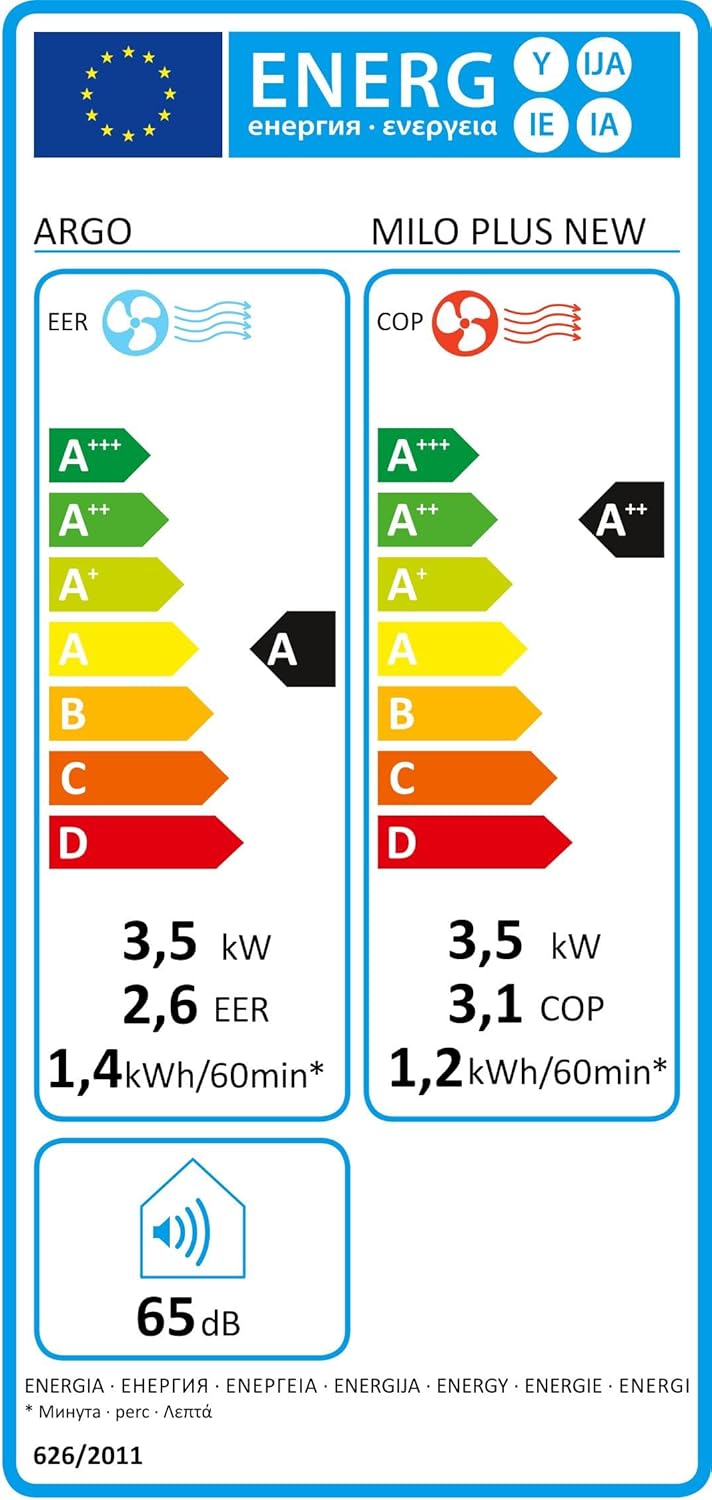
Figure 8.1: Energy Label (Cooling).

Figure 8.2: Energy Label (Heating).
9. ການຮັບປະກັນແລະການສະຫນັບສະຫນູນ
This product comes with a standard manufacturer's warranty. Please refer to the warranty card included in the packaging for specific terms and conditions, including the warranty period and coverage details.
For technical assistance, spare parts, or warranty claims, please contact your local authorized service center or the retailer where the product was purchased. Always keep your purchase receipt as proof of purchase.


