1. ບົດແນະນຳ
The Donner Dark Mouse Distortion Pedal is an effect unit designed for electric guitar, providing a range of distortion tones. It features two distinct distortion modes and a true bypass design to maintain signal integrity when the effect is disengaged. This manual provides essential information for setting up, operating, and maintaining your pedal.

Figure 1: The Donner Dark Mouse Distortion Pedal, designed to deliver classic distortion sounds.
2. ຜະລິດຕະພັນເກີນview
The Dark Mouse pedal features intuitive controls for shaping your sound. Understanding these controls is key to utilizing the pedal's full potential.

Figure 2: Control layout of the Dark Mouse Distortion Pedal.
ການຄວບຄຸມ:
- 1. DC 9V Jack: Power input for a 9V DC adapter (center negative).
- 2. Mode Switch (CLASSIC/HYPER): Toggles between two distinct distortion characteristics.
- 3. LEVEL Knob: ປັບລະດັບສຽງສົ່ງອອກໂດຍລວມຂອງເອັບເຟັກ.
- 4. FILTER Knob: Controls the tone or brightness of the distortion. Turning clockwise increases treble.
- 5. DIST Knob: Adjusts the amount of distortion or gain.
- 6. Input Jack: Connect your guitar or previous effect pedal here.
- 7. Output Jack: ເຊື່ອມຕໍ່ກັບຂອງທ່ານ amplifier ຫຼື pedal ຜົນກະທົບຕໍ່ໄປ.
- 8. ຕົວຊີ້ວັດ LED: ສະຫວ່າງຂຶ້ນເມື່ອເອັບເຟັກເປີດໃຊ້ງານ.
- 9. ສະຫຼັບຕີນ: ມີສ່ວນຮ່ວມ ຫຼື ບໍ່ມີສ່ວນຮ່ວມກັບຜົນກະທົບ.
3. ຕັ້ງຄ່າ
Follow these steps to connect your Donner Dark Mouse Distortion Pedal:
- ຮັບປະກັນຂອງທ່ານ ampເຄື່ອງເປີດເຄື່ອງຈະຖືກປິດກ່ອນທີ່ຈະເຮັດການເຊື່ອມຕໍ່ໃດໆ.
- ເຊື່ອມຕໍ່ guitar ໄຟຟ້າຂອງທ່ານກັບ ປ້ອນຂໍ້ມູນ Jack (6) of the pedal using a standard 1/4-inch instrument cable.
- ເຊື່ອມຕໍ່ ຜົນໄດ້ຮັບ Jack (7) of the pedal to your ampການປ້ອນຂໍ້ມູນຂອງເຄື່ອງຂະຫຍາຍສຽງໂດຍໃຊ້ສາຍເຄື່ອງມືມາດຕະຖານ 1/4 ນິ້ວອີກອັນໜຶ່ງ.
- Connect a 9V DC power adapter (center negative, 500mA minimum) to the Jack DC 9V (1). Note: The power supply is not included. Using an incorrect power supply may damage the pedal.
- Once all connections are secure, you may turn on your ampມີຊີວິດຊີວາ.

Figure 3: Proper connection of the pedal to power and instrument cables.
4. ຄໍາແນະນໍາການດໍາເນີນງານ
The Dark Mouse pedal offers two distinct distortion modes and flexible controls to tailor your sound.
ການມີສ່ວນຮ່ວມຜົນກະທົບ:
ກົດ ໂຟກັສ (9) to toggle the effect on or off. The ຕົວຊີ້ວັດ LED (8) will illuminate when the effect is active.
Selecting Distortion Modes:
ໃຊ້ ໂມດໂມດ (2) to select between the two distortion modes:
- ຄລາສຊີກ: ຜະລິດຄວາມອົບອຸ່ນ, vintage distortion sound with a subtle fuzz characteristic.
- HYPER: Offers a more powerful and aggressive sound with enhanced edges and low-end response.

Figure 4: The mode switch allows selection between Classic and Hyper distortion.
Adjusting Tone and Gain:
Utilize the three control knobs to fine-tune your distortion sound:
- LEVEL Knob (3): Adjust this to set the overall output volume of the pedal. Start with it at a moderate level and adjust to match your bypassed signal volume.
- DIST Knob (5): Turn this knob clockwise to increase the amount of distortion, from subtle crunch to heavy saturation.
- FILTER Knob (4): This control acts as a tone shaping filter. Turning it clockwise will increase the brightness and treble content of the distortion, while turning it counter-clockwise will result in a darker tone.
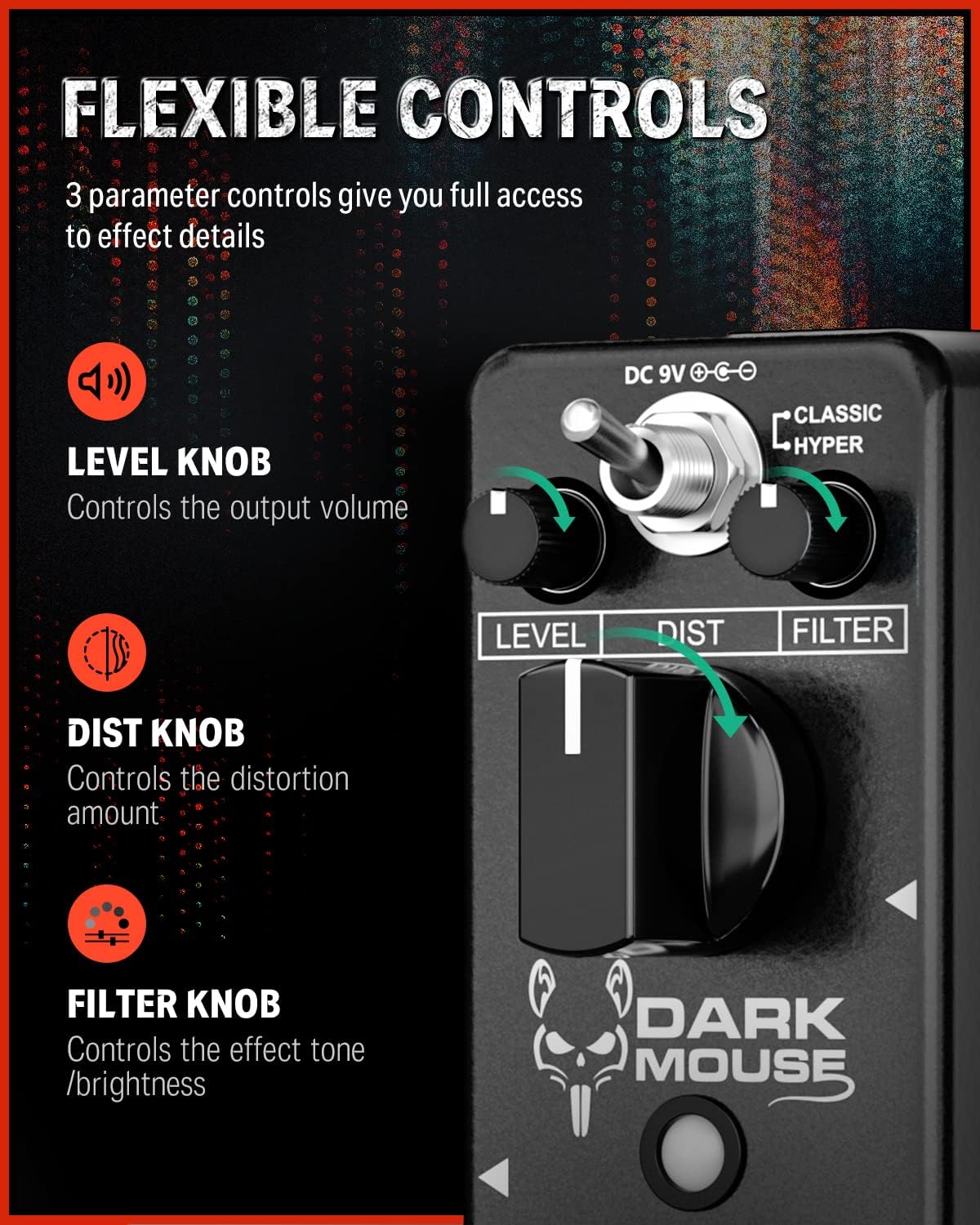
Figure 5: The Level, Dist, and Filter knobs provide flexible control over the effect.
True Bypass:
The pedal features true bypass circuitry. This means that when the effect is disengaged, your guitar signal passes directly through the pedal without any electronic interference, preserving your original tone. The LED indicator will be off when in true bypass mode.

Figure 6: True bypass ensures a clean signal when the effect is off.
5. ບໍາລຸງຮັກສາ
- ທໍາຄວາມສະອາດ: Use a soft, dry cloth to clean the pedal's exterior. Avoid using abrasive cleaners or solvents.
- ການເກັບຮັກສາ: ເກັບຮັກສາ pedal ໃນສະພາບແວດລ້ອມທີ່ແຫ້ງແລ້ງ, ຫ່າງຈາກອຸນຫະພູມທີ່ສຸດແລະແສງແດດໂດຍກົງ.
- ການສະຫນອງພະລັງງານ: Always use a 9V DC center-negative power adapter with a minimum of 500mA current. Disconnect the power supply when the pedal is not in use for extended periods.
- ການດູແລທາງດ້ານຮ່າງກາຍ: The pedal features a durable aluminum alloy casing. Avoid dropping the pedal or subjecting it to excessive force.
6. ການແກ້ໄຂບັນຫາ
- ບໍ່ມີສຽງ:
- ກວດສອບການເຊື່ອມຕໍ່ສາຍໄຟທັງຫມົດ (guitar to input, output to amp).
- Ensure the power adapter is correctly connected and providing power.
- ກວດສອບວ່າ guitar ຂອງທ່ານແລະ ampເຄື່ອງໃຊ້ໄຟຟ້າເຮັດວຽກຢ່າງຖືກຕ້ອງ.
- If the LED is off, press the footswitch to engage the effect.
- Weak or Distorted Sound (when bypassed):
- This pedal features true bypass, so a weak or distorted bypassed signal usually indicates an issue with cables or other equipment in your signal chain, not the pedal itself.
- ສິ່ງລົບກວນທີ່ບໍ່ຕ້ອງການ / Hum:
- Ensure you are using a regulated 9V DC center-negative power supply. Unregulated power supplies can introduce noise.
- ກວດສອບສໍາລັບສາຍໄຟຜິດພາດ.
- Move the pedal away from power transformers or other electronic devices that may cause interference.
7. ຂໍ້ມູນຈໍາເພາະ
| ຄຸນສົມບັດ | ຂໍ້ມູນຈໍາເພາະ |
|---|---|
| ໝາຍເລກຕົວແບບ | EC1178-FBA-US |
| ນ້ໍາຫນັກລາຍການ | 8.8 ອອນສ໌ (0.25 ກິໂລກຣາມ) |
| ຂະໜາດສິນຄ້າ | 3.7 x 1.69 x 2.01 ນິ້ວ (3.7"L x 1.7"W x 2"H) |
| ວັດສະດຸຮ່າງກາຍ | ໂລຫະປະສົມອາລູມິນຽມ |
| ແຫຼ່ງພະລັງງານ | ອະແດບເຕີ, ໄຟຟ້າ |
| ສະບັບtage | 9 Volts DC (Center Negative) |
| ປະເພດຕົວເຊື່ອມຕໍ່ | 1/4" (6.35mm) mono jack |
| ຮູບແບບສັນຍານ | ອະນາລັອກ |
8. ສິ່ງທີ່ຢູ່ໃນກ່ອງ
- 1 x Donner Dark Mouse pedal
9. ການຮັບປະກັນແລະການສະຫນັບສະຫນູນ
ສຳລັບຂໍ້ມູນການຮັບປະກັນ ຫຼື ການຊ່ວຍເຫຼືອດ້ານເຕັກນິກ, ກະລຸນາອ້າງອີງເຖິງ Donner ຢ່າງເປັນທາງການ website or contact Donner customer service directly. Keep your purchase receipt for warranty claims.


