1. ບົດແນະນຳ
ຂອບໃຈສໍາລັບການຊື້asing the Infocus 24-inch 720p LED TV, model IM24ED800. This manual provides essential information for setting up, operating, and maintaining your television. Please read this manual thoroughly before using the product and retain it for future reference.
ຂໍ້ມູນຄວາມປອດໄພ
- ຢ່າເຮັດໃຫ້ໂທລະທັດຖືກຝົນຫຼືຄວາມຊຸ່ມຊື່ນ.
- ຫ້າມກີດຂວາງການເປີດລະບາຍອາກາດ.
- ຮັບປະກັນການສະຫນອງພະລັງງານທີ່ເຫມາະສົມ voltage.
- ປົກປ້ອງສາຍໄຟຈາກການຖືກເປີດ ຫຼື ສຽບ.
- ອ້າງອີງການບໍລິການທັງໝົດໃຫ້ກັບພະນັກງານບໍລິການທີ່ມີຄຸນວຸດທິ.
- ຮັກສາໂທລະທັດໃຫ້ຫ່າງຈາກແສງແດດໂດຍກົງ, ແຫຼ່ງຄວາມຮ້ອນ, ແລະສະຫນາມແມ່ເຫຼັກທີ່ເຂັ້ມແຂງ.
2. ເນື້ອໃນຊຸດ
ກະລຸນາກວດເບິ່ງກ່ອງສໍາລັບລາຍການຕໍ່ໄປນີ້:
- Infocus 24-inch 720p LED TV (IM24ED800)
- Remote Control (with batteries, if included)
- ສາຍໄຟ
- ຂາຕັ້ງໂທລະທັດ (2 ໜ່ວຍ)
- screws ສໍາລັບຂາຕັ້ງໂທລະທັດ
- ຄູ່ມືຜູ້ໃຊ້ (ເອກະສານນີ້)
3. ຕັ້ງຄ່າ
3.1 ການຕິດຕັ້ງໂທລະພາບ
To attach the stand to your Infocus TV:
- ວາງໜ້າຈໍໂທລະທັດລົງໃສ່ພື້ນຜິວທີ່ສະອາດ, ອ່ອນໆເພື່ອປ້ອງກັນຮອຍຂີດຂ່ວນ.
- ຈັດວາງແຕ່ລະຊິ້ນສ່ວນທີ່ຕັ້ງໄວ້ກັບຊ່ອງທີ່ສອດຄ້ອງກັນຢູ່ດ້ານລຸ່ມຂອງໂທລະພາບ.
- ຮັບປະກັນແຕ່ລະຊິ້ນສ່ວນຢືນໂດຍໃຊ້ screws ທີ່ສະຫນອງໃຫ້. ໃຫ້ແນ່ໃຈວ່າພວກມັນຖືກຮັດແຫນ້ນຢ່າງແຫນ້ນຫນາ.
- ຍົກໂທລະທັດຢ່າງລະມັດລະວັງແລະວາງມັນຢູ່ເທິງພື້ນຜິວທີ່ມີລະດັບຄວາມຫມັ້ນຄົງ.
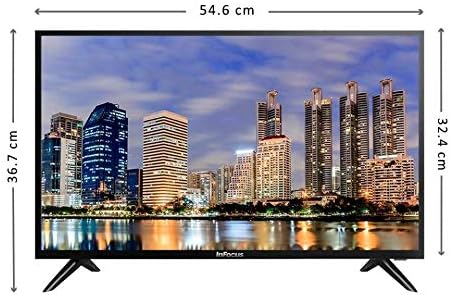
ຮູບພາບ: ທາງຫນ້າ view of the Infocus 24-inch LED TV with dimensions indicated. The TV measures approximately 54.6 cm in width and 36.7 cm in height with the stand.
3.2 ອຸປະກອນເຊື່ອມຕໍ່
Your Infocus TV features multiple input ports for connecting external devices.

ຮູບພາບ: ດ້ານຫລັງ view of the Infocus 24-inch LED TV, highlighting the location of various input ports including HDMI and USB.
- ການເຊື່ອມຕໍ່ HDMI: Connect Blu-ray players, game consoles, or cable/satellite boxes to the HDMI ports. The TV has 2 HDMI inputs.
- ການເຊື່ອມຕໍ່ USB: Connect USB flash drives for media playback to the USB ports. The TV has 2 USB inputs.
- ເສົາອາກາດ/ສາຍ: Connect an antenna or cable TV signal to the RF input (if available, not explicitly listed but standard for TVs).
- ພະລັງງານ: ເຊື່ອມຕໍ່ສາຍໄຟກັບອິນພຸດໄຟຂອງໂທລະທັດ ແລະຈາກນັ້ນໄປຫາປລັກສຽບໄຟ.
3.3 ການເປີດເຄື່ອງເບື້ອງຕົ້ນ
ຫຼັງຈາກເຊື່ອມຕໍ່ສາຍໄຟທີ່ຈຳເປັນທັງໝົດແລ້ວ:
- Ensure the power cord is securely plugged into both the TV and a power outlet.
- ກົດປຸ່ມເປີດປິດໃນຣີໂມດຄວບຄຸມ ຫຼືຢູ່ໃນໂທລະທັດເອງ.
- Follow the on-screen instructions for initial setup, which may include language selection, time zone, and channel scanning.
4. ການປະຕິບັດໂທລະພາບຂອງທ່ານ
4.1 ການຄວບຄຸມໄລຍະໄກເກີນview
The remote control allows you to access all TV functions. While specific button layouts may vary, common functions include:
- ພະລັງງານ: ເປີດ ຫຼືປິດໂທລະພາບ.
- ການປ້ອນຂໍ້ມູນ/ແຫຼ່ງຂໍ້ມູນ: ເລືອກແຫຼ່ງສັນຍານເຂົ້າ (HDMI 1, HDMI 2, USB, TV).
- ປະລິມານຂຶ້ນ/ລົງ: ປັບລະດັບສຽງ.
- ຊ່ອງຂຶ້ນ/ລົງ: ປ່ຽນຊ່ອງໂທລະພາບ.
- ປິດສຽງ: ປິດສຽງໂທລະພາບ.
- ເມນູ: ເປີດເມນູຫຼັກສໍາລັບການປັບການຕັ້ງຄ່າ.
- ປຸ່ມນຳທາງ (ຂຶ້ນ/ລົງ/ຊ້າຍ/ຂວາ/ຕົກລົງ): ໃຊ້ເພື່ອນຳທາງເມນູ ແລະຢືນຢັນການເລືອກ.
- ອອກ/ກັບຄືນ: ກັບໄປໜ້າຈໍກ່ອນໜ້າ ຫຼືອອກຈາກເມນູ.
4.2 ຫນ້າທີ່ພື້ນຖານ
- ປ່ຽນແຫຼ່ງປ້ອນຂໍ້ມູນ: ກົດ ປ້ອນຂໍ້ມູນ or ທີ່ມາ button on your remote control. Use the navigation buttons to select the desired input (e.g., HDMI 1, USB) and press OK.
- ປັບລະດັບສຽງ: ໃຊ້ ປະລິມານຂຶ້ນ (+) or ບໍລິມາດລົງ (-) ປຸ່ມ.
- ປ່ຽນຊ່ອງທາງ: ໃຊ້ Channel Up (CH+) or Channel Down (CH-) ປຸ່ມ.
4.3 ການຫຼິ້ນສື່ USB
ຫຼິ້ນສື່ files from a USB flash drive:
- Insert a USB flash drive into one of the TV's USB ports.
- ກົດ ປ້ອນຂໍ້ມູນ or ທີ່ມາ ກົດປຸ່ມເທິງການຄວບຄຸມໄລຍະໄກຂອງທ່ານແລະເລືອກ USB.
- ໂປຣແກຣມທ່ອງເວັບມີເດຍຂອງໂທລະພາບຄວນຈະປາກົດຂຶ້ນ. ນຳທາງຜ່ານ files (photos, music, videos) using the remote control.
- ເລືອກ ກ file ແລະກົດ OK ຫຼິ້ນມັນ.
5. ບໍາລຸງຮັກສາ
5.1 ການທໍາຄວາມສະອາດຫນ້າຈໍ
- Turn off the TV and unplug the power cord before cleaning.
- ໃຊ້ຜ້າອ່ອນໆທີ່ບໍ່ມີຂົນ (ເຊັ່ນ: ຜ້າໄມໂຄຣໄຟເບີ) ເຊັດໜ້າຈໍຄ່ອຍໆ.
- ສໍາລັບຮອຍແຂງ, ເບົາບາງ dampໃສ່ຜ້າດ້ວຍນ້ໍາຫຼືເຄື່ອງເຮັດຄວາມສະອາດຫນ້າຈໍພິເສດ. ຢ່າສີດນ້ຳສະອາດໃສ່ໜ້າຈໍໂດຍກົງ.
- ຫຼີກເວັ້ນການໃຊ້ເຄື່ອງເຮັດຄວາມສະອາດຂັດ, ເຫຼົ້າ, benzene, ຫຼືບາງໆ, ເພາະວ່າສິ່ງເຫຼົ່ານີ້ສາມາດທໍາລາຍຫນ້າຈໍໄດ້.
5.2 ການເບິ່ງແຍງທົ່ວໄປ
- Keep the TV in a well-ventilated area.
- ຫຼີກເວັ້ນການວາງວັດຖຸໜັກຢູ່ເທິງໂທລະທັດ.
- ຖອດປລັກໂທລະທັດໃນເວລາມີພະຍຸຟ້າຜ່າ ຫຼືເວລາທີ່ມັນຈະບໍ່ຖືກໃຊ້ເປັນໄລຍະເວລາ.
6. ການແກ້ໄຂບັນຫາ
ຖ້າຫາກທ່ານພົບບັນຫາກັບໂທລະພາບຂອງທ່ານ, ເບິ່ງບັນຫາທົ່ວໄປດັ່ງຕໍ່ໄປນີ້ແລະການແກ້ໄຂ:
| ບັນຫາ | ສາເຫດທີ່ເປັນໄປໄດ້ | ການແກ້ໄຂ |
|---|---|---|
| ບໍ່ມີພະລັງງານ | Power cord not connected; power outlet issue | ກວດໃຫ້ແນ່ໃຈວ່າໄດ້ສຽບສາຍໄຟຢ່າງປອດໄພ. ທົດສອບປລັກສຽບໄຟດ້ວຍອຸປະກອນອື່ນ. |
| ບໍ່ມີຮູບ, ແຕ່ສຽງແມ່ນປະຈຸບັນ | Incorrect input source selected; loose video cable | ກົດ ການປ້ອນຂໍ້ມູນ/ແຫຼ່ງ button to select the correct input. Check video cable connections. |
| ບໍ່ມີສຽງ, ແຕ່ມີຮູບພາບ | Volume muted or too low; audio cable issue | ກົດ ປິດສຽງ ປຸ່ມຫຼືເພີ່ມປະລິມານ. ກວດເບິ່ງການເຊື່ອມຕໍ່ສາຍສຽງ. |
| ການຄວບຄຸມໄລຍະໄກບໍ່ເຮັດວຽກ | Batteries depleted; obstruction; remote sensor blocked | Replace batteries. Remove any obstructions between the remote and TV. Ensure the TV's remote sensor is clear. |
| ຂໍ້ຄວາມ "ບໍ່ມີສັນຍານ". | Incorrect input source; device not powered on; cable issue | Verify the correct input source is selected. Ensure the connected device is powered on. Check all cable connections. |
7. ຂໍ້ມູນຈໍາເພາະ
The following are the technical specifications for the Infocus 24-inch 720p LED TV model IM24ED800:
| ຄຸນສົມບັດ | ລາຍລະອຽດ |
|---|---|
| ໝາຍເລກຕົວແບບ | IM24ED800 |
| ຂະໜາດໜ້າຈໍ | 24 ນິ້ວ (61 ຊຕມ) |
| ເຕັກໂນໂລຊີການສະແດງ | LED |
| ຄວາມລະອຽດ | 1366 x 768 (720p HD) |
| ອັດຕາການໂຫຼດຂໍ້ມູນຄືນໃໝ່ | 60 Hz |
| ການປ້ອນຂໍ້ມູນ HDMI | 2 |
| ການປ້ອນຂໍ້ມູນ USB | 2 |
| ການເຊື່ອມຕໍ່ | HDMI, USB |
| ປະເພດການຕິດຕັ້ງ | ໂຕະໂຕະ |
| ຂະໜາດແພັກເກັດ | 60.8 x 37.8 x 12 cm |
| ນ້ໍາຫນັກຊຸດ | 5 ກິໂລ |
8. ການຮັບປະກັນແລະການສະຫນັບສະຫນູນ
This Infocus TV is sold as a renewed product, which typically comes with a limited warranty provided by the seller or refurbisher. Please refer to your purchase documentation or contact your retailer for specific warranty terms and conditions.
For technical support or service inquiries, please contact the customer support channel provided by your retailer or the Infocus support webເວັບໄຊ.


