1. ບົດແນະນຳ
This manual provides essential information for the safe and efficient operation of your Intex SH4004 40-inch HD Ready LED Smart TV. Please read these instructions carefully before using the product and retain them for future reference. Your Intex SH4004 TV features a 40-inch HD Ready LED display, smart TV capabilities with Android OS, built-in Wi-Fi, and multiple connectivity options.
2. ຂໍ້ມູນຄວາມປອດໄພ
ປະຕິບັດຕາມຄວາມລະມັດລະວັງດ້ານຄວາມປອດໄພຂັ້ນພື້ນຖານສະເໝີເມື່ອໃຊ້ໂທລະທັດເຄື່ອງນີ້ເພື່ອຫຼຸດຜ່ອນຄວາມສ່ຽງຕໍ່ການເກີດອັກຄີໄພ, ໄຟຟ້າຊອດ ແລະ ການບາດເຈັບ.
- ແຫຼ່ງພະລັງງານ: ໃຫ້ແນ່ໃຈວ່າໂທລະທັດໄດ້ເຊື່ອມຕໍ່ກັບການສະຫນອງພະລັງງານພາຍໃນປະລິມານທີ່ກໍານົດໄວ້tagຊ່ວງອີ. ຢ່າໂຫຼດປລັກໄຟຟ້າເກີນ.
- ການລະບາຍອາກາດ: ຫ້າມປິດຊ່ອງລະບາຍອາກາດ. ອະນຸຍາດໃຫ້ມີພື້ນທີ່ພຽງພໍຮອບໂທລະພາບສໍາລັບການໄຫຼວຽນຂອງອາກາດທີ່ເຫມາະສົມເພື່ອປ້ອງກັນຄວາມຮ້ອນເກີນ.
- ນ້ໍາແລະຄວາມຊຸ່ມ: ຢ່າເຮັດໃຫ້ໂທລະທັດຖືກຝົນຫຼືຄວາມຊຸ່ມຊື່ນ. ຫ້າມວາງສິ່ງຂອງທີ່ເຕັມໄປດ້ວຍຂອງແຫຼວເຊັ່ນ: ກະເປົ໋າ, ໃສ່ໂທລະພາບ.
- ທໍາຄວາມສະອາດ: ຖອດສາຍໂທລະພາບອອກຈາກປລັກສຽບໄຟກ່ອນທີ່ຈະທໍາຄວາມສະອາດ. ໃຊ້ຜ້າອ່ອນ, ແຫ້ງ. ຢ່າໃຊ້ເຄື່ອງເຮັດຄວາມສະອາດຂອງແຫຼວຫຼືເຄື່ອງເຮັດຄວາມສະອາດ aerosol.
- ການຈັດວາງ: ວາງໂທລະທັດຢູ່ເທິງພື້ນຜິວທີ່ມີລະດັບຄວາມຫມັ້ນຄົງ. ຫຼີກລ້ຽງການວາງມັນໄວ້ໃນບ່ອນທີ່ມີແສງແດດໂດຍກົງ ຫຼືໃກ້ກັບແຫຼ່ງຄວາມຮ້ອນ.
- ການບໍລິການ: ຢ່າພະຍາຍາມບໍລິການຜະລິດຕະພັນນີ້ດ້ວຍຕົນເອງ. ອ້າງເຖິງການບໍລິການທັງtoົດໃຫ້ກັບພະນັກງານບໍລິການທີ່ມີຄຸນວຸດທິ.
3. ເນື້ອໃນຊຸດ
ກວດສອບວ່າລາຍການທັງຫມົດແມ່ນມີຢູ່ໃນຊຸດ:
- Intex SH4004 40-inch HD Ready LED Smart TV
- ການຄວບຄຸມໄລຍະໄກ
- ຂາຕັ້ງໂທລະທັດ (2 ໜ່ວຍ)
- screws ສໍາລັບຂາຕັ້ງໂທລະທັດ
- ສາຍໄຟ
- ຄູ່ມືຜູ້ໃຊ້
4. ຜະລິດຕະພັນເກີນview
4.1 ແນວ ໜ້າ View
The front of the Intex SH4004 TV features the 40-inch LED display and the Intex brand logo at the bottom center.

ຮູບ 4.1: ດ້ານຫນ້າ view of the Intex SH4004 Smart TV.
4.2 ດ້ານຫຼັງ View and Connectivity Ports
The rear panel houses various input and output ports for connecting external devices.

ຮູບ 4.2: ດ້ານຫລັງ view of the Intex SH4004 Smart TV, highlighting port locations.
ພອດທີ່ສາມາດໃຊ້ໄດ້:
- ຜອດ HDMI (x2): For connecting set-top boxes, Blu-ray players, gaming consoles, and other HDMI-enabled devices.
- ພອດ USB (x1): For connecting USB hard drives, flash drives, and other USB devices for media playback.
- ການປ້ອນຂໍ້ມູນເສົາອາກາດ: For connecting an aerial for terrestrial TV channels.
- ການປ້ອນຂໍ້ມູນສຽງ/ວິດີໂອ: For connecting older devices using composite cables.
- Port Ethernet: ສໍາລັບການເຊື່ອມຕໍ່ອິນເຕີເນັດແບບມີສາຍ.
4.3 ຂະໜາດ
The physical dimensions of the TV are important for placement and installation.
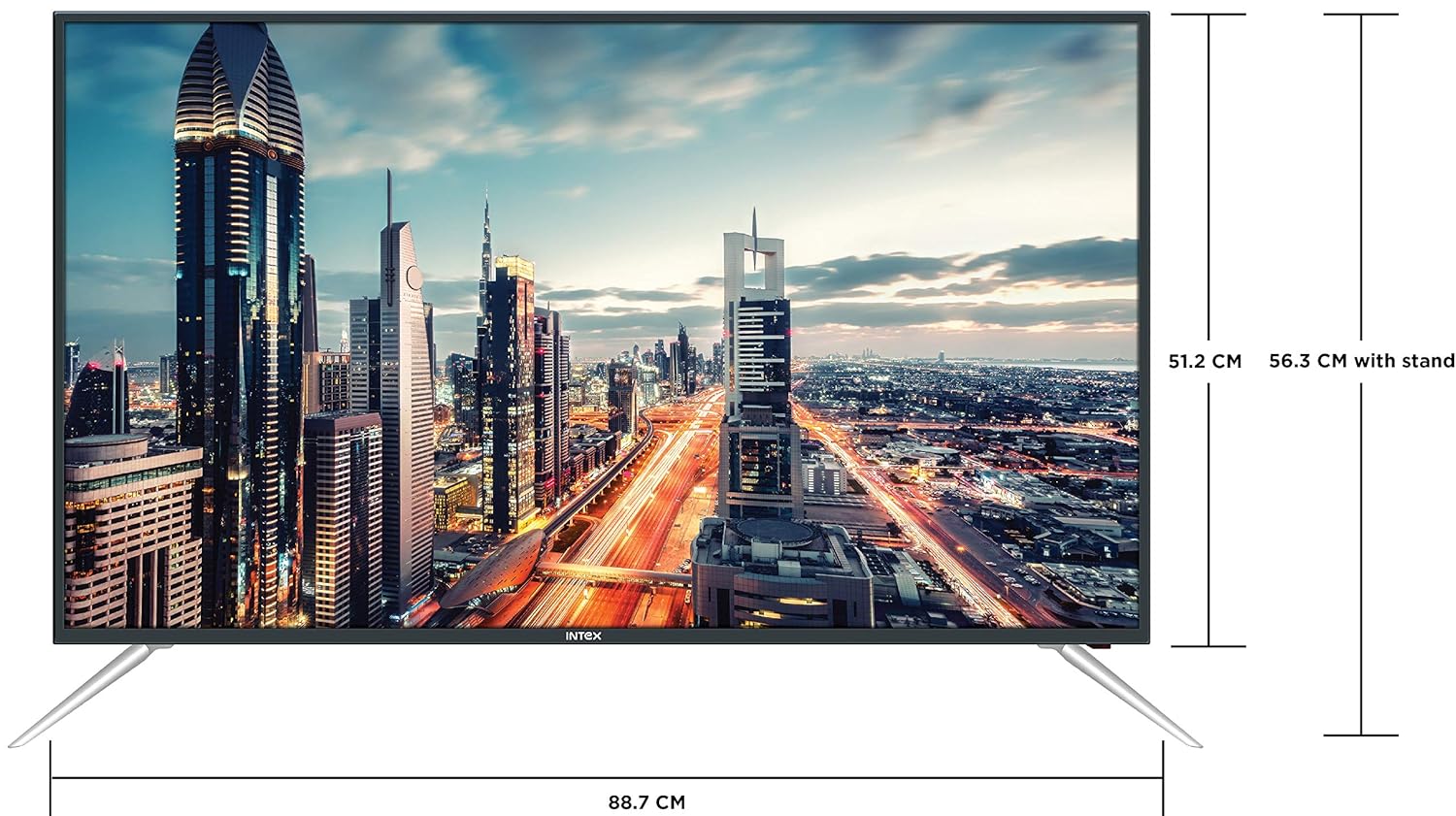
Figure 4.3: Intex SH4004 Smart TV dimensions.
- ຂະໜາດໜ້າຈໍ: 40 ນິ້ວ (98 ຊຕມ)
- ກວ້າງ: ປະມານ 88.7 ຊຕມ
- ຄວາມສູງ (ບໍ່ມີຈຸດຢືນ): ປະມານ 51.2 ຊຕມ
- ຄວາມສູງ (ມີຂາຕັ້ງ): ປະມານ 56.3 ຊຕມ
- ຂະໜາດແພັກເກດ: 102 x 60.5 x 16 cm
- ນ້ໍາຫນັກລາຍການ: 10.8 ກິໂລ
5. ຕັ້ງຄ່າ
5.1 ການຕິດຕັ້ງໂທລະພາບ
- ວາງໂທລະທັດລົງຢ່າງລະມັດລະວັງໃນພື້ນຜິວທີ່ສະອາດ, ອ່ອນໆເພື່ອປ້ອງກັນຄວາມເສຍຫາຍຂອງໜ້າຈໍ.
- ຈັດວາງຊິ້ນສ່ວນຂາຕັ້ງກັບຊ່ອງທີ່ສອດຄ້ອງກັນຢູ່ດ້ານລຸ່ມຂອງໂທລະພາບ.
- ຮັບປະກັນຊິ້ນສ່ວນຂາຕັ້ງໂດຍໃຊ້ສະກູທີ່ສະຫນອງໃຫ້. ໃຫ້ແນ່ໃຈວ່າພວກມັນຖືກຮັດແຫນ້ນຢ່າງແຫນ້ນຫນາ.
5.2 ການຕິດຝາ
If you prefer to wall mount your TV, please contact Intex support for professional installation. Refer to the Warranty and Support section for contact details. Ensure you use a compatible VESA wall mount kit (not included) and follow its instructions carefully.
5.3 ການເຊື່ອມຕໍ່ພະລັງງານ
Connect the power cable to the TV's power input and then plug the other end into a wall outlet.
5.4 ການເຊື່ອມຕໍ່ອຸປະກອນພາຍນອກ
- HDMI: Use an HDMI cable to connect devices like set-top boxes, gaming consoles, or Blu-ray players to the HDMI ports on the TV's rear panel.
- USB: Insert USB flash drives or external hard drives into the USB port for media playback.
- ເສົາອາກາດ: Connect your antenna cable to the ANTENNA IN port for receiving broadcast channels.
5.5 ຕົວຊ່ວຍສ້າງການຕິດຕັ້ງເບື້ອງຕົ້ນ
ເມື່ອເປີດເຄື່ອງທຳອິດ, ໂທລະພາບຈະແນະນຳທ່ານຜ່ານຂັ້ນຕອນການຕັ້ງຄ່າເບື້ອງຕົ້ນ:
- ການເລືອກພາສາ: ເລືອກພາສາທີ່ເຈົ້າມັກ.
- ການຕັ້ງຄ່າເຄືອຂ່າຍ: Connect to your Wi-Fi network or use a wired Ethernet connection. Enter your Wi-Fi password if prompted.
- ສະແກນຊ່ອງ: ໂທລະພາບຈະສະແກນຫາຊ່ອງອອກອາກາດທີ່ມີຢູ່.
- ເຂດເວລາ: ກຳນົດເຂດເວລາທ້ອງຖິ່ນຂອງທ່ານ.
6. ຄໍາແນະນໍາການດໍາເນີນງານ
6.1 ຫນ້າທີ່ຄວບຄຸມໄລຍະໄກ
The remote control allows you to navigate the TV's features. Common buttons include Power, Volume Up/Down, Channel Up/Down, Input Source, Menu, Navigation (Up/Down/Left/Right), OK, Back, Home, and Smart TV app shortcuts.
6.2 ຟັງຊັນໂທລະພາບພື້ນຖານ
- ເປີດ/ປິດ: ກົດປຸ່ມເປີດ/ປິດຢູ່ເທິງຣີໂໝດ ຫຼື ໂທລະພາບ.
- ການປັບລະດັບສຽງ: ໃຊ້ປຸ່ມລະດັບສຽງຂຶ້ນ/ລົງ.
- ການເລືອກຊ່ອງ: ໃຊ້ປຸ່ມຂຶ້ນ/ລົງຊ່ອງ ຫຼືໃສ່ຕົວເລກຊ່ອງໂດຍກົງ.
- ແຫຼ່ງປ້ອນຂໍ້ມູນ: Press the Input/Source button to switch between HDMI, USB, AV, and TV inputs.
6.3 ຄຸນສົມບັດໂທລະທັດອັດສະລິຍະ (Android OS)
Your Intex SH4004 runs on Android OS, providing access to various smart features:
- ການເຊື່ອມຕໍ່ Wi-Fi: ເຊື່ອມຕໍ່ຫາເຄືອຂ່າຍເຮືອນຂອງທ່ານເພື່ອເຂົ້າເຖິງອິນເຕີເນັດ.
- App Store: Download and install applications. Supported internet services include Sony, TV Store, YouTube, and Zee5.
- ການຫຼິ້ນສື່: ຫຼິ້ນວິດີໂອ, ເພງ ແລະ view photos from connected USB devices.
- Motion Sensor Gaming: The TV supports motion sensor gaming. An in-built tennis game is included for entertainment.
- ການປະຢັດພະລັງງານອັດສະລິຍະ: Features designed to optimize energy consumption.
- Eye Safe-T Matrix: Display technology aimed at reducing eye strain.
7. ບໍາລຸງຮັກສາ
7.1 ການທໍາຄວາມສະອາດໂທລະພາບ
- ຖອດປລັກໂທລະທັດທຸກຄັ້ງກ່ອນທຳຄວາມສະອາດ.
- ໃຊ້ຜ້າທີ່ອ່ອນ, ແຫ້ງ, ບໍ່ມີຂີ້ກະເທີ່ເພື່ອເຊັດຫນ້າຈໍແລະຕູ້.
- ສໍາລັບຮອຍແຂງໃນຫນ້າຈໍ, ເບົາບາງ dampen the cloth with water or a specialized screen cleaner (ensure it's suitable for LED screens) and wipe gently. Do not spray liquid directly onto the screen.
- ຫຼີກເວັ້ນການໃຊ້ເຄື່ອງເຮັດຄວາມສະອາດຂັດ, ຂີ້ເຜີ້ງ, ຫຼືສານລະລາຍ.
7.2 ການເບິ່ງແຍງທົ່ວໄປ
- ຮັກສາໂທລະທັດໃຫ້ຫ່າງຈາກແສງແດດໂດຍກົງ ແລະແຫຼ່ງຄວາມຮ້ອນ.
- ຮັບປະກັນການລະບາຍອາກາດທີ່ເຫມາະສົມຮອບໂທລະທັດ.
- ຖ້າໂທລະທັດຈະບໍ່ຖືກໃຊ້ເປັນເວລາດົນ, ໃຫ້ຖອດປລັກອອກຈາກປລັກສຽບໄຟ.
8. ການແກ້ໄຂບັນຫາ
Before contacting support, try these basic troubleshooting steps for common issues.
| ບັນຫາ | ສາເຫດທີ່ເປັນໄປໄດ້ | ການແກ້ໄຂ |
|---|---|---|
| ບໍ່ມີພະລັງງານ | Power cable disconnected; Power outlet fault. | Check power cable connection; Try a different outlet; Press power button on TV/remote. |
| ບໍ່ມີຮູບພາບ, ແຕ່ສຽງແມ່ນປະຈຸບັນ | Incorrect input source selected; External device issue. | Press the 'Input/Source' button to select the correct input; Check external device connections. |
| ບໍ່ມີສຽງ, ແຕ່ຮູບພາບແມ່ນປະຈຸບັນ | ປະລິມານປິດສຽງ ຫຼືຕໍ່າເກີນໄປ; ບັນຫາລະບົບສຽງພາຍນອກ. | Unmute volume or increase level; Check audio cables to external sound system. |
| ບັນຫາການເຊື່ອມຕໍ່ Wi-Fi | Incorrect password; Router too far; Router issue. | Re-enter Wi-Fi password; Move TV closer to router or use Ethernet; Restart router. |
| ການຄວບຄຸມໄລຍະໄກບໍ່ເຮັດວຽກ | ແບັດເຕີຣີໝົດ; ມີສິ່ງກີດຂວາງລະຫວ່າງຣີໂໝດ ແລະ ໂທລະພາບ. | Replace remote batteries; Remove any obstructions; Point remote directly at TV sensor. |
9. ຂໍ້ມູນຈໍາເພາະ
Detailed technical specifications for the Intex SH4004 Smart TV.
| ຄຸນສົມບັດ | ຂໍ້ມູນຈໍາເພາະ |
|---|---|
| ຍີ່ຫໍ້ | Intex |
| ຊື່ຕົວແບບ | SH4004 |
| ເຕັກໂນໂລຊີການສະແດງ | LED |
| ຂະໜາດໜ້າຈໍ | 40 ນິ້ວ (98 ຊມ) |
| ຄວາມລະອຽດ | ຄວາມລະອຽດ HD (1366 x 768 ພິກເຊວ) |
| ອັດຕາການໂຫຼດຂໍ້ມູນຄືນໃໝ່ | 60 Hz |
| Viewໃນມຸມ | 178 ອົງສາ |
| ອັດຕາສ່ວນ | 16:9 |
| ລະບົບປະຕິບັດການ | Android |
| ໂຮງງານຜະລິດ | 1.2GHz Quad core Mali 450 |
| RAM | 512MB |
| ຫນ່ວຍຄວາມຈໍາພາຍໃນ | 4GB |
| ການເຊື່ອມຕໍ່ | 2 HDMI ports, 1 USB port, Built-In-Wifi, Ethernet |
| ສຽງອອກ | 20 Watts (2 speakers, Stereo) |
| ບໍລິການອິນເຕີເນັດທີ່ຮອງຮັບ | Sony, TV Store, Youtube, Zee5 |
| ປະເພດການຕິດຕັ້ງ | Wall Mount / Table Top |
| ນ້ໍາຫນັກລາຍການ | 10.8 ກິໂລ |
10. ການຮັບປະກັນແລະການສະຫນັບສະຫນູນ
ຂໍ້ມູນການຮັບປະກັນ:
- The product comes with a 1-year manufacturer warranty from the date of purchase.
- An additional 2 years of extended warranty is provided by Intex.
Installation and Support:
For requesting installation, wall mounting, or a product demonstration after delivery, please contact Intex support directly.
Intex Support Contact:
- ໂທລະສັບ: 0120-4895555
When contacting support, please provide the product's model name (SH4004) and seller's details as mentioned on your invoice.


