ແນະນຳ
ຂອບໃຈສໍາລັບການຊື້asing the Supersonic IQ-1525BT Wireless Bluetooth Speaker. This manual provides essential information for the safe and efficient operation of your device. Please read it thoroughly before use and retain it for future reference.

ຮູບ 1: ດ້ານຫນ້າ view of the Supersonic IQ-1525BT Wireless Bluetooth Speaker.
ເນື້ອໃນຊຸດ
ກວດສອບວ່າລາຍການທັງຫມົດທີ່ລະບຸໄວ້ຂ້າງລຸ່ມນີ້ແມ່ນລວມຢູ່ໃນຊຸດຂອງທ່ານ:
- Supersonic IQ-1525BT Wireless Bluetooth Speaker
- ສາຍ USB
- ສາຍ AUX
- ສາຍສາກ
- ຄູ່ມືແນະ ນຳ (ເອກະສານນີ້)
ສິນຄ້າເກີນview
ແຜງຄວບຄຸມ ແລະ ພອດ

ຮູບທີ 2: ລາຍລະອຽດ view of the control panel, showing input ports and control knobs.
The front panel of the speaker features the main controls and input ports:
- IQ Sound Display: Digital display for mode, frequency, and other indicators.
- ຊ່ອງໃສ່ Micro SD Card: ສໍາລັບການຫຼິ້ນສຽງຈາກບັດ Micro SD.
- ພອດ USB: ສຳລັບການຫຼິ້ນສຽງຈາກ USB flash drive.
- AUX Input: Jack 3.5mm ສໍາລັບການເຊື່ອມຕໍ່ອຸປະກອນສຽງພາຍນອກ.
- ການປ້ອນຂໍ້ມູນ MIC: Jack 6.35mm ສໍາລັບການເຊື່ອມຕໍ່ໄມໂຄໂຟນ.
- DC 5V Input: ພະລັງງານເຂົ້າສຳລັບສາກລຳໂພງ.
- ບິດເບດ: ປັບລະດັບສຽງເບດ.
- Volume Knob (OFF/VOL/ON): Turns the speaker on/off and adjusts the master volume.
- ປຸ່ມໂໝດ (M): ສະຫຼັບລະຫວ່າງໂໝດການປ້ອນຂໍ້ມູນ (Bluetooth, FM, USB, Micro SD, AUX).
- ປຸ່ມກ່ອນໜ້າ/ຖອຍຫຼັງ: ຂ້າມໄປຫາເພງກ່ອນໜ້າ ຫຼື rewinds.
- ປຸ່ມຫຼິ້ນ/ຢຸດຊົ່ວຄາວ: ຫຼິ້ນ ຫຼືຢຸດສຽງ.
- ປຸ່ມຕໍ່ໄປ/ໄປໜ້າໄວ: ຂ້າມໄປຫາເພງຕໍ່ໄປ ຫຼືໄປໜ້າໄວ.
Speakers and LED Lighting
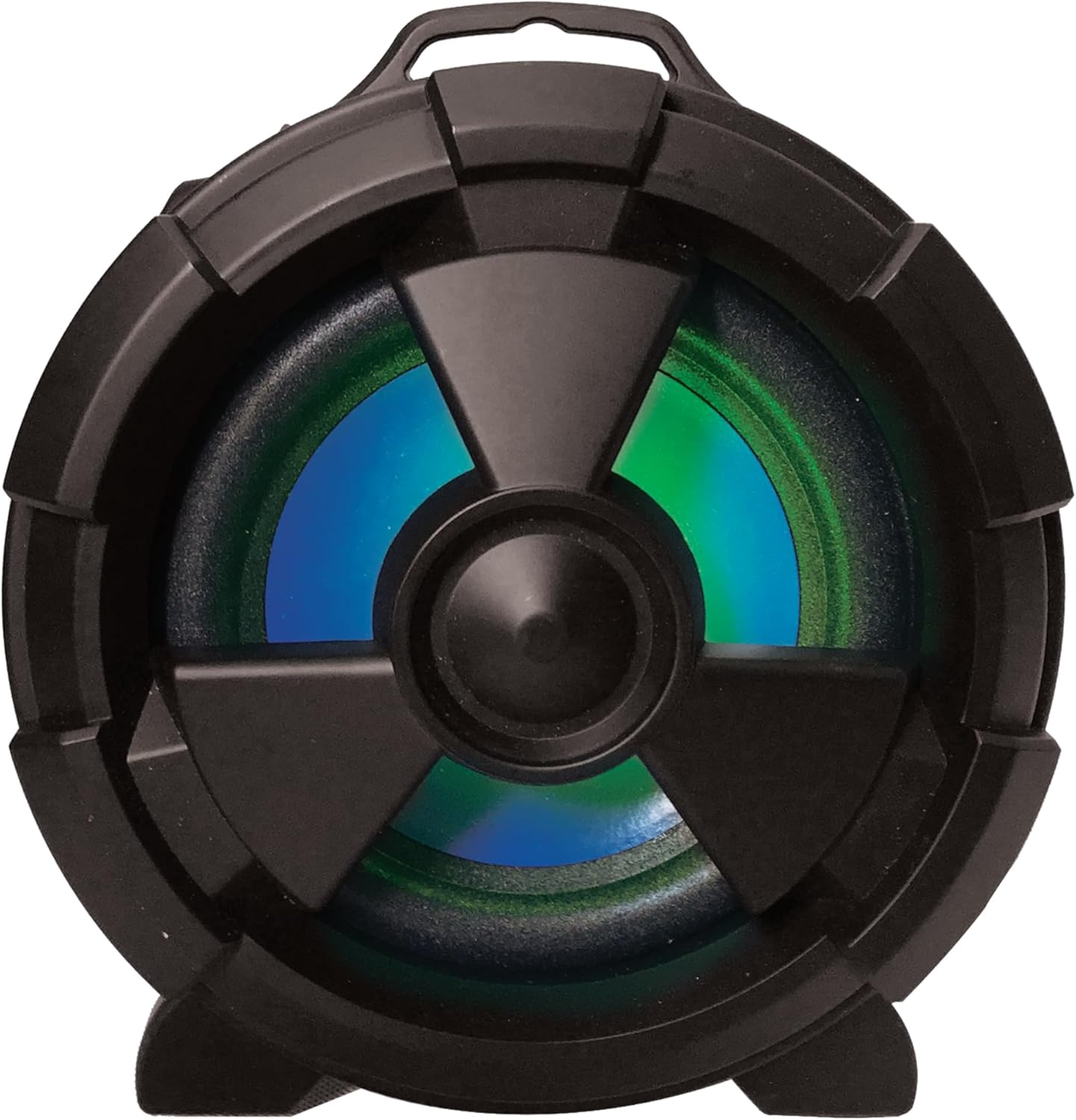
ຮູບ 3: ຂ້າງ view highlighting the main speaker and its integrated LED lighting.
The speaker features one 5-inch main speaker and two 2-inch built-in speakers for stereo sound. The main speaker on the side includes integrated LED lighting that changes colors during operation.
ຄຸນສົມບັດການພົກພາ

Figure 4: The speaker's design allows for easy transport and use in various settings.
The IQ-1525BT is designed for portability, featuring a lightweight construction and a carrying strap for convenient transport.
ຕັ້ງຄ່າ
ກຳລັງສາກລຳໂພງ
- Connect the provided USB cable to the DC 5V input port on the speaker.
- Connect the other end of the USB cable to a compatible USB power adapter (not included) or a USB port on a computer.
- ຕົວຊີ້ບອກການສາກໄຟຈະສະຫວ່າງຂຶ້ນ. ໃຫ້ເວລາພຽງພໍສຳລັບການສາກໄຟໃຫ້ເຕັມກ່ອນການນຳໃຊ້ຄັ້ງທຳອິດ.
ເປີດ/ປິດ
- To turn on the speaker, rotate the Volume knob clockwise until it clicks and the display illuminates.
- To turn off the speaker, rotate the Volume knob counter-clockwise until it clicks and the display turns off.
ຄໍາແນະນໍາການດໍາເນີນງານ
ການຈັບຄູ່ Bluetooth

Figure 5: Illustrates connecting a device via Bluetooth to the speaker.
- ເປີດລຳໂພງ. ມັນຈະເຂົ້າສູ່ໂໝດການຈັບຄູ່ Bluetooth ໂດຍອັດຕະໂນມັດ, ສະແດງໂດຍການກະພິບ "BLUE" ໃນຈໍສະແດງຜົນ ແລະສຽງເຕືອນ.
- ໃນອຸປະກອນທີ່ເປີດໃຊ້ Bluetooth ຂອງທ່ານ (ເຊັ່ນ: ໂທລະສັບສະຫຼາດ, ແທັບເລັດ), ເປີດໃຊ້ Bluetooth ແລະຄົ້ນຫາອຸປະກອນທີ່ມີຢູ່.
- ເລືອກ "IQ-1525BT" ຈາກລາຍຊື່ອຸປະກອນ.
- Once paired, the speaker will emit an audible confirmation, and "BLUE" on the display will stop flashing.
- ດຽວນີ້ທ່ານສາມາດຫຼິ້ນສຽງຈາກອຸປະກອນຂອງທ່ານຜ່ານລຳໂພງໄດ້.
ການດໍາເນີນງານວິທະຍຸ FM
- Turn on the speaker. Press the "M" (Mode) button repeatedly until "FM" appears on the display.
- ກົດປຸ່ມຫຼິ້ນ/ຢຸດຊົ່ວຄາວຄ້າງໄວ້ເພື່ອເລີ່ມການສະແກນສະຖານີ FM ໂດຍອັດຕະໂນມັດ. ລຳໂພງຈະບັນທຶກສະຖານີທັງໝົດທີ່ພົບ.
- Use the Previous/Rewind and Next/Fast Forward buttons to navigate between saved stations.
ການຫຼິ້ນ USB/Micro SD
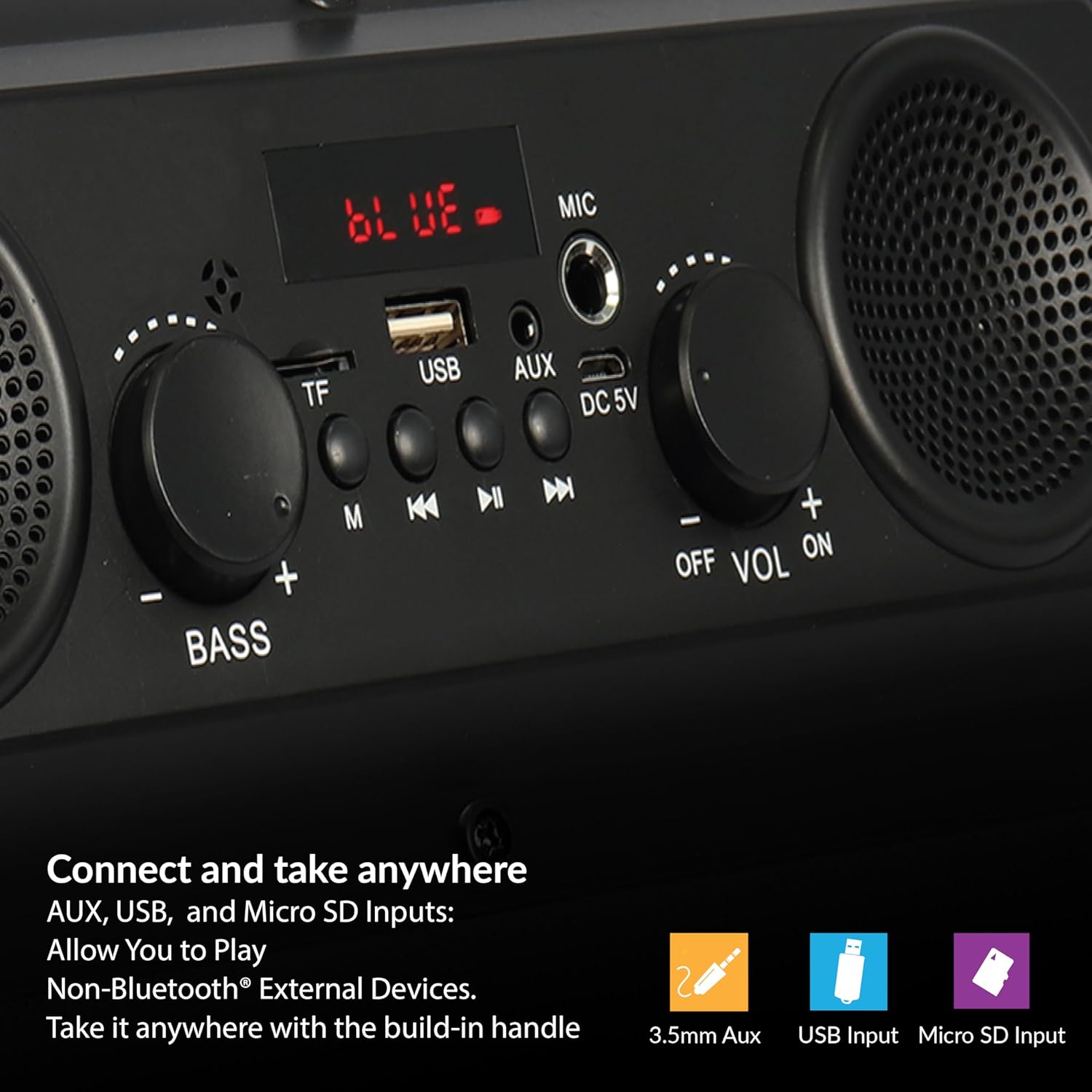
Figure 6: The speaker supports various input options for versatile audio playback.
- Insert a USB flash drive or Micro SD card (with pre-loaded audio files) ເຂົ້າໄປໃນພອດທີ່ສອດຄ້ອງກັນ.
- The speaker will automatically switch to USB or Micro SD mode and begin playback. If not, press the "M" (Mode) button to select the correct mode.
- Use the Play/Pause, Previous/Rewind, and Next/Fast Forward buttons to control playback.
ການປ້ອນຂໍ້ມູນ AUX
- Connect one end of the provided AUX cable to the AUX input port on the speaker.
- ເຊື່ອມຕໍ່ປາຍອີກດ້ານໜຶ່ງຂອງສາຍ AUX ເຂົ້າກັບຊ່ອງສຽບສຽງອອກຂອງອຸປະກອນພາຍນອກຂອງທ່ານ.
- ກົດປຸ່ມ "M" (Mode) ຈົນກ່ວາ "AUX" ປາກົດຢູ່ໃນຈໍສະແດງຜົນ.
- ຄວບຄຸມການຫຼິ້ນສຽງຈາກອຸປະກອນພາຍນອກຂອງທ່ານ.
ການນຳໃຊ້ໄມໂຄຣໂຟນ
- Connect a microphone (not included) to the MIC input port.
- Adjust the main volume using the Volume knob.
Adjusting Bass and Volume
- ໝຸນ ປະລິມານ ປຸ່ມເພີ່ມ ຫຼືຫຼຸດລະດັບສຽງທັງໝົດ.
- ໝຸນ ເບສ knob to adjust the low-frequency sound output.
ບໍາລຸງຮັກສາ
- ທໍາຄວາມສະອາດ: ໃຊ້ຜ້າປຽກແຫ້ງເພື່ອເຮັດຄວາມສະອາດດ້ານນອກຂອງລຳໂພງ. ຢ່າໃຊ້ເຄື່ອງເຮັດຄວາມສະອາດຂອງແຫຼວຫຼືວັດສະດຸຂັດ.
- ການເກັບຮັກສາ: ເມື່ອບໍ່ໄດ້ໃຊ້ເປັນເວລາດົນ, ໃຫ້ເກັບຮັກສາລໍາໂພງໄວ້ໃນບ່ອນທີ່ເຢັນ, ແຫ້ງແລ້ງຫ່າງຈາກແສງແດດໂດຍກົງ ແລະ ອຸນຫະພູມທີ່ຮຸນແຮງ.
- ການດູແລຫມໍ້ໄຟ: ເພື່ອຍືດອາຍຸການໃຊ້ງານຂອງແບັດເຕີຣີ, ໃຫ້ຫຼີກລ່ຽງການສາກແບັດເຕີຣີໃຫ້ໝົດເລື້ອຍໆ. ໃຫ້ສາກລຳໂພງຄືນໃໝ່ເປັນປະຈຳ, ເຖິງແມ່ນວ່າຈະບໍ່ໄດ້ໃຊ້ງານກໍຕາມ.
- ການເປີດເຜີຍນ້ໍາ: ລຳໂພງນີ້ບໍ່ກັນນ້ຳ. ຫຼີກລ່ຽງການສຳຜັດກັບນ້ຳ ຫຼື ຄວາມຊຸ່ມຫຼາຍເກີນໄປ.
ການແກ້ໄຂບັນຫາ
| ບັນຫາ | ສາເຫດທີ່ເປັນໄປໄດ້ | ການແກ້ໄຂ |
|---|---|---|
| ລຳໂພງບໍ່ເປີດ. | ແບັດເຕີຣີໝົດ. | ສາກລຳໂພງໂດຍໃຊ້ສາຍ USB ທີ່ໃຫ້ມາ. |
| ບໍ່ມີສຽງ. | ລະດັບສຽງຕໍ່າເກີນໄປ ຫຼືປິດສຽງໄວ້. ໂໝດປ້ອນຂໍ້ມູນບໍ່ຖືກຕ້ອງ. | Increase the volume. Press the 'M' button to select the correct input mode. |
| ອຸປະກອນ Bluetooth ບໍ່ໄດ້ຈັບຄູ່. | Speaker not in pairing mode. Device too far. | Ensure speaker is in Bluetooth mode (flashing 'BLUE'). Move device closer (within 10 meters). |
| ການຮັບ FM ບໍ່ດີ. | ສັນຍານອ່ອນ. | Reposition the speaker to improve signal reception. |
| ບໍ່ສາມາດຫຼິ້ນ USB/Micro SD ໄດ້. | ບໍ່ຖືກຕ້ອງ file format. Corrupted media. | ຮັບປະກັນສຽງ files are in a compatible format. Try a different USB drive or Micro SD card. |
ຂໍ້ມູນຈໍາເພາະ
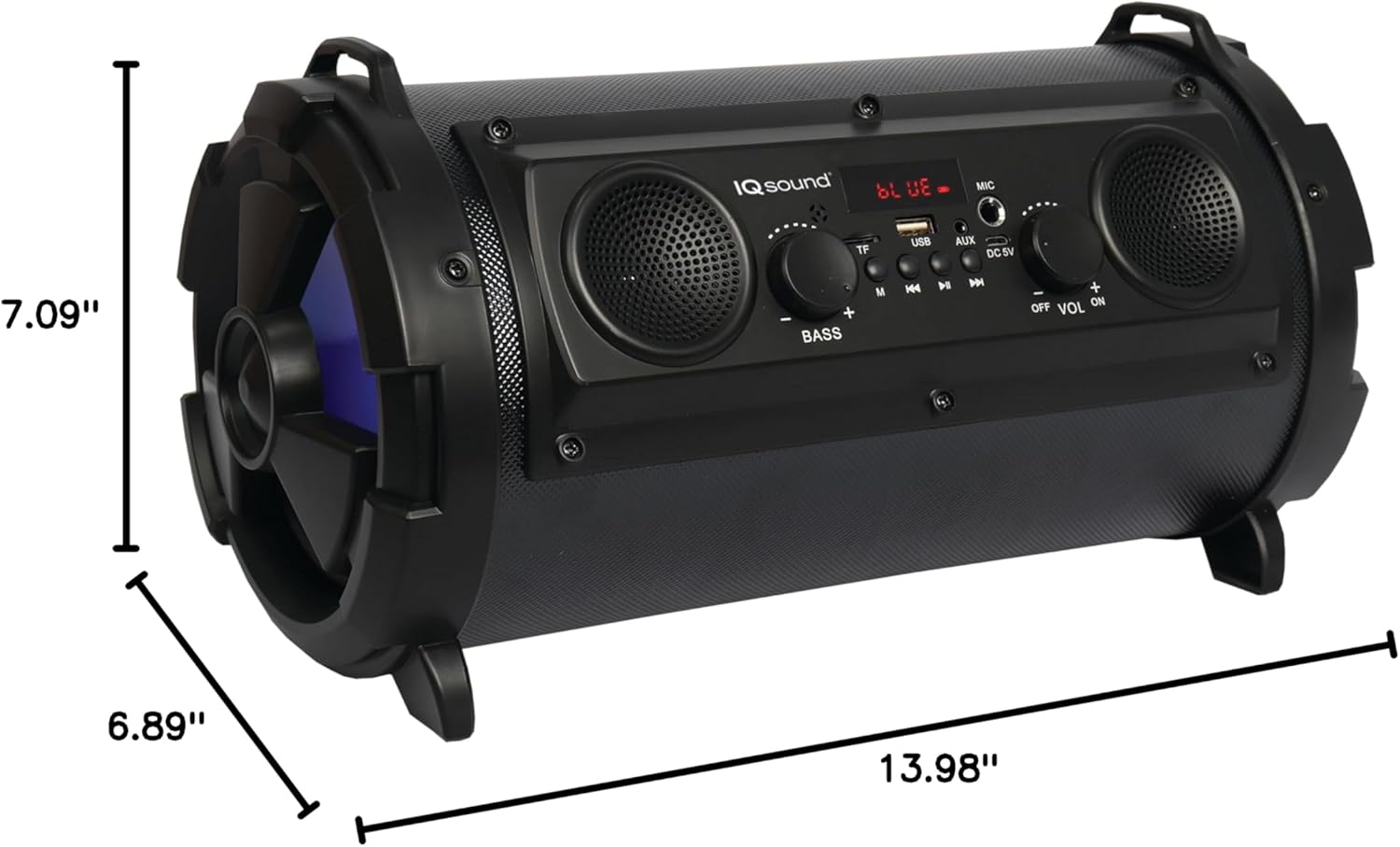
Figure 7: Product dimensions for the IQ-1525BT speaker.
| ຄຸນສົມບັດ | ລາຍລະອຽດ |
|---|---|
| ຊື່ຕົວແບບ | IQ-1525BT |
| ຍີ່ຫໍ້ | ສຽງສູງ |
| ປະເພດລຳໂພງ | ລຳໂພງ Bluetooth ແບບພົກພາ |
| ພະລັງງານຜົນຜະລິດ | 16 ວັດ |
| ການຕັ້ງຄ່າລໍາໂພງ | One 5-inch, Two 2-inch built-in speakers |
| ລຸ້ນ Bluetooth | V4.0 |
| Range ໄຮ້ສາຍ | ສູງເຖິງ 10 ແມັດ (32.8 ຟຸດ) |
| ການຕອບສະໜອງຄວາມຖີ່ | 100 Hz ຫາ 20 kHz |
| ການປ້ອນຂໍ້ມູນ Voltage | DC 5 ໂວນ |
| ແບັດເຕີຣີ | 3.7-volt, 2,400 mAh rechargeable battery |
| ວັດສະດຸປ້ອນ | USB, Micro SD, AUX, Microphone |
| ຄຸນນະສົມບັດພິເສດ | FM Tuner (87.5 - 108.0MHz), Extra Bass (Passive Radiator), LED Lighting |
| ຂະໜາດສິນຄ້າ (ກວ້າງ x ຍາວ x ສູງ) | 6.89" x 7.09" x 13.98" |
| ນ້ໍາຫນັກລາຍການ | 1 ປອນ |
| ວັດສະດຸ | ພາດສະຕິກ |
ຂໍ້ມູນການຮັບປະກັນ
This product comes with a Limited Warranty. For specific details regarding warranty coverage, terms, and conditions, please refer to the warranty card included in your product packaging or visit the official Supersonic webເວັບໄຊ. ຮັກສາຫຼັກຖານການຊື້ຂອງທ່ານສໍາລັບການຮ້ອງຂໍການຮັບປະກັນ.
ສະຫນັບສະຫນູນ
If you encounter any issues or have questions not covered in this manual, please contact Supersonic customer support for assistance. Contact information can typically be found on the product packaging or the official Supersonic webເວັບໄຊ.


