ແນະນຳ
This manual provides instructions for the Elekpia CT-RC2US-17 remote control. This remote is designed for use with various Toshiba Smart LED HDTV models, offering a direct replacement experience without complex setup.
Compatible Toshiba Smart LED HDTV Models: 32L221U, 43L621U, 49L621U, 55L421U, 55L621U, 65L621U.
ຕັ້ງຄ່າ
The Elekpia CT-RC2US-17 remote control requires two AAA batteries (not included) for operation. No programming or pairing is necessary; the remote is ready for use once batteries are installed.
ການຕິດຕັ້ງຫມໍ້ໄຟ
- ຊອກຫາຊ່ອງໃສ່ຫມໍ້ໄຟຢູ່ດ້ານຫຼັງຂອງການຄວບຄຸມໄລຍະໄກ.
- ເລື່ອນຝາປິດແບັດເຕີຣີລົງລຸ່ມເພື່ອເປີດ.
- Insert two AAA batteries, ensuring correct polarity (+ and - ends align with the markings inside the compartment).
- ເລື່ອນຝາປິດແບັດເຕີຣີຄືນໃສ່ບ່ອນເກົ່າຈົນກວ່າມັນຈະກົດຢ່າງປອດໄພ.

Image: Back of the remote control, illustrating the battery compartment.
ຄໍາແນະນໍາການດໍາເນີນງານ
The CT-RC2US-17 remote control features standard buttons for navigating your Toshiba Smart LED HDTV. Below is a general overview ຂອງຫນ້າທີ່ປຸ່ມທົ່ວໄປ.
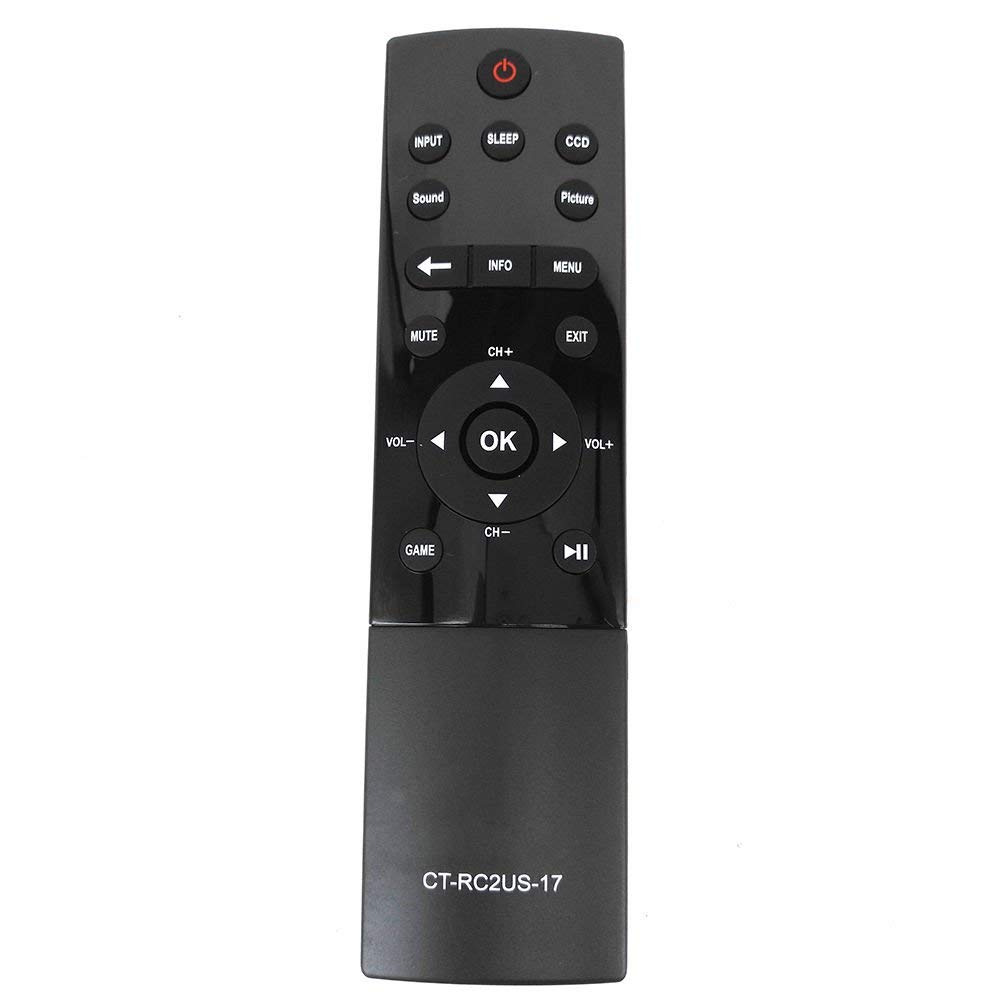
Image: Front of the remote control, displaying button layout.
ຟັງຊັນປຸ່ມ
- ປຸ່ມເປີດປິດ: ເປີດ ຫຼືປິດໂທລະພາບ.
- ປຸ່ມປ້ອນ: Selects the input source (e.g., HDMI 1, HDMI 2, AV).
- ປຸ່ມນອນ: ເປີດໃຊ້ງານຟັງຊັນຕັ້ງເວລານອນຂອງໂທລະພາບ.
- CCD Button: Controls Closed Captioning display.
- ປຸ່ມຮູບ: Adjusts picture modes or settings.
- ປຸ່ມສຽງ: Adjusts sound modes or settings.
- ປິດສຽງ: ປິດສຽງ ຫຼືປິດສຽງຂອງໂທລະພາບ.
- ປຸ່ມຂໍ້ມູນ: Displays on-screen information about the current program or input.
- ປຸ່ມເມນູ: ເຂົ້າເຖິງເມນູຫຼັກຂອງໂທລະພາບ.
- ແຖບນໍາທາງ (ຂຶ້ນ, ລົງ, ຊ້າຍ, ຂວາ, ຕົກລົງ): ໃຊ້ເພື່ອນຳທາງເມນູ ແລະຢືນຢັນການເລືອກ.
- CH+ / CH- ປຸ່ມ: ປ່ຽນຊ່ອງຂຶ້ນ ຫຼື ລົງ.
- VOL+ / VOL- ປຸ່ມ: ເພີ່ມ ຫຼື ຫຼຸດລະດັບສຽງ.
- ປຸ່ມອອກ: ອອກຈາກເມນູຫຼືຫນ້າຈໍປະຈຸບັນ.
- Game Button: May activate a specific game mode or input.
- ການຄວບຄຸມການຫຼິ້ນຄືນ (ຫຼິ້ນ/ຢຸດຊົ່ວຄາວ, ຖອຍຫຼັງ, ຍ່າງໄປໜ້າຢ່າງໄວ): Used for media playback functions.
ບໍາລຸງຮັກສາ
ເພື່ອຮັບປະກັນປະສິດທິພາບສູງສຸດ ແລະ ອາຍຸການໃຊ້ງານທີ່ຍາວນານຂອງຣີໂໝດຄວບຄຸມຂອງທ່ານ, ໃຫ້ປະຕິບັດຕາມຄຳແນະນຳການບຳລຸງຮັກສາເຫຼົ່ານີ້:
- ການປ່ຽນແບັດເຕີຣີ: Replace batteries when the remote's response becomes sluggish or stops working. Always replace both batteries simultaneously with new AAA batteries.
- ທໍາຄວາມສະອາດ: Wipe the remote control with a soft, dry cloth. Avoid using liquid cleaners or abrasive materials, as they may damage the remote's surface or internal components.
- ການເກັບຮັກສາ: ເກັບຮັກສາຣີໂໝດໄວ້ໃນບ່ອນທີ່ເຢັນ, ແຫ້ງ ແລະ ຫ່າງຈາກແສງແດດໂດຍກົງ ແລະ ອຸນຫະພູມສູງເກີນໄປ. ຖ້າເກັບຮັກສາໄວ້ເປັນເວລາດົນ, ໃຫ້ຖອດແບັດເຕີຣີອອກເພື່ອປ້ອງກັນການຮົ່ວໄຫຼ.
ການແກ້ໄຂບັນຫາ
If you encounter issues with your Elekpia CT-RC2US-17 remote control, refer to the following common problems and solutions:
- Remote is unresponsive:
- Ensure there is a clear line of sight between the remote and the TV's infrared sensor.
- ກວດເບິ່ງວ່າໃສ່ແບັດເຕີລີ່ຖືກໃສ່ຢ່າງຖືກຕ້ອງກັບຂົ້ວທີ່ຖືກຕ້ອງຫຼືບໍ່.
- ປ່ຽນແບັດເກົ່າດ້ວຍແບັດ AAA ໃໝ່.
- Limited functionality (e.g., only power and volume work):
- Some users have reported that this replacement remote may have limited functionality on certain Toshiba Smart LED HDTV models, primarily controlling power, volume, and basic menu access. Full navigation or advanced smart TV features might require the original TV remote or a universal remote specifically programmed for those functions.
- Verify your TV model is listed as compatible. If issues persist, consult the TV's original manual for remote control compatibility details.
- ປຸ່ມໜຽວ ຫຼື ບໍ່ຕອບສະໜອງ:
- This may indicate dirt or debris under the buttons. Gently clean around the buttons with a dry cotton swab. Do not attempt to disassemble the remote.
ຂໍ້ມູນຈໍາເພາະ
| ຄຸນສົມບັດ | ລາຍລະອຽດ |
|---|---|
| ໝາຍເລກຕົວແບບ | CT-RC2US-17 |
| ຍີ່ຫໍ້ | ເອເລັກເປຍ |
| ຂະໜາດສິນຄ້າ | 6.5 x 1.5 x 0.5 ນິ້ວ |
| ນ້ໍາຫນັກລາຍການ | 2.08 ອອນ |
| ຕ້ອງໃຊ້ແບັດເຕີຣີ | 2 ຫມໍ້ໄຟ AAA (ບໍ່ລວມ) |
| ເຕັກໂນໂລຊີການເຊື່ອມຕໍ່ | ອິນຟາເຣດ |
| ອຸປະກອນທີ່ເຂົ້າກັນໄດ້ | Toshiba Smart LED HDTVs |
| ຄຸນນະສົມບັດພິເສດ | ການອອກແບບ Ergonomic |
| ຈຳນວນສູງສຸດຂອງອຸປະກອນທີ່ຮອງຮັບ | 1 |
ຂໍ້ມູນສະຫນັບສະຫນູນ
For product support related to your Toshiba TV, please refer to the official Toshiba support channels:
- Webເວັບໄຊ: www.toshiba.com
- Phone (US & Canada Market): 855-527-2411
Note: This remote control is a compatible replacement manufactured by Elekpia. For specific TV features or advanced troubleshooting, consult your Toshiba TV's original user manual.


