1. ການແນະນໍາ ແລະຫຼາຍກວ່າview
The Vortex TK600 is a versatile and powerful LED flashlight designed for various outdoor and everyday carry (EDC) applications. It features a Cree XP-L LED, delivering up to 600 lumens of brightness. Its unique design allows compatibility with both 14500 Lithium batteries and standard AA dry cells, offering flexibility in power sources. The flashlight includes an extension tube to accommodate two AA batteries for extended runtime. Key features include a single-button control for multiple functions, brightness level indication, memory for the last used mode, a convenient belt clip, an orange head ring for easy identification, and a magnetic base for hands-free use.

Figure 1.1: The Vortex TK600 Flashlight, showcasing its compact design and orange head ring.
2. ຄຸນລັກສະນະຂອງຜະລິດຕະພັນ
- Cree XP-L LED: Delivers up to 600 lumens of bright illumination.
- Dual Battery Compatibility: Operates with either a 14500 Lithium battery or AA dry cells.
- ທໍ່ຂະຫຍາຍ: Allows conversion to a 2AA size for extended runtime.
- Direct USB Charging (14500 Battery): The 14500 Lithium battery can be charged directly via a USB cable (5V 1A output or lower).
- ການຄວບຄຸມປຸ່ມດຽວ: Manages all functions including dimming, Strobe, and SOS modes.
- Brightness Level Indication: Provides visual cues for current brightness (High/Middle/Low).
- ໜ່ວຍຄວາມຈຳຮູບແບບ: Remembers the last used mode before turning off.
- Clip ສາຍແອວ: Attached for convenient carrying.
- Orange Head Ring: Enhances visibility and identification.
- ຖານແມ່ເຫຼັກ: Allows attachment to metal surfaces for hands-free lighting.
- Hand Strap Hole: Integrated plastic hole at the bottom for attaching a hand strap.
- ການກະຈາຍຄວາມຮ້ອນ: Tailor-made grooves for efficient heat management.
- ຄວາມທົນທານ: IPX8 water resistance rating and Type III hard anodized aluminum case.
3. ເນື້ອໃນຊຸດ
ເມື່ອເປີດຊຸດ, ໃຫ້ແນ່ໃຈວ່າລາຍການຕໍ່ໄປນີ້ມີຢູ່:
- Vortex TK600 Flashlight Unit
- ທໍ່ຂະຫຍາຍ
- 14500 Lithium Rechargeable Battery (included)
- ສາຍສາກ USB
- ຄູ່ມືຜູ້ໃຊ້ (ເອກະສານນີ້)
- ສາຍແຂນ
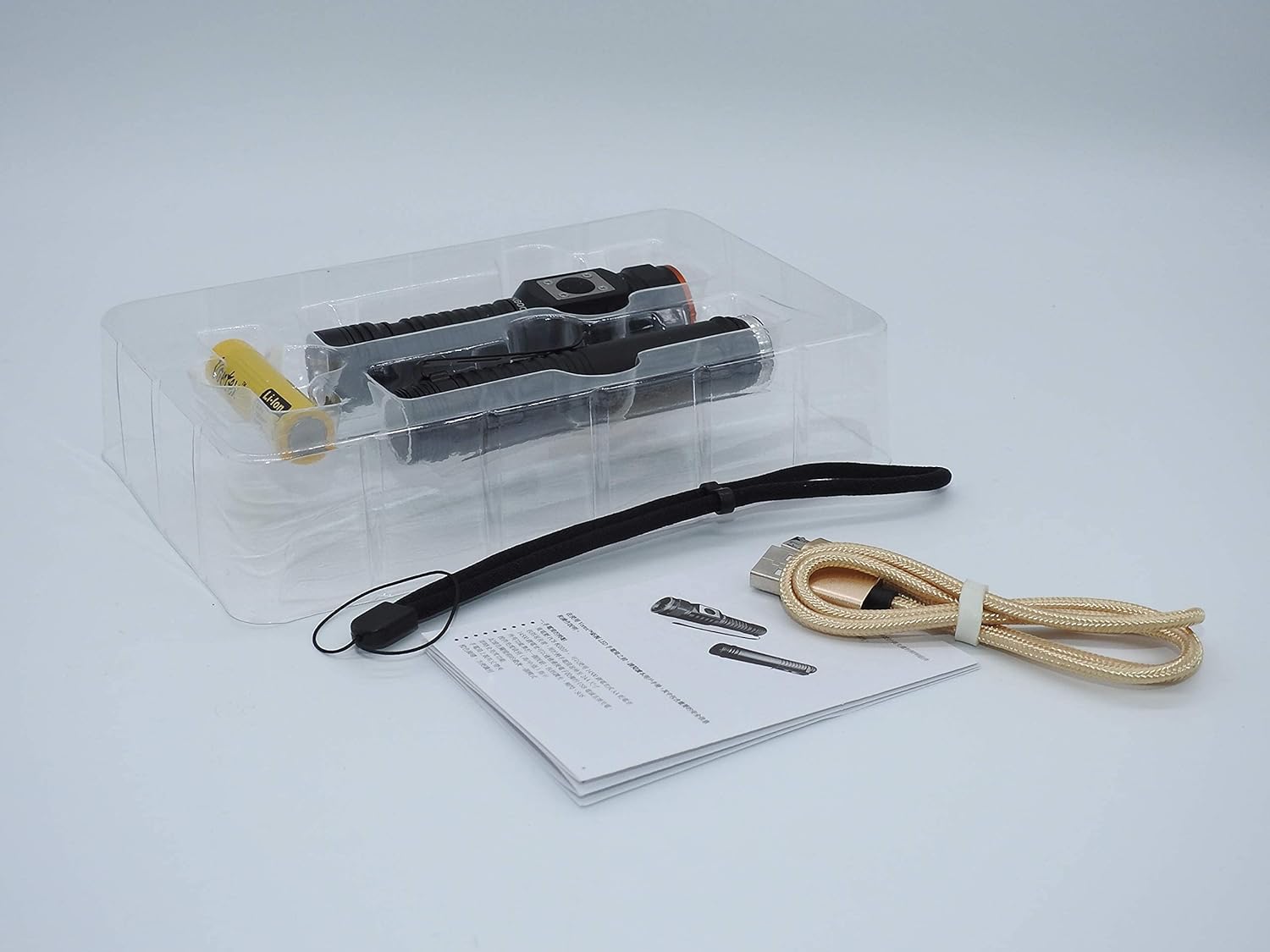
Figure 3.1: Contents of the Vortex TK600 package, including the flashlight, extension tube, battery, and charging cable.
4. ການຕິດຕັ້ງແລະການຕິດຕັ້ງຫມໍ້ໄຟ
4.1. Battery Installation (14500 Lithium Battery)
- ຖອດຝາປິດຫາງຂອງໄຟສາຍ.
- Insert the provided 14500 Lithium battery with the positive (+) end facing towards the flashlight head.
- ໝວກຝາຫາງຄືນຢ່າງປອດໄພ.
4.2. Using with AA Dry Cells (with Extension Tube)
The TK600 can be extended to use two AA dry cells for longer runtime. This requires the included extension tube.
- Unscrew the tail cap and remove the 14500 battery if installed.
- Unscrew the head of the flashlight from the main body.
- Screw the extension tube onto the main body of the flashlight.
- Insert two AA dry cells into the extension tube, ensuring correct polarity (positive (+) end towards the flashlight head).
- Screw the flashlight head back onto the extension tube securely.

Figure 4.1: The Vortex TK600 flashlight with its extension tube detached, illustrating the modular design for battery options.

Figure 4.2: The flashlight body, extension tube, and a 14500 Lithium battery, demonstrating the components for different power configurations.
Video 4.1: This video demonstrates the assembly of the Vortex TK600 flashlight, including how to attach the extension tube and install batteries for both 14500 and AA configurations.
5. ຄໍາແນະນໍາການດໍາເນີນງານ
5.1. ເປີດ/ປິດ
Press the side button once to turn the flashlight on or off.
5.2. Brightness Adjustment (Dimming)
When the flashlight is on, press and hold the side button to cycle through brightness levels (dimming function). Release the button at your desired brightness. The flashlight will blink to indicate the current brightness level:
- Blink 3 times: Full Brightness (100%)
- Blink 2 times: 50% Brightness
- Blink 1 time: 1% Brightness
Video 5.1: This video illustrates the brightness adjustment feature of the TK600, showing how to dim the light and the corresponding blink indications for different brightness levels.
5.3. Strobe Mode
From the ON state, quickly press the side button three times to activate the Strobe mode.
5.4. SOS Mode
From the ON state, press and hold the side button for an extended period (beyond dimming) to activate the SOS mode.
5.5. Charging (14500 Lithium Battery)
The included 14500 Lithium battery can be charged directly. Locate the micro USB port on the battery itself. Connect the provided USB cable to the battery and a power source (e.g., computer USB port, wall adapter) with an output of 5V 1A or lower. The battery will indicate charging status (e.g., red light for charging, green light for full).
Video 5.2: This short video demonstrates the charging process of the 14500 Lithium battery, highlighting the direct USB charging capability.
6. ບໍາລຸງຮັກສາ
- ທໍາຄວາມສະອາດ: ເຊັດຮ່າງກາຍໄຟສາຍດ້ວຍຄວາມອ່ອນ, ງamp ຜ້າ. ຢ່າໃຊ້ເຄື່ອງເຮັດຄວາມສະອາດຂັດຫຼືສານລະລາຍ.
- ການລະບາຍສີ: Periodically apply silicone grease to the O-rings and threads to maintain water resistance and smooth operation.
- ການດູແລຫມໍ້ໄຟ: If not using the flashlight for an extended period, remove the batteries to prevent leakage and damage. Store batteries in a cool, dry place.
- ການເກັບຮັກສາ: Store the flashlight in a dry environment away from direct sunlight and extreme temperatures.
7. ການແກ້ໄຂບັນຫາ
| ບັນຫາ | ສາເຫດທີ່ເປັນໄປໄດ້ | ການແກ້ໄຂ |
|---|---|---|
| ໄຟສາຍບໍ່ເປີດ. | Low or dead battery. Incorrect battery installation. Loose connections. | Charge or replace battery. Ensure correct polarity. Tighten all sections of the flashlight body. |
| ແສງສະຫວ່າງ flickers ຫຼືມືດມົວ. | Low battery. Loose connections. Dirty contacts. | Charge or replace battery. Tighten all sections. Clean battery contacts with a clean cloth. |
| ບໍ່ສາມາດປ່ຽນໂໝດໄດ້. | ປຸ່ມເຮັດວຽກຜິດປົກກະຕິ. | Ensure the button is clean and free of debris. If problem persists, contact customer support. |
8. ຂໍ້ມູນຈໍາເພາະ
| ຄຸນສົມບັດ | ລາຍລະອຽດ |
|---|---|
| ແຫຼ່ງແສງ | Cree XP-L LED |
| ຄວາມສະຫວ່າງສູງສຸດ | 600 Lumens |
| ແຫຼ່ງພະລັງງານ | 14500 Lithium Battery (included) or 2x AA Dry Cells (with extension tube) |
| ສະບັບtage | 3.7 Volts (14500 battery) |
| ວັດສະດຸ | Type III Hard Anodized Aluminum |
| ການຕໍ່ຕ້ານນ້ໍາ | ການຈັດອັນດັບ IPX8 |
| ຂະໜາດ | Approx. 1 x 1 x 4 inches (compact mode) |
| ນ້ຳໜັກ | Approx. 2.4 ounces (without extension tube/batteries) |
| ສີ | MATT ສີດຳ |

Figure 8.1: Detailed diagram illustrating various features and specifications of the Vortex TK600 flashlight.

Figure 8.2: The magnetic base of the TK600 allows it to be attached to metal surfaces for convenient, hands-free illumination.
9. ການຮັບປະກັນແລະການສະຫນັບສະຫນູນ
The Vortex TK600 flashlight comes with a 3-year warranty from the date of purchase. This warranty covers manufacturing defects and material flaws under normal use. It does not cover damage caused by misuse, accidents, unauthorized modifications, or normal wear and tear.
For warranty claims, technical support, or any inquiries, please contact Vortex customer service through the official channels provided at the point of purchase or on the manufacturer's webເວັບໄຊ. ກະລຸນາເກັບຫຼັກຖານການຊື້ຂອງທ່ານໄວ້ເພື່ອກວດສອບການຮັບປະກັນ.


