ແນະນຳ
This manual provides essential instructions for the safe and efficient use of your Smart Kingfisher Rechargeable Lithium Battery and USB Charger. Please read this manual thoroughly before use and retain it for future reference.
ຂໍ້ມູນຄວາມປອດໄພ
- ຄຳເຕືອນ: ຢ່າພະຍາຍາມສາກແບັດທີ່ບໍ່ສາມາດສາກໄດ້.
- ຄຳເຕືອນ: Do not charge batteries from other suppliers unless explicitly stated as compatible.
- ເກັບຮັກສາເຄື່ອງສາກ ແລະ ແບັດເຕີຣີໃຫ້ຫ່າງຈາກນໍ້າ ແລະ ຄວາມຊຸ່ມ.
- Do not disassemble, crush, or puncture the batteries or charger.
- ຫຼີກລ່ຽງການເອົາແບັດເຕີຣີໄປຕາກແດດໂດຍກົງ ຫຼື ໄວ້ໃນອຸນຫະພູມທີ່ສູງເກີນໄປ.
- ຖິ້ມແບດເຕີລີ່ຢ່າງມີຄວາມຮັບຜິດຊອບຕາມກົດລະບຽບທ້ອງຖິ່ນ.
ເນື້ອໃນຊຸດ
ກວດສອບວ່າລາຍການທັງຫມົດແມ່ນມີຢູ່ໃນຊຸດຂອງທ່ານ:
- 2 x 425 Rechargeable Lithium Batteries
- 1 x Dual-Port USB Charger
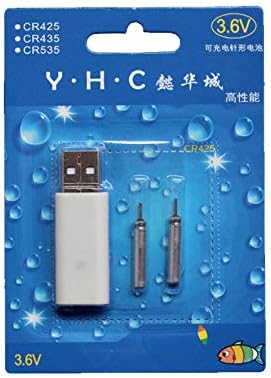
Image: Retail packaging showing the USB charger and two 425 rechargeable batteries.

Image: A pair of Smart Kingfisher 425 rechargeable lithium batteries.
ຕັ້ງຄ່າ
The Smart Kingfisher USB charger is designed for ease of use. No complex setup is required.
- Identify the USB charger and the 425 rechargeable batteries.
- Connect the USB charger to a compatible power source (see "Operating Instructions" for options).

Image: The USB charger unit with its two charging pins visible.
ຄໍາແນະນໍາການດໍາເນີນງານ
ສາກແບັດເຕີລີ
The charger features two ports, allowing for simultaneous charging of two batteries.
- Insert the 425 rechargeable batteries into the charging ports of the USB charger. Ensure a secure connection.
- Connect the USB charger to a power source. Compatible power sources include:
- USB power adapter (wall charger)
- ທະນາຄານພະລັງງານ
- ເຄື່ອງສາກລົດ
- Laptop or PC USB port
- Observe the LED indicator on the charger:
- A LED ສີຂຽວ indicates that the batteries are currently charging.
- A LED ສີແດງ indicates that the batteries are fully charged.
- Charging typically takes approximately 3 hours for a full charge.
- Once fully charged, disconnect the charger from the power source and remove the batteries.
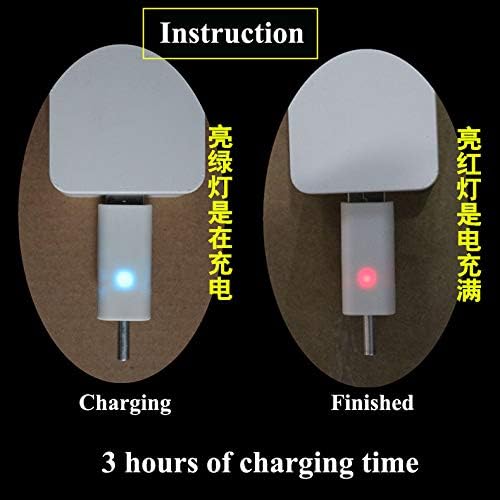
Image: Visual guide for charging status: green light for charging, red light for fully charged. Indicates a 3-hour charging time.

Image: Diagram illustrating multiple methods for charging the device, including car chargers, wall adapters, power banks, and laptops.
ບໍາລຸງຮັກສາ
- Clean the charger and batteries with a dry, soft cloth. Do not use liquids or abrasive cleaners.
- Store the batteries and charger in a cool, dry place when not in use.
- Avoid storing fully discharged batteries for extended periods to prolong their lifespan.
ການແກ້ໄຂບັນຫາ
| ບັນຫາ | ສາເຫດທີ່ເປັນໄປໄດ້ | ການແກ້ໄຂ |
|---|---|---|
| Batteries not charging (no LED indication) |
|
|
| Charging takes longer than 3 hours |
|
|
| Red LED does not turn on after extended charging |
|
|
ຂໍ້ມູນຈໍາເພາະ
- ວັດສະດຸ: ພາດສະຕິກ
- ນ້ຳໜັກສິນຄ້າ: 20 g (total for charger and batteries)
- ປະເພດຫມໍ້ໄຟ: 425 Rechargeable Lithium Battery (compatible with CR425, CR435, CR535)
- ປະເພດເຄື່ອງສາກ: ເຄື່ອງສາກ USB ແບບພົກພາສອງ
- ປ້ອນຂໍ້ມູນ: USB (compatible with various USB power sources)
- ຕົວຊີ້ບອກການສາກໄຟ: Green LED (charging), Red LED (fully charged)
- ເວລາສາກໄຟໂດຍປະມານ: 3 ຊົ່ວໂມງ
ການຮັບປະກັນແລະການສະຫນັບສະຫນູນ
ສຳລັບຂໍ້ມູນການຮັບປະກັນ ຫຼື ການຊ່ວຍເຫຼືອດ້ານເຕັກນິກ, ກະລຸນາອ້າງອີງເຖິງນະໂຍບາຍການສົ່ງຄືນຂອງຜູ້ຂາຍຍ່ອຍ ຫຼື ຕິດຕໍ່ຜູ້ຜະລິດໂດຍກົງ. ເກັບໃບຮັບເງິນຊື້ຂອງທ່ານໄວ້ເປັນຫຼັກຖານການຊື້.
ສໍາລັບການຊ່ວຍເຫຼືອເພີ່ມເຕີມ, ທ່ານອາດຈະໄປຢ້ຽມຢາມ product page on Amazon.com.mx.


