1. ບົດແນະນຳ
ຂອບໃຈສໍາລັບການຊື້asing the Alpha EK-60 61-Key Electronic Piano Keyboard. This manual provides detailed instructions for the proper setup, operation, and maintenance of your new instrument. The EK-60 is designed to offer a rich musical experience with its versatile features, including a wide range of tones and rhythms, intelligent teaching functions, and various connectivity options. Please read this manual thoroughly before using the product to ensure optimal performance and longevity.
2. ຂໍ້ມູນຄວາມປອດໄພ
ເພື່ອປ້ອງກັນໄຟຟ້າຊັອດ, ໄຟໄໝ້ ຫຼື ຄວາມເສຍຫາຍຕໍ່ຕົວເຄື່ອງ, ກະລຸນາປະຕິບັດຕາມຂໍ້ຄວນລະວັງຕໍ່ໄປນີ້:
- Do not expose the keyboard to rain or moisture.
- Do not place objects filled with liquids, such as vases, on the keyboard.
- ຫ້າມປິດຊ່ອງລະບາຍອາກາດໃດໆ.
- ໃຊ້ພຽງແຕ່ອະແດັບເຕີພະລັງງານທີ່ລະບຸໄວ້.
- ຫ້າມຖອດ ຫຼືດັດແປງໜ່ວຍ. ອ້າງອີງການບໍລິການທັງໝົດໃຫ້ກັບບຸກຄະລາກອນທີ່ມີຄຸນວຸດທິ.
- ຮັກສາໃຫ້ໄກຈາກເດັກນ້ອຍນ້ອຍໆ.
3. ເນື້ອໃນຊຸດ
ກະລຸນາກວດເບິ່ງວ່າລາຍການທັງໝົດຕໍ່ໄປນີ້ແມ່ນລວມຢູ່ໃນຊຸດຂອງທ່ານ:
- 1 x Alpha 61-Key Standard Keyboard EK-60
- 1 x ຂາຕັ້ງທີ່ສາມາດປັບໄດ້
- 1 x ຜູ້ຖືແຜ່ນດົນຕີ
- 1 x Power Adapter
- 1 x ຄູ່ມືຜູ້ໃຊ້ (ເອກະສານນີ້)
4. ຜະລິດຕະພັນເກີນview
Familiarize yourself with the components of your Alpha EK-60 keyboard.
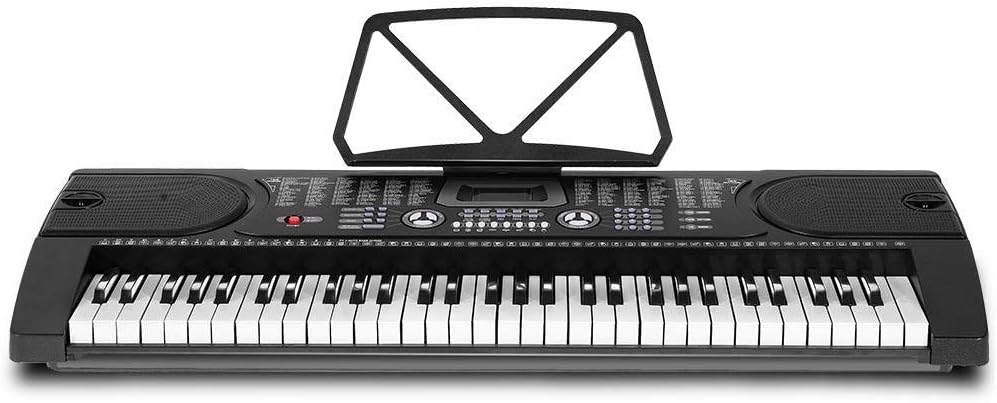
ຮູບ 4.1: ເທິງລົງລຸ່ມ view of the Alpha EK-60 keyboard, highlighting the control panel, integrated speakers, and the 61 standard piano keys.

Figure 4.2: Detail of the LED display for convenient settings adjustment and the battery compartment for portable use.

ຮູບທີ 4.3: View of the multiple jacks including Audio Input, Microphone Input, and Headphone Output for versatile connectivity.
ຄຸນນະສົມບັດທີ່ສໍາຄັນ:
- 61-Key Standard Piano Keyboard
- LED display for easy navigation
- 24 ບົດສາທິດ
- 255 timbres (instrument sounds)
- 255 rhythms (accompaniment styles)
- 61 kinds of keyboard percussions
- 8 Panel Percussions
- Master volume, accompaniment volume, and tempo control
- Intelligent teaching function: one-key, follow and ensemble function
- ຟັງຊັນການຂຽນໂປຼແກຼມ Rhythm
- Auto chord and chord timbre option
- ບັນທຶກ ແລະຟັງຊັນການຫຼິ້ນ
- Sustain and vibrato effects
- Microphone input and speaker output
- Headphone jack for silent practice
- Battery powered option (6 x AA-size batteries, not included)
5. ຕັ້ງຄ່າ
5.1 ການປະກອບຂາຕັ້ງ
- Unpack all components of the adjustable stand.
- Connect the horizontal support bars to the vertical legs, ensuring they are securely fastened.
- Adjust the height of the stand to your preferred playing position using the adjustment knobs. The stand is adjustable from 59cm to 79cm in height.
- Place the keyboard securely on top of the assembled stand.
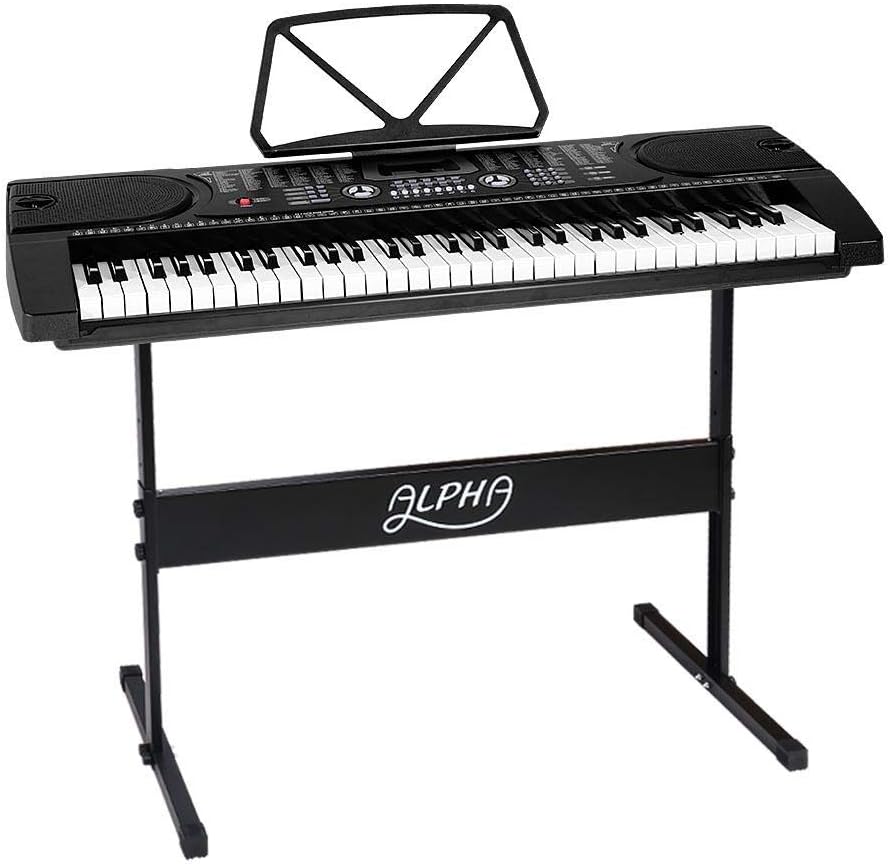
Figure 5.1: The Alpha EK-60 keyboard fully assembled on its adjustable stand, ready for use.
5.2 Powering the Keyboard
The Alpha EK-60 can be powered by the included AC adaptor or by batteries.
ການໃຊ້ AC Adapter:
- Connect the DC plug of the power adaptor to the DC 9V input jack on the rear of the keyboard.
- ສຽບອະແດບເຕີ AC ເຂົ້າໄປໃນເຕົ້າສຽບໄຟມາດຕະຖານ.
ການນໍາໃຊ້ຫມໍ້ໄຟ:
- ຊອກຫາຊ່ອງໃສ່ຫມໍ້ໄຟຢູ່ດ້ານລຸ່ມຂອງແປ້ນພິມ.
- ເປີດຝາປິດຊ່ອງໃສ່ຫມໍ້ໄຟ.
- Insert 6 x AA-size batteries (not included), ensuring correct polarity (+/-).
- ປິດຝາປິດຊ່ອງໃສ່ຫມໍ້ໄຟຢ່າງປອດໄພ.
Note: When using batteries, disconnect the AC adaptor. The keyboard will automatically switch to battery power if the adaptor is removed.
6. ຄໍາແນະນໍາການດໍາເນີນງານ
6.1 ການດໍາເນີນງານພື້ນຖານ
- ເປີດ/ປິດ: ກົດ ພະລັງງານ ເພື່ອເປີດ ຫຼື ປິດແປ້ນພິມ.
- ການຄວບຄຸມລະດັບສຽງ: ໃຊ້ ໝວດ MASTER VOLUME ປຸ່ມເພື່ອປັບລະດັບສຽງໂດຍລວມ.
- ການຄວບຄຸມ Tempo: ໃຊ້ TEMPO buttons to adjust the speed of rhythms and demo songs.
6.2 ການເລືອກສຽງ ແລະ ຈັງຫວະ
- Tones (Timbre): ກົດ TIMBRE button, then use the number pad or +/- buttons to select from 255 different instrument sounds. The selected timbre number will appear on the LED display.
- ຈັງຫວະ: ກົດ ຈັງຫວະ button, then use the number pad or +/- buttons to select from 255 accompaniment rhythms. Press ເລີ່ມ/ຢຸດ to begin or end the rhythm.
6.3 Intelligent Teaching Function
The EK-60 features a 3-step intelligent teaching system to help you learn to play.
- ໜຶ່ງ ປຸ່ມ: Plays the melody of a demo song by pressing any key.
- ຕິດຕາມ: Waits for you to play the correct note before proceeding with the melody.
- ປະກອບ: Plays the accompaniment while you play the melody.
To use, select a demo song, then press the desired teaching mode button (ປຸ່ມດຽວ, ຕິດຕາມ, ຫຼື ENSEMBLE).
6.4 ການບັນທຶກແລະການຫຼິ້ນ
The keyboard allows you to record your performances.
- ກົດ REC button to start recording. The LED display will indicate recording mode.
- Play your desired melody.
- ກົດ ຫຼິ້ນ button to stop recording and play back your recorded performance.
6.5 ການເຊື່ອມຕໍ່
- ຫູຟັງ Jack: ເຊື່ອມຕໍ່ຫູຟັງກັບ ຫູຟັງ jack ສຳລັບການຝຶກຊ້ອມແບບງຽບໆ.
- ການປ້ອນຂໍ້ມູນໄມໂຄຣໂຟນ: ເຊື່ອມຕໍ່ໄມໂຄຣໂຟນກັບ ເຂົ້າຮ່ວມ MIC jack to sing along while playing.
- ສຽງເຂົ້າ/ອອກ: ໃຊ້ ການເຂົ້າເຖິງ AUDIO to connect external audio devices (e.g., MP3 player) and the ໂອດUDອບ OUTPUT to connect to external speakers or an ampມີຊີວິດຊີວາ.
7. ບໍາລຸງຮັກສາ
Proper care will ensure the longevity of your Alpha EK-60 keyboard.
- ທໍາຄວາມສະອາດ: Wipe the keyboard with a soft, dry cloth. For stubborn dirt, use a slightly damp cloth and then wipe dry immediately. Do not use abrasive cleaners, waxes, or solvents.
- ການເກັບຮັກສາ: When not in use for extended periods, store the keyboard in a cool, dry place away from direct sunlight and extreme temperatures. If using batteries, remove them before long-term storage to prevent leakage.
- ການຈັດການ: ຫຼີກລ້ຽງການຫຼຸດລົງແປ້ນພິມຫຼືການເຮັດໃຫ້ມັນມີຜົນກະທົບທີ່ເຂັ້ມແຂງ.
8. ການແກ້ໄຂບັນຫາ
If you encounter any issues with your keyboard, refer to the following table for common problems and solutions.
| ບັນຫາ | ສາເຫດທີ່ເປັນໄປໄດ້ | ການແກ້ໄຂ |
|---|---|---|
| ບໍ່ມີສຽງ | Volume is too low; Power is off; Headphones connected; Faulty power connection. | Increase master volume; Turn on power; Disconnect headphones; Check power adaptor or replace batteries. |
| ປຸ່ມບໍ່ຕອບສະໜອງ | Keyboard is in a teaching mode; Internal malfunction. | Exit teaching mode; Power cycle the keyboard. If issue persists, contact support. |
| Rhythm/Demo song not playing | Rhythm/Demo song not selected; START/STOP button not pressed. | Select a rhythm/demo song; Press START/STOP. |
| ສຽງບິດເບືອນ | Volume too high; External device connected incorrectly. | Reduce volume; Check connections of external devices. |
ຖ້າບັນຫາຍັງຄົງຢູ່ຫຼັງຈາກພະຍາຍາມແກ້ໄຂເຫຼົ່ານີ້, ກະລຸນາຕິດຕໍ່ຝ່າຍຊ່ວຍເຫຼືອລູກຄ້າ.
9. ຂໍ້ມູນຈໍາເພາະ
| ຄຸນສົມບັດ | ລາຍລະອຽດ |
|---|---|
| ຕົວແບບ | EK-60 |
| ກະແຈ | 61 Standard Piano Keys |
| Key Width | 1.9 ຊຕມ |
| Tones (Timbres) | 255 |
| ຈັງຫວະ | 255 |
| ເພງສາທິດ | 24 |
| Polyphony ສູງສຸດ | 8 |
| ການເຊື່ອມຕໍ່ | Audio Input, Audio Output, Headphone Jack (3.5mm), Microphone Input (3.5mm) |
| ການສະຫນອງພະລັງງານ | AC Adaptor (DC 9V) or 6 x AA-size batteries (not included) |
| ຂະໜາດ (ຄີບອດ) | 86ຊມ (L) x 32.5ຊມ (ວ) |
| Dimensions (Overall with Stand) | 86cm (L) x 32.5cm (W) x 59-79cm (H) |
| ນ້ຳໜັກ | 6.2 ກິໂລກຣາມ |
| ສີ | ດຳ |

Figure 9.1: Detailed dimensions of the Alpha EK-60 keyboard and its adjustable stand.
10. ການຮັບປະກັນແລະການສະຫນັບສະຫນູນ
10.1 ຂໍ້ມູນການຮັບປະກັນ
The Alpha EK-60 keyboard comes with a ຮັບປະກັນ 1 ປີ from the date of purchase. This warranty covers manufacturing defects and ensures the product is free from defects in material and workmanship under normal use. It does not cover damage caused by misuse, accident, unauthorized modification, or normal wear and tear.
10.2 ສະຫນັບສະຫນູນລູກຄ້າ
For any queries, technical assistance, or warranty claims, please contact the seller or manufacturer directly. Please have your purchase receipt and product model number (EK-60) ready when contacting support.


