1. ຜະລິດຕະພັນເກີນview
The SilverStone Strider Gold S Series SST-ST75F-GS-V3 is a 750W fully modular ATX power supply designed for desktop computers. It features 80 PLUS Gold certification for high efficiency, a compact 140mm depth for easy integration, and a class-leading single +12V rail for stable power delivery. This power supply is built to provide reliable and continuous power output under various operating conditions.
- 750 Watt Maximum DC Output: ສະຫນອງ ample power for high-performance systems.
- ການອອກແບບກະທັດຮັດ: With a depth of 140mm, it allows for easy installation in various PC cases.
- 100% Modular Cables: Enhances cable management and airflow within the system.
- ການຮັບຮອງ 80 PLUS Gold: Ensures high power efficiency, reducing heat and operating costs.
- Class-Leading Single +12V Rail: Delivers stable and consistent power to critical components.
- Strict 3% Voltage Regulation and Low Ripple & Noise: Guarantees clean and reliable power.
- 24/7 Continuous Power Output: Operates reliably with 40℃ operating temperature.
- Silent Running 120mm Fan: Features an 18dBA minimum noise level for quiet operation.

Image: The SilverStone Strider Gold S 750W power supply shown alongside its retail packaging.
2. ຂໍ້ມູນຄວາມປອດໄພ
ກະລຸນາອ່ານແລະເຂົ້າໃຈຄໍາແນະນໍາດ້ານຄວາມປອດໄພທັງຫມົດກ່ອນທີ່ຈະຕິດຕັ້ງຫຼືປະຕິບັດການສະຫນອງພະລັງງານນີ້. ການບໍ່ປະຕິບັດຕາມຄໍາແນະນໍາເຫຼົ່ານີ້ອາດຈະເຮັດໃຫ້ເກີດການຊ໊ອກໄຟຟ້າ, ໄຟໄຫມ້, ຫຼືຄວາມເສຍຫາຍຕໍ່ຜະລິດຕະພັນແລະອົງປະກອບທີ່ເຊື່ອມຕໍ່.
- Hazardous Area: This device is not designed to be user serviceable and contains high voltage inside that can be dangerous when opened. In the event of malfunction, please notify your dealer or local distributor for service.
- ການຕິດຕັ້ງແບບມືອາຊີບ: Installation should be performed by qualified personnel to prevent damage or injury.
- ການລະບາຍອາກາດ: ຮັບປະກັນໃຫ້ມີລະບາຍອາກາດພຽງພໍອ້ອມຮອບແຫຼ່ງຈ່າຍໄຟ. ຢ່າອຸດຕັນຊ່ອງລະບາຍອາກາດໃດໆ.
- ຄວາມຊຸ່ມ: ຢ່າໃຫ້ແຫຼ່ງຈ່າຍໄຟສຳຜັດກັບນ້ຳ ຫຼື ຄວາມຊຸ່ມຊື່ນຫຼາຍເກີນໄປ.
- ແຫຼ່ງພະລັງງານ: Connect the power supply only to a grounded power outlet.
- ເກີນ ກຳ ລັງ: Do not overload the power supply beyond its specified wattage.
- ການຄຸ້ມຄອງສາຍໄຟ: ໃຫ້ແນ່ໃຈວ່າສາຍເຄເບີ້ນທັງໝົດຖືກສົ່ງຢ່າງຖືກຕ້ອງ ແລະປອດໄພເພື່ອປ້ອງກັນຄວາມເສຍຫາຍ ຫຼືການລົບກວນ.

ຮູບພາບ: ເທິງ view of the power supply showing the product label, including electrical specifications and safety warnings in multiple languages.
3. ເນື້ອໃນຊຸດ
ກວດສອບວ່າລາຍການທັງຫມົດທີ່ລະບຸໄວ້ຂ້າງລຸ່ມນີ້ແມ່ນລວມຢູ່ໃນຊຸດຜະລິດຕະພັນຂອງທ່ານ:
- SilverStone Strider Gold S 750W Power Supply (SST-ST75F-GS-V3)
- ຊຸດສາຍໄຟແບບໂມດູນ (ຫຼາຍປະເພດສຳລັບເມນບອດ, CPU, PCIe, SATA, ອຸປະກອນຕໍ່ພ່ວງ)
- ສາຍໄຟ AC
- screws ການຕິດຕັ້ງ
- User Manual / Warranty Information Booklet
- Cable Ties / Velcro Straps (for cable management)

Image: A complete set of modular cables, mounting screws, cable ties, and documentation included with the power supply.
4. ການຕິດຕັ້ງແລະການຕິດຕັ້ງ
Follow these steps to properly install your SilverStone Strider Gold S 750W power supply into your computer system.
4.1 ລາຍການກວດກ່ອນການຕິດຕັ້ງ
- ກວດໃຫ້ແນ່ໃຈວ່າລະບົບຄອມພິວເຕີຂອງທ່ານຖືກປິດ ແລະຖອດປລັກສຽບອອກຈາກປລັກສຽບໄຟ.
- ເປີດເຄສຄອມພິວເຕີຂອງທ່ານເພື່ອເຂົ້າເຖິງພື້ນທີ່ຕິດຕັ້ງແຫຼ່ງຈ່າຍໄຟ.
- If replacing an existing power supply, carefully disconnect all cables and remove it.
4.2 ການຕິດຕັ້ງທາງດ້ານຮ່າງກາຍ
- Position the SilverStone SST-ST75F-GS-V3 power supply into the designated PSU bay in your computer case. Ensure the fan is oriented correctly for optimal airflow (typically facing downwards if there's a bottom vent, or upwards if not).
- ຍຶດແຫຼ່ງຈ່າຍໄຟເຂົ້າກັບເຄສໂດຍໃຊ້ສະກູຕິດຕັ້ງທີ່ໃຫ້ມາ.
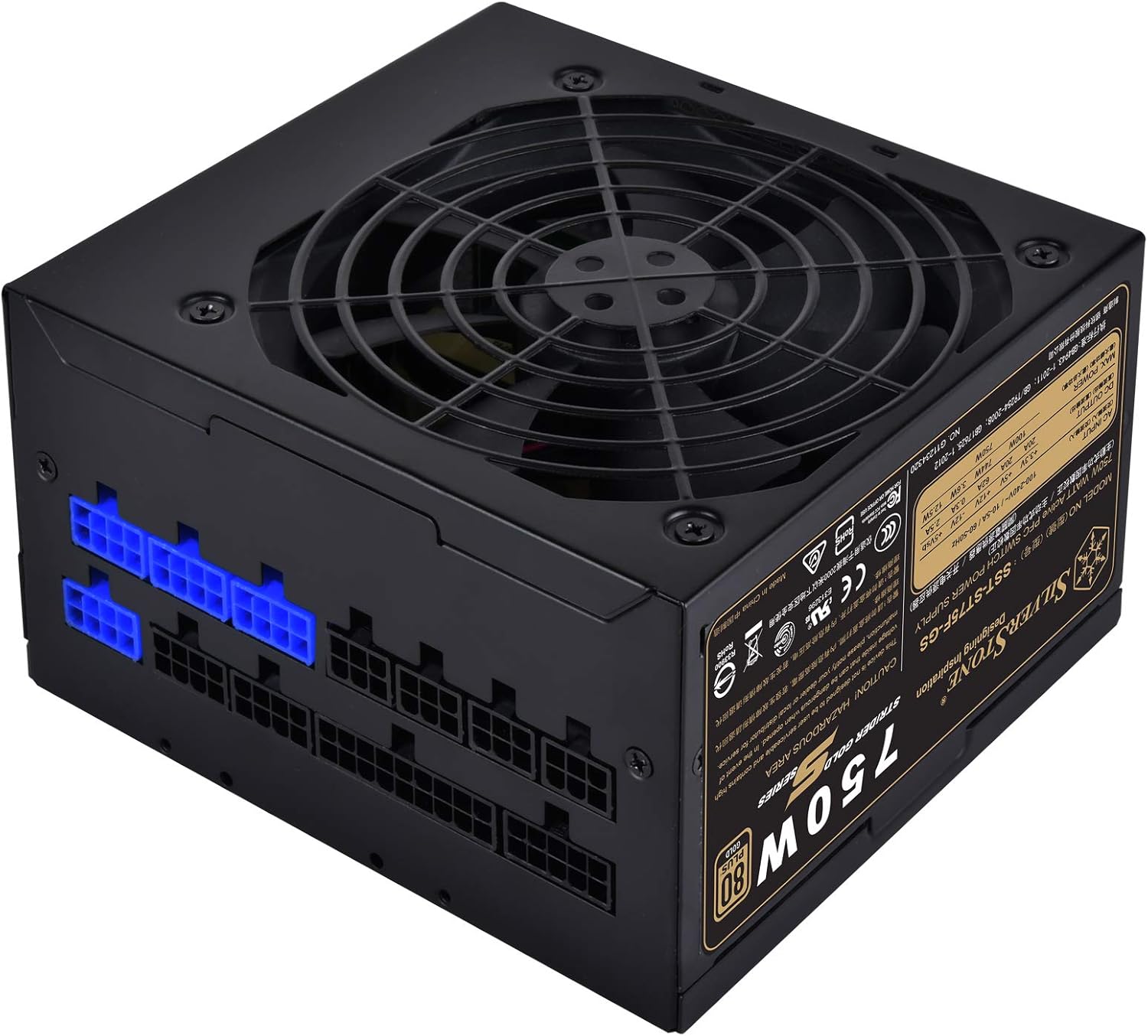
ຮູບພາບ: ເປັນມຸມ view of the power supply, highlighting the modular cable connection ports on one side.
4.3 Cable Connection Guide
As a fully modular power supply, you only need to connect the cables required for your system components. This improves cable management and airflow.
- 24-pin ATX Motherboard Cable: Connect the large 24-pin cable from the PSU to the corresponding port on your motherboard.
- 8-pin (4+4) EPS/ATX 12V CPU Cable: Connect the 8-pin or split 4+4-pin cable to the CPU power connector on your motherboard. Some motherboards may require two such connectors.
- PCI-E Cables: For graphics cards, connect the appropriate 6-pin or 8-pin (6+2) PCI-E power cables from the PSU to your graphics card(s). Use separate cables for each connector on the GPU if possible for better power delivery.
- ສາຍໄຟ SATA: ເຊື່ອມຕໍ່ສາຍໄຟ SATA ກັບ SSDs, HDDs ແລະ optical drives ຂອງທ່ານ.
- ສາຍໄຟຕໍ່ພ່ວງ (Molex): Connect Molex cables for any other components requiring this type of power, such as case fans or older peripherals.

ຮູບພາບ: A ລາຍລະອຽດ view of the modular cable connection panel, showing various types of ports for different cables.
Ensure all connections are firm and secure. After connecting all necessary cables, organize them using the provided cable ties or Velcro straps to improve airflow and aesthetics.
5. ການດໍາເນີນງານ
Once the power supply is installed and all components are connected, you can power on your system.
- Connect the AC power cord to the power supply's inlet and then to a grounded wall outlet.
- Flip the power switch on the back of the power supply to the 'ON' (I) position.
- ກົດປຸ່ມເປີດປິດຢູ່ເທິງເຄສຄອມພິວເຕີຂອງທ່ານເພື່ອເລີ່ມຕົ້ນລະບົບ.
5.1 ການດໍາເນີນງານພັດລົມ
The 120mm fan in the SST-ST75F-GS-V3 is designed for silent operation, with a minimum noise level of 18dBA. The fan speed will adjust automatically based on the power supply's load and temperature to maintain optimal cooling while minimizing noise.

ຮູບພາບ: A close-up view of the 120mm cooling fan integrated into the power supply unit.
6. ບໍາລຸງຮັກສາ
Proper maintenance can extend the lifespan of your power supply and ensure stable operation.
- ທໍາຄວາມສະອາດ: Periodically clean the exterior of the power supply and its fan grille to prevent dust buildup. Use compressed air to gently clear dust from the fan blades and vents. Ensure the system is powered off and unplugged before cleaning.
- ສະພາບແວດລ້ອມ: Operate the power supply in a clean, dry, and well-ventilventilated environment. Avoid extreme temperatures.
- Cable Checks: ໃຫ້ກວດສອບການເຊື່ອມຕໍ່ສາຍໄຟແບບໂມດູນທັງໝົດເປັນບາງຄັ້ງຄາວເພື່ອຮັບປະກັນວ່າພວກມັນຍັງຄົງປອດໄພ.
7. ການແກ້ໄຂບັນຫາ
If you encounter issues with your power supply, try the following basic troubleshooting steps:
- ບໍ່ມີພະລັງງານ:
- Ensure the AC power cord is securely connected to both the power supply and the wall outlet.
- ກວດສອບວ່າສະວິດໄຟຢູ່ດ້ານຫຼັງຂອງ PSU ຢູ່ໃນຕຳແໜ່ງ 'ON' (I) ແລ້ວ.
- ກວດສອບວ່າເຕົ້າສຽບຝາເຮັດວຽກໂດຍການສຽບອຸປະກອນອື່ນ.
- Ensure all modular cables are correctly and firmly seated in both the PSU and the components.
- ຄວາມບໍ່ສະຖຽນຂອງລະບົບ/ການປິດແບບສຸ່ມ:
- ກວດເບິ່ງການເຊື່ອມຕໍ່ສາຍເຄເບີ້ນວ່າງ.
- Ensure adequate ventilation within the PC case to prevent overheating.
- ຢືນຢັນວ່າຄວາມຕ້ອງການພະລັງງານຂອງລະບົບຂອງທ່ານບໍ່ເກີນຄວາມຈຸ 750W ຂອງ PSU.
- ສຽງພັດລົມດັງ:
- ເຊັດຂີ້ຝຸ່ນທີ່ສະສົມຢູ່ໃນພັດລົມ ແລະ ຊ່ອງລະບາຍອາກາດ.
- Ensure the PSU is not operating under excessive load for prolonged periods.
If issues persist after performing these steps, please refer to the warranty information or contact SilverStone customer support.
8. ຂໍ້ມູນຈໍາເພາະ
Detailed technical specifications for the SilverStone Strider Gold S 750W Power Supply (SST-ST75F-GS-V3).
| ຄຸນສົມບັດ | ຂໍ້ມູນຈໍາເພາະ |
|---|---|
| ໝາຍເລກຕົວແບບ | SST-ST75F-GS-V3 |
| Maximum DC Output | 750W |
| ການຢັ້ງຢືນ 80 PLUS | ຄໍາ |
| ປັດໄຈແບບຟອມ | ATX |
| ການອອກແບບການສະຫນອງພະລັງງານ | Modular ຢ່າງເຕັມສ່ວນ |
| ຂະໜາດ (LxWxH) | 140mm x 150mm x 86mm (5.51 x 5.91 x 3.39 ນິ້ວ) |
| ນ້ຳໜັກ | 1.31 ກິໂລ (2.89 ປອນ) |
| ວິທີການເຮັດຄວາມເຢັນ | ອາກາດ (ພັດລົມ 120 ມມ) |
| Minimum Fan Noise | 18dBA |
| ອຸນຫະພູມປະຕິບັດການ | 0 ℃ ~ 40 ℃ |
| ສະບັບtage ລະບຽບ | ±3% |
| Ripple & Noise | ±3% |
8.1 Electrical Output Specifications
| ລົດໄຟ | +3.3V | +5V | +12V | -12V | +5Vsb |
|---|---|---|---|---|---|
| ສູງສຸດທີ່ເຄຍ. ປັດຈຸບັນຜົນໄດ້ຮັບ | 20A | 20A | 62A | 0.3A | 2.5A |
| ສູງສຸດທີ່ເຄຍ. ພະລັງງານລວມ | 100W | 744W | 3.6W | 12.5W | |
| ສູງສຸດທັງໝົດ. ພະລັງງານ | 750W | ||||
9. ການຮັບປະກັນແລະການສະຫນັບສະຫນູນ
SilverStone Technology provides a limited warranty for its products. The specific terms and duration of the warranty may vary by region and product. Please refer to the warranty information booklet included with your product for detailed terms and conditions.
For technical support, warranty claims, or further assistance, please visit the official SilverStone Technology website or contact your local dealer or distributor. You can find contact information and support resources on their webເວັບໄຊ.
ຊັບພະຍາກອນອອນໄລນ໌: www.silverstonetek.com


