1. ບົດແນະນຳ
This manual provides essential information for the safe and efficient operation of your Xerox VersaLink C8000/DT Color Printer. It covers setup, daily use, maintenance, and troubleshooting. Please read this manual thoroughly before using the printer and retain it for future reference.
2. ສິ່ງທີ່ຢູ່ໃນກ່ອງ
Verify that all items are present in the packaging.
- Xerox VersaLink C8000/DT Color Printer
- ສາຍໄຟ
- ເອກະສານ (ຄູ່ມືນີ້, ຂໍ້ມູນຄວາມປອດໄພ)
- Initial Toner Cartridges (Black, Cyan, Magenta, Yellow)
3. ຕັ້ງຄ່າ
3.1 ການຫຸ້ມຫໍ່
- ລະມັດລະວັງເອົາເຄື່ອງພິມອອກຈາກການຫຸ້ມຫໍ່ຂອງມັນ.
- ເອົາເທບປ້ອງກັນແລະວັດສະດຸຫຸ້ມຫໍ່ທັງຫມົດອອກຈາກພາຍນອກແລະພາຍໃນຂອງເຄື່ອງພິມ. ອ້າງອີງເຖິງຄູ່ມືການຕັ້ງຄ່າດ່ວນສຳລັບສະຖານທີ່ສະເພາະ.
3.2 ການຈັດວາງທາງດ້ານຮ່າງກາຍ
Place the printer on a sturdy, level surface capable of supporting its weight (approximately 178 pounds). Ensure adequate ventilation around the printer.

ຮູບທີ 3.2.1: ດ້ານໜ້າ view of the Xerox VersaLink C8000/DT Color Printer, showing its overall design and paper trays.
3.3 ການເຊື່ອມຕໍ່ພະລັງງານ
- ເຊື່ອມຕໍ່ສາຍໄຟເຂົ້າກັບຊ່ອງສຽບໄຟຟ້າຂອງເຄື່ອງພິມ.
- ສຽບສາຍໄຟອີກດ້ານໜຶ່ງເຂົ້າໄປໃນປ້ຳໄຟຟ້າທີ່ມີສາຍດິນ.
- ກົດປຸ່ມເປີດປິດເພື່ອເປີດເຄື່ອງພິມ.
3.4 ການຕັ້ງຄ່າເບື້ອງຕົ້ນ ແລະການຕັ້ງຄ່າເຄືອຂ່າຍ
Upon first power-on, the printer's user interface will guide you through initial setup steps, including language selection, date/time, and network configuration. The printer supports Ethernet connectivity.

ຮູບທີ 3.4.1: Close-up of the printer's control panel, displaying the touch screen interface with various application icons.
For network connection, connect an Ethernet cable from your network router or switch to the Ethernet port on the printer. Follow the on-screen prompts to complete network settings.
4. ຄໍາແນະນໍາການດໍາເນີນງານ
4.1 ການພິມພື້ນຖານ
- ໃຫ້ແນ່ໃຈວ່າເຄື່ອງພິມເປີດຢູ່ ແລະ ເຊື່ອມຕໍ່ກັບເຄືອຂ່າຍຂອງທ່ານ.
- Load paper into the paper trays. The printer supports standard paper sizes up to 8.5 x 14 inches.
- From your computer or mobile device, select the Xerox VersaLink C8000/DT as your printer.
- Adjust print settings (e.g., color, duplex, paper type) as needed.
- ເລີ່ມວຽກພິມ.
4.2 ການເຊື່ອມຕໍ່ມືຖື ແລະ ຄລາວດ໌
The VersaLink C8000/DT offers instant connectivity to cloud services and mobile devices directly from its user interface. Access pre-loaded, cloud-hosted services to manage documents and print from various platforms. Compatible with smartphones and controlled via an app.
4.3 ການພິມສອງຊັ້ນ
The printer supports automatic dual-sided (duplex) printing. This feature can be enabled through the print settings on your computer or directly from the printer's control panel for supported functions.
5. ບໍາລຸງຮັກສາ
5.1 ການປ່ຽນຕະຫລັບຫມຶກ
When a toner cartridge is low or empty, the printer's control panel will display a notification.
- ເປີດຝາດ້ານໜ້າຂອງເຄື່ອງພິມ.
- Locate the toner cartridge that needs replacement (Black, Cyan, Magenta, or Yellow).
- Grasp the handle of the cartridge and pull it straight out.
- ຖອດຕອກໝຶກໃໝ່ອອກ ແລະ ສັ່ນມັນຄ່ອຍໆເພື່ອແຈກຢາຍໂຕນ.
- ສຽບໃສ່ໄສ້ຕອງໃຫມ່ເຂົ້າໄປໃນຊ່ອງທີ່ສອດຄ້ອງກັນຈົນກ່ວາມັນກົດເຂົ້າໄປໃນສະຖານທີ່.
- ປິດຝາດ້ານຫນ້າ.
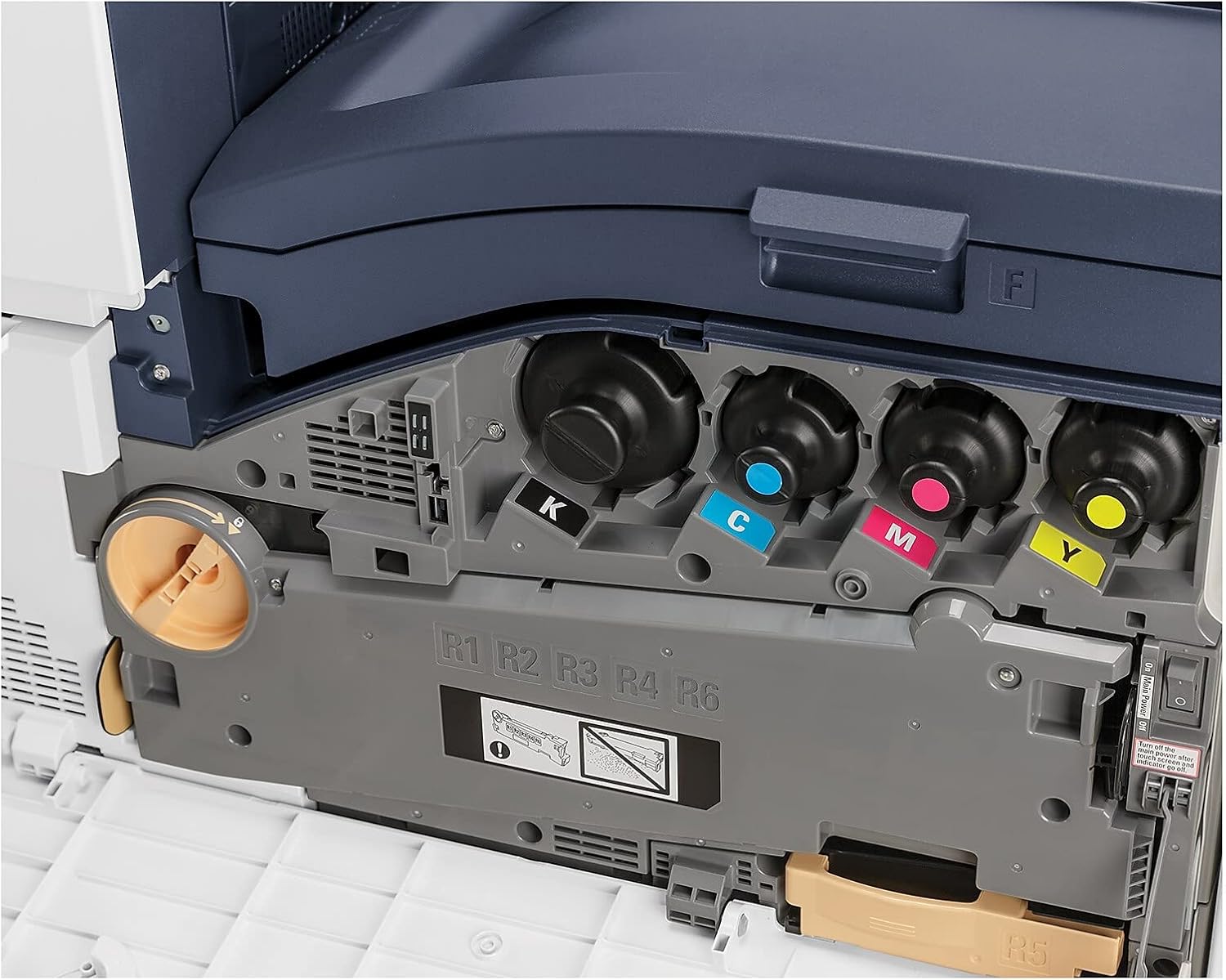
ຮູບທີ 5.1.1: View of the toner cartridge compartment, showing the slots for Black (K), Cyan (C), Magenta (M), and Yellow (Y) toner.
5.2 ການທໍາຄວາມສະອາດ
Regularly clean the exterior of the printer with a soft, lint-free cloth. Do not use abrasive cleaners or solvents. Refer to the printer's internal cleaning procedures via the control panel for specific instructions on cleaning internal components.
6. ການແກ້ໄຂບັນຫາ
This section provides solutions to common issues. For more complex problems, refer to the online support resources or contact Xerox customer service.
- ເຄື່ອງພິມບໍ່ຕອບສະໜອງ: Check power connection, network cable, and ensure the printer is powered on. Restart the printer and the connected device.
- ບັນຫາຄຸນນະພາບການພິມ: Check toner levels. Perform a print quality calibration from the printer's control panel. Ensure correct paper type settings.
- ເຈ້ຍຕິດ: Follow the on-screen instructions or refer to the printer's internal guides for clearing paper jams from specific areas.
- ບັນຫາການເຊື່ອມຕໍ່ເຄືອຂ່າຍ: Verify Ethernet cable connection. Check network settings on the printer and your computer. Restart network devices.
7. ຂໍ້ມູນຈໍາເພາະ
| ຄຸນສົມບັດ | ລາຍລະອຽດ |
|---|---|
| ຍີ່ຫໍ້ | ເຊຣັອກ |
| ໝາຍເລກຕົວແບບ | C8000/DT |
| ເຕັກໂນໂລຊີການພິມ | ເລເຊີ |
| ຜົນຜະລິດເຄື່ອງພິມ | ສີ |
| ຄວາມໄວການພິມສູງສຸດ (ສີ) | 42 ppm |
| ຄວາມໄວການພິມສູງສຸດ (ໂມໂນໂຄມ) | 42 ppm |
| ຄວາມລະອຽດການພິມສີສູງສຸດ | 1200 x 2400 dpi |
| ຄວາມລະອຽດການພິມສີດໍາ ແລະສີຂາວສູງສຸດ | 1200 x 2400 dpi |
| ການພິມສອງຊັ້ນ | ອັດຕະໂນມັດ |
| ເຕັກໂນໂລຊີການເຊື່ອມຕໍ່ | ອີເທີເນັດ |
| ການໂຕ້ຕອບຮາດແວ | ອີເທີເນັດ |
| ອຸປະກອນທີ່ເຂົ້າກັນໄດ້ | ໂທລະສັບສະຫຼາດ |
| ວິທີການຄວບຄຸມ | ແອັບ |
| ຂະໜາດມີເດຍສູງສຸດ | 8.5 x 14 ນິ້ວ |
| ປະເພດສື່ສິ່ງພິມ | ຊອງຈົດໝາຍ, ເຈ້ຍ (ທຳມະດາ) |
| ຄວາມອາດສາມາດຂອງແຜ່ນປ້ອນຂໍ້ມູນສູງສຸດ | 45 |
| ຈຳນວນຖາດ | 2 |
| ນ້ໍາຫນັກລາຍການ | 178 ປອນ |
| ຂະໜາດສິນຄ້າ | 28.5 x 24.4 x 31.9 ນິ້ວ |
| ຄວາມອາດສາມາດເກັບຮັກສາຫນ່ວຍຄວາມຈໍາ | 4096 MB |
| ວັດtage | 2300 ວັດ |
| ປະເພດເຄື່ອງສະແກນ | ຕຽງນອນ |
| ຟັງຊັນເຄື່ອງພິມເພີ່ມເຕີມ | All In One |
8. ການຮັບປະກັນແລະການສະຫນັບສະຫນູນ
8.1 ການຮັບປະກັນຜະລິດຕະພັນ
The Xerox VersaLink C8000/DT Color Printer comes with a standard one-year warranty. For detailed terms and conditions, please refer to the warranty documentation included with your product or visit the official Xerox support webເວັບໄຊ.
8.2 ສະຫນັບສະຫນູນລູກຄ້າ
For technical assistance, troubleshooting, or service requests, please contact Xerox customer support. Support contact information can typically be found on the Xerox webເວັບໄຊ ຫຼືໃນເອກະສານທີ່ສະໜອງໃຫ້ກັບເຄື່ອງພິມຂອງເຈົ້າ.