ແນະນຳ
The Nyko Wireless Core Controller is designed to enhance your gaming experience across multiple platforms, including Nintendo Switch, Android devices, and PC. This controller features an ergonomic design, reliable Bluetooth connectivity, and a programmable turbo function. Please read this manual thoroughly to ensure proper setup and operation of your new controller.
ມີຫຍັງແດ່
ກວດສອບວ່າລາຍການທັງຫມົດແມ່ນມີຢູ່ໃນຊຸດ:
- 1x Nyko Wireless Core Controller
- 1x ສາຍສາກ USB Type-C

Image: Contents of the Nyko Wireless Core Controller package, showing the controller and its USB Type-C charging cable.
ຄຸນສົມບັດ
The Nyko Wireless Core Controller offers a range of features for an optimized gaming experience:
- ການເຊື່ອມຕໍ່ແບບໄຮ້ສາຍ: Utilizes Bluetooth for a responsive, lag-free connection.
- ການອອກແບບ Ergonomic: Full-sized controller with comfortable grips for extended gameplay sessions.
- ຟັງຊັນ Turbo: Programmable turbo button for any face buttons or triggers, allowing for rapid, automatic inputs.
- ແບັດເຕີຣີທີ່ສາມາດສາກໄດ້: Internal battery provides up to 20 hours of playtime, recharged via the included USB Type-C cable.
- ການຄວບຄຸມການເຄື່ອນໄຫວ: Integrated gyroscope supports games requiring motion control.
- ການສັ່ນເຕືອນ: ສະໜອງຄຳຕິຊົມ haptic immersive ໃນລະຫວ່າງການຫຼິ້ນເກມ.
- ຄວາມເຂົ້າກັນໄດ້ຫຼາຍເວທີ: Works with Nintendo Switch, Android, and PC.
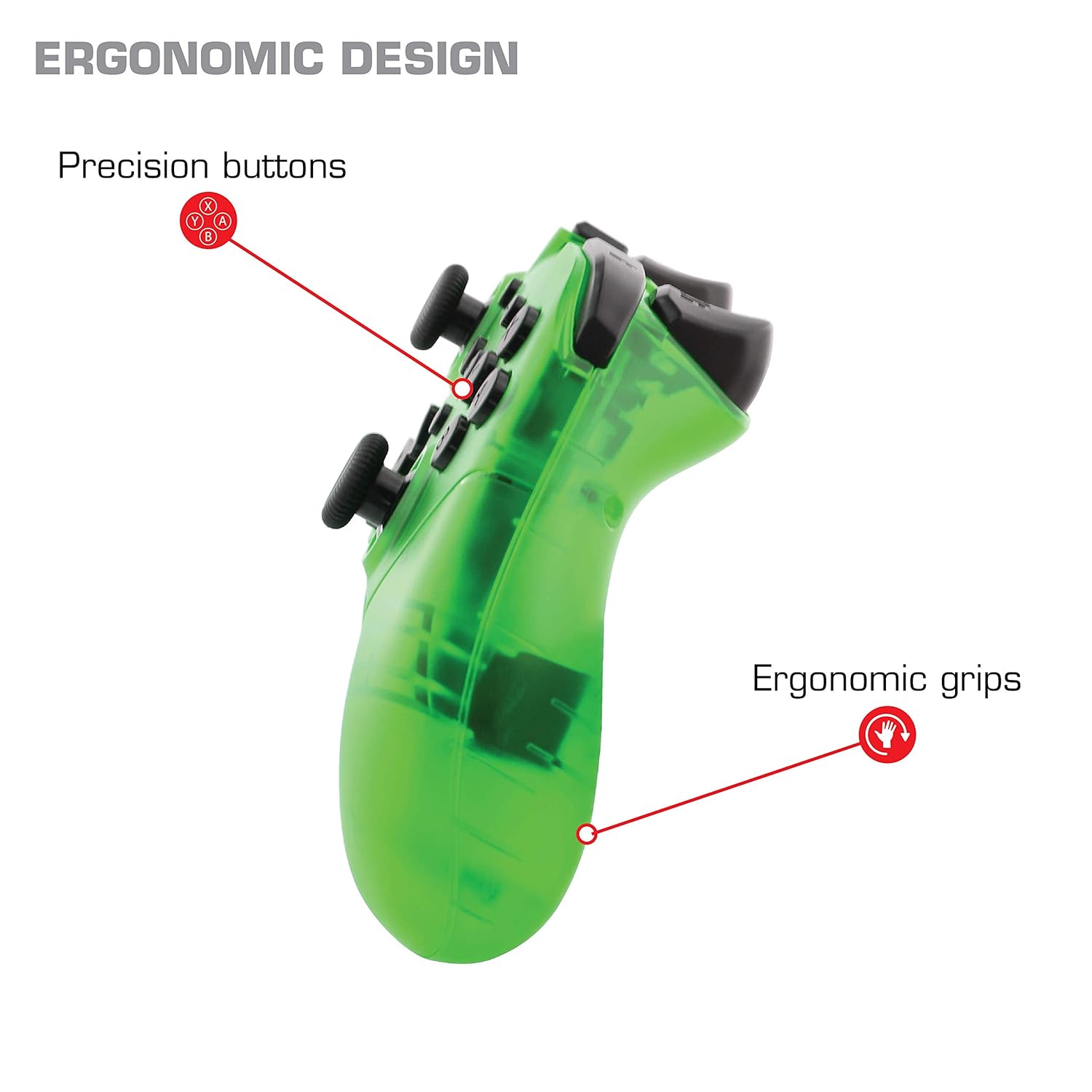
ຮູບພາບ: ໃກ້ຊິດ view of the Nyko Wireless Core Controller highlighting its ergonomic design and precision buttons.

ຮູບພາບ: ທາງຫນ້າ view of the Nyko Wireless Core Controller, indicating its compatibility with PC, the turbo feature, and LED player indicators.
Video: A comparison between the Nyko Wireless Core Controller and a standard Nintendo Switch Pro Controller, showcasing their similar layouts and features.
ຕັ້ງຄ່າ
ການສາກໄຟເບື້ອງຕົ້ນ
Before first use, fully charge the controller using the included USB Type-C cable. Connect the small end of the cable to the controller's USB-C port and the larger end to a USB power source (e.g., Nintendo Switch dock, PC, or USB wall adapter).
ການຈັບຄູ່ກັບ Nintendo Switch
- ໃຫ້ແນ່ໃຈວ່າເຄື່ອງຫຼີ້ນເກມ Nintendo Switch ຂອງທ່ານເປີດຢູ່ ແລະ ອັບເດດເປັນຊອບແວລະບົບລ່າສຸດແລ້ວ.
- ຈາກເມນູ HOME, ເລືອກ "ຕົວຄວບຄຸມ" > "ປ່ຽນດ້າມຈັບ/ລຳດັບ".
- While on this screen, press and hold the SYNC button on the top of the Nyko controller for a few seconds until the player indicator LEDs begin to flash.
- Once the controller is recognized and paired, the player indicator LED(s) will light up solid.
- ໝາຍເຫດ: For the first connection, it may be necessary to connect the controller physically to the Switch dock via the USB-C cable to initiate pairing.
Pairing with Android/PC
- Ensure Bluetooth is enabled on your Android device or PC.
- ໃນອຸປະກອນຂອງທ່ານ, ໄປທີ່ການຕັ້ງຄ່າ Bluetooth ແລະຊອກຫາອຸປະກອນໃໝ່.
- Press and hold the SYNC button on the top of the Nyko controller until the player indicator LEDs begin to flash, indicating it's in pairing mode.
- Select "Nyko Core Controller" (or similar name) from the list of available devices on your Android/PC.
- Once paired, the player indicator LED(s) will light up solid.
ຄໍາແນະນໍາການດໍາເນີນງານ
ການຄວບຄຸມພື້ນຖານ
The controller features standard button layouts including A, B, X, Y buttons, D-Pad, Left and Right Analog Sticks, L/R and ZL/ZR shoulder buttons, HOME, +, -, and Screenshot buttons. Refer to your game's instructions for specific button functions.
Programmable Turbo Functionality
The turbo function allows for rapid, repeated input of a button press. This can be set for multiple buttons simultaneously.

Image: Diagram of the Nyko Wireless Core Controller indicating which buttons are programmable for turbo functionality and which are not.
Enabling Turbo and Auto-Fire
- To enable Turbo: ກົດຄ້າງໄວ້ ປຸ່ມ Turbo, then press any face button (Y, X, B, A) or trigger (L, R, ZL, ZR) you wish to have turbo functionality. While holding the assigned button, it will rapidly input.
- To enable Auto-Fire: ກົດຄ້າງໄວ້ ປຸ່ມ Turbo, then press the desired button ສອງເທື່ອ. The button will now continuously input without needing to be held down.
Disabling Turbo and Auto-Fire
- To disable Turbo/Auto-Fire for a specific button: ກົດຄ້າງໄວ້ ປຸ່ມ Turbo, then press the assigned button ສອງເທື່ອ.
- To reset all Turbo/Auto-Fire settings: ກົດຄ້າງໄວ້ ປຸ່ມ Turbo ແລະ (-) ປຸ່ມ ພ້ອມໆກັນ.
Changing the Speed of Turbo and Auto-Fire
This setting affects the speed of all active turbo/auto-fire enabled buttons.
- ກົດຄ້າງໄວ້ ປຸ່ມ Turbo.
- To increase speed, tilt the right analog stick up.
- To decrease speed, tilt the right analog stick down.
- ປ່ອຍຕົວ ປຸ່ມ Turbo when your desired speed is set.
ບໍາລຸງຮັກສາ
ທໍາຄວາມສະອາດ
ເພື່ອເຮັດຄວາມສະອາດເຄື່ອງຄວບຄຸມ, ໃຫ້ໃຊ້ຜ້າອ່ອນໆ, ແຫ້ງ. ສໍາລັບຝຸ່ນ stubborn, ເລັກນ້ອຍ dampen the cloth with water. Avoid using harsh chemicals, solvents, or abrasive cleaners, as these can damage the controller's finish and internal components.
ການດູແລຫມໍ້ໄຟ
The controller contains a built-in Lithium Ion battery. To prolong battery life:
- ຫຼີກລ້ຽງການປະຈຸຫມໍ້ໄຟຢ່າງເຕັມທີ່ເລື້ອຍໆ.
- ເກັບຮັກສາຕົວຄວບຄຸມໄວ້ໃນບ່ອນທີ່ເຢັນແລະແຫ້ງເມື່ອບໍ່ໄດ້ໃຊ້ງານເປັນເວລາດົນ.
- ຢ່າໃຫ້ຕົວຄວບຄຸມຢູ່ໃນອຸນຫະພູມສູງເກີນໄປ.
ການແກ້ໄຂບັນຫາ
Controller Not Connecting/Losing Connection
- ກວດສອບຫມໍ້ໄຟ: Ensure the controller is fully charged. A completely drained battery may prevent initial connection.
- Re-pair Controller: Follow the pairing instructions in the "Setup" section. For Nintendo Switch, try connecting via USB-C to the dock first.
- ໄລຍະທາງແລະການແຊກແຊງ: Ensure the controller is within range of the console/device and there are no major obstructions or sources of wireless interference.
- ອັບເດດລະບົບ: Ensure your Nintendo Switch console or PC operating system is up to date.
ປຸ່ມບໍ່ຕອບສະໜອງ
- Re-sync: Try re-syncing the controller with your device.
- ຣີສະຕາດ: Power off and on both the controller and the console/device.
- ສະອາດ: ໃຫ້ແນ່ໃຈວ່າບໍ່ມີສິ່ງເສດເຫຼືອຢູ່ໃນປຸ່ມຕ່າງໆ.
Rumble is Too Strong
The controller's vibration feature is designed to provide strong feedback. If the rumble intensity is too high, check the in-game settings of the specific game you are playing, as some games allow for rumble intensity adjustment. The controller itself does not have a direct setting to adjust rumble strength.
ຂໍ້ມູນຈໍາເພາະ
- ໝາຍເລກຕົວແບບ: 87264
- ການເຊື່ອມຕໍ່: Bluetooth Wireless
- ຊ່ອງສາກໄຟ: USB Type-C
- ປະເພດຫມໍ້ໄຟ: Lithium Ion (ລວມ)
- Approximate Playtime: ສູງສຸດ 20 ຊົ່ວໂມງ
- ຂະໜາດຜະລິດຕະພັນ: 6.3 x 2.76 x 5.91 ນິ້ວ
- ນ້ໍາຫນັກລາຍການ: 10.6 ອອນ
- ຜູ້ຜະລິດ: ນີໂກ້
- ຄວາມເຂົ້າກັນໄດ້: Nintendo Switch, Android, PC
ການຮັບປະກັນແລະການສະຫນັບສະຫນູນ
Nyko products are manufactured to high-quality standards. For specific warranty information, please refer to the warranty card included with your product or visit the official Nyko website. For technical support, troubleshooting assistance, or to inquire about replacement parts, please contact Nyko Customer Support through their official channels.
ສະຫນັບສະຫນູນອອນໄລນ໌: www.nyko.com/support


