ແນະນຳ
Thank you for choosing the Peakeep S8 Digital Alarm Clock. This manual provides detailed instructions for setting up, operating, and maintaining your new alarm clock. Please read this manual thoroughly before use to ensure proper function and to maximize your product experience.
ຄຸນສົມບັດຜະລິດຕະພັນ
- ຈໍ LCD ຂະຫນາດໃຫຍ່: Features a clear, boldface number display for easy readability.
- ເຊັນເຊີແສງອັດສະລິຍະ: Built-in sensor automatically activates a soft backlight in dark environments, ensuring visibility without disturbing sleep.
- Gradually Strengthening Alarm: The alarm sound increases in volume gradually to gently wake you up.
- ຟັງຊັນ Snooze: Provides an additional 5 minutes of sleep after the alarm sounds.
- Adjustable Time and Date Format: Customize time display (12/24 hour) and date format.
- ການຕິດຕາມອຸນຫະພູມ: Displays ambient temperature in Celsius or Fahrenheit.
- ພະລັງງານຫມໍ້ໄຟ: Operates on 3 x AAA batteries (not included).
ເນື້ອໃນຊຸດ
- 1 x Peakeep S8 Digital Alarm Clock
- 1 x ຄູ່ມືຜູ້ໃຊ້
ການຄວບຄຸມແລະການສະແດງ
ຈໍສະແດງຜົນດ້ານ ໜ້າ
The large LCD screen displays time, date, day of the week, alarm status, and temperature. The backlight activates automatically in low light conditions when the sensor is enabled.
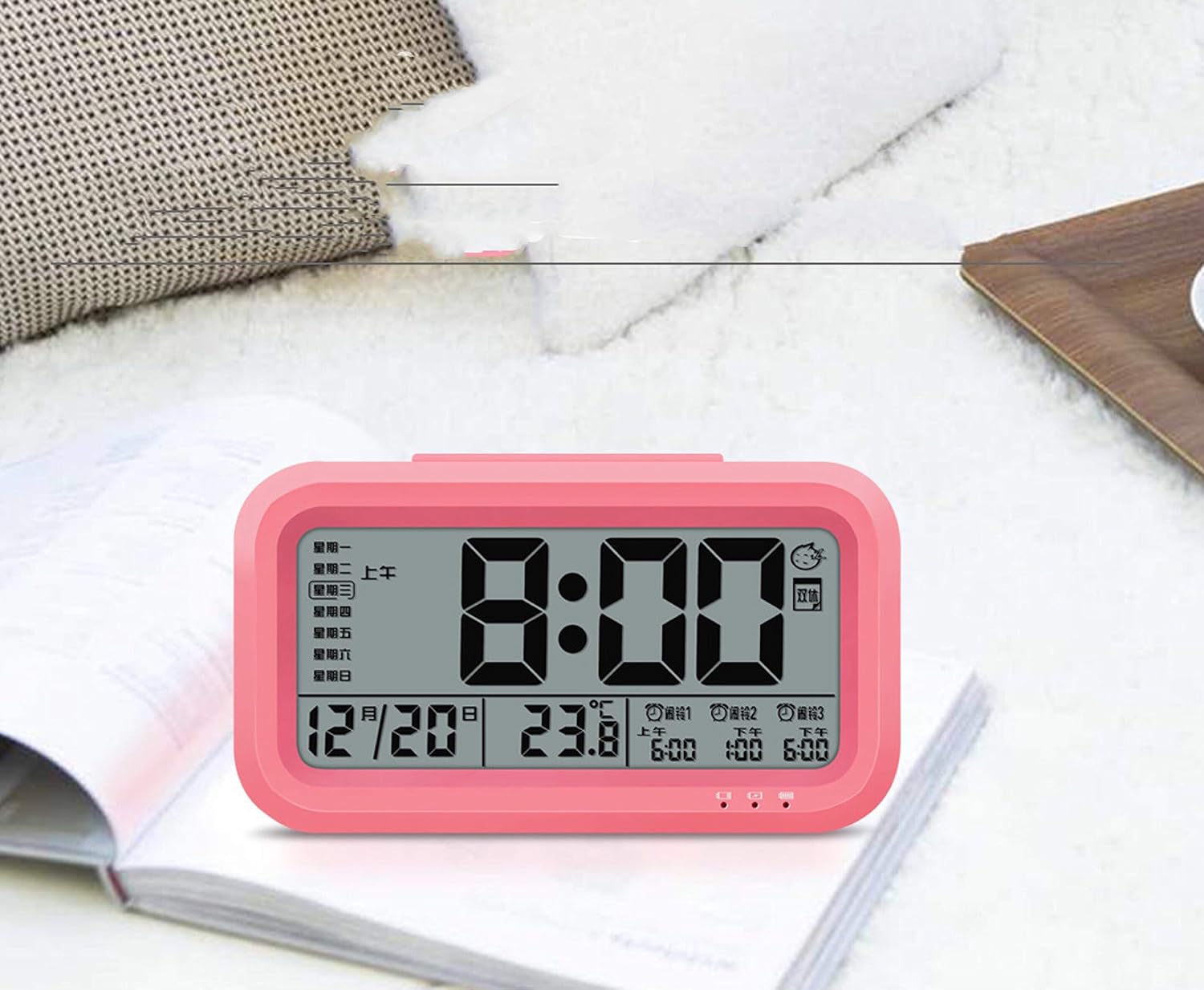
ຮູບພາບ: ທາງຫນ້າ view of the Peakeep S8 Digital Alarm Clock. This image shows the large digital display with the time (8:00), date (12/20), and temperature (23.8°C). It also indicates alarm settings and day of the week.
ການຄວບຄຸມຫລັງ
The back of the clock features several buttons and switches for setting time, date, alarm, and other functions.
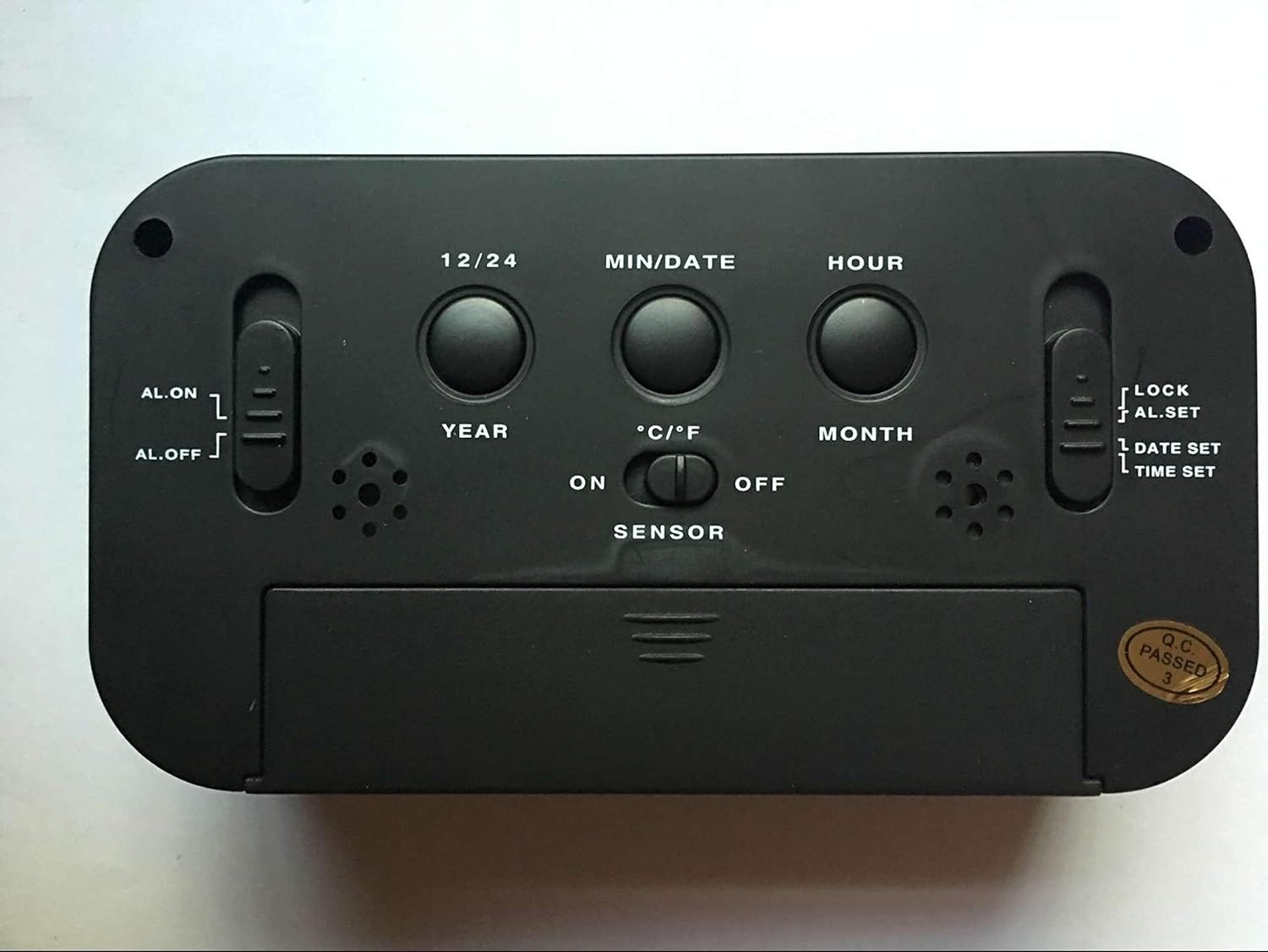
ຮູບພາບ: ດ້ານຫລັງ view of the Peakeep S8 Digital Alarm Clock. This image highlights the control panel on the back, including buttons for 12/24 hour format, MIN/DATE, HOUR, YEAR, MONTH, °C/°F, and switches for AL.ON/AL.OFF, LOCK/AL.SET/DATE SET/TIME SET, and SENSOR ON/OFF.
- 12/24 ປຸ່ມ: Toggles between 12-hour and 24-hour time display.
- ປຸ່ມ MIN/DATE: Used to adjust minutes during time/alarm setting, and to view ວັນທີ.
- ປຸ່ມຊົ່ວໂມງ: Used to adjust hours during time/alarm setting.
- ປຸ່ມປີ: Used to set the year.
- MONTH Button: Used to set the month.
- ປຸ່ມ °C/°F: Switches temperature display between Celsius and Fahrenheit.
- AL.ON/AL.OFF Switch: Turns the alarm function on or off.
- ສະວິດໂໝດ (ລັອກ/ຕັ້ງ Al/ຕັ້ງວັນທີ/ຕັ້ງເວລາ):
- ລັອກ: ລັອກການຕັ້ງຄ່າປັດຈຸບັນເພື່ອປ້ອງກັນການປ່ຽນແປງໂດຍບັງເອີນ.
- AL.SET: ເຂົ້າສູ່ໂໝດການຕັ້ງຄ່າສັນຍານເຕືອນໄພ.
- DATE SET: Enters date setting mode.
- ກຳ ນົດເວລາ: ເຂົ້າສູ່ໂໝດຕັ້ງເວລາ.
- ສະວິດເປີດ/ປິດເຊັນເຊີ: Activates or deactivates the smart light sensor for automatic backlight.
- SNOOZE/LIGHT Button (Top): Activates snooze when alarm sounds, or temporarily illuminates the display.
ຕັ້ງຄ່າ
1. ການຕິດຕັ້ງຫມໍ້ໄຟ
- ເປີດຝາປິດຊ່ອງໃສ່ແບັດເຕີຣີຢູ່ດ້ານຫຼັງຂອງໂມງ.
- Insert 3 new 1.5V AAA batteries, ensuring correct polarity (+ and -).
- ປິດຝາປິດຊ່ອງໃສ່ຫມໍ້ໄຟຢ່າງປອດໄພ.
- ຫມາຍເຫດ: ບໍ່ໄດ້ລວມເອົາຫມໍ້ໄຟ.
2. ການຕັ້ງເວລາເບື້ອງຕົ້ນ
- ເລື່ອນສະວິດ MODE ໄປທີ່ ເວລາ ກຳ ນົດ.
- ກົດ ຊົ່ວໂມງ ປຸ່ມເພື່ອປັບຊົ່ວໂມງ.
- ກົດ MIN/DATE ປຸ່ມເພື່ອປັບນາທີ.
- Once the correct time is set, slide the MODE switch back to ລັອກ.
3. Initial Date Setting
- ເລື່ອນສະວິດ MODE ໄປທີ່ ວັນທີກໍານົດ.
- ກົດ ປີ ປຸ່ມເພື່ອປັບປີ.
- ກົດ ເດືອນ ປຸ່ມເພື່ອປັບເດືອນ.
- ກົດ MIN/DATE button to adjust the day.
- Once the correct date is set, slide the MODE switch back to ລັອກ.
ຄໍາແນະນໍາການດໍາເນີນງານ
ການຕັ້ງຄ່າປຸກ
- ເລື່ອນສະວິດ MODE ໄປທີ່ AL.SET.
- ກົດ ຊົ່ວໂມງ ປຸ່ມເພື່ອປັບໂມງປຸກ.
- ກົດ MIN/DATE ປຸ່ມເພື່ອປັບນາທີປຸກ.
- Once the desired alarm time is set, slide the MODE switch back to ລັອກ.
- ເພື່ອເປີດໃຊ້ງານໂມງປຸກ, ເລື່ອນ AL.ON/AL.OFF ສະຫຼັບໄປ AL.ONໄອຄອນໂມງປຸກຈະປາກົດຢູ່ເທິງຈໍສະແດງຜົນ.
ການໃຊ້ຟັງຊັນ Snooze
ເມື່ອສຽງປຸກດັງຂຶ້ນ, ກົດປຸ່ມໃຫຍ່ ແສງ SNOOZE / LIGHT button on top of the clock. The alarm will pause for approximately 5 minutes and then sound again. This can be repeated.
ກຳ ລັງປິດການແຈ້ງເຕືອນ
ເພື່ອປິດໂມງປຸກຢ່າງສົມບູນ, ໃຫ້ເລື່ອນ AL.ON/AL.OFF ສະຫຼັບໄປ AL.OFF. The alarm icon will disappear from the display.
Activating the Smart Light Sensor
To enable the automatic backlight feature, slide the ເຊັນເຊີ ສະຫຼັບໄປ ON. The display will automatically illuminate with a soft glow in dark environments. Slide the switch to ປິດ ເພື່ອປິດຄຸນສົມບັດນີ້.
ການປ່ຽນແປງຫນ່ວຍອຸນຫະພູມ
ກົດ ° C / ° F button on the back of the clock to switch the temperature display between Celsius and Fahrenheit.
Changing Time Format (12/24 Hour)
ກົດ 12/24 button on the back of the clock to toggle between 12-hour (with AM/PM indicator) and 24-hour time formats.
ບໍາລຸງຮັກສາ
ທໍາຄວາມສະອາດ
ເຊັດໂມງດ້ວຍຜ້າອ່ອນໆ, ແຫ້ງ. ຫ້າມໃຊ້ເຄື່ອງຊັກຜ້າ ຫຼືສານລະລາຍ, ເພາະມັນອາດເຮັດໃຫ້ພື້ນຜິວເສຍຫາຍໄດ້.
ການປ່ຽນແບັດ
When the display becomes dim or the clock functions erratically, it is time to replace the batteries. Follow the battery installation steps in the "Setup" section. Always replace all three AAA batteries at the same time with new ones.
ການແກ້ໄຂບັນຫາ
| ບັນຫາ | ສາເຫດ / ການແກ້ໄຂທີ່ເປັນໄປໄດ້ |
|---|---|
| ຈໍສະແດງຜົນຫວ່າງເປົ່າ ຫຼືມືດ. |
|
| ໂມງປຸກບໍ່ມີສຽງ. |
|
| ໂມງກຳລັງເສຍເວລາ ຫຼື ເພີ່ມເວລາ. |
|
| ປຸ່ມບໍ່ຕອບສະໜອງ. |
|
ຂໍ້ມູນຈໍາເພາະ
- ຍີ່ຫໍ້: Peakeep
- ໝາຍເລກຕົວແບບ: S8 (Item Model Number: Crazy Curry-030)
- ປະເພດການສະແດງ: Digital LCD
- ວັດສະດຸ: ພາດສະຕິກ
- ສີ: Black (Black-a)
- ແຫຼ່ງພະລັງງານ: 3 x 1.5V AAA Batteries (Not included)
- ຄຸນນະສົມບັດພິເສດ: Alarm, Snooze, Smart Light Sensor, Temperature Display (°C/°F), 12/24 Hour Format
- ຂະໜາດ: (Approximate, based on typical alarm clock size and weight)
- ນ້ໍາຫນັກລາຍການ: 178 g
- ນ້ຳໜັກການຂົນສົ່ງ: 0.18 ກິໂລກຣາມ
- UPC: 734602860235
ການຮັບປະກັນແລະການສະຫນັບສະຫນູນ
This product is designed for reliability and ease of use. For specific warranty information, please refer to the documentation provided at the time of purchase or contact your retailer.
If you encounter any issues not covered in this manual, please contact the retailer or manufacturer for assistance. Keep your purchase receipt as proof of purchase for any warranty claims.


