1. ຄໍາແນະນໍາຄວາມປອດໄພທີ່ສໍາຄັນ
Please read and follow these instructions carefully for safe assembly and operation of your FLEXISPOT E5W-UK electric standing desk frame. Adhere to all weight restrictions and consider using additional anchors for enhanced stability, especially if the desk is frequently moved or heavily loaded.
- ໃຫ້ແນ່ໃຈວ່າອົງປະກອບທັງຫມົດມີຢູ່ແລະບໍ່ເສຍຫາຍກ່ອນທີ່ຈະປະກອບ.
- ບໍ່ໃຫ້ເກີນຄວາມອາດສາມາດໂຫຼດໄດ້ສູງສຸດຂອງ 125 kg (275 lbs).
- ໃຫ້ເດັກນ້ອຍ ແລະສັດລ້ຽງຢູ່ຫ່າງຈາກໂຕະເຮັດວຽກໃນລະຫວ່າງການເຮັດວຽກ.
- Avoid placing objects under the desk that could obstruct its movement.
- ຕັດການເຊື່ອມຕໍ່ໄຟຟ້າກ່ອນທີ່ຈະທໍາຄວາມສະອາດຫຼືບໍາລຸງຮັກສາ.
- ໃຊ້ພຽງແຕ່ອະແດັບເຕີໄຟທີ່ໃຫ້ມາ.
2. ຜະລິດຕະພັນເກີນview
The FLEXISPOT E5W-UK is a robust electric standing desk frame designed for height adjustability and stability. It features a dual-motor lifting system and a memory control panel.

ຮູບພາບ: ຫຼາຍກວ່າview of the FLEXISPOT EC5 height-adjustable desk frame, showcasing its robust and stable design in various color options (black, grey, white).
ຄຸນນະສົມບັດທີ່ສໍາຄັນ:
- ລະບົບຍົກໄຟຟ້າ: Powerful dual motors with a three-stage linear motion system ensure smooth and rapid height adjustment at 38 mm/second with low noise (under 50 dB).
- Solid and Robust Construction: The heavy-duty coated steel frame provides stability and supports a load capacity of up to 125 kg (275 lbs). Telescopic crossbars extend from 110 cm to 190 cm to accommodate tabletops from 120 cm to 200 cm in width.
- Humanized Lifting Function: Height adjustment range from 62 cm to 125 cm to suit various user heights and office needs.
- Anti-Collision Function: Protects the desk from collisions with obstacles during height adjustment, enhancing safety.
- ການຮັບປະກັນຄຸນນະພາບ: Each Flexispot desk frame undergoes 10,000 fatigue tests, meeting international standards with CE/BIFMA/RoHS certification.

Image: Illustrates the dual motor system, highlighting specifications such as max load capacity (160kg), low energy consumption (<0.5W), speed (35mm/s), and noise level (under 50dB).

Image: Details the stability and durability features, including 3 lifting columns, height adjustment from 62-127cm, 20,000+ fatigue test validation, and removable foot caps for casters.
3. ການຕິດຕັ້ງແລະການປະກອບ
The FLEXISPOT E5W-UK desk frame requires assembly. All necessary tools are included in the package. Assembly typically takes 20-25 minutes with clear, top-notch instructions.
ຂັ້ນຕອນການປະກອບ:
- ຖອດຊິ້ນສ່ວນທັງໝົດອອກ ແລະກວດສອບກັບລາຍການຊິ້ນສ່ວນໃນຄູ່ມືທີ່ປະກອບມາ.
- Attach the lifting columns to the foot supports.
- Connect the crossbars between the lifting columns.
- Install the control box and motor cables.
- Mount the control panel to the desired location on the desk frame.
- Secure your chosen tabletop to the assembled frame using appropriate screws (tabletop not included).
- ເຊື່ອມຕໍ່ສາຍໄຟ ແລະ ຮັບປະກັນວ່າການເຊື່ອມຕໍ່ທັງໝົດແໜ້ນດີ.

Image: Displays all components of the FLEXISPOT EC5 desk frame laid out for assembly, including legs, crossbars, control box, and tools, indicating an easy assembly process.
Adjusting Frame Width:
The frame's width is adjustable from 110 cm to 190 cm to accommodate various tabletop sizes (120-200 cm width x 60-80 cm depth). Adjust the telescopic crossbars to match your tabletop before securing it.
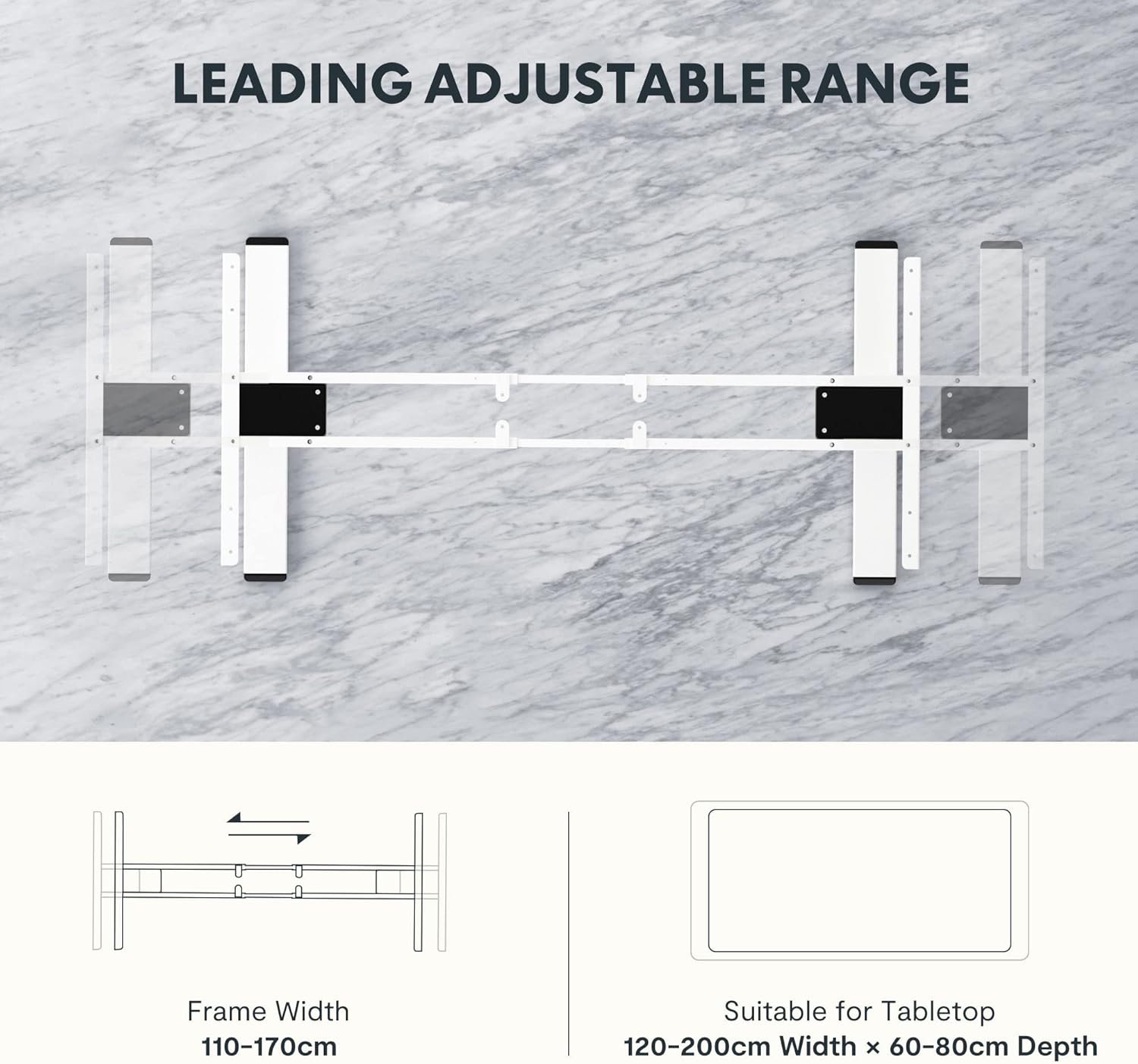
Image: Diagram illustrating the adjustable frame width from 110-170cm and suitable tabletop dimensions (120-200cm width x 60-80cm depth).
4. ຄໍາແນະນໍາການດໍາເນີນງານ
The FLEXISPOT E5W-UK desk frame is operated via an intuitive control panel with memory presets.
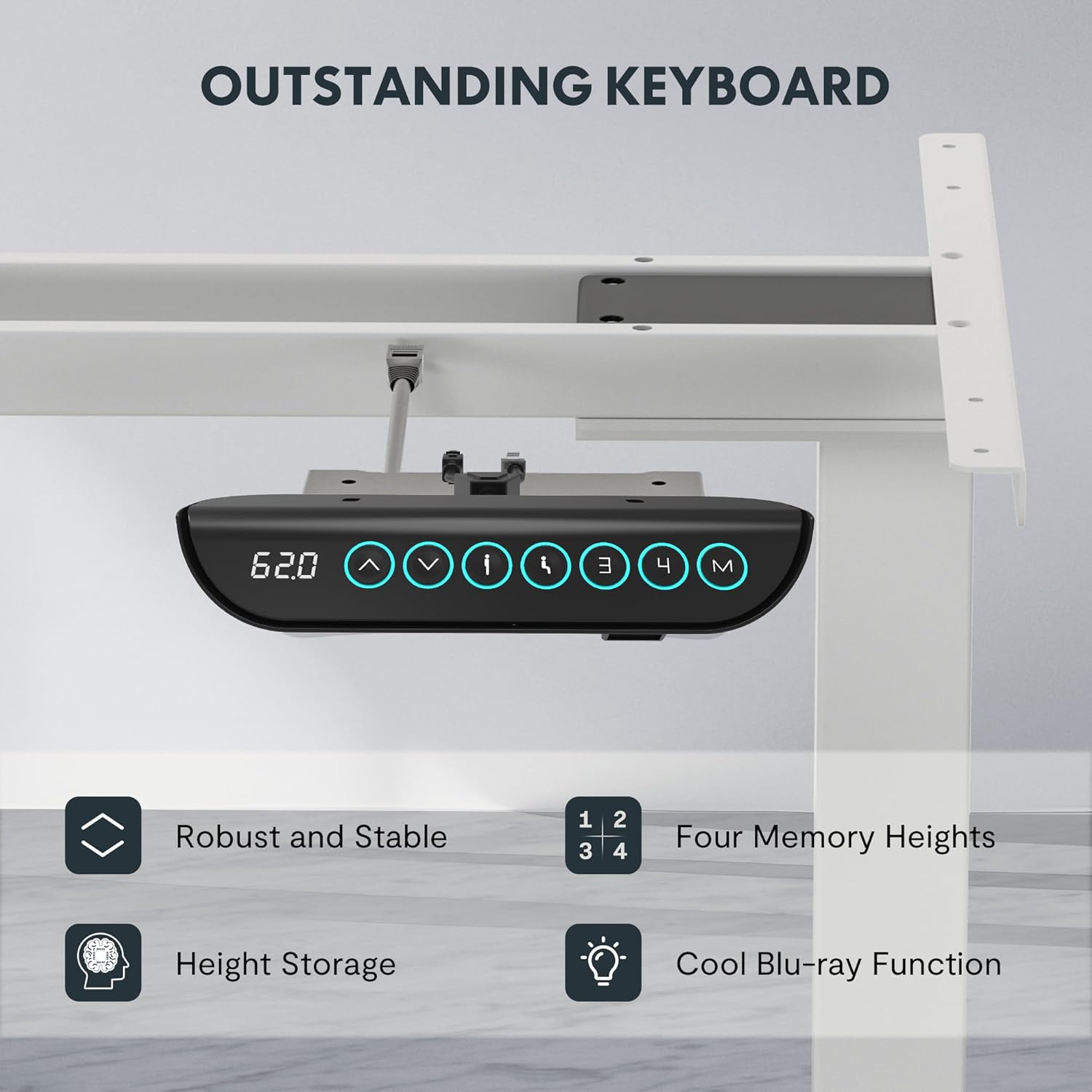
Image: Close-up of the FLEXISPOT EC5 control panel, featuring a digital height display, up/down buttons, and four memory preset buttons (1, 2, 3, 4), along with a memory set button (M).
ຟັງຊັນແຜງຄວບຄຸມ:
- ປຸ່ມຂຶ້ນ/ລົງ (▲ / ▼): Press and hold to adjust the desk height manually. Release to stop at the desired height.
- ຈໍດິຈິຕອນ: Shows the current height of the desk in centimeters.
- ໜ່ວຍຄວາມຈຳທີ່ຕັ້ງໄວ້ລ່ວງໜ້າ (1, 2, 3, 4):
- ປັບໂຕະກັບຄວາມສູງທີ່ທ່ານຕ້ອງການ.
- Press the "M" button. The display will show "S-".
- Press one of the number buttons (1, 2, 3, or 4) within 3 seconds to save the current height to that preset.
- To recall a saved height, simply press the corresponding number button. The desk will automatically move to the stored position.
- ລະບົບຕ້ານການ collision: The desk is equipped with an anti-collision feature. If the desk encounters an obstacle during movement, it will automatically stop and reverse slightly to prevent damage.
5. ບໍາລຸງຮັກສາ
Regular maintenance ensures the longevity and optimal performance of your FLEXISPOT E5W-UK desk frame.
- ທໍາຄວາມສະອາດ: ເຊັດກອບໂຕະດ້ວຍຜ້າອ່ອນໆ, ເຊັດໃຫ້ແຫ້ງ.amp cloth. Avoid abrasive cleaners or solvents. Ensure the power is disconnected before cleaning.
- ການຄຸ້ມຄອງສາຍໄຟ: Periodically check all cables for wear or damage. Ensure they are neatly routed and not pinched.
- fasteners: ບາງຄັ້ງກວດເບິ່ງ screws ແລະ bolts ທັງຫມົດເພື່ອຮັບປະກັນວ່າພວກເຂົາແຫນ້ນ. ຮັດແໜ້ນ ຖ້າຈຳເປັນ.
- ກວດສອບການເຄື່ອນໄຫວ: Operate the desk through its full height range periodically to ensure smooth movement.
6. ການແກ້ໄຂບັນຫາ
If you encounter issues with your FLEXISPOT E5W-UK desk frame, refer to the common solutions below.
| ບັນຫາ | ສາເຫດທີ່ເປັນໄປໄດ້ | ການແກ້ໄຂ |
|---|---|---|
| ໂຕະບໍ່ຍ້າຍ. | Power cable disconnected, control box loose, overload. | Check power connection. Ensure all cables are securely plugged in. Reduce weight on the desk. |
| ການເຄື່ອນໄຫວທີ່ບໍ່ສະໝໍ່າສະເໝີ ຫຼື ມີສຽງແປກໆ. | Loose fasteners, obstruction, uneven weight distribution. | Check and tighten all screws. Remove any obstructions. Redistribute weight evenly on the tabletop. |
| Anti-collision system frequently triggers. | Obstacles under or above the desk, sensitivity setting. | Clear the area around the desk. Consult the full manual for adjusting anti-collision sensitivity if available. |
| ໜ່ວຍຄວາມຈຳທີ່ຕັ້ງໄວ້ລ່ວງໜ້າບໍ່ເຮັດວຽກ. | Not saved correctly. | Re-save the memory presets following the operating instructions. |
ຖ້າບັນຫາຍັງຄົງຢູ່ຫຼັງຈາກພະຍາຍາມແກ້ໄຂບັນຫາເຫຼົ່ານີ້ແລ້ວ, ກະລຸນາຕິດຕໍ່ຫາຝ່າຍຊ່ວຍເຫຼືອລູກຄ້າ FLEXISPOT.
7. ຂໍ້ມູນຈໍາເພາະ
- ໝາຍເລກຕົວແບບ: E5W-UK
- ຍີ່ຫໍ້: FLEXISPOT
- ສີ: White (Frame 3 Levels - White)
- ວັດສະດຸ: Alloy Steel (Frame), Metal (Raw Material)
- ຂະໜາດ (L x W x H): 45.87 x 110 x 7.87 cm (packaged); Product dimensions: 116.5P x 32l x 20H cm (assembled, without tabletop)
- ນ້ຳໜັກ: 29.72 ກິໂລ (ຫຸ້ມຫໍ່)
- ຄວາມອາດສາມາດໂຫຼດ: ສູງເຖິງ 125 ກິໂລ (275 ໂລ)
- ໄລຍະການປັບຄວາມສູງ: 62ຊມ ຫາ 125ຊມ
- ຄວາມໄວ: 38 ມມ/ວິນາທີ
- ລະດັບສຽງລົບກວນ: ໜ້ອຍກວ່າ 50 dB
- Frame Width Adjustment: 110ຊມ ຫາ 190ຊມ
- Suitable Tabletop Dimensions: 120-200 cm (width) x 60-80 cm (depth)
- ສະພາແຫ່ງທີ່ຕ້ອງການ: ແມ່ນແລ້ວ
- ຄຸນນະສົມບັດພິເສດ: Sit-stand desk, Height-adjustable desk, Electric standing desk, Anti-collision function, Memory presets.
- ການຢັ້ງຢືນ: CE/BIFMA/RoHS (as per product features)

Image: Displays certifications for the FLEXISPOT EC5, including an IGR Institute certificate for ergonomic product and a German Health Award for ergonomic brands.
8. ການຮັບປະກັນແລະການສະຫນັບສະຫນູນ
FLEXISPOT stands by the quality of its products.
- ການຮັບປະກັນກອບ: 5 ປີ
- ການຮັບປະກັນມໍເຕີ: 3 ປີ
- ສະຫນັບສະຫນູນດ້ານວິຊາການ: ສະຫນັບສະຫນູນດ້ານວິຊາການຕະຫຼອດຊີວິດຟຣີ
For warranty claims, technical assistance, or any questions regarding your FLEXISPOT E5W-UK desk frame, please contact FLEXISPOT customer service through their official website or the retailer where the product was purchased. Please have your model number (E5W-UK) and proof of purchase ready when contacting support.


