1. ບົດແນະນຳ
Thank you for choosing the AVANTEK CW-11 Wireless Doorbell. This manual provides essential information for the proper installation, operation, and maintenance of your new doorbell system. Please read these instructions carefully before use and retain them for future reference.

Image 1.1: AVANTEK CW-11 Wireless Doorbell system, showing the compact transmitter and receiver units.
2. ຂໍ້ມູນຄວາມປອດໄພ
- ຢ່າເຮັດໃຫ້ອຸປະກອນຖືກອຸນຫະພູມທີ່ຮຸນແຮງ ຫຼືແສງແດດໂດຍກົງ.
- Keep the device away from water and high humidity. The transmitter is IP55 waterproof, but the receiver is for indoor use only.
- ຢ່າພະຍາຍາມຖອດປະກອບ ຫຼືສ້ອມແປງອຸປະກອນດ້ວຍຕົນເອງ. ຕິດຕໍ່ຝ່າຍຊ່ວຍເຫຼືອລູກຄ້າເພື່ອຂໍຄວາມຊ່ວຍເຫຼືອ.
- ຮັກສາຫມໍ້ໄຟໃຫ້ໄກຈາກເດັກນ້ອຍ. ຖິ້ມແບັດເຕີລີທີ່ໃຊ້ແລ້ວຢ່າງຖືກຕ້ອງ.
3. ເນື້ອໃນຊຸດ
- 1 x Wireless Transmitter (Doorbell Button)
- 1 x Plug-in Receiver (Chime Unit)
- 1 x CR2 Battery (pre-installed in transmitter)
- 2 x screws
- 2 x Anchors
- 1 x ເທບກາວສອງດ້ານ
- 1 x screwdriver
4. ຜະລິດຕະພັນເກີນview
The AVANTEK CW-11 Wireless Doorbell system consists of a battery-powered transmitter (doorbell button) and a plug-in receiver (chime unit). The receiver features 52 selectable melodies, 5 adjustable volume levels, and an LED indicator for visual alerts.

Image 4.1: The receiver unit, illustrating its features including 52 chimes, 5 volume levels, and an LED indicator.
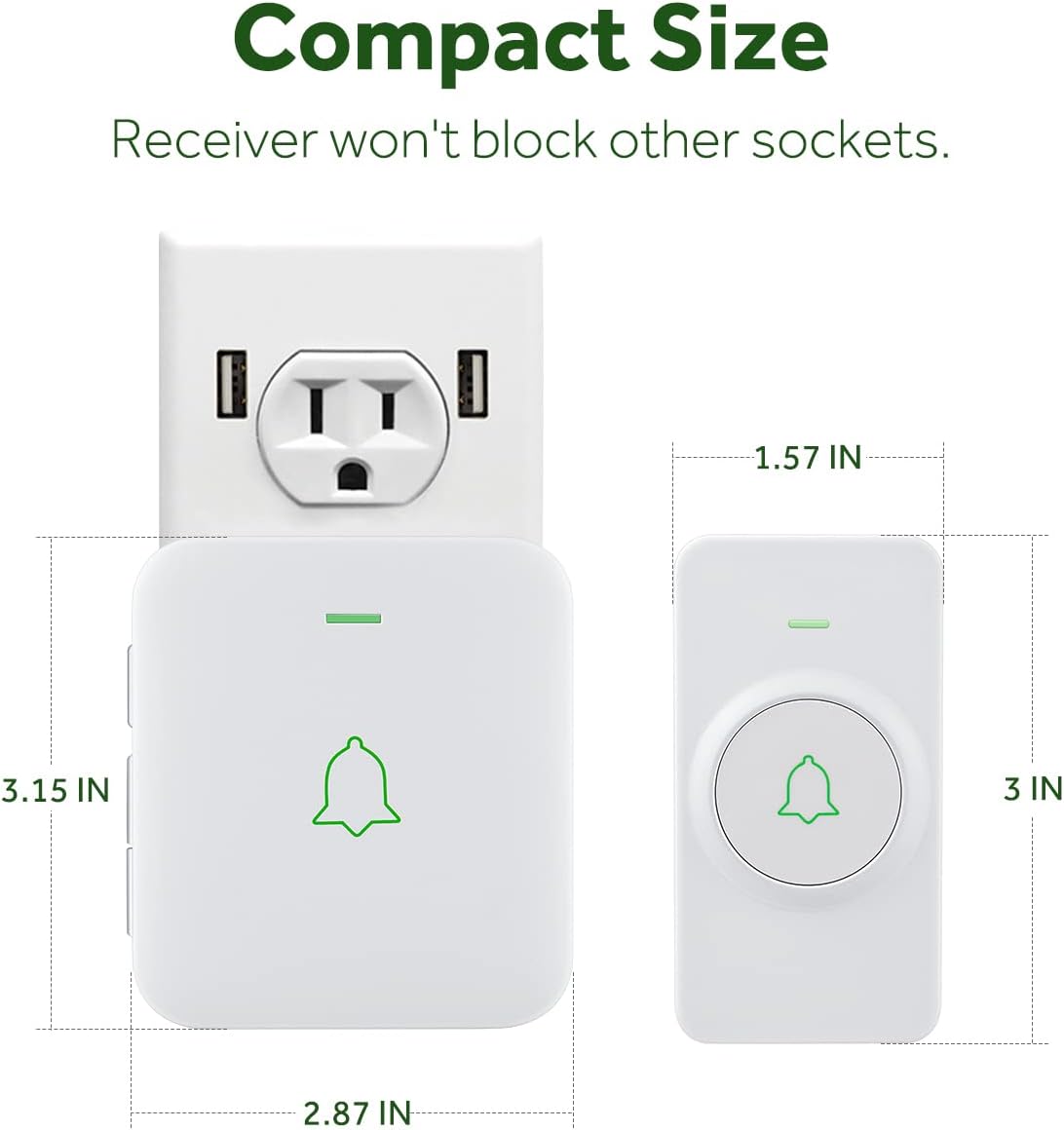
Image 4.2: The compact size of both the transmitter and receiver, designed to not obstruct adjacent power sockets.
5. ຄໍາແນະນໍາການຕິດຕັ້ງ
5.1 ການຕິດຕັ້ງເຄື່ອງສົ່ງສັນຍານ
The transmitter can be installed using either the provided double-sided adhesive tape or screws and anchor plugs.

Image 5.1: Visual guide for installing the transmitter using either adhesive tape or screws and anchor plugs.
Method A: Using Double-Sided Adhesive Tape
- Clean the desired mounting surface thoroughly to ensure it is free of dust and moisture.
- Peel off one side of the protective film from the double-sided adhesive tape and attach it to the back of the transmitter.
- Peel off the other side of the protective film and firmly press the transmitter onto the cleaned surface for at least 30 seconds.
Method B: Using Screws and Anchor Plugs
- Mark the desired mounting points for the transmitter on the wall.
- ເຈາະສອງຮູຢູ່ຕໍາແໜ່ງທີ່ໝາຍໄວ້.
- ສຽບສຽບສະມໍເຂົ້າໄປໃນຮູທີ່ເຈາະ.
- Align the transmitter's mounting holes with the anchor plugs and secure it with the provided screws.
ສຳຄັນ: To prevent signal interference, do not install the transmitter close to or on metal surfaces such as metal door frames or mailboxes.
5.2 ການສຽບເຄື່ອງຮັບສັນຍານ
Plug the receiver into a standard electrical outlet in a location where the chime can be easily heard. The LED on the receiver will flash upon initial power-up.
5.3 Pairing the Doorbell System
The transmitter and receiver are pre-paired at the factory. If re-pairing is needed or if you add additional transmitters/receivers, follow these steps:
- ສຽບສາຍຮັບໃສ່ປລັກສຽບໄຟ.
- To enter pairing mode, hold down the Volume button on the receiver for 3 seconds. The LED on the receiver will flash.
- Remove the battery insulating film from the transmitter (if not already done).
- Press the Push button on the transmitter. Its LED will flash.
- After successful pairing, the receiver will chime once, and the LEDs on both the receiver and transmitter will flash simultaneously.
Video 5.2: Official AVANTEK video demonstrating how to install the wireless doorbell transmitter.
Video 5.3: Official AVANTEK video demonstrating how to pair the wireless doorbell system.
6. ຄໍາແນະນໍາການດໍາເນີນງານ
6.1 Changing Melodies
The receiver offers 52 different melodies. Use the 'Next' and 'Previous' buttons on the side of the receiver to cycle through the available tunes. Press the doorbell button to preview the selected melody.

Image 6.1: The receiver offers a wide selection of melodies for personalization.
6.2 ການປັບລະດັບສຽງ
There are 5 adjustable volume levels, with a maximum setting of 115 dB. Use the 'Volume' button on the side of the receiver to increase or decrease the sound level.
6.3 ໂໝດປິດສຽງ
To activate mute mode (0 dB), repeatedly press the 'Volume' button until the sound is off. In this mode, only the LED indicator will flash when the doorbell is pressed, providing a silent visual alert.

Image 6.2: The mute mode feature allows for silent notifications, ideal for quiet environments.
7. ບໍາລຸງຮັກສາ
7.1 ການທໍາຄວາມສະອາດ
ເຊັດອຸປະກອນດ້ວຍຜ້າອ່ອນແລະແຫ້ງ. ຢ່າໃຊ້ນໍ້າຢາທໍາຄວາມສະອາດທີ່ມີສີຂັດ ຫຼື ຕົວລະລາຍ.
7.2 Battery Replacement (Transmitter)
The transmitter uses a CR2 battery with an estimated lifespan of 3 years. When the battery is low, the transmitter's LED may not light up or the signal range may decrease. To replace the battery:
- ເປີດຕົວສົ່ງສັນຍານຢ່າງລະມັດລະວັງ casing using the provided screwdriver or a small flat-head screwdriver.
- ເອົາແບັດ CR2 ເກົ່າອອກ.
- ໃສ່ແບັດເຕີຣີ CR2 ໃໝ່, ຮັບປະກັນວ່າຂົ້ວທີ່ຖືກຕ້ອງ (+/-).
- ປິດຄasing ຢ່າງປອດໄພ.
8. ການແກ້ໄຂບັນຫາ
- Doorbell not chiming: Ensure the receiver is plugged in and powered. Check the transmitter battery. Re-pair the devices if necessary (refer to Section 5.3).
- Short signal range: Ensure the transmitter is not installed on or near metal surfaces. Relocate the receiver to a more central position. Replace the transmitter battery.
- ແຊກແຊງ: The doorbell operates on a frequency that minimizes interference with other household devices. If interference occurs, try changing the melody or relocating the receiver.
- ຟັງຊັນຫນ່ວຍຄວາມຈໍາ: The device remembers your last melody and volume level after a power outage, so no need to reset settings.
9. ຂໍ້ມູນຈໍາເພາະ
| ຄຸນສົມບັດ | ຂໍ້ມູນຈໍາເພາະ |
|---|---|
| ໝາຍເລກຕົວແບບ | CW-11 |
| Range ໄຮ້ສາຍ | ສູງເຖິງ 1000 ຟຸດ (300 ແມັດ) |
| ເນື້ອເພງ | 52 |
| ລະດັບສຽງ | 5 (up to 115 dB) |
| ແບດເຕີຣີ້ເຄື່ອງສົ່ງ | 1 x CR2 (ລວມ) |
| Transmitter ຊີວິດຫມໍ້ໄຟ | ປະມານ. 3 ປີ |
| ການປະເມີນກັນນ້ໍາ | IP55 (Transmitter) |
| ອຸນຫະພູມປະຕິບັດການ | -4 °F ຫາ 140 °F (-20 °C ຫາ 60 °C) |
| ແຫຼ່ງພະລັງງານ | AC & Battery |
| ຂະໜາດສິນຄ້າ | Receiver: 2.8 x 0.6 x 3.1 inches; Transmitter: 3.15 x 1.57 x 0.79 inches (approx.) |
10. ການຮັບປະກັນແລະການສະຫນັບສະຫນູນ
For warranty information or technical support, please refer to the contact details provided with your product packaging or visit the official AVANTEK webເວັບໄຊ. ຮັກສາໃບຮັບເງິນການຊື້ຂອງທ່ານໄວ້ເປັນຫຼັກຖານການຊື້.


