1. ບົດແນະນຳ
Thank you for choosing the MOZA HGP Shifter. This manual provides essential information for the proper setup, operation, and maintenance of your new H-pattern shifter. Please read this manual thoroughly before use to ensure optimal performance and longevity of the product.
2. ຂໍ້ມູນຄວາມປອດໄພ
- ຮັກສາອຸປະກອນໃຫ້ຫ່າງຈາກນ້ໍາແລະຂອງແຫຼວອື່ນໆ.
- ຢ່າເຮັດໃຫ້ອຸປະກອນຖືກອຸນຫະພູມທີ່ຮຸນແຮງ ຫຼືແສງແດດໂດຍກົງ.
- ໃຫ້ຈັດການດ້ວຍຄວາມລະມັດລະວັງເພື່ອຫຼີກລ່ຽງການຕົກ ຫຼື ກະທົບກັບອຸປະກອນ.
- ໃຫ້ແນ່ໃຈວ່າການເຊື່ອມຕໍ່ທັງຫມົດແມ່ນປອດໄພກ່ອນທີ່ຈະດໍາເນີນການ.
3. ເນື້ອໃນຊຸດ
The MOZA HGP Shifter package typically includes:
- MOZA HGP Shifter Unit
- ສາຍເຊື່ອມຕໍ່ USB
- ຮາດແວຕິດຕັ້ງ (ສະກູ, ວົງເລັບ)
- ຄູ່ມືແນະ ນຳ (ເອກະສານນີ້)
4. ຕັ້ງຄ່າ
Follow these steps to set up your MOZA HGP Shifter:
- ການຕິດຕັ້ງຕົວປ່ຽນ: Secure the MOZA HGP Shifter to your sim racing rig using the provided mounting hardware. Ensure it is firmly attached to prevent movement during use. The shifter features multiple mounting points on its base for versatile installation.

ຮູບພາບ: ລຸ່ມ view of the MOZA HGP Shifter, highlighting the various mounting points for secure attachment to a sim racing rig.
- ການເຊື່ອມຕໍ່ກັບ PC: Locate the USB port on the back of the shifter. Connect one end of the supplied USB cable to the shifter and the other end to an available USB port on your PC.

ຮູບພາບ: ດ້ານຫລັງ view of the MOZA HGP Shifter, displaying the USB port for PC connection and other potential ports.
- ການຕິດຕັ້ງໄດເວີ: Your PC should automatically detect the shifter. If not, please visit the official MOZA Racing webເວັບໄຊ (mozaracing.com) to download and install the latest drivers and software for the MOZA HGP Shifter.
- ການປັບທຽບ: Follow the instructions in the MOZA Pit House software (or your sim racing software) to calibrate the shifter. This ensures accurate gear detection.
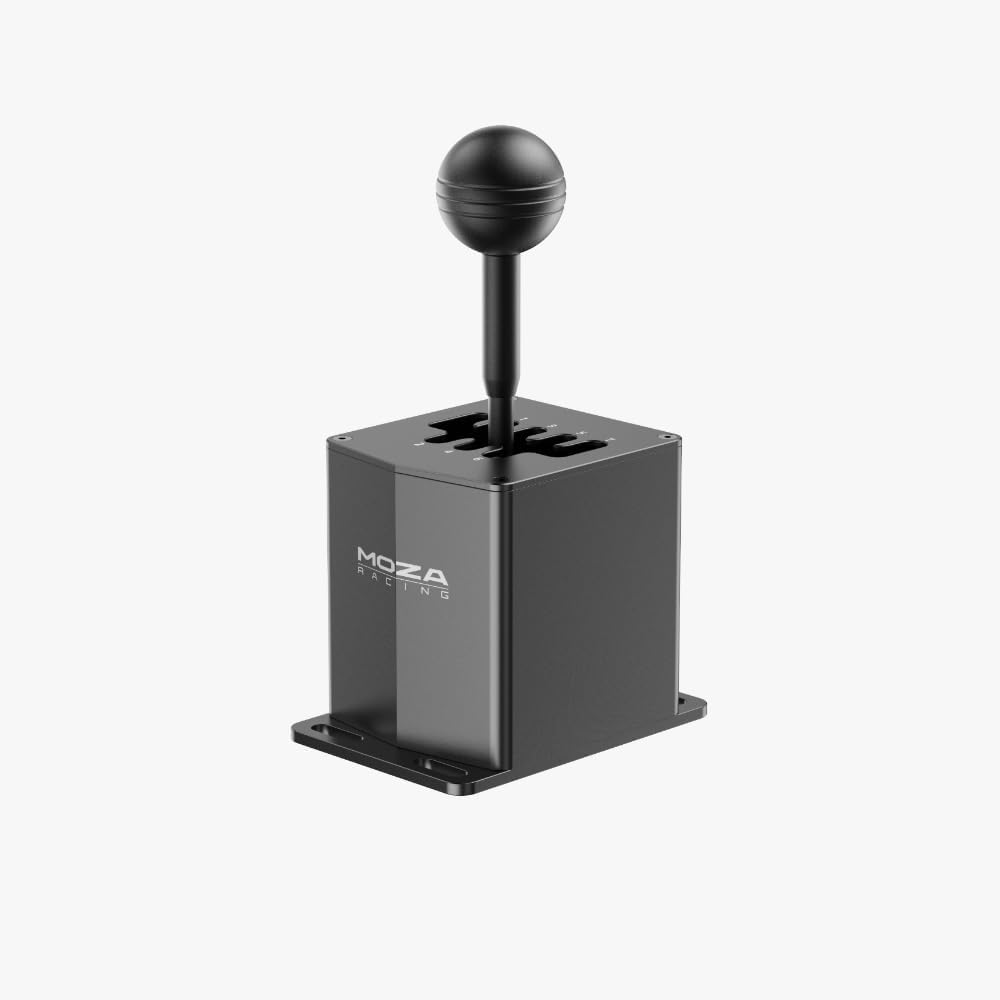
ຮູບພາບ: ດ້ານຫນ້າເປັນມຸມ view of the MOZA HGP Shifter, showcasing its robust design and gear stick.
5. ຄໍາແນະນໍາການດໍາເນີນງານ
The MOZA HGP Shifter is designed for realistic H-pattern gear shifting in sim racing. It features a 7+R (7 forward gears plus Reverse) configuration.
- Gear Engagement: To engage a gear, firmly push the gear stick into the desired gate. The shifter provides tactile feedback for precise engagement.
- ເກຍປີ້ນກັບ: To engage Reverse, typically you will need to push down on the shifter knob while moving it into the Reverse (R) gate. Refer to your specific sim racing game settings for exact reverse engagement mechanics.
- ຄວາມເຂົ້າກັນໄດ້: The shifter is compatible with most major sim racing titles that support H-pattern shifters. Ensure your game's control settings are configured to recognize the MOZA HGP Shifter.

ຮູບພາບ: ເທິງລົງລຸ່ມ view of the MOZA HGP Shifter, clearly showing the engraved 7-speed plus Reverse (7+R) gear layout.
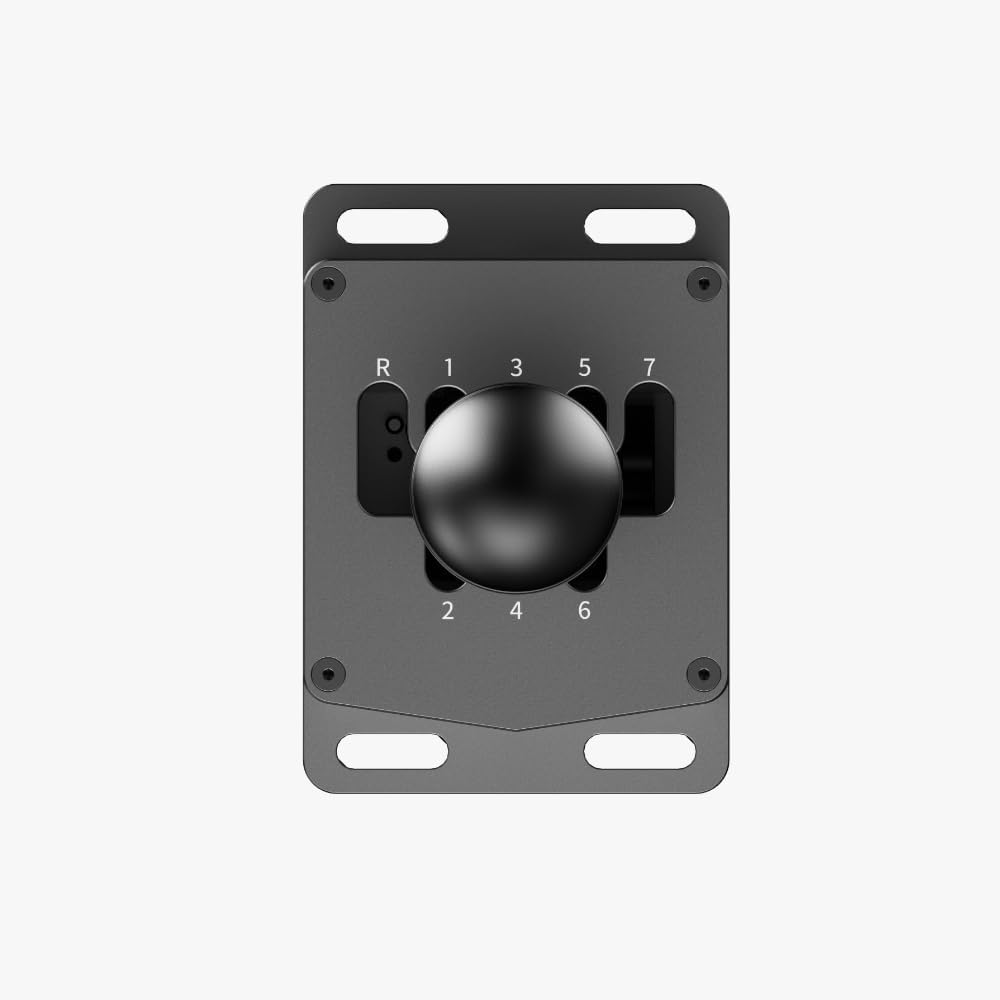
ຮູບພາບ: ຮູບຖ່າຍໃກ້ໆດ້ານເທິງ view of the MOZA HGP Shifter's gear plate, highlighting the detailed numbering and gate design.
6. ບໍາລຸງຮັກສາ
To ensure the longevity and performance of your shifter:
- ທໍາຄວາມສະອາດ: Use a soft, dry cloth to wipe down the shifter. Avoid abrasive cleaners or solvents.
- ການເກັບຮັກສາ: When not in use for extended periods, store the shifter in a clean, dry environment, away from direct sunlight and extreme temperatures.
- ການກວດກາ: ກວດສອບສະກູຕິດຕັ້ງ ແລະ ຈຸດເຊື່ອມຕໍ່ທັງໝົດເປັນໄລຍະເພື່ອຮັບປະກັນວ່າພວກມັນຍັງຄົງແໜ້ນໜາ ແລະ ໝັ້ນຄົງ.
7. ການແກ້ໄຂບັນຫາ
If you encounter issues with your MOZA HGP Shifter, try the following:
- Shifter Not Detected:
- Ensure the USB cable is securely connected to both the shifter and your PC.
- ລອງໃຊ້ພອດ USB ອື່ນໃນ PC ຂອງທ່ານ.
- ຣີສະຕາດ PC ຂອງທ່ານ.
- Reinstall the MOZA drivers from the official webເວັບໄຊ.
- Incorrect Gear Detection:
- Recalibrate the shifter using the MOZA Pit House software or your sim racing game's calibration utility.
- Check for any physical obstructions preventing full gear engagement.
- Loose Gear Stick:
- Check if the screws securing the gear stick to the base are tight.
If these steps do not resolve the issue, please contact MOZA Racing customer support.
8. ຂໍ້ມູນຈໍາເພາະ
| ຍີ່ຫໍ້ | MOZA |
| ໝາຍເລກຕົວແບບ | MOZA-HGP |
| ນ້ໍາຫນັກລາຍການ | 3.69 ປອນ |
| ຂະໜາດສິນຄ້າ | 19.69 x 19.69 x 11.02 ນິ້ວ |
| ສີ | ດຳ |
| ການເຊື່ອມຕໍ່ | USB |
| Gear Layout | 7+R (H-pattern) |
9. ການຮັບປະກັນແລະການສະຫນັບສະຫນູນ
For detailed warranty information and customer support, please refer to the warranty card included with your product or visit the official MOZA Racing webເວັບໄຊ:
ໄດ້ website provides access to FAQs, driver downloads, and contact information for technical assistance.


