ແນະນຳ
ຂອບໃຈສໍາລັບການຊື້asing the Aduro LED Wireless Speaker. This portable speaker combines high-quality audio with dynamic LED lighting, creating an immersive experience for any setting. Designed for ease of use and portability, it features wireless connectivity, hands-free calling, and multiple light modes. Please read this manual carefully to ensure proper operation and to maximize your enjoyment of the product.
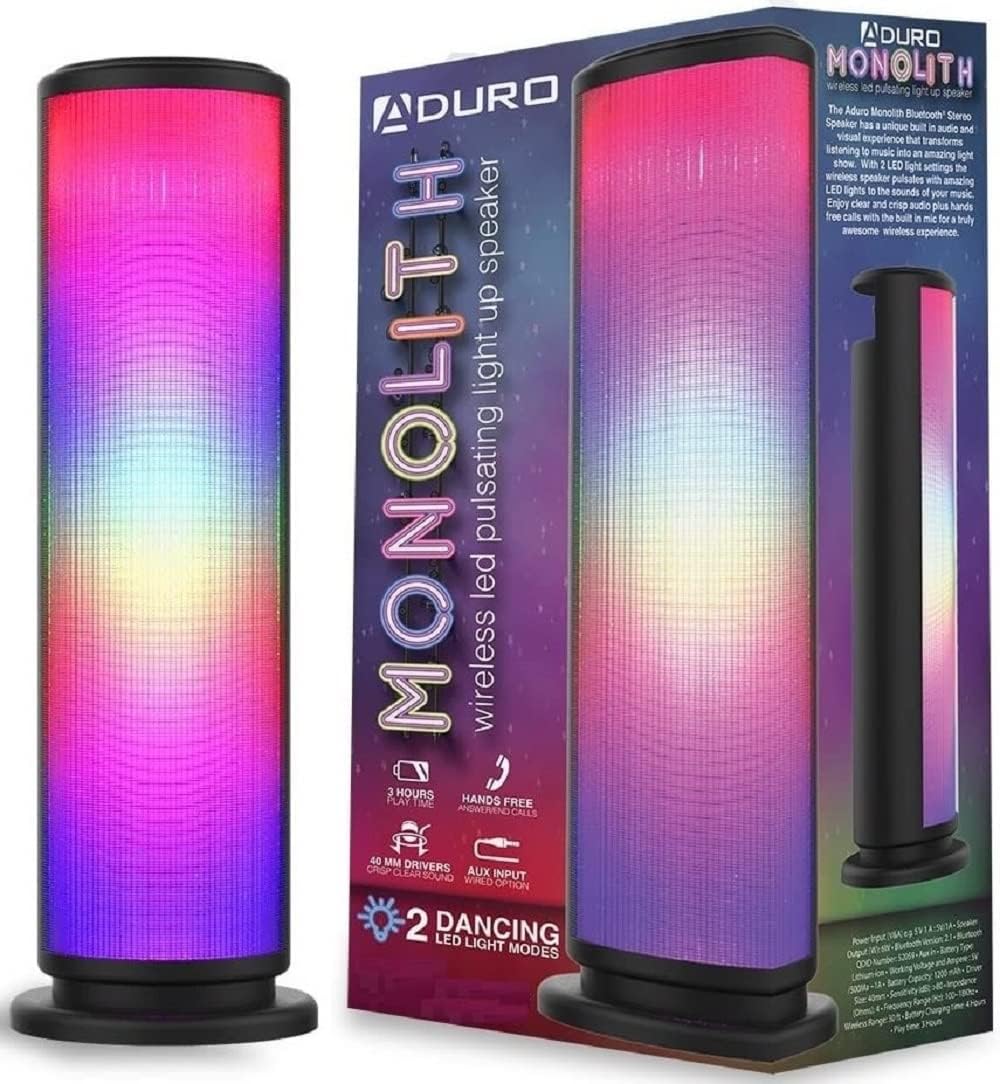
Image: The Aduro LED Wireless Speaker, showcasing its vibrant pulsating LED lights and sleek black design.
ຂໍ້ມູນຄວາມປອດໄພ
- ຢ່າເຮັດໃຫ້ລໍາໂພງຖືກອຸນຫະພູມທີ່ຮຸນແຮງ, ແສງແດດໂດຍກົງ, ຫຼືຄວາມຊຸ່ມຊື່ນສູງ.
- ຫຼີກລ່ຽງການລຸດລົງ ຫຼື ວາງລຳໂພງຕໍ່ກັບຜົນກະທົບທີ່ຮຸນແຮງ.
- ຫ້າມຖອດປະກອບ, ສ້ອມແປງ ຫຼືດັດແປງລຳໂພງດ້ວຍຕົວຂອງທ່ານເອງ. ອ້າງອີງການບໍລິການທັງໝົດໃຫ້ກັບບຸກຄະລາກອນທີ່ມີຄຸນວຸດທິ.
- ຮັກສາລຳໂພງໃຫ້ຫ່າງຈາກນໍ້າ ແລະ ຂອງແຫຼວ. ຜະລິດຕະພັນນີ້ບໍ່ກັນນໍ້າ.
- ໃຊ້ພຽງແຕ່ສາຍສາກ ແລະອະແດັບເຕີໄຟທີ່ລະບຸໄວ້ເທົ່ານັ້ນ.
- Do not operate the speaker near medical equipment or in environments where radio frequency interference is prohibited.
ແມ່ນຫຍັງຢູ່ໃນກ່ອງ
ກະລຸນາກວດສອບເນື້ອໃນຂອງຊຸດເພື່ອໃຫ້ແນ່ໃຈວ່າລາຍການທັງຫມົດມີຢູ່:
- Aduro LED Wireless Speaker (1 unit)
- ສາຍສາກ USB (1 ໜ່ວຍ)
- ຄູ່ມືຜູ້ໃຊ້ (ເອກະສານນີ້)
Note: Wall adapter for charging is not included.
ສິນຄ້າເກີນview
ເຮັດຄວາມຄຸ້ນເຄີຍກັບອົງປະກອບ ແລະການຄວບຄຸມຂອງລຳໂພງ:
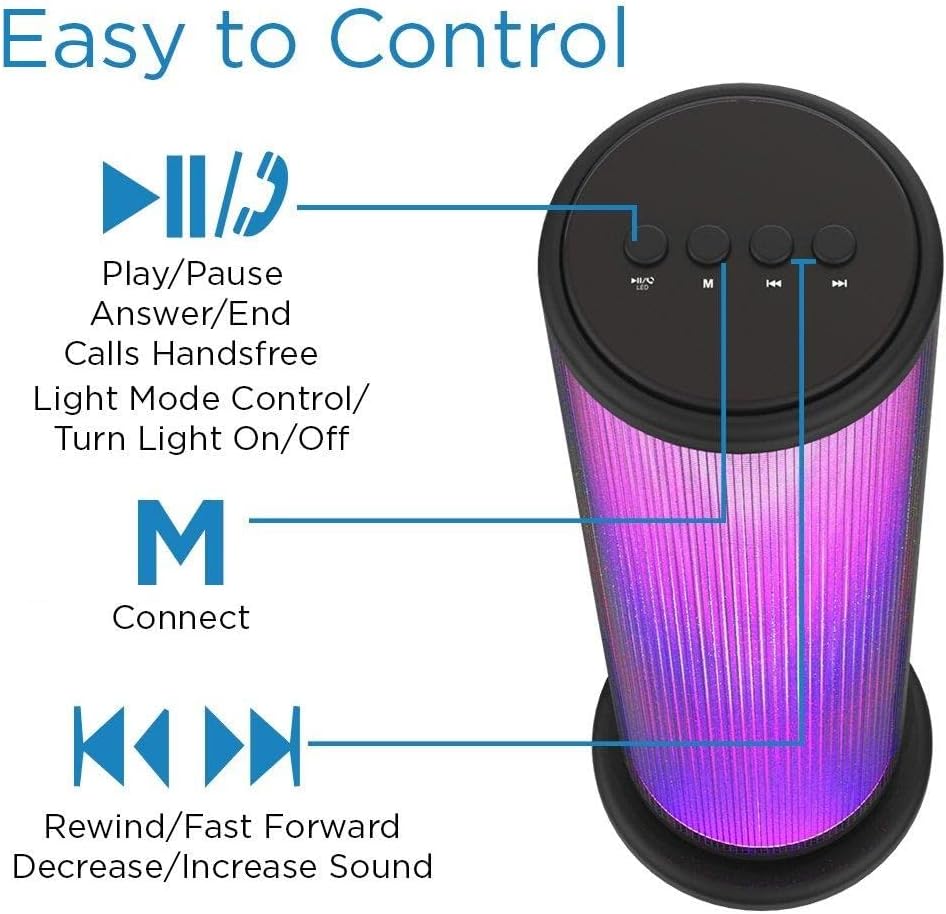
Image: Top panel of the Aduro speaker, illustrating the control buttons for play/pause, light mode, connect, and track/volume control.
ແຜງຄວບຄຸມ (ເທິງສຸດ)
- Play/Pause Button (►▮▮): Press to play or pause audio. Also used to answer/end calls.
- Light Mode Button (●/LED): Press to switch between LED light modes (Rhythmic Lights, Still Pattern) or turn lights on/off.
- Mode/Connect Button (M): Press to switch between Bluetooth and AUX input modes. Long press to enter Bluetooth pairing mode.
- Previous Track/Volume Down (◀◀)ກົດສັ້ນສຳລັບເພງກ່ອນໜ້ານີ້. ກົດຄ້າງໄວ້ເພື່ອຫຼຸດລະດັບສຽງ.
- Next Track/Volume Up (►►)ກົດສັ້ນສຳລັບເພງຕໍ່ໄປ. ກົດຄ້າງໄວ້ເພື່ອເພີ່ມລະດັບສຽງ.

Image: Bottom panel of the Aduro speaker, showing the Micro USB charging port and the AUX input port.
Ports (Bottom)
- ພອດ USB ຂະ ໜາດ ນ້ອຍ: ສໍາລັບການສາກໄຟລໍາໂພງ.
- ການປ້ອນຂໍ້ມູນ AUX: For wired audio connection using a 3.5mm audio cable.
ຕັ້ງຄ່າ
ກຳລັງສາກລຳໂພງ
- Connect the Micro USB end of the charging cable to the Micro USB port on the speaker.
- ເຊື່ອມຕໍ່ປາຍ USB-A ຂອງສາຍສາກກັບແຫຼ່ງໄຟ USB (ເຊັ່ນ: ພອດ USB ຂອງຄອມພິວເຕີ, ຕົວແປງໄຟ USB).
- ຕົວຊີ້ວັດ LED ຈະສະຫວ່າງໃນລະຫວ່າງການສາກໄຟ ແລະປິດເມື່ອສາກເຕັມ.
- A full charge takes approximately 4 hours. The speaker provides up to 3 hours of playtime with LED lights active.
ຄໍາແນະນໍາການດໍາເນີນງານ
ເປີດ/ປິດ
- To power on, press and hold the Play/Pause button (►▮▮) for a few seconds until you hear an audible prompt.
- To power off, press and hold the Play/Pause button (►▮▮) again for a few seconds.
ການຈັບຄູ່ Bluetooth
- ໃຫ້ແນ່ໃຈວ່າລຳໂພງເປີດຢູ່ ແລະ ຢູ່ໃນໂໝດ Bluetooth (ສະແດງດ້ວຍໄຟ LED ສີຟ້າກະພິບ). ຖ້າບໍ່, ໃຫ້ກົດປຸ່ມ 'M' ເພື່ອສະຫຼັບໂໝດ.
- ໃນອຸປະກອນຂອງທ່ານ (ໂທລະສັບສະຫຼາດ, ແທັບເລັດ, ແລະອື່ນໆ), ເປີດໃຊ້ Bluetooth ແລະຊອກຫາອຸປະກອນທີ່ມີຢູ່.
- Select "Aduro Monolith" from the list of devices.
- ເມື່ອຈັບຄູ່ແລ້ວ, ລຳໂພງຈະໃຫ້ການຢືນຢັນດ້ວຍສຽງ, ແລະໄຟ LED ສີຟ້າຈະຢຸດກະພິບ ແລະ ຍັງຄົງສະຫວ່າງຢູ່.
- ລຳໂພງຈະພະຍາຍາມເຊື່ອມຕໍ່ໃໝ່ກັບອຸປະກອນທີ່ຈັບຄູ່ສຸດທ້າຍໂດຍອັດຕະໂນມັດເມື່ອເປີດເຄື່ອງ.
ໃຊ້ AUX Input
- ເຊື່ອມຕໍ່ປາຍໜຶ່ງຂອງສາຍສຽງ 3.5 ມມ (ບໍ່ລວມ) ກັບຜອດອິນພຸດ AUX ຢູ່ລໍາໂພງ.
- ເຊື່ອມຕໍ່ປາຍອີກດ້ານໜຶ່ງຂອງສາຍສຽງເຂົ້າກັບຊ່ອງສຽບຫູຟັງ ຫຼື ຊ່ອງສຽບສຽງອອກຂອງອຸປະກອນຂອງທ່ານ.
- ລຳໂພງຈະປ່ຽນເປັນໂໝດ AUX ໂດຍອັດຕະໂນມັດ.
- Control audio playback and volume from your connected device.
ໂໝດໄຟ LED
The speaker features two LED light modes. Press the Light Mode button (●/LED) to cycle through the options:
- Rhythmic Lights: Lights pulsate and change color in sync with the music.
- Still Pattern: Lights display a continuous, non-pulsating color pattern.
- Pressing the button again will turn the lights off.

Image: The Aduro speaker demonstrating its two distinct LED light modes: Rhythmic Lights and Still Pattern.
ໂທຟຣີ
When connected via Bluetooth, the speaker's built-in microphone allows for hands-free calls:
- ຮັບສາຍ: Press the Play/Pause button (►▮▮) once.
- ສິ້ນສຸດການໂທ: Press the Play/Pause button (►▮▮) once during a call.
- ປະຕິເສດການໂທ: Press and hold the Play/Pause button (►▮▮) for 2 seconds.
ບໍາລຸງຮັກສາ
- ເຮັດຄວາມສະອາດລໍາໂພງດ້ວຍຜ້າອ່ອນໆ, ແຫ້ງ. ຢ່າໃຊ້ເຄື່ອງເຮັດຄວາມສະອາດຂັດຫຼືສານລະລາຍ.
- ເກັບຮັກສາລໍາໂພງໄວ້ໃນບ່ອນທີ່ເຢັນ, ແຫ້ງເມື່ອບໍ່ໄດ້ໃຊ້.
- ຫຼີກເວັ້ນການສໍາຜັດກັບແສງແດດໂດຍກົງຫຼືອຸນຫະພູມທີ່ຮຸນແຮງເປັນເວລາດົນ.
- ໃຫ້ສາກແບັດເຕີຣີເປັນປະຈຳ, ເຖິງແມ່ນວ່າຈະບໍ່ໄດ້ໃຊ້ເລື້ອຍໆກໍຕາມ, ເພື່ອຮັກສາສຸຂະພາບຂອງແບັດເຕີຣີ.
ການແກ້ໄຂບັນຫາ
| ບັນຫາ | ສາເຫດທີ່ເປັນໄປໄດ້ | ການແກ້ໄຂ |
|---|---|---|
| ລຳໂພງບໍ່ເປີດ. | ແບັດເຕີຣີໝົດ. | ສາກລຳໂພງໃຫ້ເຕັມ. |
| ບໍ່ສາມາດຈັບຄູ່ຜ່ານ Bluetooth ໄດ້. | ລຳໂພງບໍ່ຢູ່ໃນໂໝດຈັບຄູ່ ຫຼືຢູ່ໄກຈາກອຸປະກອນ. | Ensure speaker is in Bluetooth pairing mode (flashing blue LED). Move device closer to speaker (within 10 meters). Turn off and on Bluetooth on your device. |
| ບໍ່ມີສຽງຈາກລຳໂພງ. | ລະດັບສຽງຕໍ່າເກີນໄປ ຫຼື ອຸປະກອນບໍ່ໄດ້ເຊື່ອມຕໍ່ຢ່າງຖືກຕ້ອງ. | Increase volume on both speaker and connected device. Re-pair Bluetooth or re-connect AUX cable. |
| ໄຟ LED ບໍ່ເຮັດວຽກ. | ໄຟປິດຢູ່ ຫຼື ແບັດເຕີຣີເຫຼືອໜ້ອຍ. | Press the Light Mode button (●/LED) to turn lights on. Charge the speaker. |
| ຄຸນະພາບສຽງບໍ່ດີ. | Device is too far, interference, or low battery. | Move device closer. Avoid obstacles. Charge the speaker. |
ຂໍ້ມູນຈໍາເພາະ
| ຄຸນສົມບັດ | ລາຍລະອຽດ |
|---|---|
| ຊື່ຕົວແບບ | ມອນລິດ |
| ໝາຍເລກຕົວແບບ | AY-MTSP-01 |
| ປະເພດລຳໂພງ | ກາງແຈ້ງ, Portable |
| ເຕັກໂນໂລຊີການເຊື່ອມຕໍ່ | Bluetooth, AUX |
| ຊ່ວງ Bluetooth | ສູງເຖິງ 10 ແມັດ (33 ຟຸດ) |
| ຮູບແບບການອອກສຽງ | ສະເຕຣິໂອ |
| ລຳໂພງກຳລັງຜົນຜະລິດສູງສຸດ | 6 ວັດ |
| ຂະໜາດຄົນຂັບ | 40ມມ |
| ປະເພດຫມໍ້ໄຟ | ລີທຽມໄອອອນ |
| ຄວາມອາດສາມາດຫມໍ້ໄຟ | 1200mAh |
| ຊີວິດຫມໍ້ໄຟ | Up to 3 hours (with LED lights active) |
| ເວລາສາກໄຟ | ປະມານ 4 ຊົ່ວໂມງ |
| ຂະໜາດ (L x W x H) | 3.5 x 5.8 x 11.8 ນິ້ວ |
| ນ້ໍາຫນັກລາຍການ | 15 ອອນສ໌ (0.94 ປອນ) |
| ສີ | ດຳ |
| ອົງປະກອບລວມ | 40mm Drivers, rechargeable battery, sensitive control panel, speakers, built-in microphone |
ການຮັບປະກັນແລະການສະຫນັບສະຫນູນ
Aduro products are designed with quality and reliability in mind. This product comes with a manufacturer's warranty. For specific warranty details and duration, please refer to the warranty card included with your purchase or visit the official Aduro webເວັບໄຊ.
For technical support, troubleshooting assistance, or warranty claims, please contact Aduro customer service through their official channels. Please have your model number (AY-MTSP-01) and proof of purchase ready when contacting support.
ທ່ານສາມາດຊອກຫາຂໍ້ມູນເພີ່ມເຕີມແລະລາຍລະອຽດການຕິດຕໍ່ກ່ຽວກັບການ Aduro Store on Amazon.


