ແນະນຳ
Thank you for choosing the Auna TT-30 BT Turntable. This manual provides essential information for the safe and efficient operation of your new device. Please read it thoroughly before use and keep it for future reference.
The Auna TT-30 BT is a belt-driven turntable designed for playing vinyl records, featuring an integrated Bluetooth receiver for wireless audio streaming from compatible devices.
ຄໍາແນະນໍາຄວາມປອດໄພ
- ອ່ານຄໍາແນະນໍາທັງຫມົດຢ່າງລະອຽດກ່ອນທີ່ຈະດໍາເນີນການອຸປະກອນ.
- ຮັກສາຄູ່ມືສໍາລັບການອ້າງອີງໃນອະນາຄົດ.
- ຫ້າມບໍ່ໃຫ້ອຸປະກອນຖືກຝົນ ຫຼື ຄວາມຊຸ່ມຊື້ນ ເພື່ອປ້ອງກັນໄຟໄໝ້ ຫຼື ໄຟຟ້າຊອດ.
- ຮັບປະກັນການລະບາຍອາກາດທີ່ເຫມາະສົມ. ຫ້າມປິດຊ່ອງລະບາຍອາກາດໃດໆ.
- ວາງອຸປະກອນຢູ່ເທິງພື້ນຜິວທີ່ມີລະດັບຄວາມຫມັ້ນຄົງ.
- ໃຊ້ພຽງແຕ່ໄຟລ໌ແນບ/ອຸປະກອນເສີມທີ່ລະບຸໂດຍຜູ້ຜະລິດ.
- ຖອດປລັກອຸປະກອນໃນເວລາມີພະຍຸຟ້າຜ່າ ຫຼືເມື່ອບໍ່ໄດ້ໃຊ້ເປັນເວລາດົນນານ.
- ອ້າງອີງການບໍລິການທັງໝົດໃຫ້ກັບພະນັກງານບໍລິການທີ່ມີຄຸນວຸດທິ.
ເນື້ອໃນຊຸດ
Please check that all items listed below are present in the packaging:
- Auna TT-30 BT Turntable Unit
- Platter (Metal)
- ການປົກຫຸ້ມຂອງຝຸ່ນ
- Power Adapter
- ຄໍາແນະນໍາການດໍາເນີນງານ (ຄູ່ມືນີ້)
ສິນຄ້າເກີນview
The Auna TT-30 BT Turntable features a robust design with a metal platter for stable playback. Key components include the tonearm with cartridge and stylus, speed selector, cueing lever, and an integrated Bluetooth receiver.
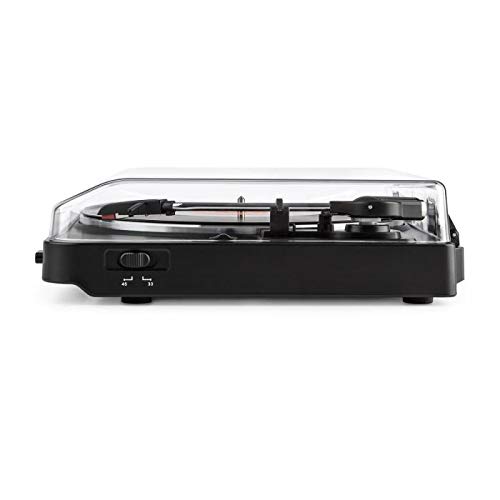
Image of the Auna TT-30 BT Turntable, showcasing ການອອກແບບແລະອົງປະກອບຂອງມັນ.
ຕັ້ງຄ່າ
1. ບັນຈຸເຂົ້າຮຽນ
Place the turntable on a flat, stable, and vibration-free surface away from direct sunlight, heat sources, and strong magnetic fields. Ensure there is enough space around the unit for proper ventilation and operation of the dust cover.
2. Platter Assembly
- Carefully place the metal platter onto the center spindle.
- Locate the drive belt (usually pre-installed or found separately). Stretch the belt around the motor pulley and the inner rim of the platter.
- Place the felt mat (if included) on top of the platter.
3. ການເຊື່ອມຕໍ່ພະລັງງານ
Connect the power adapter to the DC input on the rear of the turntable, then plug the adapter into a suitable wall outlet.
4. Stylus Protection
Remove the stylus protector from the cartridge before playing any records. Ensure the tonearm is properly balanced and the tracking force is set according to the cartridge manufacturer's recommendations (if adjustable).
ຄໍາແນະນໍາການດໍາເນີນງານ
1. Playing Records
- ເປີດຝາປິດຂີ້ຝຸ່ນ.
- ເອົາບັນທຶກໃສ່ແຜ່ນ.
- Select the correct speed (33 1/3 or 45 RPM) using the speed selector switch. For 45 RPM records, place the 45 RPM adapter over the spindle if needed.
- ປ່ອຍ lock tonearm ໄດ້.
- ຍົກ tonearm ໂດຍໃຊ້ lever cueing.
- ຍ້າຍ tonearm ຂ້າມຮ່ອງເລີ່ມຕົ້ນທີ່ຕ້ອງການຂອງບັນທຶກ.
- Gently lower the tonearm using the cueing lever. The stylus will make contact with the record, and playback will begin.
- At the end of the record, the turntable may feature an auto-stop function, which will stop the platter rotation. Lift the tonearm and return it to its rest, then engage the tonearm lock.
2. Bluetooth Playback (Receiving Audio)
The Auna TT-30 BT Turntable features an integrated Bluetooth receiver, allowing you to stream audio wirelessly from your smartphone, tablet, or other Bluetooth-enabled devices to the turntable's output (e.g., connected speakers).
- ກວດໃຫ້ແນ່ໃຈວ່າໄດ້ເປີດເຄື່ອງ turntable ແລ້ວ.
- Activate Bluetooth on your external audio device (e.g., smartphone).
- ຊອກຫາ available Bluetooth devices. The turntable should appear as "Auna TT-30 BT" or similar.
- Select the turntable from the list to pair. Once paired, audio from your device will be routed through the turntable's audio output.
ໝາຍເຫດ: The turntable acts as a Bluetooth receiver, meaning it receives audio from other devices. It does not transmit audio wirelessly to Bluetooth headphones or speakers.
ບໍາລຸງຮັກສາ
1. ເຮັດຄວາມສະອາດ Turntable ໄດ້
- ຕ້ອງຖອດປລັກແຜ່ນສຽງອອກຈາກປລັກໄຟກ່ອນທຳຄວາມສະອາດສະເໝີ.
- ໃຊ້ຜ້າອ່ອນແລະແຫ້ງເຊັດພື້ນຜິວພາຍນອກ. ຢ່າໃຊ້ນໍ້າຢາທໍາຄວາມສະອາດທີ່ມີສີຂັດ ຫຼື ຕົວລະລາຍ.
- For the dust cover, use a soft cloth and a mild, non-abrasive cleaner if necessary.
- Regularly dust the stylus with a soft brush, moving from back to front.
2. ການປ່ຽນປາກກາປາກກາ
The stylus (needle) is a delicate component and will wear out over time, typically after 300-500 hours of playback. A worn stylus can damage your records and degrade sound quality. Consult your retailer or Auna support for information on replacement styli compatible with your TT-30 BT turntable.
ການແກ້ໄຂບັນຫາ
| ບັນຫາ | ສາເຫດທີ່ເປັນໄປໄດ້ | ການແກ້ໄຂ |
|---|---|---|
| ບໍ່ມີພະລັງງານ | ບໍ່ໄດ້ເຊື່ອມຕໍ່ອະແດບເຕີໄຟ; ປລັກໄຟບໍ່ໄດ້ເປີດໃຊ້ງານ. | ກວດສອບການເຊື່ອມຕໍ່ພະລັງງານ; ລອງຮ້ານອື່ນ. |
| ບໍ່ມີສຽງຫລືປະລິມານຕ່ ຳ | ພາຍນອກ amplifier/speakers not connected or turned on; volume too low; stylus dirty or damaged. | Ensure audio cables are connected; turn on amplifier/speakers and adjust volume; clean or replace stylus. |
| ຂ້າມ ຫຼືສຽງບິດເບືອນ | Record dirty or damaged; stylus dirty or worn; turntable not level; excessive vibration. | Clean record; clean or replace stylus; ensure turntable is on a level, stable surface; reduce vibrations. |
| ການຈັບຄູ່ Bluetooth ລົ້ມເຫລວ | Turntable ບໍ່ຢູ່ໃນຮູບແບບການຈັບຄູ່; ອຸປະກອນໄກເກີນໄປ; ແຊກແຊງ. | Ensure turntable is discoverable; move device closer; restart both devices. |
ຂໍ້ມູນຈໍາເພາະ
| ຍີ່ຫໍ້ | ອານາ |
| ໝາຍເລກຕົວແບບ | TTS10-2300-plat |
| ຂະໜາດ (L x W x H) | 45.5 x 43 x 16.5 cm |
| ນ້ຳໜັກ | 3.7 ກິໂລ |
| ວັດສະດຸ | ໂລຫະ |
| ຄຸນນະສົມບັດພິເສດ | ເຄື່ອງຮັບ Bluetooth ແບບປະສົມປະສານ |
| ປະເພດຕົວເຊື່ອມຕໍ່ | USB (for connectivity, not necessarily for audio output) |
ຫມາຍເຫດ: ຂໍ້ມູນຈໍາເພາະແມ່ນມີການປ່ຽນແປງໂດຍບໍ່ມີການແຈ້ງລ່ວງຫນ້າ.
ການຮັບປະກັນແລະການສະຫນັບສະຫນູນ
For warranty information, please refer to the warranty card included with your product or contact your retailer. For technical support or service inquiries, please visit the official Auna webເວັບໄຊ ຫຼືຕິດຕໍ່ພະແນກບໍລິການລູກຄ້າຂອງເຂົາເຈົ້າ. ຮັກສາຫຼັກຖານການຊື້ຂອງທ່ານສໍາລັບການຮຽກຮ້ອງການຮັບປະກັນໃດໆ.
Auna Official Webເວັບໄຊ: www.auna.de (ຕ. ຢample link, ການເຊື່ອມຕໍ່ຕົວຈິງອາດຈະແຕກຕ່າງກັນໄປຕາມພາກພື້ນ)


