ແນະນຳ
This manual provides essential information for the safe and efficient operation of your Behringer EUROPORT MPA200BT portable PA system. Please read these instructions thoroughly before using the device to ensure proper setup, usage, and maintenance. Retain this manual for future reference.
The Behringer EUROPORT MPA200BT is an all-in-one portable PA system designed for various applications, featuring 200 watts of power, Bluetooth connectivity for audio streaming, and a wireless microphone for vocal performances or presentations. Its battery operation allows for use in locations without direct power access.
ຄໍາແນະນໍາຄວາມປອດໄພທີ່ສໍາຄັນ
ປະຕິບັດຕາມຄວາມລະມັດລະວັງດ້ານຄວາມປອດໄພພື້ນຖານເຫຼົ່ານີ້ສະເໝີເມື່ອໃຊ້ອຸປະກອນໄຟຟ້າ:
- ອ່ານຄໍາແນະນໍາທັງຫມົດກ່ອນທີ່ຈະດໍາເນີນການຜະລິດຕະພັນ.
- Do not use this product near water or in wet environments.
- ເຮັດຄວາມສະອາດດ້ວຍຜ້າແຫ້ງເທົ່ານັ້ນ.
- ຫ້າມປິດຊ່ອງລະບາຍອາກາດໃດໆ. ຕິດຕັ້ງຕາມຄໍາແນະນໍາຂອງຜູ້ຜະລິດ.
- ຫ້າມຕິດຕັ້ງໃກ້ກັບແຫຼ່ງຄວາມຮ້ອນເຊັ່ນລັງສີ, ເຄື່ອງບັນທຶກຄວາມຮ້ອນ, ເຕົາຫຼືອຸປະກອນອື່ນໆ (ລວມທັງ. amplifiers) ທີ່ຜະລິດຄວາມຮ້ອນ.
- ຢ່າທຳລາຍຈຸດປະສົງດ້ານຄວາມປອດໄພຂອງປລັກຂົ້ວໂລກ ຫຼື ປະເພດດິນ. ປລັກຂົ້ວມີສອງໃບມີໃບໜຶ່ງກວ້າງກວ່າອີກແຜ່ນໜຶ່ງ. ປລັກສາຍດິນມີສອງໃບ ແລະ ງ່າເຂົ້າດິນທີສາມ. ແຜ່ນໃບກວ້າງຫຼືງ່າທີສາມແມ່ນສະຫນອງໃຫ້ເພື່ອຄວາມປອດໄພຂອງທ່ານ. ຖ້າປລັກສຽບທີ່ໃຫ້ມານັ້ນບໍ່ພໍດີກັບປລັກສຽບໄຟຂອງທ່ານ, ໃຫ້ປຶກສາກັບຊ່າງໄຟຟ້າເພື່ອທົດແທນປລັກສຽບທີ່ໝົດແລ້ວ.
- ປົກປ້ອງສາຍໄຟຈາກການຖືກສຽບ ຫຼື ສຽບ, ໂດຍສະເພາະຢູ່ປລັກສຽບ, ກ່ອງຮັບສະດວກ, ແລະຈຸດທີ່ພວກມັນອອກຈາກອຸປະກອນ.
- ໃຊ້ໄຟລ໌ແນບ/ອຸປະກອນເສີມທີ່ຜູ້ຜະລິດລະບຸໄວ້ເທົ່ານັ້ນ.
- ຖອດອຸປະກອນນີ້ອອກໃນລະຫວ່າງການມີພາຍຸຟ້າຜ່າ ຫຼືເມື່ອບໍ່ໄດ້ໃຊ້ເປັນເວລາດົນນານ.
- ອ້າງອີງການບໍລິການທັງໝົດໃຫ້ກັບພະນັກງານບໍລິການທີ່ມີຄຸນວຸດທິ. ການບໍລິການແມ່ນຕ້ອງການເມື່ອອຸປະກອນໄດ້ຮັບຄວາມເສຍຫາຍໃນທາງໃດກໍ່ຕາມເຊັ່ນ: ສາຍໄຟຫຼືປລັກສຽບຖືກເສຍຫາຍ, ແຫຼວຮົ່ວໄຫຼຫຼືສິ່ງຂອງຕົກເຂົ້າໄປໃນອຸປະກອນ, ອຸປະກອນຖືກຝົນຫຼືຄວາມຊຸ່ມຊື່ນ, ບໍ່ເຮັດວຽກຕາມປົກກະຕິ. , ຫຼືໄດ້ຖືກຫຼຸດລົງ.
ເນື້ອໃນຊຸດ
Upon unpacking your Behringer EUROPORT MPA200BT, please verify that all components are present and in good condition:
- Behringer EUROPORT MPA200BT Portable PA System
- Wireless Microphone (ULM300M)
- USB Receiver for Wireless Microphone (ULM300USB)
- ສາຍໄຟ
- ຄູ່ມືຜູ້ໃຊ້ (ເອກະສານນີ້)

Image: The Behringer EUROPORT MPA200BT portable PA system shown with its accompanying wireless microphone.
ສິນຄ້າເກີນview: ການຄວບຄຸມ ແລະການເຊື່ອມຕໍ່
Familiarize yourself with the various controls and connection points on your MPA200BT unit.

Image: Rear panel of the MPA200BT, highlighting the main control interface, inputs, and outputs.

ຮູບພາບ: ລາຍລະອຽດ view of the MPA200BT's control panel, including display, rotary encoder, and buttons.
ຄຸນນະສົມບັດກະດານຄວບຄຸມ:
- ຈໍສະແດງຜົນ: Shows current settings, input levels, and Bluetooth status.
- ຕົວເຂົ້າລະຫັດແບບ Rotary: Used to navigate menus and adjust parameters. Press to confirm selections.
- PROCESS Button: Activates or deactivates sound processing effects.
- ປຸ່ມຕັ້ງຄ່າ: ເຂົ້າສູ່ເມນູຕັ້ງຄ່າລະບົບ.
- ປຸ່ມອອກ: Exits current menu or setting.
- ປຸ່ມ ENTER: ຢືນຢັນການເລືອກພາຍໃນເມນູ.
- ປຸ່ມ Bluetooth: ເລີ່ມໂໝດການຈັບຄູ່ Bluetooth.
ການເຊື່ອມຕໍ່ຂາເຂົ້າ/ອອກ:
- INPUT 1 & 2 (XLR/TRS Combo Jacks): For connecting microphones or line-level instruments.
- WIRELESS SYSTEM (USB Port): For connecting the ULM300USB wireless microphone receiver.
- MP3 Input (3.5mm Stereo Jack): For connecting external audio players.
- MIX Output (XLR): For sending the mixed audio signal to another PA system or recording device.
- ຊ່ອງສຽບໄຟ AC: ສໍາລັບການເຊື່ອມຕໍ່ສາຍໄຟ.
ຕັ້ງຄ່າ
- ການເຊື່ອມຕໍ່ພະລັງງານ:
Connect the supplied power cable to the AC Power Inlet on the rear of the MPA200BT and then to a suitable power outlet. The unit can also operate on its internal battery.
- ການເປີດເຄື່ອງເບື້ອງຕົ້ນ:
Press the power switch to turn on the unit. The display will illuminate.
- ຕຳແໜ່ງ:
Place the MPA200BT on a stable, flat surface or mount it on a speaker stand (sold separately). Ensure proper ventilation around the unit.
- ເຊື່ອມຕໍ່ວັດສະດຸປ້ອນ:
- ໄມໂຄຣໂຟນ/ເຄື່ອງດົນຕີແບບມີສາຍ: Connect to INPUT 1 or INPUT 2 using XLR or 1/4" TRS cables.
- External Audio Players: Connect to the MP3 Input using a 3.5mm stereo cable.
ຄໍາແນະນໍາການດໍາເນີນງານ
ກະແສສຽງຂອງ Bluetooth

Image: The Bluetooth logo, representing wireless audio streaming capability.
- ໃຫ້ແນ່ໃຈວ່າ MPA200BT ເປີດຢູ່.
- ກົດ Bluetooth button on the control panel. The Bluetooth icon on the display will flash, indicating pairing mode.
- On your smartphone or Bluetooth-enabled device, navigate to the Bluetooth settings and select "BEHRINGER MPA200BT" from the list of available devices.
- Once paired, the Bluetooth icon on the MPA200BT display will stop flashing and remain solid.
- You can now stream audio from your device to the MPA200BT. Adjust the volume using your device's controls and the MPA200BT's master volume.
Wireless Microphone Usage (ULM300M/ULM300USB)
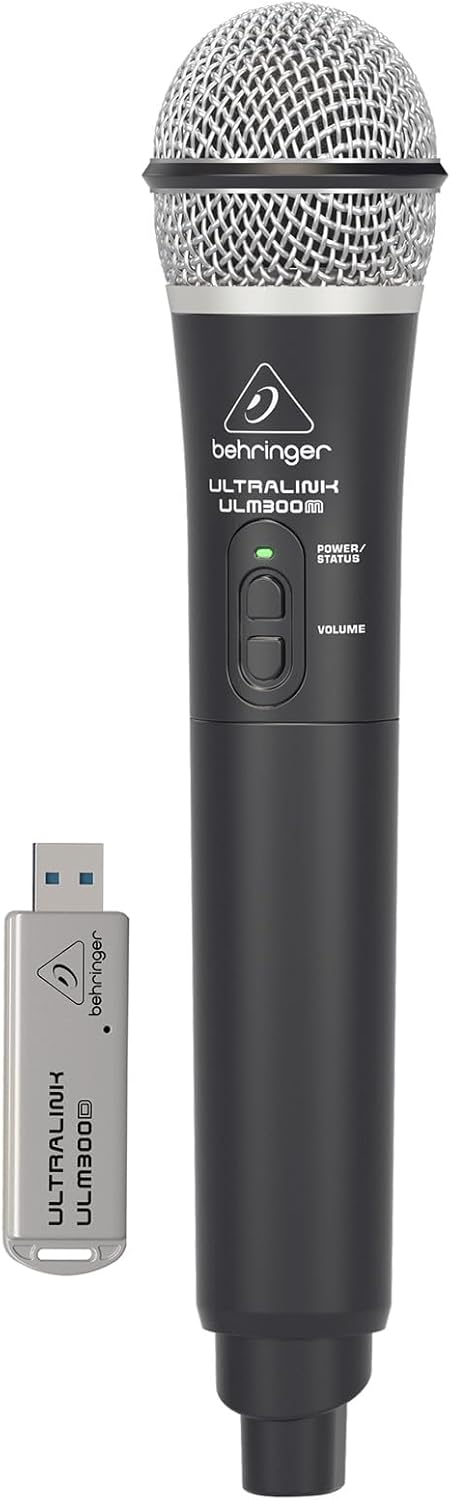
Image: The Behringer ULM300M wireless microphone shown with its USB receiver, the ULM300USB.
- Insert the ULM300USB receiver into the ລະບົບ WIRELESS USB port on the MPA200BT.
- Ensure the ULM300M wireless microphone has fresh batteries installed.
- Power on the wireless microphone. The status LED on both the microphone and the receiver should indicate a successful connection (usually a solid green light).
- Adjust the microphone's volume using the controls on the microphone itself and the MPA200BT's input gain settings.
Remote Control via Smartphone App

Image: A smartphone screen showing the graphical user interface of the Behringer remote control application, used to manage the PA system settings.
The MPA200BT can be controlled remotely using a dedicated smartphone application. This allows for adjustments to volume, EQ, and effects from a distance.
- Download the official Behringer MPA200BT control app from your device's app store (iOS/Android).
- Ensure your smartphone is connected to the MPA200BT via Bluetooth (as described in the "Bluetooth Audio Streaming" section).
- Open the app. It should automatically detect and connect to your MPA200BT unit.
- Use the app's interface to control various parameters of the PA system.
ການດໍາເນີນງານຫມໍ້ໄຟ
The MPA200BT features an internal rechargeable battery for portable use.
- The battery charges automatically when the unit is connected to AC power.
- A battery level indicator on the display shows the remaining charge.
- For optimal battery life, fully charge the unit before its first use and periodically when not in use for extended periods.
ບໍາລຸງຮັກສາ
- ທໍາຄວາມສະອາດ: ໃຊ້ຜ້າປຽກແຫ້ງເພື່ອເຮັດຄວາມສະອາດດ້ານນອກຂອງເຄື່ອງ. ຢ່າໃຊ້ເຄື່ອງເຮັດຄວາມສະອາດຂັດຫຼືສານລະລາຍ.
- ການເກັບຮັກສາ: When not in use, store the MPA200BT in a cool, dry place, away from direct sunlight and extreme temperatures.
- ການດູແລຫມໍ້ໄຟ: If storing for extended periods, ensure the battery is partially charged (around 50%) and recharge it every few months to prevent deep discharge.
- ການລະບາຍອາກາດ: Ensure that the ventilation openings are not obstructed during operation to prevent overheating.
ການແກ້ໄຂບັນຫາ
| ບັນຫາ | ສາເຫດທີ່ເປັນໄປໄດ້ | ການແກ້ໄຂ |
|---|---|---|
| ບໍ່ມີພະລັງງານ | Power cable not connected; unit not switched on; battery depleted. | Check power cable connection; ensure power switch is ON; charge battery. |
| ບໍ່ມີສຽງອອກ | Volume too low; input source not connected or selected; faulty cable; microphone off. | Increase master volume and input gain; check input connections; test cables; ensure microphone is powered on and paired. |
| ການຈັບຄູ່ Bluetooth ລົ້ມເຫລວ | MPA200BT not in pairing mode; device too far; interference. | Press Bluetooth button to enter pairing mode; move device closer; restart both devices. |
| ໄມໂຄຣໂຟນໄຮ້ສາຍບໍ່ເຮັດວຽກ | USB receiver not connected; microphone off; depleted batteries in microphone; interference. | Ensure ULM300USB is fully inserted; power on microphone; replace microphone batteries; ensure clear line of sight. |
| Squealing/Feedback | Microphone too close to speaker; microphone gain too high. | Move microphone further from speaker; reduce microphone input gain. |
ຂໍ້ມູນຈໍາເພາະ
| ຄຸນສົມບັດ | ລາຍລະອຽດ |
|---|---|
| ຕົວແບບ | ເອີຣົບ MPA200BT |
| ຜົນຜະລິດວັດtage | 200 ວັດ |
| ແຫຼ່ງພະລັງງານ | Battery Powered / AC Power |
| ເຕັກໂນໂລຊີການເຊື່ອມຕໍ່ | Bluetooth |
| ຈໍານວນຊ່ອງ | 2 |
| ນ້ໍາຫນັກລາຍການ | 12.1 ກິໂລ (26.6 ປອນ) |
| ຂະໜາດສິນຄ້າ (L x W x H) | 11.02 x 10.11 x 16.53 ນິ້ວ |
| ປະເພດການຕິດຕັ້ງ | ໂຕະ |
| ອຸປະກອນທີ່ເຂົ້າກັນໄດ້ | ໂທລະສັບສະຫຼາດ |
| ຜູ້ຜະລິດ | ດົນຕີຊົນເຜົ່າສະຫະລັດ |
ການຮັບປະກັນແລະການສະຫນັບສະຫນູນ
ສໍາລັບຂໍ້ມູນການຮັບປະກັນລາຍລະອຽດ ແລະການຊ່ວຍເຫຼືອດ້ານວິຊາການ, ກະລຸນາອ້າງອີງເຖິງ Behringer ຢ່າງເປັນທາງການ webເວັບໄຊ ຫຼືຕິດຕໍ່ບໍລິການລູກຄ້າຂອງເຂົາເຈົ້າ. ຮັກສາໃບຮັບເງິນການຊື້ຂອງທ່ານໄວ້ເປັນຫຼັກຖານການຊື້.
ຊັບພະຍາກອນອອນໄລນ໌: www.behringer.com
ຜູ້ຜະລິດ: ດົນຕີຊົນເຜົ່າສະຫະລັດ
ວິດີໂອຜະລິດຕະພັນຢ່າງເປັນທາງການ
No relevant official product videos from the seller were found in the provided data for embedding.


