1. ບົດແນະນຳ
The POWERTECH MP3752 is an intelligent and lightweight solar charge controller designed to manage the power flow from your solar panels to your battery bank. Utilizing Pulse Width Modulation (PWM) technology, it ensures efficient and safe battery charging. This controller offers a set-and-forget operation, providing maximum charge into your batteries without constant monitoring. It integrates essential safety features such as overload, short-circuit, over-discharge, and reverse-polarity protection. Additionally, a convenient USB port on the front panel allows for up to 1.2A charging, useful for mobile devices during power outages. The unit supports various battery types including sealed lead-acid, Gel, and flooded cells, and automatically selects the optimal charging mode (bulk, equalise, float).
2. ຂໍ້ມູນຄວາມປອດໄພ
Please read all instructions carefully before installation and operation. Failure to follow these instructions may result in damage to the unit, battery, or personal injury.
- Ensure all connections are correct and secure before applying power.
- Do not connect the solar controller to an AC power source.
- ຕິດຕັ້ງຕົວຄວບຄຸມໄວ້ໃນບໍລິເວນທີ່ມີລະບາຍອາກາດດີ, ຫ່າງຈາກວັດສະດຸໄວໄຟ ແລະ ແສງແດດໂດຍກົງ.
- Avoid short-circuiting the battery terminals or solar panel terminals.
- Always connect the battery first, then the solar panel, and finally the load. Disconnect in reverse order.
- This device is not waterproof; protect it from moisture and water.
- ພຽງແຕ່ບຸກຄະລາກອນທີ່ມີຄຸນວຸດທິຄວນປະຕິບັດການຕິດຕັ້ງແລະການບໍາລຸງຮັກສາ.
3. ຄຸນລັກສະນະຂອງຜະລິດຕະພັນ
- Automatic charge mode selection (Bulk, Equalise, Float).
- Suitable for both 12V and 24V battery banks.
- Integrated USB charging port (5V, 1.2A max) on the front panel.
- Supports sealed lead-acid, Gel, and flooded battery types.
- Comprehensive protection features: overload, short-circuit, over-discharge, reverse-polarity.
- Pulse Width Modulation (PWM) charging technology.
4. ເນື້ອໃນຊຸດ
ກະລຸນາກວດເບິ່ງເນື້ອໃນຂອງແພັກເກດເມື່ອໄດ້ຮັບ:
- 1 x POWERTECH MP3752 Solar Controller
- 1 x ຄູ່ມືຜູ້ໃຊ້ (ເອກະສານນີ້)
5. ຜະລິດຕະພັນເກີນview ແລະການເຊື່ອມຕໍ່
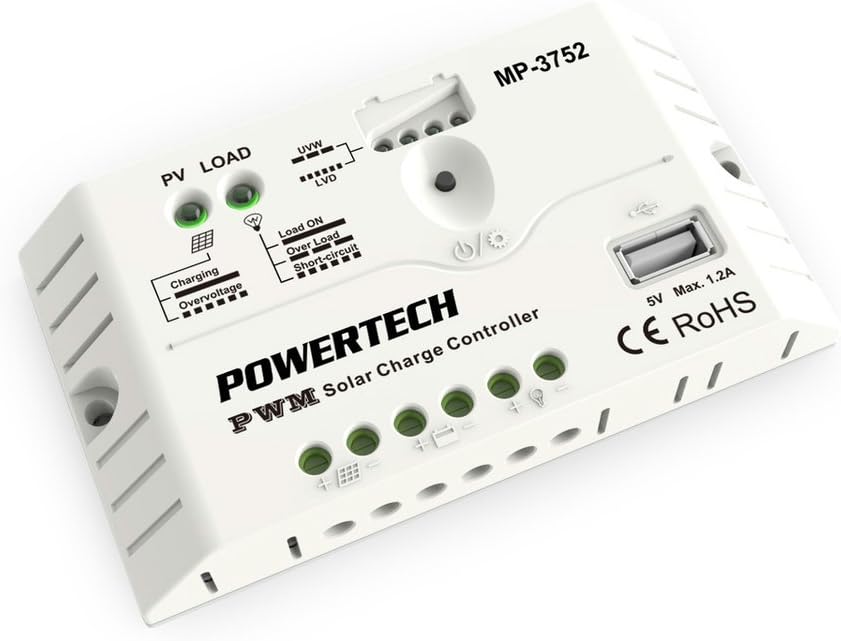
ຮູບ 1: ດ້ານຫນ້າ view of the POWERTECH MP3752 Solar Controller. This image displays the PV LOAD, UVW, LVD, Load ON, Over Load, Short-Circuit indicators, the USB port, and the connection terminals for solar panels, battery, and load.
The MP3752 controller features clearly marked terminals for easy connection. Refer to Figure 1 for a visual guide to the controller's layout and indicators.
ຈຸດເຊື່ອມຕໍ່:
- Solar Panel Input (PV): Connect your solar panel array here. Ensure correct polarity (+ and -).
- ການເຊື່ອມຕໍ່ຫມໍ້ໄຟ: Connect your 12V or 24V battery bank here. Observe correct polarity (+ and -).
- ໂຫຼດຜົນຜະລິດ: Connect your DC loads (e.g., lights, fans) here. Observe correct polarity (+ and -).
- ພອດ USB: 5V, 1.2A max output for charging small electronic devices.
6. ການຕິດຕັ້ງແລະການຕິດຕັ້ງ
Follow these steps for proper installation of your solar charge controller:
- ການຕິດຕັ້ງ: Choose a dry, well-ventilated indoor location, away from direct sunlight, high temperatures, and moisture. Ensure sufficient air circulation around the controller.
- ການເຊື່ອມຕໍ່ຫມໍ້ໄຟ:
- Connect the positive (+) terminal of the battery to the battery positive (+) terminal on the controller.
- Connect the negative (-) terminal of the battery to the battery negative (-) terminal on the controller.
- The controller will automatically detect if it's a 12V or 24V system.
- ການເຊື່ອມຕໍ່ແຜງແສງອາທິດ:
- Connect the positive (+) terminal of the solar panel to the solar panel positive (+) terminal on the controller.
- Connect the negative (-) terminal of the solar panel to the solar panel negative (-) terminal on the controller.
- Ensure the open-circuit voltage of the solar panel does not exceed the maximum input voltage of the controller (typically 50V for 12/24V systems).
- ໂຫຼດການເຊື່ອມຕໍ່:
- Connect the positive (+) terminal of your DC load to the load positive (+) terminal on the controller.
- Connect the negative (-) terminal of your DC load to the load negative (-) terminal on the controller.
- Do not exceed the maximum rated current for the load output (20A).
- ຢືນຢັນການເຊື່ອມຕໍ່: Double-check all connections for correct polarity and tightness before proceeding.

Figure 2: The POWERTECH MP3752 Solar Controller shown in its packaging, illustrating its application with solar panels. This image provides a contextual view of the product's intended use.
7. ຄໍາແນະນໍາການດໍາເນີນງານ
7.1. Automatic System Voltage ການຮັບຮູ້
The controller automatically detects whether the connected battery bank is 12V or 24V upon initial connection. Ensure the battery is connected first for proper voltage ການຊອກຄົ້ນຫາ.
7.2. ຮູບແບບການສາກໄຟ
The MP3752 employs intelligent PWM charging, automatically cycling through different stages to optimize battery health and lifespan:
- ຄ່າໃຊ້ຈ່າຍຫຼາຍ: Delivers maximum current to rapidly bring the battery to approximately 80% charge.
- Equalise Charge: Periodically applies a higher voltage to equalize the charge among battery cells, preventing sulfation and extending battery life (for flooded batteries).
- ຄ່າໃຊ້ຈ່າຍທີ່ເລື່ອນໄດ້: Maintains the battery at a full charge by providing a small, constant voltage, compensating for self-discharge.
7.3. ການຄວບຄຸມການໂຫຼດ
The load output is controlled by the controller to prevent over-discharge of the battery. When the battery voltage ຫຼຸດລົງຂ້າງລຸ່ມນີ້ຕ່ໍາ Voltage Disconnect (LVD) threshold, the load output will be automatically disconnected. It will reconnect once the battery has recharged to the Low Voltage Reconnect (LVR) threshold.
Press the power button on the controller to manually turn the load output ON or OFF.
7.4. ພອດສາກ USB
The 5V, 1.2A USB port can be used to charge small electronic devices like smartphones or tablets. This port is active as long as the battery has sufficient charge.
8. ຕົວຊີ້ວັດ
The POWERTECH MP3752 features several LED indicators to provide real-time status information:
- PV LOAD (Solar Panel Indicator):
- ສີຂຽວ: Solar panel is connected and generating power.
- ປິດ: No solar input or insufficient light.
- ຕົວຊີ້ບອກການສາກໄຟ:
- ສີຂຽວ: ແບັດເຕີຣີກຳລັງສາກຢູ່.
- ປິດ: Battery is fully charged or not charging.
- Overvoltage ຕົວຊີ້ວັດ:
- ສີແດງ: ການປ້ອນຂໍ້ມູນ voltage from solar panel is too high, or battery voltage is overcharge protection level.
- UVW (Battery Voltage Indicator): Multiple LEDs indicating battery charge level.
- LVD (ສະບັບຕ່ໍາtage Disconnect Indicator):
- ສີແດງ: ຫມໍ້ໄຟ voltage is low, load output has been disconnected.
- Load ON Indicator:
- ສີຂຽວ: Load output is active.
- Over Load Indicator:
- ສີແດງ: Load current exceeds the maximum rated current. Load output may be temporarily disconnected.
- Short-Circuit Indicator:
- ສີແດງ: Short-circuit detected on the load output. Load output will be disconnected.
9. ບໍາລຸງຮັກສາ
To ensure optimal performance and longevity of your solar charge controller, regular maintenance is recommended:
- ທໍາຄວາມສະອາດ: Periodically clean the exterior of the controller with a dry, soft cloth. Do not use solvents or abrasive cleaners.
- ການເຊື່ອມຕໍ່: Annually check all wiring connections for tightness and corrosion. Loose connections can cause overheating and poor performance.
- ການລະບາຍອາກາດ: ໃຫ້ແນ່ໃຈວ່າຊ່ອງລະບາຍອາກາດບໍ່ຖືກອຸດຕັນ ແລະ ມີກະແສລົມໄຫຼວຽນພຽງພໍອ້ອມຮອບເຄື່ອງ.
- ການກວດກາ: Inspect the controller for any signs of physical damage, discoloration, or unusual odors.
10. ການແກ້ໄຂບັນຫາ
| ບັນຫາ | ສາເຫດທີ່ເປັນໄປໄດ້ | ການແກ້ໄຂ |
|---|---|---|
| No charging from solar panel. |
|
|
| Load output not working. |
|
|
| Overvoltage ຕົວຊີ້ວັດແມ່ນເປີດ. |
|
|
11. ຂໍ້ມູນຈໍາເພາະ
| ພາລາມິເຕີ | ມູນຄ່າ |
|---|---|
| ໝາຍເລກຕົວແບບ | MP3752 (03617080) |
| ລະບົບ Voltage | 12V/24V Auto-sensing |
| ສູງສຸດ. ສາກໄຟປະຈຸບັນ | 20A |
| ສູງສຸດ. ໂຫຼດປັດຈຸບັນ | 20A |
| USB Output | 5V, 1.2A ສູງສຸດ |
| ປະເພດການສາກໄຟ | PWM (Bulk, Equalise, Float) |
| ປະເພດແບດເຕີລີ່ສະຫນັບສະຫນູນ | Sealed Lead-Acid, Gel, Flooded |
| ຂະໜາດສິນຄ້າ | 5.83 x 3.39 x 1.38 ນິ້ວ |
| ນ້ໍາຫນັກລາຍການ | 5.6 ອອນ |
| ຜູ້ຜະລິດ | ພະລັງງານ |
| ຍີ່ຫໍ້ | ເຈຄາ |
12. ການຮັບປະກັນແລະການສະຫນັບສະຫນູນ
This product is covered by a standard manufacturer's warranty against defects in materials and workmanship. Please refer to your purchase documentation for specific warranty terms and duration. For technical support, troubleshooting assistance, or warranty claims, please contact your retailer or the manufacturer directly.
ໝາຍເຫດ: ການຖອດປະກອບ ຫຼື ການດັດແປງຜະລິດຕະພັນໂດຍບໍ່ໄດ້ຮັບອະນຸຍາດຈະເຮັດໃຫ້ການຮັບປະກັນເປັນໂມຄະ.


