1. ບົດແນະນຳ
This manual provides essential information for the safe and efficient operation of your Digi International WR21-L52A-DE1-TB Cellular Wireless Router. Please read this manual thoroughly before installation and use, and retain it for future reference. This device is designed to provide reliable cellular connectivity for various applications.
2. ຂໍ້ມູນຄວາມປອດໄພ
- ການສະຫນອງພະລັງງານ: Use only the power adapter supplied with the device. Using an incorrect adapter may damage the device and void the warranty.
- ການລະບາຍອາກາດ: Ensure adequate ventilation around the router. Do not block ventilation openings.
- ສະພາບແວດລ້ອມ: Avoid exposing the device to extreme temperatures, humidity, direct sunlight, or corrosive environments.
- ການບໍລິການ: ຢ່າພະຍາຍາມເປີດຫຼືສ້ອມແປງອຸປະກອນດ້ວຍຕົນເອງ. ອ້າງອີງການບໍລິການທັງໝົດໃຫ້ກັບບຸກຄະລາກອນທີ່ມີຄຸນວຸດທິ.
- ເສົາອາກາດ: Ensure antennas are securely connected before powering on the device.
3. ເນື້ອໃນຊຸດ
ກວດສອບວ່າລາຍການທັງຫມົດແມ່ນມີຢູ່ໃນຊຸດ:
- Digi International WR21-L52A-DE1-TB Cellular Wireless Router
- Power Adapter
- Antennas (quantity may vary)
- ສາຍອີເທີເນັດ
- ຄູ່ມືເລີ່ມຕົ້ນດ່ວນ (ຖ້າລວມ)
ຖ້າມີສິນຄ້າໃດຂາດຫາຍໄປ ຫຼື ເສຍຫາຍ, ໃຫ້ຕິດຕໍ່ຫາຜູ້ຂາຍຂອງທ່ານທັນທີ.
4. ຜະລິດຕະພັນເກີນview
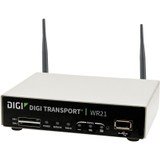
ຮູບພາບ: ທາງຫນ້າ view of the Digi International WR21-L52A-DE1-TB Cellular Wireless Router. This image displays the compact form factor of the device, likely showing ports for antennas, power, and network connections.
The Digi International WR21-L52A-DE1-TB is a robust cellular wireless router designed for reliable and secure connectivity. It features multiple connectivity options and is suitable for various industrial and enterprise applications requiring remote access and data transfer over cellular networks.
5. ຕັ້ງຄ່າ
5.1. ການຕິດຕັ້ງຊິມກາດ
- ກວດໃຫ້ແນ່ໃຈວ່າ router ປິດ ແລະຕັດການເຊື່ອມຕໍ່ຈາກແຫຼ່ງພະລັງງານ.
- Locate the SIM card slot(s) on the device. Refer to the device's physical markings for exact location.
- Insert the activated cellular SIM card into the slot with the gold contacts facing down and the notched corner oriented correctly. Push until it clicks into place.
- If applicable, secure the SIM card tray or cover.
5.2. ການເຊື່ອມຕໍ່ເສົາອາກາດ
- Identify the cellular antenna ports (typically labeled 'MAIN' and 'DIV' or similar).
- Screw the provided cellular antennas onto the corresponding ports until finger-tight. Do not overtighten.
- ວາງສາຍອາກາດເພື່ອຮັບສັນຍານທີ່ດີທີ່ສຸດ.
5.3. ການເຊື່ອມຕໍ່ພະລັງງານ
- Connect the power adapter to the router's power input port.
- ສຽບອະແດບເຕີໄຟເຂົ້າໄປໃນບ່ອນສຽບໄຟຟ້າທີ່ເຫມາະສົມ.
- The router will power on automatically or may require pressing a power button. Observe the LED indicators for power status.
5.4. ການເຊື່ອມຕໍ່ເຄືອຂ່າຍ (ທາງເລືອກ)
- To connect a device via Ethernet, plug one end of an Ethernet cable into an available LAN port on the router.
- Plug the other end of the Ethernet cable into the network port of your computer or other network device.
6. ຄໍາແນະນໍາການດໍາເນີນງານ
6.1. ເປີດ / ປິດພະລັງງານ
- ເປີດ: Connect the power adapter. The device will typically power on automatically. Observe the power LED.
- ປິດພະລັງງານ: Disconnect the power adapter from the electrical outlet. For controlled shutdown, refer to the device's web interface or specific documentation for a software shutdown procedure if available.
6.2. ການເຂົ້າເຖິງ Web ການໂຕ້ຕອບ
- Ensure your computer is connected to the router via Ethernet or Wi-Fi (if enabled).
- ເປີດ ກ web browser (ເຊັ່ນ: Chrome, Firefox, Edge).
- Enter the router's default IP address (e.g., 192.168.1.1 or 192.168.0.1) into the address bar and press Enter. Refer to the Quick Start Guide or device label for the exact default IP address.
- Enter the default username and password when prompted. These are typically found on a label on the device or in the Quick Start Guide.
- Upon successful login, you will access the router's configuration interface.
6.3. ການຕັ້ງຄ່າພື້ນຖານ
ພາຍໃນ web ໃນການໂຕ້ຕອບ, ທ່ານສາມາດ configure ການຕັ້ງຄ່າຕ່າງໆ:
- Cellular Settings: Verify APN settings, signal strength, and connection status.
- ການຕັ້ງຄ່າເຄືອຂ່າຍ: Configure LAN IP address, DHCP server, and port forwarding.
- ຄວາມປອດໄພ: Change default login credentials, configure firewall rules, and VPN settings.
- ອັບເດດເຟີມແວ: Check for and apply firmware updates to ensure optimal performance and security.
7. ບໍາລຸງຮັກສາ
- ທໍາຄວາມສະອາດ: ໃຊ້ຜ້າອ່ອນໆແຫ້ງເພື່ອທຳຄວາມສະອາດດ້ານນອກຂອງເຣົາເຕີ. ຢ່າໃຊ້ນ້ຳຢາທຳຄວາມສະອາດ ຫຼື ສະເປຣ.
- ການອັບເດດເຟີມແວ: ກວດສອບຜູ້ຜະລິດເປັນປະຈຳ website for firmware updates. Keeping the firmware updated ensures the latest features, security patches, and performance improvements.
- ເງື່ອນໄຂສິ່ງແວດລ້ອມ: Ensure the router is operating within its specified temperature and humidity ranges to prevent overheating or damage.
8. ການແກ້ໄຂບັນຫາ
8.1. No Cellular Connection
- Verify the SIM card is correctly inserted and activated with your cellular provider.
- Check antenna connections and ensure they are positioned for optimal signal.
- ເຂົ້າສູ່ລະບົບ web interface to check cellular signal strength and connection status.
- ຣີສະຕາດ router.
8.2. ບໍ່ສາມາດເຂົ້າເຖິງໄດ້ Web ການໂຕ້ຕອບ
- ໃຫ້ແນ່ໃຈວ່າຄອມພິວເຕີຂອງທ່ານເຊື່ອມຕໍ່ໂດຍກົງກັບເຣົາເຕີຜ່ານ Ethernet.
- Verify your computer's IP address is in the same subnet as the router (e.g., if router is 192.168.1.1, computer should be 192.168.1.x).
- ລອງລຶບ cache ຂອງຕົວທ່ອງເວັບຂອງທ່ານ ຫຼືໃຊ້ຕົວທ່ອງເວັບອື່ນ.
- If you forgot the password, a factory reset might be necessary (refer to specific device documentation for this procedure, as it will erase all configurations).
8.3. ຄວາມໄວໃນການເຊື່ອມຕໍ່ຊ້າ
- Check cellular signal strength in the web interface. Weak signal can lead to slow speeds.
- ຮັບປະກັນວ່າເສົາອາກາດຢູ່ໃນຕຳແໜ່ງທີ່ຖືກຕ້ອງ ແລະ ບໍ່ມີສິ່ງກີດຂວາງ.
- Verify your cellular data plan has not reached its data cap or is being throttled.
- Restart the router and connected devices.
9. ຂໍ້ມູນຈໍາເພາະ
| ຄຸນສົມບັດ | ລາຍລະອຽດ |
|---|---|
| ຕົວແບບ | WR21-L52A-DE1-TB |
| ຍີ່ຫໍ້ | Digi International |
| ອະນຸສັນຍາການເຊື່ອມຕໍ່ | ໂທລະສັບມືຖື |
| ເຕັກໂນໂລຊີການເຊື່ອມຕໍ່ | USB |
| ວິທີການຄວບຄຸມ | ໄລຍະໄກ |
| ຄຸນນະສົມບັດພິເສດ | WPS |
| ອຸປະກອນທີ່ເຂົ້າກັນໄດ້ | ຄອມພິວເຕີສ່ວນບຸກຄົນ |
| ການນໍາໃຊ້ທີ່ແນະນໍາ | ບ້ານ |
| UPC | 747356312219 |
10. ການຮັບປະກັນແລະການສະຫນັບສະຫນູນ
For detailed warranty information, please refer to the warranty card included with your product or visit the official Digi International website. Technical support is available through the manufacturer's support channels. Please have your product model number (WR21-L52A-DE1-TB) and serial number ready when contacting support.


