ແນະນຳ
This manual provides detailed instructions for the installation, operation, and troubleshooting of the Zooz 800 Series Z-Wave Long Range Toggle Dimmer, model ZEN74 800LR. This device is designed for wireless brightness control of lighting fixtures within a Z-Wave smart home system. It supports both manual and remote control, offering advanced features for modern lighting management.
ຂໍ້ມູນຈໍາເພາະ
- ໝາຍເລກຕົວແບບ: ZEN74 800LR
- ພາກພື້ນຄື້ນ Z: US / MX / CA
- ພະລັງງານ: 120 VAC, 60 Hz
- ການໂຫຼດສູງສຸດ: 100W LED, 300W Incandescent
- Z-Wave Range: Up to 300 feet line of sight (up to 1300 ft with Z-Wave Long Range)
- ອຸນຫະພູມປະຕິບັດການ: 32-104° F (0-40° C)
- ການຕິດຕັ້ງແລະການນໍາໃຊ້: Indoor ເທົ່ານັ້ນ
- ອະນຸສັນຍາການເຊື່ອມຕໍ່: Z-Wave
- ປະເພດວົງຈອນ: 3 ທາງ
- ນ້ໍາຫນັກລາຍການ: 5.3 ອອນ
- ຂະໜາດ: Approximately 1.1 inches deep for easy fit in electrical boxes.
ໝາຍເຫດ: Do NOT connect this switch to ceiling fans, motors, or home appliances. Use with lighting only.
ການຕິດຕັ້ງແລະການຕິດຕັ້ງ
Important: A neutral wire is required for installation. Ensure power is off at the circuit breaker before beginning any electrical work. This dimmer is designed for direct 3-way and 4-way installations without the need for add-on switches, working with existing mechanical 3-way switches (do not connect to other dimmers).
ການພິຈາລະນາສາຍ
- Always identify the line (hot) and load (light) wires.
- Install the ZEN74 dimmer in the electrical box that has a direct connection to power.
- Do NOT use the ZEN74 model as a direct replacement for older ZEN23 or ZEN24 switches in multi-point control setups, as wiring differs. Always follow the appropriate diagram.
ແຜນຜັງສາຍ
Refer to the following diagrams for common 3-way and 4-way wiring configurations. These diagrams illustrate the connection of the ZEN74 dimmer with existing mechanical switches.

ຮູບທີ 1: 3-Way Wiring Diagram Option 1. This diagram shows the wiring configuration for a 3-way setup where the power line enters the box with the ZEN74 dimmer, and a traveler wire connects to a mechanical switch in the second box.

ຮູບທີ 2: 3-Way Wiring Diagram Option 2. This diagram illustrates an alternative 3-way wiring setup, detailing connections for the ZEN74 dimmer and a mechanical switch.
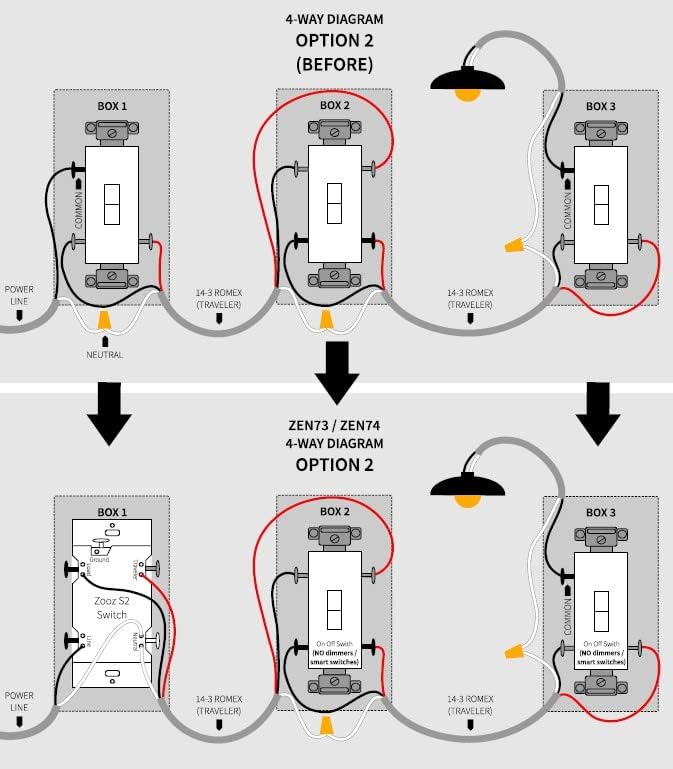
ຮູບທີ 3: 4-Way Wiring Diagram Option 2. This diagram provides the wiring instructions for a 4-way lighting system, showing how to integrate the ZEN74 dimmer with multiple mechanical switches.
ການລວມເອົາ Z-Wave
To integrate the dimmer into your Z-Wave network, follow your Z-Wave hub's instructions for adding a new device. The ZEN74 800LR features an 800 series Z-Wave chip for faster response and improved range, supporting Z-Wave Long Range for ultra-reliable direct hub-to-device communication (requires a compatible LR hub).
ການດໍາເນີນງານ
ການຄວບຄຸມດ້ວຍມື
- Toggle Up (Click): Turns on the light to the last brightness level. The dimmer takes approximately 1 second to reach full brightness. The ramp rate is adjustable via advanced hub settings.
- Toggle Down (Click): Turns off the light with a fade-out effect and a 1-second ramp ອັດຕາ.
- Toggle Up (Press and Hold): ເພີ່ມຄວາມສະຫວ່າງ.
- Toggle Down (Press and Hold): ຫຼຸດຄວາມສະຫວ່າງ.
After a power failure, the switch will automatically turn on to the last brightness level.
3-Way Installation Operation
In a 3-way installation, the secondary mechanical switch can only turn the light on or off. It will always turn the light on to the last brightness level. Dimming functionality is exclusively available from the primary Zooz switch or through your Z-Wave software.
ການຄວບຄຸມໄລຍະໄກ
The ZEN74 dimmer offers wireless brightness control from your mobile device or computer when included in a Z-Wave gateway controller. It reports its status instantly to the hub.
ຄວາມເຂົ້າກັນໄດ້
ຄວາມເຂົ້າກັນໄດ້ຂອງດອກໄຟ
The ZEN74 dimmer allows brightness adjustment between 10% and 100% for popular dimmable LED bulbs. Compatible brands include Amazon Basics, BROADA, CREE, Ecosmart, GE, Halo, Sunco, Utilitech Recessed Dimmable LEDs, and Utilitech Dimmable LEDs.
Do NOT use with Feit, Luminus, or Lithonia bulbs.
Z-Wave Hub Compatibility
This dimmer works with most Z-Wave controllers based on the universal multilevel command class. Smart speakers are NOT Z-Wave hubs; a compatible Z-Wave hub is required to control this switch with voice commands or other smart home integrations.
ການແກ້ໄຂບັນຫາ
ບັນຫາທົ່ວໄປ
- ສະວິດບໍ່ຕອບສະໜອງ: Ensure the neutral wire is correctly connected. Verify all wiring connections are secure.
- ບັນຫາການ dimming: Check bulb compatibility. Some LED bulbs may flicker or not dim smoothly.
- Inclusion failure: Ensure the dimmer is within range of your Z-Wave hub. Try excluding the device first (if it was previously included) and then re-including it.
Always check your wiring first. A neutral wire is required to complete installation.
ການຮັບປະກັນແລະການສະຫນັບສະຫນູນ
Zooz offers lifetime technical support for its products. The ZEN74 dimmer comes with a 5-year extended warranty once registered. For support, please visit the official Zooz webເວັບໄຊ ຫຼືຕິດຕໍ່ບໍລິການລູກຄ້າຂອງເຂົາເຈົ້າ.


