ແນະນຳ
This manual provides essential instructions for the Jam Audio Out There Active Noise Cancelling On-Ear Bluetooth Headphones. Please read this guide thoroughly to ensure proper use, maintenance, and to maximize your listening experience. These headphones offer active noise cancellation, Bluetooth connectivity, hands-free calling, and a comfortable on-ear design.
ແມ່ນຫຍັງຢູ່ໃນກ່ອງ
ກວດສອບວ່າລາຍການທັງຫມົດແມ່ນມີຢູ່ໃນການຫຸ້ມຫໍ່:
- Out There Headphones
- ສາຍ AUX (3.5mm)
- ສາຍສາກ USB
- ຄູ່ມືເລີ່ມຕົ້ນດ່ວນ (ອ້າງອີງໃສ່ຄູ່ມືນີ້ສຳລັບຄຳແນະນຳລະອຽດ)

Image: Contents of the Jam Audio Out There headphone package, including the headphones, AUX cable, and USB charging cable.
ສິນຄ້າເກີນview ແລະການຄວບຄຸມ
Familiarize yourself with the headphone's layout and controls for optimal use.
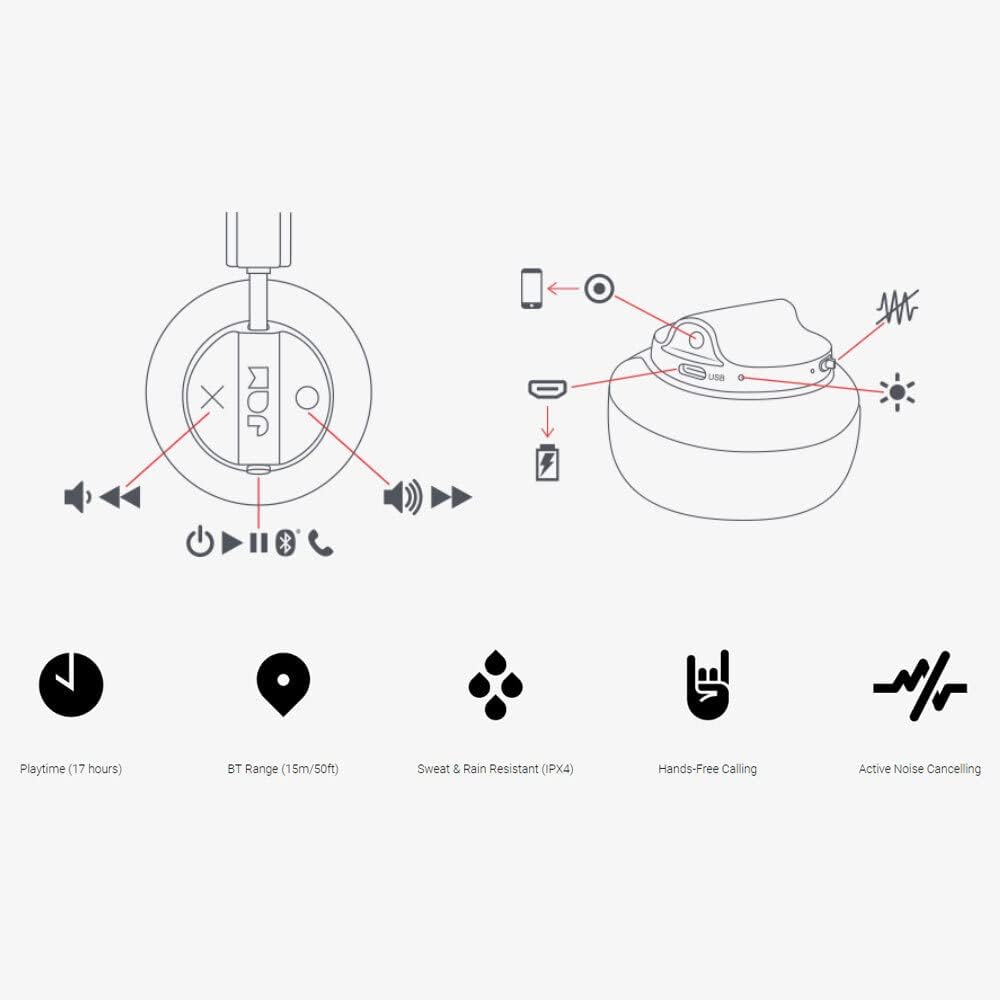
Image: Detailed diagram illustrating the control buttons and ports on the Jam Audio Out There headphones, including power, volume, track navigation, call management, and the charging port.
- ປຸ່ມເປີດປິດ: ກົດຄ້າງໄວ້ເພື່ອເປີດ/ປິດ.
- ເພີ່ມລະດັບສຽງຂຶ້ນ/ເພງຕໍ່ໄປ: ກົດສັ້ນເພື່ອປະລິມານຂຶ້ນ, ກົດຄ້າງໄວ້ສຳລັບເພງຕໍ່ໄປ.
- ຫຼຸດສຽງລົງ/ເພງກ່ອນ ໜ້າ: ກົດສັ້ນເພື່ອປະລິມານລົງ, ກົດຄ້າງໄວ້ສຳລັບເພງກ່ອນໜ້າ.
- ຫຼິ້ນ/ຢຸດ/ຮັບສາຍ: Single press to play/pause music or answer/end a call.
- Active Noise Cancelling (ANC) Switch: Toggle to activate or deactivate noise cancellation.
- ຊ່ອງສາກໄຟ: ພອດ Micro USB ສໍາລັບການສາກໄຟ.
- AUX-in Port: jack 3.5mm ສໍາລັບການເຊື່ອມຕໍ່ສຽງມີສາຍ.
ຕັ້ງຄ່າ
1. ການສາກຫູຟັງ
Before first use, fully charge your headphones. Connect the provided USB charging cable to the charging port on the headphones and the other end to a USB power source. The LED indicator will show charging status and turn off when fully charged. A full charge takes approximately 2 hours and provides up to 17 hours of playtime.

Image: The Jam Audio Out There headphones provide up to 17 hours of playtime on a single charge.
2. ເປີດ / ປິດພະລັງງານ
- To power on: Press and hold the Power button for 3 seconds. The LED indicator will flash.
- ເພື່ອປິດເຄື່ອງ: ກົດປຸ່ມເປີດ/ປິດຄ້າງໄວ້ 3 ວິນາທີ. ໄຟ LED ຈະດັບ.
3. ການຈັບຄູ່ Bluetooth
- ກວດໃຫ້ແນ່ໃຈວ່າປິດຫູຟັງແລ້ວ.
- Press and hold the Power button for 5 seconds until the LED indicator flashes red and blue, indicating pairing mode.
- ໃນອຸປະກອນຂອງທ່ານ (ໂທລະສັບສະຫຼາດ, ແທັບເລັດ, ຄອມພິວເຕີ), ເປີດ Bluetooth ແລະຊອກຫາອຸປະກອນທີ່ມີຢູ່.
- Select "JAM Out There" from the list of devices.
- Once paired, the LED indicator on the headphones will turn solid blue.
- ຫູຟັງມີລະດັບ Bluetooth ສູງເຖິງ 15 ແມັດ (50 ຟຸດ).

Image: The Jam Audio Out There headphones offer Bluetooth compatibility, allowing a range of up to 15 meters or 50 feet from your connected device.
ຄໍາແນະນໍາການດໍາເນີນງານ
ເພັງ Playback
- ຫຼິ້ນ/ຢຸດ: ກົດປຸ່ມຫຼິ້ນ/ຢຸດຊົ່ວຄາວໜຶ່ງຄັ້ງ.
- ເພງຕໍ່ໄປ: ກົດປຸ່ມເພີ່ມສຽງຄ້າງໄວ້.
- ຕິດຕາມກ່ອນ ໜ້າ ນີ້: ກົດປຸ່ມ Volume Down ຄ້າງໄວ້.
- ການປັບລະດັບສຽງ: Short press the Volume Up or Volume Down buttons.
ໂທຟຣີ
- ຮັບ/ສາຍໂທ: ກົດປຸ່ມຫຼິ້ນ/ຢຸດຊົ່ວຄາວໜຶ່ງຄັ້ງ.
- ປະຕິເສດການໂທ: ກົດປຸ່ມຫຼິ້ນ/ຢຸດຄ້າງໄວ້ 2 ວິນາທີ.
- ໂທອອກ: Initiate the call from your connected device. The audio will automatically transfer to the headphones.
- Music will automatically pause during a call and resume after the call ends.
Active Noise Canceling (ANC)
- To activate ANC: Slide the ANC switch to the ON position. The ANC indicator light will illuminate.
- To deactivate ANC: Slide the ANC switch to the OFF position. The ANC indicator light will turn off.
- Using ANC can reduce ambient noise, enhancing your listening experience. Note that ANC can be used independently or with Bluetooth audio.
Wired Connection (AUX-in)
For a wired connection, use the provided 3.5mm AUX cable. Plug one end into the headphone's AUX-in port and the other into your audio device. This allows you to continue listening even if the headphone battery is depleted or if Bluetooth is not available.
ບໍາລຸງຮັກສາ
- ທໍາຄວາມສະອາດ: ເຊັດຫູຟັງດ້ວຍຜ້າອ່ອນ, ແຫ້ງ. ຢ່າໃຊ້ສານເຄມີທີ່ຮຸນແຮງຫຼືວັດສະດຸຂັດ.
- ການເກັບຮັກສາ: ເກັບຮັກສາຫູຟັງໄວ້ໃນບ່ອນທີ່ເຢັນ, ແຫ້ງ, ຫ່າງຈາກອຸນຫະພູມສູງສຸດ.
- ຄວາມຕ້ານທານນ້ໍາ: These headphones are IPX4 rated, meaning they are resistant to sweat and light splashes of water. Do not submerge them in water or expose them to heavy rain. Ensure the charging port cover is securely closed when not charging to maintain water resistance.
- ການດູແລຫມໍ້ໄຟ: ເພື່ອຍືດອາຍຸແບັດເຕີຣີ, ຫຼີກເວັ້ນການຖອດຫູຟັງອອກເຕັມທີ່ເລື້ອຍໆ. ໄລ່ພວກມັນເປັນປົກກະຕິ, ເຖິງແມ່ນວ່າບໍ່ໄດ້ໃຊ້ສໍາລັບໄລຍະເວລາທີ່ຍາວນານ.
ການແກ້ໄຂບັນຫາ
| ບັນຫາ | ການແກ້ໄຂ |
|---|---|
| ຫູຟັງບໍ່ເປີດ | ໃຫ້ແນ່ໃຈວ່າຫູຟັງສາກໄຟແລ້ວ. ເຊື່ອມຕໍ່ກັບແຫຼ່ງພະລັງງານໂດຍໃຊ້ສາຍ USB. |
| ບໍ່ສາມາດຈັບຄູ່ຜ່ານ Bluetooth ໄດ້ |
|
| ບໍ່ມີສຽງຫລືປະລິມານຕ່ ຳ |
|
| Active Noise Cancelling not working | Ensure the ANC switch is in the ON position and the ANC indicator light is illuminated. |
| Headphones falling apart or breaking | While the product is designed for durability, excessive force or improper handling can cause damage. Handle with care. If issues persist, refer to warranty information. |
ຂໍ້ມູນຈໍາເພາະ
- ຊື່ຕົວແບບ: ອອກມີ
- ໝາຍເລກຕົວແບບ: HX-HP303BK
- ການເຊື່ອມຕໍ່: Bluetooth, 3.5 mm Jack (AUX-in)
- ຊ່ວງໄຮ້ສາຍ: ສູງເຖິງ 15 ແມັດ (50 ຟຸດ)
- ຊີວິດຫມໍ້ໄຟ: ສູງສຸດ 17 ຊົ່ວໂມງ
- ການຄວບຄຸມສິ່ງລົບກວນ: Active Noise Cancellation
- ຄວາມຕ້ານທານນ້ໍາ: IPX4 Rated (Sweat and Rain Resistant)
- ການວາງຫູ: ສຸດຫູ
- ວັດສະດຸ: ຢາງ, ຊິລິໂຄນ
- ນ້ໍາຫນັກລາຍການ: 5.1 ອອນສ໌ (0.32 ປອນ)
- ຂະໜາດຜະລິດຕະພັນ: 8.58 x 3.19 x 8.66 ນິ້ວ
- ອົງປະກອບລວມ: Headphones, Charging Cord, AUX Cable
ວິດີໂອຜະລິດຕະພັນຫຼາຍກວ່າview
ເບິ່ງວິດີໂອຜະລິດຕະພັນຢ່າງເປັນທາງການນີ້ສຳລັບພາບລວມview of the Jam Audio product line, including the Out There headphones.
Video: An official Jam Audio sizzle video showcasing various products, including the Out There headphones, highlighting their design and features.
ການຮັບປະກັນແລະການສະຫນັບສະຫນູນ
For warranty information, product registration, or technical support, please refer to the official Jam Audio webເວັບໄຊ ຫຼືຕິດຕໍ່ບໍລິການລູກຄ້າຂອງເຂົາເຈົ້າ. ຮັກສາຫຼັກຖານການຊື້ຂອງທ່ານສໍາລັບການຮ້ອງຂໍການຮັບປະກັນ.