ແນະນຳ
This manual provides detailed instructions for the safe and efficient operation of your Mikado MD-856 Multimedia Bluetooth Speaker system. Please read this manual thoroughly before using the product and retain it for future reference.
ຂໍ້ມູນຄວາມປອດໄພ
- ຫ້າມບໍ່ໃຫ້ອຸປະກອນຖືກຝົນ ຫຼື ຄວາມຊຸ່ມຊື້ນເພື່ອປ້ອງກັນໄຟ ຫຼື ໄຟຟ້າຊັອດ.
- ຫ້າມເປີດຄasing. ອ້າງອີງການບໍລິການທັງໝົດໃຫ້ກັບບຸກຄະລາກອນທີ່ມີຄຸນວຸດທິ.
- ຮັບປະກັນການລະບາຍອາກາດທີ່ເຫມາະສົມຮອບຫນ່ວຍ.
- ໃຊ້ສະເພາະແຫຼ່ງພະລັງງານທີ່ລະບຸໄວ້ສຳລັບອຸປະກອນນີ້ເທົ່ານັ້ນ.
- ຮັກສາໃຫ້ຫ່າງຈາກແສງແດດໂດຍກົງ, ແຫຼ່ງຄວາມຮ້ອນ ແລະ ສະໜາມແມ່ເຫຼັກແຮງ.
- ຫຼີກລ້ຽງການວາງວັດຖຸໜັກໃສ່ເຄື່ອງ.
ເນື້ອໃນຊຸດ
ກະລຸນາກວດສອບວ່າລາຍການທັງຫມົດທີ່ລະບຸໄວ້ຂ້າງລຸ່ມນີ້ແມ່ນລວມຢູ່ໃນຊຸດຂອງທ່ານ:
- Main Subwoofer Unit
- ລຳໂພງດາວທຽມ (5 ໜ່ວຍ)
- ການຄວບຄຸມໄລຍະໄກ
- Usage Manual (this document)
- ໃບຢັ້ງຢືນການຮັບປະກັນ
- ສາຍ RCA
- ສາຍອາກາດ
ສິນຄ້າເກີນview
The Mikado MD-856 is a 5.1 channel multimedia speaker system designed to deliver rich audio. It features multiple connectivity options including Bluetooth, USB, SD card, FM radio, and AUX input.
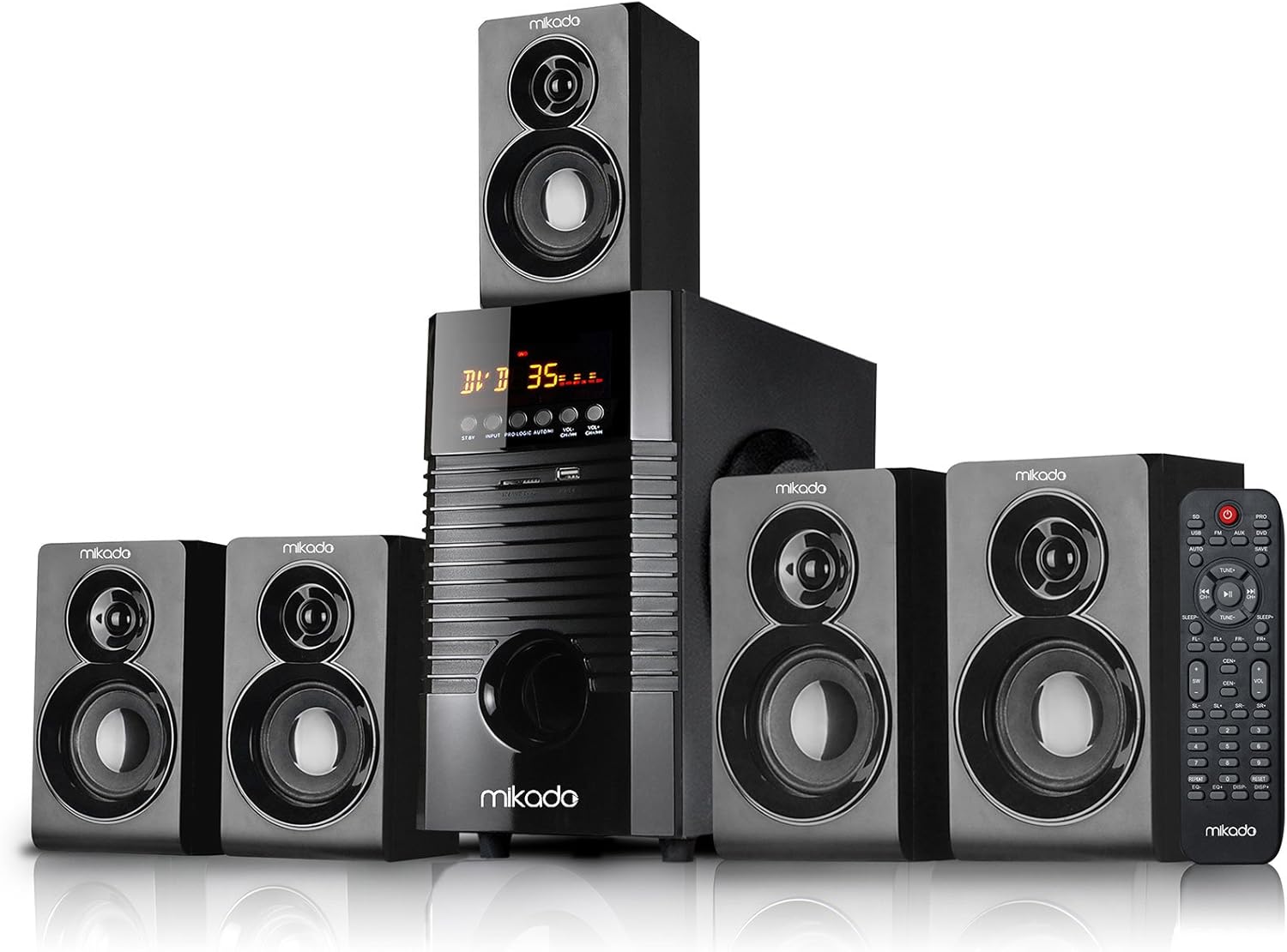
ຮູບທີ 1: ດ້ານໜ້າ view of the Mikado MD-856 5.1 Multimedia Bluetooth Speaker system, showing the central subwoofer unit, five satellite speakers, and the remote control.

ຮູບທີ 2: Rear panel of the Mikado MD-856 subwoofer, displaying various audio input and output ports, power switch, and power cable connection.
ຕັ້ງຄ່າ
1. ການເຊື່ອມຕໍ່ລໍາໂພງ
- Connect the five satellite speakers to the corresponding output ports on the rear panel of the main subwoofer unit. Ensure correct polarity (+ to + and - to -).
- Position the speakers for optimal 5.1 surround sound experience. Typically, one center speaker, two front speakers, and two rear speakers.
2. ການເຊື່ອມຕໍ່ພະລັງງານ
- ໃຫ້ແນ່ໃຈວ່າສະວິດໄຟຢູ່ເທິງແຜງດ້ານຫຼັງຢູ່ໃນຕຳແໜ່ງປິດ.
- Connect the power cable to the main subwoofer unit and then plug it into a standard electrical outlet.
3. ການເຊື່ອມຕໍ່ການປ້ອນຂໍ້ມູນສຽງ
ເລືອກຫນຶ່ງໃນວິທີການຕໍ່ໄປນີ້ເພື່ອເຊື່ອມຕໍ່ແຫຼ່ງສຽງຂອງທ່ານ:
- ສັນຍານເຂົ້າ RCA (AUX): Use the provided RCA cable to connect your audio source (e.g., TV, PC, DVD player) to the "AUX AUDIO INPUT" ports on the rear panel. Match the red and white connectors.
- ແຜ່ນ USB/SD: Insert a USB flash drive or SD card into the respective slots on the front panel of the subwoofer.
- ເສົາອາກາດ FM: Connect the included antenna cable to the FM antenna port on the rear panel for improved radio reception.
ຄໍາແນະນໍາການດໍາເນີນງານ
1. ເປີດ/ປິດ
Flip the power switch on the rear panel to the ON position. The display on the front panel will illuminate.
2. ການເລືອກແບບ
Press the "MODE" button on the front panel or the remote control to cycle through available input modes: Bluetooth, USB, SD, FM, and AUX.
3. ການຄວບຄຸມປະລິມານ
Adjust the master volume using the large knob on the front panel or the volume buttons on the remote control.
4. ການຈັບຄູ່ Bluetooth
- Switch the speaker system to Bluetooth mode. The display will show "BT" or a similar indicator.
- ເປີດໃຊ້ Bluetooth ໃນອຸປະກອນມືຖືຂອງທ່ານ (ໂທລະສັບສະຫຼາດ, ແທັບເລັດ, ແລະອື່ນໆ) ແລະຄົ້ນຫາອຸປະກອນທີ່ມີຢູ່.
- Select "MD-856" from the list of devices. Once paired, you will hear a confirmation sound.
5. ການຫຼິ້ນ USB/SD
When a USB drive or SD card is inserted, the system will automatically switch to USB/SD mode and begin playing compatible audio files. Use the remote control for playback functions (play/pause, next/previous track).
6. ວິທະຍຸ FM
In FM mode, press the "SCAN" button on the remote control to automatically scan and save available radio stations. Use the "PREV/NEXT" buttons to navigate through saved stations.
ບໍາລຸງຮັກສາ
- ທໍາຄວາມສະອາດ: Use a soft, dry cloth to clean the surfaces of the speakers. Do not use liquid cleaners or abrasive materials.
- ການເກັບຮັກສາ: ຖ້າເກັບຮັກສາເຄື່ອງໄວ້ເປັນເວລາດົນ, ໃຫ້ຖອດສາຍອອກຈາກແຫຼ່ງຈ່າຍໄຟ ແລະ ເກັບຮັກສາໄວ້ໃນບ່ອນທີ່ເຢັນ ແລະ ແຫ້ງ.
- ການລະບາຍອາກາດ: Ensure that the ventilation openings on the subwoofer are not blocked to prevent overheating.
ການແກ້ໄຂບັນຫາ
| ບັນຫາ | ສາເຫດທີ່ເປັນໄປໄດ້ | ການແກ້ໄຂ |
|---|---|---|
| ບໍ່ມີພະລັງງານ | Power cable not connected; Power switch off; Power outlet faulty | Check power cable connection; Turn power switch ON; Try a different power outlet |
| ບໍ່ມີສຽງ | Volume too low; Incorrect input mode; Audio cables not connected properly; Source device not playing | Increase volume; Select correct input mode; Check audio cable connections; Ensure source device is playing audio |
| Bluetooth ບໍ່ໄດ້ຈັບຄູ່ | Speaker not in Bluetooth mode; Device too far; Bluetooth on device off | Switch to Bluetooth mode; Move device closer; Enable Bluetooth on your device |
| ການຮັບ FM ບໍ່ດີ | ບໍ່ໄດ້ເຊື່ອມຕໍ່ເສົາອາກາດ; ສັນຍານອ່ອນ | Connect FM antenna; Adjust antenna position for better signal |
ຂໍ້ມູນຈໍາເພາະ
- ຕົວແບບ: MD-856
- ຍີ່ຫໍ້: ມິກາໂດ
- ປະເພດລຳໂພງ: Multimedia 5.1 Channel
- ເຕັກໂນໂລຍີການເຊື່ອມຕໍ່: Bluetooth, USB
- ລຳໂພງກຳລັງຜົນຜະລິດສູງສຸດ: 25 ວັດ
- ການຕັ້ງຄ່າຊ່ອງສຽງອ້ອມຮອບ: 5.1
- ການນໍາໃຊ້ທີ່ແນະນໍາ: PC - TV
- ຂະໜາດຜະລິດຕະພັນ: 35 x 35 x 44 cm
- ນ້ໍາຫນັກລາຍການ: 7.9 ກິໂລກຣາມ
- ສີ: ດຳ
- ອົງປະກອບລວມ: Controller, Usage Manual, Warranty Certificate, RCA Cable, Antenna Cable
ການຮັບປະກັນແລະການສະຫນັບສະຫນູນ
Your Mikado MD-856 speaker system comes with a Warranty Certificate. Please refer to the certificate for details regarding warranty coverage and terms. For technical support or service inquiries, please contact your local Mikado dealer or authorized service center.


