1. ບົດແນະນຳ
ເຄື່ອງ MOOER Micro Preamp M013 Matchbox is a compact digital preamp pedal designed to accurately recreate the sound and feel of a Matchless amplifier. It features dual channels (Clean and Gain), a 3-band EQ, and an integrated cabinet simulator, making it suitable for direct recording, practice, or integration into a pedalboard setup.
2. ຂໍ້ມູນຄວາມປອດໄພ
- ໃຊ້ອະແດບເຕີໄຟ DC 9V ທີ່ລະບຸໄວ້ເທົ່ານັ້ນ (ຂົ້ວລົບກາງ) .
- ຫ້າມໃຫ້ເຄື່ອງຖືກນ້ຳ, ຄວາມຊຸ່ມ ຫຼື ອຸນຫະພູມສູງ ຫຼື ຕ່ຳເກີນໄປ.
- ຫຼີກລ້ຽງການຫຼຸດລົງຫຼືກົດດັນໃຫ້ມີການກະທົບຢ່າງແຂງແຮງ.
- ຢ່າພະຍາຍາມຖອດປະກອບຫຼືດັດແປງຫນ່ວຍງານ.
- ຮັກສາໃຫ້ໄກຈາກເດັກນ້ອຍ.
3. ຜະລິດຕະພັນເກີນview
The M013 Matchbox pedal features a robust metal casing and intuitive controls for shaping your tone.

ຮູບ 1: ເທິງລົງລຸ່ມ view ຂອງ MOOER Micro Preamp M013 Matchbox pedal, illustrating the layout of controls and jacks.
ການຄວບຄຸມ:
- VOL (ປະລິມານ): Adjusts the overall output level of the selected channel.
- TRE (ສຽງສູງ): ຄວບຄຸມການຕອບສະໜອງຄວາມຖີ່ສູງ.
- MID (Middle): ຄວບຄຸມການຕອບສະໜອງຄວາມຖີ່ກາງ.
- ເບສ (ເບສ): Controls the low-frequency response.
- ໄດ້ຮັບ: ປັບປະລິມານຂອງ overdrive/distortion ສຳລັບຊ່ອງທາງທີ່ເລືອກ.
- ສະວິດ CH/CAB: This toggle switch has two functions:
- In normal operation, it switches between the Clean and Gain channels.
- When holding down the footswitch, it toggles the cabinet simulator on/off.
- ສະຫຼັບຕີນ: Toggles between the two channels (Clean/Gain) or bypasses the pedal.
ການເຊື່ອມຕໍ່:

Figure 2: Input Jack (left side)

Figure 3: Output Jack (right side)
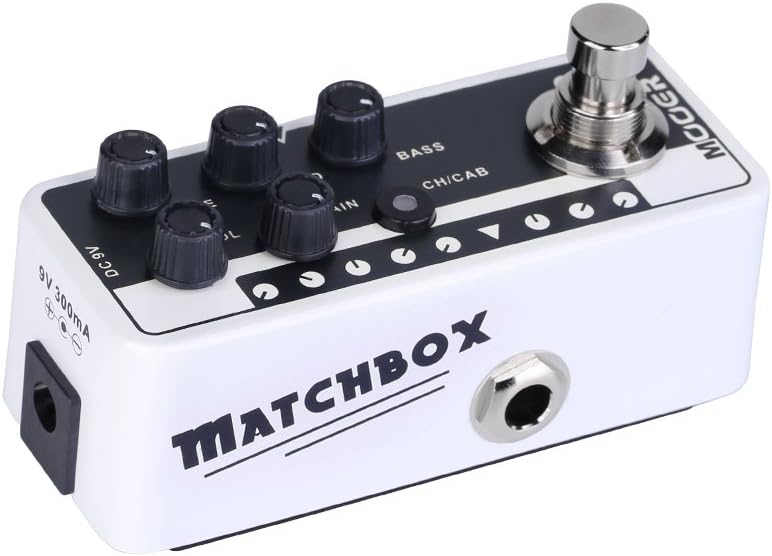
Figure 4: DC 9V Power Input
- Jack ຂາເຂົ້າ: ເຊື່ອມຕໍ່ກີຕ້າ ຫຼືເຄື່ອງມືອື່ນໆຂອງທ່ານທີ່ນີ້.
- ຜົນໄດ້ຮັບ Jack: ເຊື່ອມຕໍ່ກັບຂອງທ່ານ amplifier, mixer, ຫຼືການໂຕ້ຕອບສຽງ.
- ຊິງຕັນດີຊີ 9V: Power input for a 9V DC (center negative) power supply.
4. ຕັ້ງຄ່າ
- ເຊື່ອມຕໍ່ guitar ຂອງທ່ານກັບ ປ້ອນຂໍ້ມູນ Jack on the right side of the pedal.
- ເຊື່ອມຕໍ່ ຜົນໄດ້ຮັບ Jack on the left side of the pedal to your amplifier's input, a mixer, or an audio interface.
- Connect a 9V DC (center negative) power adapter to the DC 9V ວັດສະດຸປ້ອນ.
- ໃຫ້ແນ່ໃຈວ່າການເຊື່ອມຕໍ່ທັງໝົດປອດໄພກ່ອນທີ່ຈະເປີດເຄື່ອງ amplifier ຫຼືລະບົບສຽງ.
5. ຄໍາແນະນໍາການດໍາເນີນງານ
ການເລືອກຊ່ອງ:
The M013 Matchbox offers two distinct channels: Clean and Gain. Use the CH/CAB switch to toggle between these channels. The LED indicator will change color to show the active channel (typically blue for Clean, red for Gain).
Cabinet Simulator:
The integrated cabinet simulator can be toggled on or off. To activate or deactivate the cabinet simulator, press and hold the ໂຟກັສ for approximately 1 second. The LED will flash to indicate the change in status.
ການສ້າງຮູບແບບສຽງ:
ປັບ VOL, TRE, ກາງ, ເບສ, ແລະ ໄດ້ຮັບ knobs to achieve your desired tone for each channel. Experiment with different settings to explore the full range of sounds this pedal can produce.
Footswitch Functionality:
A quick press of the ໂຟກັສ will toggle between the currently selected channel and bypass mode. The LED will indicate whether the pedal is active or bypassed.
ວິດີໂອສາທິດ:
Video 1: Official MOOER demonstration of the Micro Preamp M013 Matchbox, showcasing both Clean and Gain channels with and without cabinet simulation. This video provides examples of the pedal's tonal capabilities.
6. ບໍາລຸງຮັກສາ
- Clean the pedal with a soft, dry cloth. Do not use abrasive cleaners or solvents.
- Store the pedal in a dry environment away from direct sunlight and extreme temperatures.
- Regularly check cable connections for wear and tear.
7. ການແກ້ໄຂບັນຫາ
ບໍ່ມີພະລັງງານ:
- ໃຫ້ແນ່ໃຈວ່າອະແດບເຕີໄຟ 9V DC ໄດ້ເຊື່ອມຕໍ່ຢ່າງຖືກຕ້ອງ ແລະ ເຮັດວຽກໄດ້ຢ່າງຖືກຕ້ອງ.
- ກວດສອບເບິ່ງວ່າປລັກສຽບໄຟເປີດໃຊ້ງານຢູ່.
ບໍ່ມີສຽງ:
- ກວດສອບການເຊື່ອມຕໍ່ສາຍໄຟທັງຫມົດ (guitar to input, output to amp/mixer).
- Ensure the pedal is not in bypass mode (check LED indicator).
- Verify that the volume knobs on the pedal and your ampເຄື່ອງຊ່ວຍຫາຍໃຈຖືກເປີດຂຶ້ນ.
- ຖ້າເປັນໄປໄດ້, ທົດສອບດ້ວຍສາຍໄຟທີ່ແຕກຕ່າງກັນ ແລະ ແຫຼ່ງຈ່າຍໄຟທີ່ແຕກຕ່າງກັນ.
ສິ່ງລົບກວນທີ່ບໍ່ຕ້ອງການ / Hum:
- Ensure you are using a regulated 9V DC (center negative) power supply. Unregulated power supplies can introduce noise.
- Check for ground loops by trying different power outlets or isolating the pedal's power.
- Keep the pedal away from other electronic devices that may cause interference.
8. ຂໍ້ມູນຈໍາເພາະ
- ນ້ໍາຫນັກລາຍການ: 5.8 ອອນສ໌ (165 ກຣາມ)
- ຂະໜາດຜະລິດຕະພັນ: 3.58 x 1.26 x 1.42 ນິ້ວ
- ແຫຼ່ງພະລັງງານ: ໄຟຟ້າສາຍ
- ສະບັບtage: 9 volts DC
- ຜົນຜະລິດວັດtage: 30 Watts (referring to the amp model it simulates, not the pedal's power output)
- ປະເພດຕົວເຊື່ອມຕໍ່: Jack 6.35mm
- ອຸປະກອນທີ່ເຂົ້າກັນໄດ້: ກີຕ້າ
- ສີ: ດຳ
9. ການຮັບປະກັນແລະການສະຫນັບສະຫນູນ
ສຳລັບຂໍ້ມູນການຮັບປະກັນ ແລະ ການຊ່ວຍເຫຼືອດ້ານເຕັກນິກ, ກະລຸນາອ້າງອີງເຖິງ MOOER ຢ່າງເປັນທາງການ website or contact your local dealer. Keep your purchase receipt as proof of purchase for any warranty claims.


