1. ຜະລິດຕະພັນເກີນview
The CHACON 54661 Set provides a convenient solution for wirelessly controlling your electrical appliances and lighting. This set includes two remote-controlled sockets and one remote control, allowing you to switch devices on or off from a distance within your home.
- ການຄວບຄຸມໄຮ້ສາຍ: Operate devices without direct access to the wall socket.
- ການຕິດຕັ້ງງ່າຍດາຍ: Simple plug-and-play setup.
- ຄວາມເຂົ້າກັນໄດ້ຢ່າງກວ້າງຂວາງ: Suitable for various household appliances.
- ຄວາມຖີ່ຂອງການດໍາເນີນການ: 433.92 MHz.
- ພະລັງງານສູງສຸດ: 2000 ວັດ.
- ໄລຍະສາຍສົ່ງ: Up to 25 meters in open field conditions.

Image: CHACON remote control and a socket in a typical home environment, demonstrating wireless control.
2. ຂໍ້ມູນຄວາມປອດໄພ
ກະລຸນາອ່ານ ແລະເຂົ້າໃຈຄຳແນະນຳຄວາມປອດໄພທັງໝົດກ່ອນທີ່ຈະໃຊ້ຜະລິດຕະພັນນີ້. ການບໍ່ປະຕິບັດຕາມຄໍາແນະນໍາເຫຼົ່ານີ້ອາດຈະເຮັດໃຫ້ໄຟຟ້າຊ໊ອກ, ໄຟໄຫມ້, ຫຼືບາດເຈັບສາຫັດ.
- ໃຊ້ພາຍໃນເຮືອນເທົ່ານັ້ນ: This product is designed for indoor use in dry locations. Do not expose to rain or moisture.
- ການໂຫຼດສູງສຸດ: Do not exceed the maximum load of 2000 Watts. Overloading can cause overheating and fire.
- ການລະບາຍອາກາດ: Ensure adequate ventilation around the sockets. Do not cover them.
- ເດັກນ້ອຍແລະສັດລ້ຽງ: ຮັກສາໃຫ້ໄກຈາກເດັກນ້ອຍ ແລະສັດລ້ຽງ.
- ການຖອດອອກໄດ້: ຢ່າພະຍາຍາມເປີດ, ດັດແປງ ຫຼື ສ້ອມແປງອຸປະກອນ. ໃຫ້ສົ່ງຕໍ່ການບໍລິການທັງໝົດໄປຫາພະນັກງານທີ່ມີຄຸນວຸດທິ.
- ທໍາຄວາມສະອາດ: ຕັດການເຊື່ອມຕໍ່ຈາກພະລັງງານກ່ອນທີ່ຈະທໍາຄວາມສະອາດ. ໃຊ້ຜ້າແຫ້ງ, ອ່ອນໆ. ຢ່າໃຊ້ນໍ້າສະອາດ.
- ການຖິ້ມຂີ້ເຫຍື້ອ: ກຳຈັດແບັດເຕີຣີ ແລະ ຜະລິດຕະພັນຕາມລະບຽບການຂອງທ້ອງຖິ່ນ.
3. ເນື້ອໃນຊຸດ
ກວດສອບວ່າລາຍການທັງຫມົດແມ່ນມີຢູ່ໃນຊຸດ:
- 2 x CHACON Remote Controlled Sockets
- 1 x CHACON Remote Control
- 1 x Lithium-ion Battery (pre-installed in remote or supplied separately)
- 1 x ຄູ່ມືຜູ້ໃຊ້ (ເອກະສານນີ້)
4. ຕັ້ງຄ່າ
4.1. ການຕິດຕັ້ງຫມໍ້ໄຟຄວບຄຸມໄລຍະໄກ
The remote control requires one Lithium-ion battery. If not pre-installed, follow these steps:
- ຊອກຫາຊ່ອງໃສ່ຫມໍ້ໄຟຢູ່ດ້ານຫຼັງຂອງການຄວບຄຸມໄລຍະໄກ.
- ເປີດຝາປິດຊ່ອງໃສ່ຫມໍ້ໄຟ.
- Insert the Lithium-ion battery, ensuring correct polarity (+ and -).
- ປິດຝາປິດຊ່ອງໃສ່ຫມໍ້ໄຟຢ່າງປອດໄພ.

ຮູບພາບ: ໃກ້ຊິດ view of the CHACON remote control, showing the ON/OFF buttons and channel selectors (1, 2, 3, 4).
4.2. Pairing Sockets with Remote Control
Each socket needs to be paired with the remote control to establish communication. The remote control has four channels (1, 2, 3, 4) which can be used to control individual sockets or groups of sockets.
- Plug one CHACON remote controlled socket into a standard wall outlet. The LED indicator on the socket may flash.
- Within 5 seconds of plugging in the socket, press and hold the small pairing button located on the side or front of the socket until the LED indicator starts flashing rapidly.
- While the socket's LED is flashing, press the desired "ON" button (e.g., "1 ON") on the remote control.
- The socket's LED indicator will stop flashing and remain solid for a moment, then turn off, indicating successful pairing.
- Repeat this process for the second socket, assigning it to a different channel (e.g., "2 ON") or the same channel if you wish to control both simultaneously.
- To unpair a socket, plug it in, then press and hold the pairing button until the LED flashes rapidly. Then, press the corresponding "OFF" button on the remote control.

Image: A CHACON remote controlled socket plugged into a wall outlet, ready for pairing.
5. ຄໍາແນະນໍາການດໍາເນີນງານ
Once your sockets are paired, you can easily control your connected devices.
- Plug the appliance you wish to control into the CHACON remote controlled socket.
- Ensure the appliance's own power switch is in the "ON" position (if applicable).
- To turn the appliance ON, press the corresponding "ON" button (1, 2, 3, or 4) on your remote control.
- To turn the appliance OFF, press the corresponding "OFF" button (1, 2, 3, or 4) on your remote control.
You can control devices individually or, if multiple sockets are paired to the same channel, control them simultaneously.
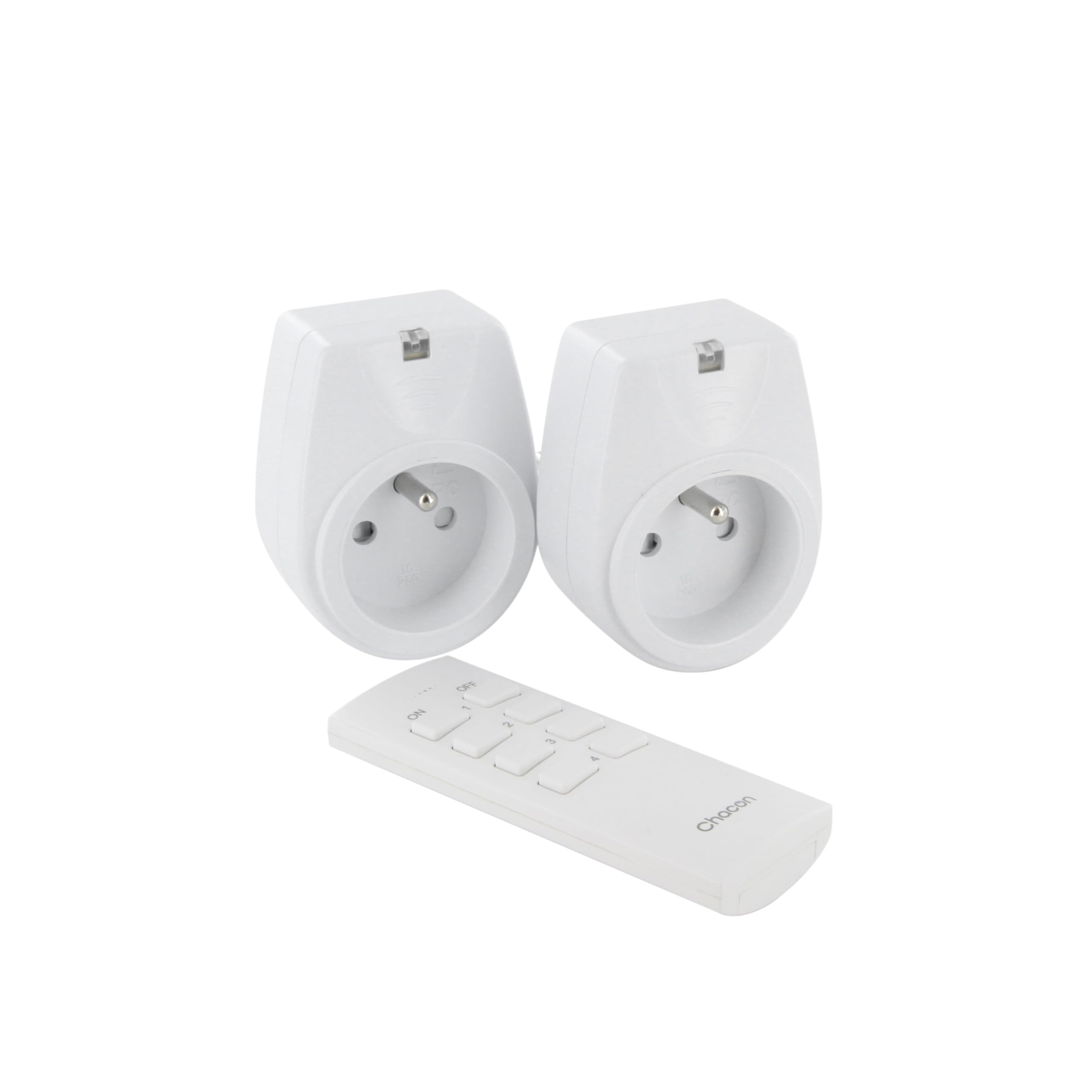
Image: A hand holding the CHACON remote control, demonstrating its use to switch on a lamp.
6. ບໍາລຸງຮັກສາ
6.1. ທໍາຄວາມສະອາດ
To clean the sockets and remote control, ensure they are disconnected from power. Use a soft, dry cloth. Do not use abrasive cleaners, solvents, or immerse in water.
6.2. ການທົດແທນຫມໍ້ໄຟການຄວບຄຸມໄລຍະໄກ
If the remote control's range decreases or it stops responding, the battery may need replacement. Follow the steps in Section 4.1 to replace the Lithium-ion battery with a new one of the same type.
7. ການແກ້ໄຂບັນຫາ
| ບັນຫາ | ສາເຫດທີ່ເປັນໄປໄດ້ | ການແກ້ໄຂ |
|---|---|---|
| ຊັອກເກັດບໍ່ຕອບສະໜອງຕໍ່ການຄວບຄຸມໄລຍະໄກ. |
|
|
| Connected appliance does not turn on/off. |
|
|
| Reduced transmission range. |
|
|
8. ຂໍ້ມູນຈໍາເພາະ
| ຍີ່ຫໍ້ | CHACON |
| ໝາຍເລກຕົວແບບ | 54661 |
| ສີ | ສີຂາວ |
| ຄຸນນະສົມບັດພິເສດ | ໄຮ້ສາຍ |
| ອຸປະກອນທີ່ເຂົ້າກັນໄດ້ | Air conditioner, Game console, Iron, Speaker, Lamp, DVD player, MP3 player, E-reader, Coffee machine, Modem, Laptop, Heater, Router, Refrigerator, Set-top box, Smartphone, Smartwatch, Audio system, Hair dryer, Tablet, Television |
| ປະເພດຫມໍ້ໄຟໄລຍະໄກ | Lithium-ion (ລວມເອົາ 1 ອັນ) |
| ພະລັງງານສູງສຸດ | 2000 ວັດ |
| ໄລຍະການສົ່ງ | 25 ແມັດ (ເປີດ) |
| ຄວາມຖີ່ | 433.92 MHz |
| ສະບັບtage | 230V |
| ຈໍານວນເຕົ້າສຽບ | 2 |
| ປະເພດສຽບ | FR (Type E/F) |
| ວັດສະດຸ | ໂພລີວິນນິນ chloride (PVC) |
| ປະເທດຕົ້ນກໍາເນີດ | ຈີນ |
9. ການຮັບປະກັນ
This CHACON product is covered by a ຮັບປະກັນ 2 ປີ from the date of purchase. This warranty covers manufacturing defects and material faults under normal use. It does not cover damage caused by misuse, accident, unauthorized modification, or improper installation.
ກະລຸນາຮັກສາຫຼັກຖານການຊື້ຂອງທ່ານສໍາລັບການຮຽກຮ້ອງການຮັບປະກັນ.
10. ສະຫນັບສະຫນູນ
For technical assistance, troubleshooting not covered in this manual, or warranty inquiries, please contact CHACON customer support.
Visit the official CHACON webເວັບໄຊທ໌ສຳລັບຂໍ້ມູນການຊ່ວຍເຫຼືອ ແລະ ລາຍລະອຽດການຕິດຕໍ່ທີ່ທັນສະໄໝທີ່ສຸດ.
Note: Specific contact information may vary by region.


