1. ບົດແນະນຳ
This manual provides detailed instructions for the installation, operation, and maintenance of your Intelbras MHDX-1004 4-Channel Multi HD Digital Video Recorder (DVR). This DVR is designed for surveillance applications, offering recording capabilities for up to four security cameras and comes with a pre-installed 1TB WD Purple hard drive for reliable 24/7 video storage.
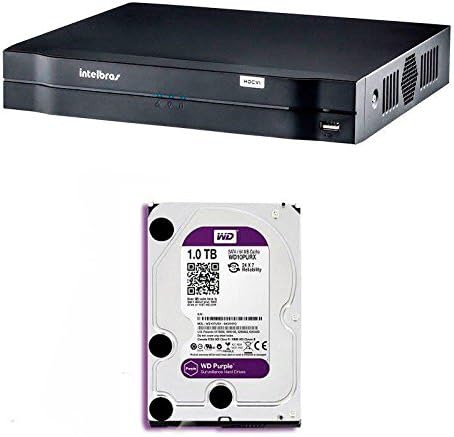
ຮູບທີ 1.1: ດ້ານໜ້າ view of the Intelbras MHDX-1004 Digital Video Recorder. This image shows the front view of the Intelbras MHDX-1004 Digital Video Recorder, featuring the Intelbras logo, status indicators, and a front USB port.

ຮູບທີ 1.2: Intelbras MHDX-1004 DVR with 1TB WD Purple hard drive. This image illustrates the Intelbras MHDX-1004 DVR unit alongside a 1TB WD Purple surveillance hard drive, indicating the pre-installed storage solution.
2. ເນື້ອໃນຊຸດ
ກະລຸນາກວດເບິ່ງຊຸດສຳລັບລາຍການຕໍ່ໄປນີ້:
- Intelbras MHDX-1004 DVR unit with pre-installed 1TB WD Purple HDD
- Power Adapter
- ເມົາສ໌ USB
- ຄູ່ມືເລີ່ມຕົ້ນດ່ວນ (ເອກະສານນີ້)
3. ຕັ້ງຄ່າ
3.1. ການເຊື່ອມຕໍ່ທາງດ້ານຮ່າງກາຍ
Before powering on the DVR, connect all necessary cables as described below. Refer to Figure 3.1 for a visual guide to the rear panel connections.
- ການປ້ອນຂໍ້ມູນວິດີໂອ: Connect your security cameras to the BNC video input ports (1-4). The DVR supports Multi HD technologies (HDCVI, HDTVI, AHD, IP, Analog).
- ຜົນໄດ້ຮັບວິດີໂອ: Connect a monitor to either the HDMI or VGA port for local display.
- Audio Inputs/Output: Connect audio input devices to the RCA audio input ports and an audio output device (e.g., speakers) to the RCA audio output port.
- ເຄືອຂ່າຍ: Connect an Ethernet cable from your router or network switch to the RJ45 LAN port for network access and remote viewing.
- ພອດ USB: Connect the included USB mouse to one of the USB ports. The other USB port can be used for data backup or connecting other USB devices.
- ການປ້ອນຂໍ້ມູນພະລັງງານ: Connect the power adapter to the DC 12V power input port.
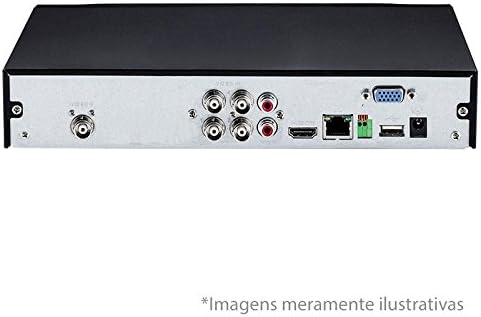
ຮູບທີ 3.1: Rear panel connections of Intelbras MHDX-1004 DVR. This image displays the rear panel of the Intelbras MHDX-1004 DVR, showing various ports including BNC video inputs, HDMI, VGA, audio, Ethernet, and USB connections.
3.2. Hard Drive Installation (Pre-installed)
The Intelbras MHDX-1004 DVR comes with a 1TB WD Purple surveillance-grade hard drive pre-installed. No additional installation is required for initial setup. If you need to replace or upgrade the hard drive in the future, ensure the DVR is powered off and disconnected from the power source before opening the casing. Refer to the detailed instructions in the full user manual for hard drive replacement procedures.

ຮູບທີ 3.2: ພາຍໃນ view of Intelbras MHDX-1004 DVR with 1TB WD Purple HDD installed. This image provides an internal view of the Intelbras MHDX-1004 DVR, clearly showing the 1TB WD Purple hard drive securely installed within the chassis.
3.3. ເປີດເຄື່ອງ ແລະການຕັ້ງຄ່າເບື້ອງຕົ້ນ
After all connections are made, connect the power adapter to an electrical outlet. The DVR will power on automatically. Follow the on-screen wizard for initial setup, which typically includes:
- ການເລືອກພາສາ
- ການຕັ້ງຄ່າວັນທີ ແລະເວລາ
- Network configuration (DHCP recommended for most users)
- Setting up a strong administrator password (crucial for security)
- Hard drive initialization (if prompted, though pre-installed drives are usually pre-formatted)
4. ຄໍາແນະນໍາການດໍາເນີນງານ
4.1. ການນຳທາງອິນເຕີເຟດຜູ້ໃຊ້
Navigate the DVR's graphical user interface (GUI) using the connected USB mouse. Right-click to access the main menu, and left-click to select options or confirm actions.
4.2. ມີຊີວິດ View
Upon startup, the DVR will display the live view ຂອງກ້ອງຖ່າຍຮູບທີ່ເຊື່ອມຕໍ່. ທ່ານສາມາດປ່ຽນລະຫວ່າງກ້ອງຖ່າຍຮູບດຽວ view ແລະຕາຂ່າຍຫຼາຍກ້ອງຖ່າຍຮູບ views (ຕົວຢ່າງ: 4-channel view) ການນໍາໃຊ້ໄອຄອນຢູ່ລຸ່ມສຸດຂອງຫນ້າຈໍຫຼືໂດຍການຄລິກຂວາແລະເລືອກທາງເລືອກທີ່ເຫມາະສົມ.
4.3. ການບັນທຶກ
DVR ສະຫນັບສະຫນູນຮູບແບບການບັນທຶກຕ່າງໆ:
- ບັນທຶກຢ່າງຕໍ່ເນື່ອງ: ບັນທຶກ 24/7.
- ການບັນທຶກການຊອກຄົ້ນຫາ Motion: ບັນທຶກພຽງແຕ່ເມື່ອການເຄື່ອນໄຫວໄດ້ຖືກກວດພົບໃນພາກສະຫນາມຂອງກ້ອງຖ່າຍຮູບຂອງ view.
- ກຳ ນົດການບັນທຶກ: ບັນທຶກຕາມຕາຕະລາງເວລາທີ່ກຳນົດໄວ້ລ່ວງໜ້າ.
Configure recording settings via the Main Menu > Record > Record Schedule. Ensure the hard drive is initialized and healthy for recording functionality.
4.4. ການຫວນຄືນ
ກັບຄືນມາview ບັນທຶກ footage:
- Go to Main Menu > Playback.
- ເລືອກວັນທີທີ່ຕ້ອງການ ແລະຊ່ອງກ້ອງຖ່າຍຮູບ.
- Use the timeline to navigate to the specific time. Different colors on the timeline indicate different recording types (e.g., green for continuous, yellow for motion).
- Use playback controls (play, pause, fast forward, rewind) as needed.
4.5. ຂໍ້ມູນສຳຮອງ
ອາຫານທີ່ສຳຄັນtage can be backed up to a USB flash drive or over the network.
- ການສໍາຮອງ USB: Insert a formatted USB drive into a USB port. Go to Main Menu > Backup, select the camera, time range, and file type, then initiate the backup.
- ການສໍາຮອງຂໍ້ມູນເຄືອຂ່າຍ: Use the Intelbras client software on a connected computer to download footage ໂດຍກົງຈາກ DVR.
4.6. ການເຂົ້າເຖິງໄລຍະໄກ
ສໍາລັບໄລຍະໄກ viewing on a smartphone or computer, ensure the DVR is connected to the internet. Configure network settings (e.g., port forwarding or P2P/Cloud service) and install the appropriate Intelbras mobile app or client software on your device. Refer to the full user manual for detailed network configuration steps.
5. ບໍາລຸງຮັກສາ
5.1. ທໍາຄວາມສະອາດປົກກະຕິ
Keep the DVR unit clean and free from dust. Use a soft, dry cloth to wipe the exterior. Ensure ventilation openings are not obstructed to prevent overheating.
5.2. ອັບເດດເຟີມແວ
Periodically check the Intelbras official webເວັບໄຊທ໌ສໍາລັບການອັບເດດເຟີມແວ. ການອັບເດດເຟີມແວສາມາດປັບປຸງປະສິດທິພາບ, ເພີ່ມຄຸນສົມບັດໃໝ່ ແລະເພີ່ມຄວາມປອດໄພ. ປະຕິບັດຕາມຄໍາແນະນໍາທີ່ສະຫນອງໃຫ້ກັບຊຸດການອັບເດດເຟີມແວຢ່າງລະມັດລະວັງ.
5.3. Hard Drive Health Check
The pre-installed WD Purple hard drive is designed for continuous surveillance. However, it is good practice to periodically check its health status through the DVR's system information or storage management menu. For more information on WD Purple drives, you can visit the WD Purple product page.

ຮູບທີ 5.1: 1TB WD Purple surveillance hard drive. A detailed image of the 1TB WD Purple hard drive, designed specifically for 24/7 surveillance systems, showing its label and specifications.
5.4. ການຄຸ້ມຄອງລະຫັດຜ່ານ
Regularly change your administrator password and ensure it is strong (a combination of uppercase, lowercase, numbers, and symbols). Do not share your password.
6. ການແກ້ໄຂບັນຫາ
If you encounter issues with your DVR, refer to the following common troubleshooting steps:
- ບໍ່ມີຜົນຜະລິດວິດີໂອ:
- Check HDMI/VGA cable connections to the monitor and DVR.
- ກວດໃຫ້ແນ່ໃຈວ່າເປີດໜ້າຈໍ ແລະຕັ້ງເປັນແຫຼ່ງປ້ອນຂໍ້ມູນທີ່ຖືກຕ້ອງ.
- ລອງໃຊ້ຈໍພາບ ຫຼື ສາຍໄຟອື່ນ.
- ບໍ່ມີການບັນທຶກ:
- Verify the hard drive status in the DVR's menu (Main Menu > Storage > HDD Manage). Ensure it is initialized and healthy.
- Check recording schedules and settings (Main Menu > Record > Record Schedule).
- Ensure cameras are properly connected and displaying live video.
- Network Issues / Remote Access Failure:
- ກວດເບິ່ງການເຊື່ອມຕໍ່ສາຍອີເທີເນັດ.
- Verify network settings (IP address, gateway, DNS) in Main Menu > Network.
- Ensure your router is functioning correctly and providing internet access.
- Confirm port forwarding or P2P/Cloud service settings are correctly configured.
- ຄວາມຜິດປົກກະຕິຂອງລະບົບ:
- Restart the DVR by disconnecting and reconnecting the power.
- If issues persist, consider restoring the DVR to factory default settings (Main Menu > System > Default), but be aware this will erase all configurations.
7. ຂໍ້ມູນຈໍາເພາະ
| ຄຸນສົມບັດ | ຂໍ້ມູນຈໍາເພາະ |
|---|---|
| ຕົວແບບ | MHDX-1004 |
| ຍີ່ຫໍ້ | Intelbras |
| ຈໍານວນຊ່ອງ | 4 |
| Video Input Technology | Multi HD (HDCVI, HDTVI, AHD, IP, Analog) |
| ຜົນຜະລິດວິດີໂອ | hdmi, vga |
| ຂາເຂົ້າ/ຂາອອກສຽງ | RCA |
| ຄວາມອາດສາມາດເກັບຮັກສາ | 1 TB WD Purple HDD (pre-installed) |
| ການເຊື່ອມຕໍ່ | Ethernet (RJ45), USB |
| ອຸປະກອນທີ່ເຂົ້າກັນໄດ້ | ກ້ອງຖ່າຍຮູບຄວາມປອດໄພ |
| ASIN | B078K2QS7V |
| EAN | 7896637650984 |
8. ການຮັບປະກັນແລະການສະຫນັບສະຫນູນ
8.1. ຂໍ້ມູນການຮັບປະກັນ
Your Intelbras MHDX-1004 DVR is covered by a manufacturer's warranty. Please refer to the warranty card included in your product packaging or visit the official Intelbras webເວັບໄຊສໍາລັບເງື່ອນໄຂການຮັບປະກັນລາຍລະອຽດສະເພາະກັບພາກພື້ນຂອງທ່ານ.
8.2. ສະຫນັບສະຫນູນດ້ານວິຊາການ
For technical assistance, product inquiries, or further support, please contact Intelbras customer service through their official webເວັບໄຊທ໌ ຫຼື ຂໍ້ມູນຕິດຕໍ່ທີ່ໃຫ້ໄວ້ໃນເອກະສານຜະລິດຕະພັນຂອງທ່ານ. ໃຫ້ແນ່ໃຈວ່າທ່ານມີຮຸ່ນຜະລິດຕະພັນ ແລະ ໝາຍເລກລຳດັບຂອງທ່ານພ້ອມແລ້ວເມື່ອຕິດຕໍ່ຝ່າຍຊ່ວຍເຫຼືອ.


