ແນະນຳ
Thank you for choosing the Capello Extra Large Display Digital Alarm Clock. This manual provides detailed instructions to help you set up, operate, and maintain your new alarm clock. Designed for clarity and ease of use, this clock features a large digital display and a stylish wood-grain finish, making it a perfect addition to any bedroom or living space.
ສິນຄ້າເກີນview
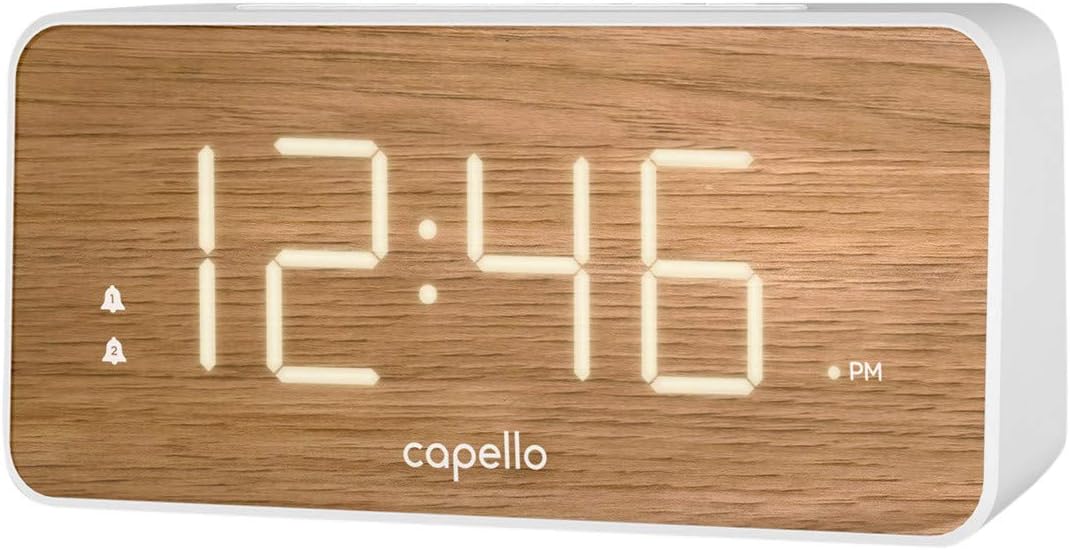
The Capello Digital Alarm Clock (Model: 43213-14795) features an extra-large digital display for easy readability from across the room. Its elegant white and pine D-frame design with a wood-grain finish complements various interior styles. The clock is equipped with intuitive controls for setting time and alarms, ensuring a user-friendly experience.
ຕັ້ງຄ່າ
ການເຊື່ອມຕໍ່ພະລັງງານ
The alarm clock requires a continuous power supply via its included AC adapter for full functionality. Insert the adapter into a standard wall outlet and connect it to the clock's power input port. For backup during power outages, install 2 AAA batteries (not included) into the battery compartment located on the underside of the unit. These batteries will preserve time and alarm settings but will not power the display or alarm functions during an outage.
ກໍານົດເວລາ
- ກົດຄ້າງໄວ້ ເວລາ ກຳ ນົດ button (or similar button, refer to specific button labels on your unit) until the hour digits begin to flash.
- ໃຊ້ ຊົ່ວໂມງ ປຸ່ມເພື່ອປັບຊົ່ວໂມງ. ເອົາໃຈໃສ່ກັບຕົວຊີ້ວັດ AM/PM.
- ກົດ ເວລາ ກຳ ນົດ button again to move to the minute digits.
- ໃຊ້ ນາທີ ປຸ່ມເພື່ອປັບນາທີ.
- ກົດ ເວລາ ກຳ ນົດ ອີກເທື່ອໜຶ່ງເພື່ອຢືນຢັນ ແລະອອກຈາກໂໝດການຕັ້ງຄ່າເວລາ.
ການຕັ້ງຄ່າປຸກ
This clock supports dual alarms.
- ກົດຄ້າງໄວ້ ໂມງປຸກ 1 ກົດປຸ່ມຈົນກ່ວາຕົວເລກຊົ່ວໂມງປຸກກະພິບ.
- ໃຊ້ ຊົ່ວໂມງ ແລະ ນາທີ ປຸ່ມເພື່ອຕັ້ງເວລາປຸກທີ່ຕ້ອງການສຳລັບໂມງປຸກ 1.
- ກົດ ໂມງປຸກ 1 again to confirm. The alarm indicator for Alarm 1 will illuminate.
- ເຮັດຊ້ໍາຂັ້ນຕອນ 1-3 ສໍາລັບ ໂມງປຸກ 2 if a second alarm is desired.
- To activate/deactivate an alarm, simply press the corresponding ໂມງປຸກ 1 or ໂມງປຸກ 2 button. The alarm indicator will show its status.
ຄໍາແນະນໍາການດໍາເນີນງານ
ຟັງຊັນເລື່ອນ
ເມື່ອສຽງປຸກດັງຂຶ້ນ, ກົດປຸ່ມໃຫຍ່ ງອກ button located on the top of the clock. This will temporarily silence the alarm for approximately 9 minutes, allowing for extra rest. The alarm will sound again after the snooze period ends.
ການຢຸດເຊົາການປຸກ
To turn off the alarm completely after it sounds, press the corresponding ໂມງປຸກ 1 or ໂມງປຸກ 2 button. The alarm indicator will turn off, signifying that the alarm is deactivated for the next day.
ຄວາມສະຫວ່າງຂອງຈໍສະແດງຜົນ
The display brightness can be adjusted to suit your preference. Locate the ແສງສະຫວ່າງ or ດີນ button (often represented by a sun icon) on the top panel. Press this button repeatedly to cycle through different brightness levels (e.g., High, Medium, Low, Off).
ບໍາລຸງຮັກສາ
To ensure the longevity and optimal performance of your Capello Digital Alarm Clock, follow these simple maintenance guidelines:
- ທໍາຄວາມສະອາດ: Wipe the clock's surface with a soft, dry cloth. Do not use abrasive cleaners, waxes, or solvents as they may damage the finish.
- ການຈັດວາງ: ວາງໂມງໄວ້ເທິງພື້ນທີ່ຄົງທີ່, ຮາບພຽງຢູ່ຫ່າງຈາກແສງແດດໂດຍກົງ, ແຫຼ່ງຄວາມຮ້ອນ, ແລະຄວາມຊຸ່ມຊື່ນຫຼາຍເກີນໄປ.
- ການປ່ຽນແບັດເຕີຣີ: ປ່ຽນແບັດສຳຮອງທຸກປີ ຫຼືເມື່ອຈໍສະແດງຜົນສະແດງອາການຂອງການຫຼຸມລົງໃນລະຫວ່າງການສາກໄຟtage. Ensure correct polarity when inserting new batteries.
ການແກ້ໄຂບັນຫາ
If you encounter any issues with your alarm clock, please refer to the following common problems and solutions:
| ບັນຫາ | ການແກ້ໄຂທີ່ເປັນໄປໄດ້ |
|---|---|
| ຈໍສະແດງຜົນຫວ່າງເປົ່າ ຫຼືມືດ. | Ensure the AC adapter is securely plugged into both the clock and a working wall outlet. Check the display brightness setting using the LIGHT/DIMMER button. |
| ໂມງປຸກບໍ່ມີສຽງ. | Verify that the alarm is activated (alarm indicator is lit). Ensure the alarm time is set correctly (AM/PM). Check if the volume is set to an audible level. |
| ເວລາບໍ່ຖືກຕ້ອງ. | Reset the time following the 'Setting the Time' instructions. If using backup batteries, ensure they are fresh and correctly installed. |
| ປຸ່ມບໍ່ຕອບສະໜອງ. | Unplug the AC adapter, remove backup batteries, wait for 1 minute, then reconnect power. This performs a soft reset. |
ຂໍ້ມູນຈໍາເພາະ
- ຍີ່ຫໍ້: Capello
- ໝາຍເລກຕົວແບບ: 43213-14795
- ສີ: ສີຂາວ
- ປະເພດການສະແດງ: ດິຈິຕອລ
- ຮູບແບບ: ທັນສະໄຫມ
- ຄຸນນະສົມບັດພິເສດ: Large Display, Alarm
- ຂະໜາດຜະລິດຕະພັນ: 8.74"W x 5.83"H
- ແຫຼ່ງພະລັງງານ: AC Powered (with battery backup for settings)
- ວັດສະດຸ: ພາດສະຕິກ
- ນ້ໍາຫນັກລາຍການ: 1.01 ປອນ
ວິດີໂອຜະລິດຕະພັນຢ່າງເປັນທາງການ
ບໍ່ມີວິດີໂອຜະລິດຕະພັນຢ່າງເປັນທາງການຈາກຜູ້ຂາຍສໍາລັບລາຍການນີ້ໃນເວລານີ້.
ການຮັບປະກັນແລະການສະຫນັບສະຫນູນ
For warranty information and customer support, please refer to the manufacturer's official documentation included with your product or visit the Capello webເວັບໄຊ. ຮັກສາໃບຮັບເງິນການຊື້ຂອງທ່ານສໍາລັບການຮ້ອງຂໍການຮັບປະກັນ.


