1. ບົດແນະນຳ
This manual provides essential information for the safe and efficient operation of your InFocus IN112XV Presentation Projector. The IN112XV is designed for business presentations and educational use, offering a long lamp life, high brightness, and clear image quality.
- ຂະຫຍາຍ Lamp ຊີວິດ: Enjoy over 15,000 hours of viewing.
- ຄວາມສະຫວ່າງສູງ: 3800 lumens for clear images in various lighting conditions.
- ອັດຕາສ່ວນກົງກັນຂ້າມ: 26000:1 for distinct whites and blacks.
- ປ່ຽນແປງໄດ້ Viewໃນ: Projects images from 28 inches to 300 inches diagonally.
- ການເຊື່ອມຕໍ່: Features HDMI input and SVGA (800 x 600) resolution.
2. ເນື້ອໃນຊຸດ
ກວດສອບວ່າລາຍການທັງຫມົດທີ່ລະບຸໄວ້ຂ້າງລຸ່ມນີ້ແມ່ນລວມຢູ່ໃນຊຸດຂອງທ່ານ:
- InFocus IN112XV Projector
- ສາຍໄຟ
- ການຄວບຄຸມໄລຍະໄກ
- ສາຍ VGA
- ເອກະສານ (ຄູ່ມືນີ້ ແລະຄູ່ມືອື່ນໆ)
3. ຜະລິດຕະພັນເກີນview
Familiarize yourself with the components and controls of your InFocus IN112XV projector.
3.1 ແນວ ໜ້າ View
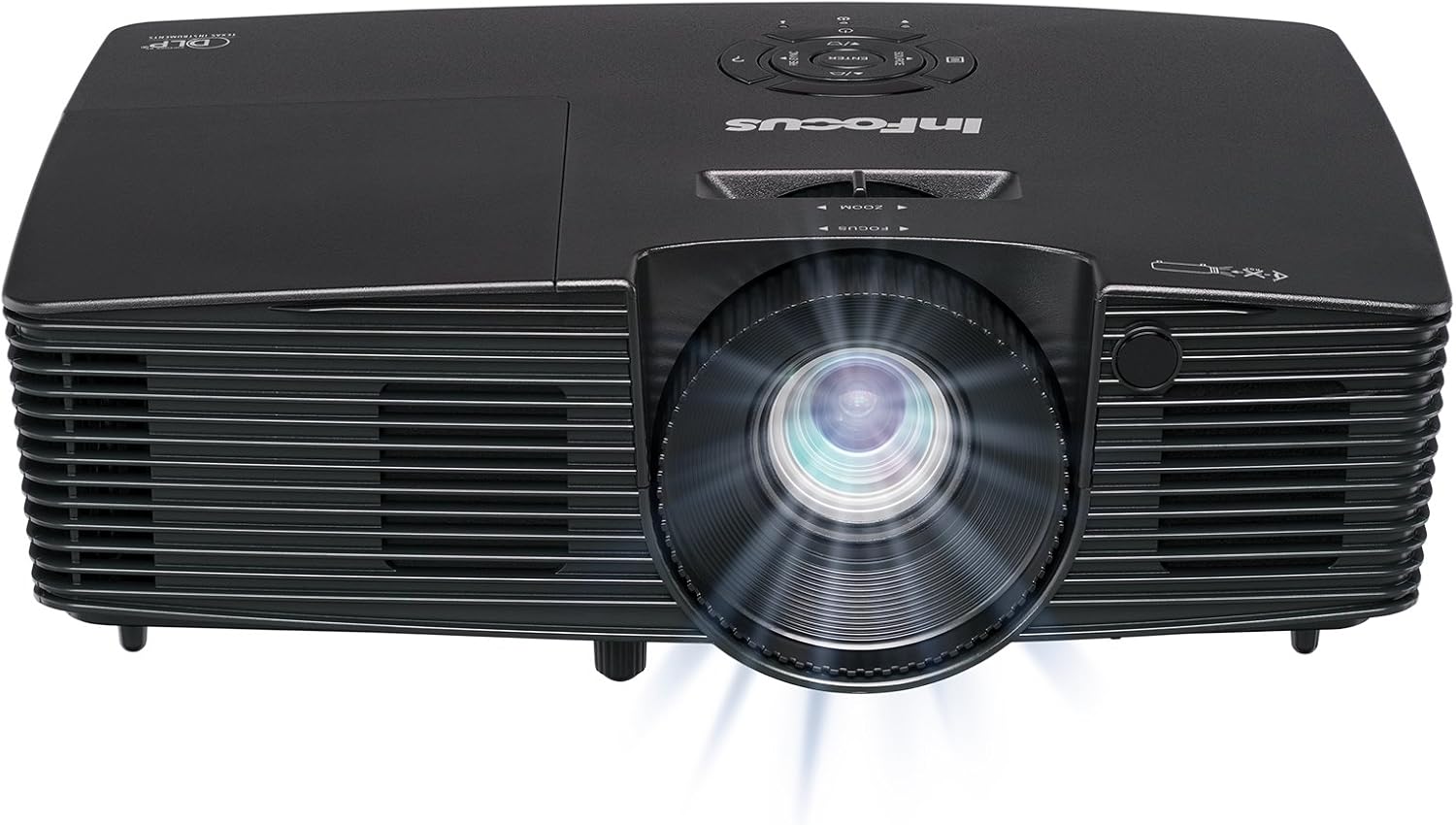
ຮູບພາບ 3.1: ດ້ານໜ້າ view of the InFocus IN112XV projector. This image highlights the main projection lens and the front ventilation grilles.
3.2 ເທິງ View ແລະກະດານຄວບຄຸມ

ຮູບພາບ 3.2: ເທິງ view of the InFocus IN112XV projector. The control panel is visible on the right, featuring buttons for power, source selection, menu navigation, keystone adjustment, and volume. The focus and zoom adjustment rings are located around the lens.
The control panel on the top of the projector allows for basic operation without the remote. Key buttons include:
- ພະລັງງານ: ເປີດ ຫຼືປິດໂປຣເຈັກເຕີ.
- ທີ່ມາ: ຮອບວຽນຜ່ານແຫຼ່ງປ້ອນຂໍ້ມູນທີ່ມີຢູ່.
- ເມນູ: ເຂົ້າເຖິງເມນູການສະແດງເທິງໜ້າຈໍ (OSD).
- ປ້ອນ: Confirms selections in the OSD menu.
- ປຸ່ມລູກສອນ: ໄປທີ່ຕົວເລືອກເມນູ ແລະປັບການຕັ້ງຄ່າ.
- Re-Sync: Synchronizes the image.
3.3 ດ້ານຫຼັງ View ແລະພອດເຊື່ອມຕໍ່

ຮູບພາບ 3.3: ຫລັງ view of the InFocus IN112XV projector. This image displays the available connection ports, including Video In, S-Video In, Computer In (VGA), HDMI, and the power input.
The rear panel provides various ports for connecting external devices:
- ວິດີໂອໃນ: For composite video sources.
- S-Video In: For S-Video sources.
- Computer In (VGA): For connecting to computers via VGA cable.
- HDMI: For digital video and audio sources.
- ບໍລິການ: For service and maintenance purposes.
- ການປ້ອນຂໍ້ມູນພະລັງງານ: Connects the power cord to an electrical outlet.
3.4 ການຄວບຄຸມໄລຍະໄກ

ຮູບພາບ 3.4: Remote control for the InFocus IN112XV projector. The remote provides full control over the projector's functions, including power, source selection, menu navigation, keystone correction, and volume.
The remote control offers convenient access to all projector functions. Ensure batteries are correctly installed.
4. ຕັ້ງຄ່າ
4.1 ການຈັດວາງ
Position the projector on a stable, flat surface or mount it securely. Ensure there is adequate space around the projector for ventilation.
4.2 ການເຊື່ອມຕໍ່ພະລັງງານ
- ເຊື່ອມຕໍ່ສາຍໄຟເຂົ້າກັບພອດປ້ອນຂໍ້ມູນພະລັງງານຂອງໂປເຈັກເຕີ.
- ສຽບສາຍໄຟອີກດ້ານໜຶ່ງເຂົ້າໄປໃນປ້ຳໄຟຟ້າທີ່ມີສາຍດິນ.
4.3 ການເຊື່ອມຕໍ່ແຫຼ່ງປ້ອນຂໍ້ມູນ
The projector supports various input sources. Choose the appropriate cable for your device:
- HDMI: Connect an HDMI cable from your source device (e.g., laptop, media player) to the projector's HDMI port.
- VGA (Computer In): Connect a VGA cable from your computer to the projector's Computer In port. This is a plug-and-play connection.
- Video In / S-Video In: Use composite video or S-Video cables for older video sources.
- ອຸປະກອນມືຖື: To connect an iPad or smartphone, a LightCast Key (sold separately) is required.
5. ຄໍາແນະນໍາການດໍາເນີນງານ
5.1 ການເປີດ/ປິດ
- ເພື່ອເປີດເຄື່ອງ: ກົດ ພະລັງງານ ປຸ່ມຢູ່ເທິງແຜງຄວບຄຸມຂອງໂປເຈັກເຕີ ຫຼື ຣີໂໝດຄວບຄຸມ. ໄຟສະແດງພະລັງງານຈະປ່ຽນ.
- ປິດເຄື່ອງ: ກົດ ພະລັງງານ button again. A confirmation message may appear. Press again to confirm shutdown. Allow the projector to cool down before unplugging.
5.2 ການເລືອກແຫຼ່ງທີ່ມາຂອງຂໍ້ມູນເຂົ້າ
After connecting your source device, select the correct input:
- ກົດ ທີ່ມາ button on the projector's control panel or the remote control to cycle through available inputs (HDMI, VGA, Video, S-Video).
- Alternatively, use the dedicated input buttons (HDMI, VGA, Video) on the remote control.
5.3 ການປັບໂຟກັສ ແລະ ການຊູມ
For a clear and appropriately sized image, adjust the lens rings:

ຮູບພາບ 5.1: Manual Focus Adjustment. This image illustrates the effect of adjusting the focus ring, transforming a blurry projection into a clear and sharp image.
- ຈຸດສຸມ: ໝຸນ ສຸມໃສ່ ring on the projector lens until the image appears sharp and clear.
- ຊູມ: ໝຸນ ຊູມ ring on the projector lens to adjust the size of the projected image.
5.4 Keystone ການແກ້ໄຂ
If the projected image appears trapezoidal (wider at the top or bottom), use keystone correction to square it:
- ກົດ Keystone+ or Keystone- buttons on the remote control to adjust the image geometry.
5.5 ການ ນຳ ທາງເມນູ
Access the On-Screen Display (OSD) menu for advanced settings:
- ກົດ ເມນູ ຢູ່ເທິງຣີໂໝດ ຫຼື ແຜງຄວບຄຸມ.
- Use the arrow keys to navigate through menu options.
- ກົດ ເຂົ້າ ເພື່ອເລືອກຕົວເລືອກ ຫຼື ຢືນຢັນການຕັ້ງຄ່າ.
- ກົດ ເມນູ again to exit the OSD.
6. ບໍາລຸງຮັກສາ
6.1 ລamp ຊີວິດ
ໂປເຈັກເຕີ lamp has an estimated life of over 15,000 hours. When the lamp reaches the end of its life, the projector may display a warning message or the image brightness may significantly decrease. Refer to the full service manual for lamp replacement procedures if necessary.
6.2 ການທໍາຄວາມສະອາດ
- ໂປເຈັກເຕີ Casing: ໃຊ້ຜ້າອ່ອນໆແຫ້ງເຊັດດ້ານນອກຂອງໂປເຈັກເຕີ. ຢ່າໃຊ້ນໍ້າຢາທໍາຄວາມສະອາດທີ່ມີສານຂັດ ຫຼື ສານລະລາຍ.
- ເລນ: Gently clean the lens with a lens cleaning cloth and specialized lens cleaning solution. Avoid touching the lens surface with your fingers.
- ການເປີດລະບາຍອາກາດ: Periodically check and clean the ventilation openings to ensure proper airflow and prevent overheating. Use a soft brush or compressed air to remove dust.
7. ການແກ້ໄຂບັນຫາ
ພາກສ່ວນນີ້ແກ້ໄຂບັນຫາທົ່ວໄປທີ່ທ່ານອາດຈະພົບກັບໂປເຈັກເຕີຂອງທ່ານ.
| ບັນຫາ | ສາເຫດທີ່ເປັນໄປໄດ້ | ການແກ້ໄຂ |
|---|---|---|
| ບໍ່ມີຮູບພາບສະແດງ |
|
|
| ຮູບພາບມົວ |
|
|
| ຮູບພາບແມ່ນ trapezoidal |
|
|
| Projector runs hot or smells of burning plastic |
|
|
| ບໍ່ມີສຽງ |
|
|
ໝາຍເຫດສຳຄັນ: This projector is not recommended for high-definition movie viewing. While it can accept a 1080p input signal, it projects at its native SVGA (800 x 600) resolution.
8. ຂໍ້ມູນຈໍາເພາະ
| ຄຸນສົມບັດ | ລາຍລະອຽດ |
|---|---|
| ໝາຍເລກຕົວແບບ | IN112XV |
| ເຕັກໂນໂລຊີການສະແດງ | DLP |
| ຄວາມລະອຽດເດີມ | SVGA (800 x 600) |
| ຄວາມສະຫວ່າງ | 3800 Lumens |
| ອັດຕາສ່ວນກົງກັນຂ້າມ | 26000:1 |
| Lamp ຊີວິດ | ສູງສຸດ 15,000 ຊົ່ວໂມງ |
| ການເຊື່ອມຕໍ່ | HDMI, VGA (Computer In), Video In, S-Video In |
| ຄຸນນະສົມບັດພິເສດ | 3D-ພ້ອມ |
| ການນໍາໃຊ້ທີ່ແນະນໍາ | Business, Education |
| ຂະໜາດສິນຄ້າ | 8.8 x 12.4 x 4 ນິ້ວ |
| ນ້ໍາຫນັກລາຍການ | 5.5 ປອນ |
9. ການຮັບປະກັນແລະການສະຫນັບສະຫນູນ
9.1 ຂໍ້ມູນການຮັບປະກັນ
The InFocus IN112XV projector is backed by a ຮັບປະກັນ 2 ປີ. ການຮັບປະກັນນີ້ກວມເອົາຂໍ້ບົກພ່ອງຂອງວັດສະດຸແລະການເຮັດວຽກພາຍໃຕ້ການນໍາໃຊ້ປົກກະຕິ. ກະລຸນາຮັກສາຫຼັກຖານການຊື້ຂອງທ່ານສໍາລັບການຮຽກຮ້ອງການຮັບປະກັນ.
9.2 ສະຫນັບສະຫນູນລູກຄ້າ
For technical assistance, troubleshooting beyond this manual, or warranty service, please contact InFocus customer support. Contact information can typically be found on the official InFocus webເວັບໄຊ ຫຼືໃນເອກະສານປະກອບກັບຜະລິດຕະພັນຂອງທ່ານ.


