1. ບົດແນະນຳ
The AUNA Stealth Bar 60 is a compact 2.1 soundbase designed to significantly enhance your home entertainment audio experience. This manual provides essential information for the safe operation, proper setup, and effective maintenance of your device. Please read this manual thoroughly before using the product and retain it for future reference.

ຮູບທີ 1.1: The AUNA Stealth Bar 60 soundbase integrated into a home entertainment setup.
2. ຄໍາແນະນໍາຄວາມປອດໄພ
ເພື່ອຮັບປະກັນການເຮັດວຽກທີ່ປອດໄພ ແລະປ້ອງກັນຄວາມເສຍຫາຍ, ກະລຸນາປະຕິບັດຕາມຂໍ້ຄວນລະວັງດ້ານຄວາມປອດໄພຕໍ່ໄປນີ້:
- ອ່ານ ຄຳ ແນະ ນຳ ທັງcarefullyົດຢ່າງລະມັດລະວັງກ່ອນ ນຳ ໃຊ້ແລະເກັບຮັກສາໄວ້ເພື່ອການອ້າງອີງໃນອະນາຄົດ.
- ຢ່າປ່ອຍໃຫ້ອຸປະກອນຖືກນໍ້າ, ຄວາມຊຸ່ມຊື່ນ, ຫຼືອຸນຫະພູມທີ່ຮຸນແຮງ.
- ຮັບປະກັນການລະບາຍອາກາດທີ່ພຽງພໍຢູ່ອ້ອມໜ່ວຍ. ຫ້າມປິດຊ່ອງລະບາຍອາກາດໃດໆ.
- Install the device according to the manufacturer's instructions.
- ປົກປ້ອງສາຍໄຟຈາກການຖືກສຽບ ຫຼື ສຽບ, ໂດຍສະເພາະຢູ່ປລັກສຽບ, ກ່ອງຮັບສະດວກ, ແລະຈຸດທີ່ພວກມັນອອກຈາກອຸປະກອນ.
- ຖອດປລັກອຸປະກອນໃນເວລາມີພະຍຸຟ້າຜ່າ ຫຼືເມື່ອບໍ່ໄດ້ໃຊ້ເປັນເວລາດົນນານ.
- ອ້າງອີງການບໍລິການທັງໝົດໃຫ້ກັບພະນັກງານບໍລິການທີ່ມີຄຸນວຸດທິ. ການບໍລິການແມ່ນຕ້ອງການເມື່ອອຸປະກອນໄດ້ຮັບຄວາມເສຍຫາຍໃນທາງໃດກໍ່ຕາມເຊັ່ນ: ສາຍໄຟຫຼືປລັກສຽບຖືກເສຍຫາຍ, ແຫຼວຮົ່ວໄຫຼຫຼືສິ່ງຂອງຕົກເຂົ້າໄປໃນອຸປະກອນ, ອຸປະກອນຖືກຝົນຫຼືຄວາມຊຸ່ມຊື່ນ, ບໍ່ເຮັດວຽກຕາມປົກກະຕິ. , ຫຼືໄດ້ຖືກຫຼຸດລົງ.
3. ເນື້ອໃນຊຸດ
Carefully unpack the box and ensure all items listed below are present and in good condition:
- 1 x AUNA Stealth Bar 60 Soundbase
- 1 x ການຄວບຄຸມໄລຍະໄກ
- ສາຍ 1 x RCA
- 1 x Audio Cable (3.5mm AUX)
- 1 x ຄູ່ມືຜູ້ໃຊ້ (ພາສາອັງກິດ ແລະ ເຢຍລະມັນ)
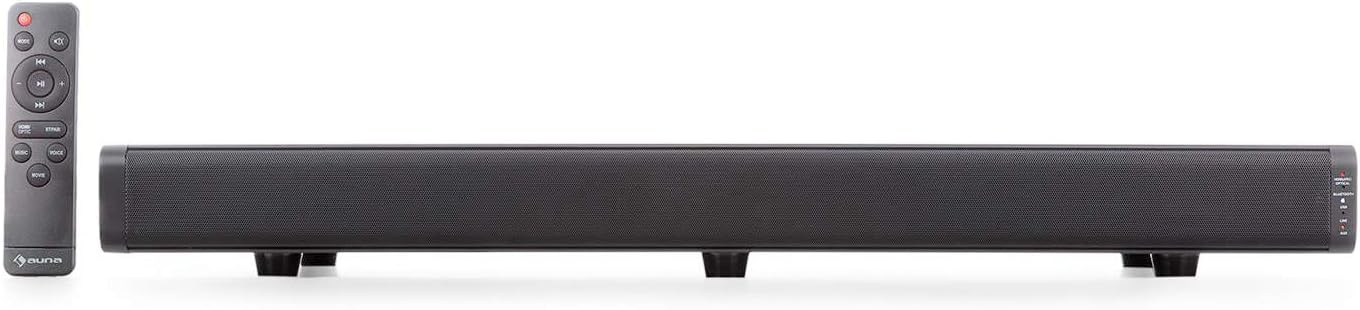
ຮູບທີ 3.1: The AUNA Stealth Bar 60 soundbase and its remote control.
4. ຄຸນລັກສະນະຂອງຜະລິດຕະພັນ
The AUNA Stealth Bar 60 offers a range of features designed for an immersive audio experience:
- 2.1 Compact Soundbase: Designed for TVs between 32-55 inches, supporting a maximum weight of 22kg.
- ການເຊື່ອມຕໍ່ອະເນກປະສົງ: Includes USB, HDMI (ARC), Optical, and AUX inputs for various digital and analog sources.
- ການຖ່າຍທອດ Bluetooth: Wirelessly stream audio from compatible devices like smartphones and tablets.
- Integrated DSP 3D Surround Stereo: Enhances audio depth and immersion.
- EQ presets: Three selectable equalizer modes (Music, Voice, Movie) to optimize sound for different content.
- ການຄວບຄຸມສະດວກ: Operate directly from the unit or via the included remote control.
- ການທໍາງານຂອງພອດ USB: Supports MP3 playback from USB drives (up to 32GB) and can also serve as a charging port for other devices.

ຮູບທີ 4.1: ດ້ານໜ້າ view of the AUNA Stealth Bar 60 soundbase.
5. ການຄວບຄຸມແລະການເຊື່ອມຕໍ່
5.1 ແຜງຄວບຄຸມດ້ານໜ້າ ແລະຕົວຊີ້ບອກ
The right side of the soundbase features control buttons and LED indicators for easy operation and status monitoring.
- ປຸ່ມເປີດ/ປິດໂໝດ: Press to power on/off or cycle through input sources (HDMI, Optical, Bluetooth, USB, Line In, AUX).
- PAIR / Play / Pause Button: In Bluetooth mode, press and hold to initiate pairing. Press briefly to play or pause audio.
- VOL+ / Next Track Button: Press to increase volume. In Bluetooth/USB mode, press and hold to skip to the next track.
- VOL- / Previous Track Button: Press to decrease volume. In Bluetooth/USB mode, press and hold to skip to the previous track.
- ຕົວຊີ້ວັດ LED: Lights indicate the currently selected input source (HDMI, Optical, Bluetooth, USB, Line In, AUX).

ຮູບທີ 5.1: Front panel controls and LED indicators.
5.2 Side and Rear Panel Connections
The soundbase offers various ports for connecting external audio sources.
- ພອດ USB: For connecting USB storage devices (max 32GB) for MP3 playback or charging external devices.
- ພອດ LINE IN (AUX): 3.5mm jack for connecting analog audio sources.
- ອິນພຸດ HDMI (ARC): For connecting to a TV's HDMI ARC port to receive audio.
- Optical Input: For connecting to a TV or other device with an optical digital audio output.
- AUX Input: RCA stereo input for connecting analog audio sources.
- ການປ້ອນຂໍ້ມູນພະລັງງານ: ສໍາລັບການເຊື່ອມຕໍ່ອະແດບເຕີພະລັງງານ.

ຮູບທີ 5.2: USB and Line In ports on the side panel.
6. ຕັ້ງຄ່າ
6.1 ການຈັດວາງ
- Place the AUNA Stealth Bar 60 on a stable, flat surface directly below your television.
- Ensure there is adequate space around the soundbase for proper ventilation.
- The soundbase is designed to support TVs weighing up to 22 kg. Do not exceed this weight limit.
6.2 ການເຊື່ອມຕໍ່ກັບພະລັງງານ
- Connect the power cable to the Power Input port on the soundbase.
- Plug the other end of the power cable into a suitable wall outlet (110-220 V~ | 50/60 Hz).
6.3 ການເຊື່ອມຕໍ່ແຫຼ່ງສຽງ
Choose one of the following connection methods based on your TV or audio source:
- HDMI (ARC): Connect an HDMI cable from the soundbase's HDMI (ARC) port to your TV's HDMI (ARC) port. This allows the TV to send audio to the soundbase and often enables control of the soundbase volume with your TV remote.
- Optical: Connect an optical audio cable from the soundbase's OPTICAL input to your TV's optical digital audio output.
- ຊ່ອງສຽບ (RCA): Use the provided RCA cable to connect the soundbase's AUX input to the RCA audio output jacks on your TV or other audio device.
- ສາຍເຂົ້າ (3.5 ມມ): Use the provided 3.5mm audio cable to connect the soundbase's LINE IN port to the headphone jack or 3.5mm audio output of your device.
- USB: Insert a USB flash drive (formatted to FAT32, max 32GB) into the USB port for direct MP3 playback.
7. ຄໍາແນະນໍາການດໍາເນີນງານ
7.1 ເປີດ/ປິດ
ກົດ ພະລັງງານ / ແບບ button on the soundbase or the remote control to turn the unit on or off.
7.2 ການເລືອກແຫຼ່ງ
ກົດ ໂໝດ button repeatedly on the soundbase or remote control to cycle through the available input sources: HDMI, Optical, Bluetooth, USB, Line In, and AUX. The corresponding LED indicator on the front panel will illuminate to show the active source.
7.3 ການຄວບຄຸມປະລິມານ
ໃຊ້ VOL+ ແລະ VOL- buttons on the soundbase or remote control to adjust the volume level.
7.4 ການຈັບຄູ່ Bluetooth
- Turn on the soundbase and select Bluetooth mode using the ໂໝດ button. The Bluetooth LED indicator will flash, indicating it is in pairing mode.
- ເປີດໃຊ້ Bluetooth ໃນໂທລະສັບສະຫຼາດ, ແທັບເລັດ, ຫຼືອຸປະກອນອື່ນໆຂອງທ່ານ.
- ຊອກຫາ available devices and select "AUNA Stealth Bar 60" from the list.
- Once successfully paired, the Bluetooth LED indicator on the soundbase will glow solid.
- You can now play audio from your device through the soundbase. Use the PAIR / Play / Pause, VOL+ / ເພງຕໍ່ໄປ, ແລະ VOL- / ເພງກ່ອນໜ້ານີ້ ປຸ່ມສໍາລັບການຄວບຄຸມການຫຼິ້ນ.
7.5 EQ ຕັ້ງໄວ້ລ່ວງ ໜ້າ
Use the dedicated buttons on the remote control to select one of the three equalizer presets:
- ດົນຕີ: Optimized for general music listening.
- ສຽງ: ຊ່ວຍເພີ່ມຄວາມຊັດເຈນຂອງສຽງຮ້ອງ, ເໝາະສຳລັບຂ່າວ ຫຼື ເນື້ອຫາທີ່ມີຫຼາຍການສົນທະນາ.
- ຮູບເງົາ: ໃຫ້ສຽງແບບໄດນາມິກtage for movies and cinematic experiences.
8. ບໍາລຸງຮັກສາ
Proper care ensures the longevity and performance of your soundbase:
- ທໍາຄວາມສະອາດ: Use a soft, dry cloth to clean the exterior of the soundbase. Do not use liquid cleaners, aerosols, or abrasive chemicals, as they may damage the finish.
- ການລະບາຍອາກາດ: ກວດສອບເປັນໄລຍະວ່າຊ່ອງລະບາຍອາກາດບໍ່ມີຝຸ່ນ ແລະ ສິ່ງເສດເຫຼືອເພື່ອປ້ອງກັນຄວາມຮ້ອນເກີນໄປ.
- ການເກັບຮັກສາ: If storing the unit for an extended period, unplug it from the power outlet and store it in a cool, dry place, preferably in its original packaging.
9. ການແກ້ໄຂບັນຫາ
If you encounter issues with your AUNA Stealth Bar 60, refer to the following table for common problems and solutions:
| ບັນຫາ | ສາເຫດທີ່ເປັນໄປໄດ້ | ການແກ້ໄຂ |
|---|---|---|
| ບໍ່ມີພະລັງງານ | ສາຍໄຟບໍ່ໄດ້ເຊື່ອມຕໍ່; ປລັກສຽບໄຟບໍ່ເຮັດວຽກ. | ໃຫ້ແນ່ໃຈວ່າສາຍໄຟໄດ້ເຊື່ອມຕໍ່ຢ່າງແໜ້ນໜາແລ້ວ. ກວດສອບວ່າປລັກໄຟໃຊ້ງານໄດ້ຫຼືບໍ່. |
| ບໍ່ມີສຽງ | Incorrect input source selected; Volume too low; Audio cables not connected properly. | Select the correct input source. Increase the volume. Check all audio cable connections. |
| Bluetooth ບໍ່ເຊື່ອມຕໍ່ | Soundbase not in pairing mode; Device Bluetooth off; Device too far. | Ensure soundbase is in Bluetooth pairing mode (flashing LED). Turn on Bluetooth on your device. Move device closer to the soundbase. |
| ການຄວບຄຸມໄລຍະໄກບໍ່ເຮັດວຽກ | Batteries depleted; Obstruction between remote and soundbase. | Replace batteries in the remote control. Ensure there is a clear line of sight to the soundbase's sensor. |
10. ຂໍ້ມູນຈໍາເພາະ
Technical specifications for the AUNA Stealth Bar 60:
| ຄຸນສົມບັດ | ຂໍ້ມູນຈໍາເພາະ |
|---|---|
| ໝາຍເລກຕົວແບບ | KTCLJ4O-Q |
| ຜົນຜະລິດພະລັງງານ (RMS) | 2 x 20W + 40W |
| impedance | 8 ໂອມ |
| ລຸ້ນ Bluetooth | V3.0 + EDR |
| Max USB Storage Size | 32GB |
| Max TV Load | 22 ກິໂລ |
| ຂະໜາດ (ກວ້າງ x ສູງ x ຍາວ) | 68 x 6 x 27 cm |
| ນ້ຳໜັກ | 5 ກິໂລ |
| ການສະຫນອງພະລັງງານ | 110-220 V~ | 50/60 Hz |
| ການເຊື່ອມຕໍ່ | HDMI (ARC), USB, Optical, AUX (RCA), Line In (3.5mm) |
| ຕັ້ງຄ່າ EQ ລ່ວງ ໜ້າ | Music, Voice, Movie |
11. ການຮັບປະກັນແລະການສະຫນັບສະຫນູນ
For detailed warranty information, terms, and conditions, please refer to the warranty card or documentation included with your purchase. For technical support, service inquiries, or to obtain replacement parts, please visit the official AUNA website or contact your local dealer. Please have your model number (KTCLJ4O-Q) and purchase date available when contacting support.


