1. ບົດແນະນຳ
This manual provides detailed instructions for the installation, configuration, operation, and maintenance of the Fortinet FortiAP-U321EV Universal Indoor Wireless Access Point. Please read this manual thoroughly before attempting to install or operate the device to ensure proper functionality and safety.
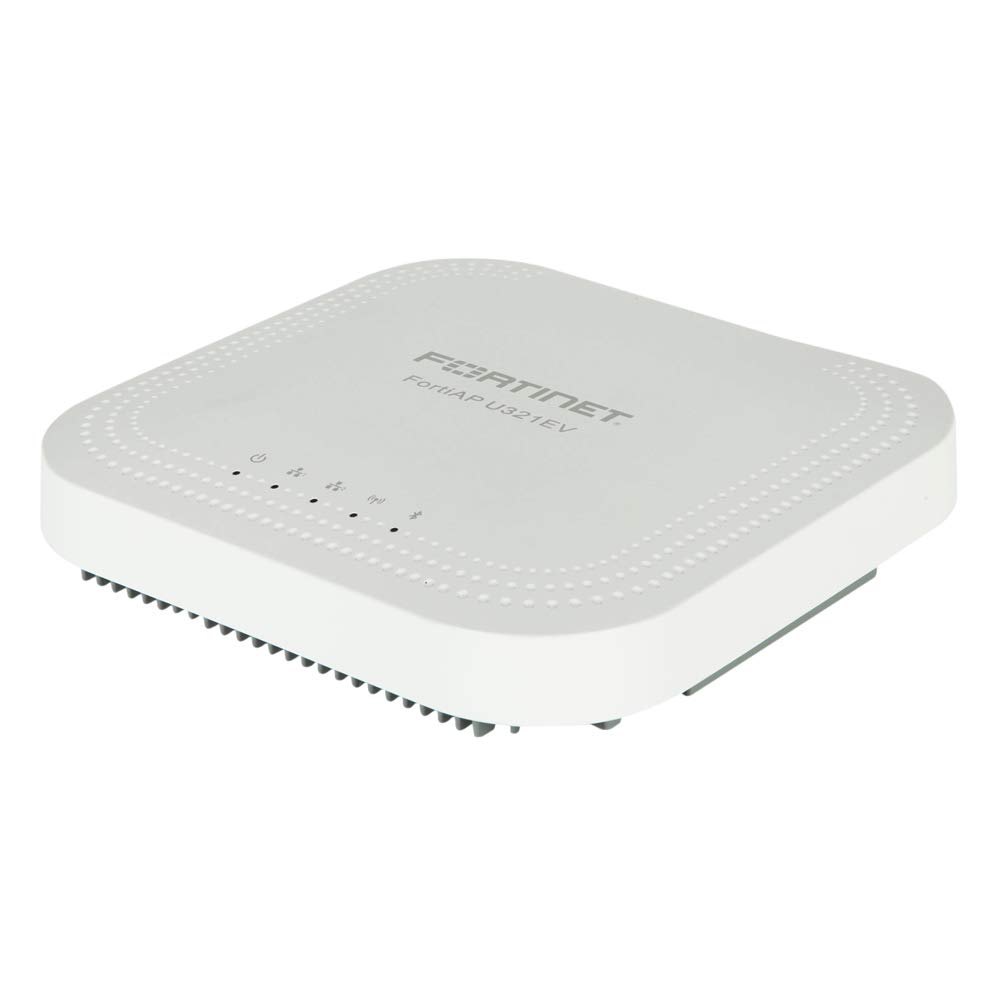
ຮູບທີ 1: ດ້ານໜ້າ view of the Fortinet FortiAP-U321EV Universal Indoor Wireless Access Point. This image shows the compact design suitable for indoor deployments.
2. ເນື້ອໃນຊຸດ
ກວດສອບໃຫ້ແນ່ໃຈວ່າລາຍການທັງໝົດມີຢູ່ໃນການຫຸ້ມຫໍ່. ຖ້າມີລາຍການໃດຂາດຫາຍໄປ ຫຼື ເສຍຫາຍ, ໃຫ້ຕິດຕໍ່ຜູ້ຂາຍຂອງທ່ານທັນທີ.
- FortiAP-U321EV Universal Indoor Wireless Access Point
- ວົງເລັບຕິດຕັ້ງ
- ຮາດແວຕິດຕັ້ງ (ສະກູ, ສະມໍ)
- Ethernet Cable (optional, check specific package)
- ຄູ່ມືເລີ່ມຕົ້ນດ່ວນ
3. ການຕິດຕັ້ງແລະການຕິດຕັ້ງ
3.1. ຂໍ້ຄວນລະວັງຄວາມປອດໄພ
- Ensure the installation environment is dry and well-ventilated.
- ຢ່າເຮັດໃຫ້ອຸປະກອນຢູ່ໃນອຸນຫະພູມ ຫຼືຄວາມຊຸ່ມຊື່ນທີ່ສຸດ.
- Use only the power adapter or Power over Ethernet (PoE) source specified for this device.
- ຕັດການເຊື່ອມຕໍ່ໄຟກ່ອນທຳຄວາມສະອາດ ຫຼື ບໍລິການອຸປະກອນ.
3.2. ການຕິດຕັ້ງຈຸດເຂົ້າເຖິງ
The FortiAP-U321EV can be mounted on a wall or ceiling. Choose a central location for optimal wireless coverage.
- ຕິດຂາຍຶດໃສ່ກັບພື້ນຜິວທີ່ຕ້ອງການໂດຍໃຊ້ສະກູ ແລະ ສະກູທີ່ໃຫ້ມາ.
- Align the FortiAP-U321EV with the mounting bracket.
- Slide the access point onto the bracket until it clicks securely into place.
3.3. ການເປີດອຸປະກອນ
The FortiAP-U321EV supports Power over Ethernet (PoE) or an external power adapter (sold separately).
- PoE: Connect an Ethernet cable from a PoE-enabled switch or injector to the LAN port on the FortiAP-U321EV.
- ອະແດັບເຕີພະລັງງານພາຍນອກ: ເຊື່ອມຕໍ່ອະແດບເຕີໄຟຟ້າເຂົ້າກັບຊ່ອງສຽບໄຟຟ້າຂອງອຸປະກອນ ແລະ ຈາກນັ້ນເຂົ້າກັບປລັກໄຟ.
The device will power on automatically. Observe the LED indicators for status.
3.4. ການຕັ້ງຄ່າເບື້ອງຕົ້ນ
The FortiAP-U321EV is typically managed by a FortiGate firewall or FortiCloud. Refer to the FortiGate or FortiCloud documentation for detailed configuration steps.
- Connect the FortiAP to your network.
- Ensure the FortiAP can reach the FortiGate or FortiCloud.
- Authorize and configure the FortiAP from your FortiGate or FortiCloud interface.
4. Operating the FortiAP-U321EV
4.1. ຕົວຊີ້ວັດ LED
The device features LED indicators to provide status information:
- ໄຟ LED:
- Solid Green: Device is powered on and operating normally.
- Flashing Green: Device is booting up or performing a firmware upgrade.
- ປິດ: ອຸປະກອນຖືກປິດ.
- Wi-Fi LED (2.4GHz/5GHz):
- Solid Green: Wireless radio is active and transmitting.
- Flashing Green: Data activity on the wireless radio.
- Off: Wireless radio is disabled.
4.2. ການເຊື່ອມຕໍ່ໄຮ້ສາຍ
Once configured via FortiGate or FortiCloud, the FortiAP-U321EV will broadcast the configured SSIDs (Wi-Fi networks). Users can connect to these networks using standard Wi-Fi client devices.
- Ensure your client device's Wi-Fi is enabled.
- Select the appropriate SSID from the list of available networks.
- Enter the network password (if required).
5. ບໍາລຸງຮັກສາ
5.1. ອັບເດດເຟີມແວ
Regularly update the device firmware to ensure optimal performance, security, and access to new features. Firmware updates are typically managed through the connected FortiGate or FortiCloud platform.
- Access your FortiGate or FortiCloud management interface.
- Navigate to the FortiAP management section.
- Check for available firmware updates and follow the on-screen instructions to apply them.
- It is recommended to perform updates during off-peak hours to minimize service disruption.
5.2. ທໍາຄວາມສະອາດ
To clean the device, power it off and disconnect it from the power source. Use a soft, dry cloth to wipe the exterior. Do not use liquid cleaners or aerosols.
6. ການແກ້ໄຂບັນຫາ
This section addresses common issues you might encounter with your FortiAP-U321EV.
| ບັນຫາ | ສາເຫດທີ່ເປັນໄປໄດ້ | ການແກ້ໄຂ |
|---|---|---|
| ບໍ່ມີໄຟ LED ສະແດງພະລັງງານ | No power supply or faulty power source. |
|
| ບໍ່ມີສັນຍານ Wi-Fi | Wireless radios disabled or incorrect configuration. |
|
| ການເຊື່ອມຕໍ່ Wi-Fi ຊ້າ | Interference, poor signal strength, or network congestion. |
|
| Cannot connect to FortiGate/FortiCloud | Network connectivity issues or incorrect management settings. |
|
7. ຂໍ້ມູນຈໍາເພາະ
Key technical specifications for the FortiAP-U321EV:
- ຕົວແບບ: FAP-U321EV
- ປະເພດໄຮ້ສາຍ: 802.11a/b/g/n (Dual Radio, 3x3 MIMO 2.4/5GHz)
- ປະເພດແຖບຄວາມຖີ່: Dual-Band
- ລະບົບປະຕິບັດການ: FortiOS
- ເຕັກໂນໂລຍີການເຊື່ອມຕໍ່: ໄຮ້ສາຍ
- ນ້ໍາຫນັກລາຍການ: ປະມານ 3.88 ປອນ (1.76 ກິໂລ)
- ຂະໜາດແພັກເກດ: ຂະໜາດປະມານ 13.23 x 11.61 x 4.13 ນິ້ວ (33.6 x 29.5 x 10.5 cm)
- ຜູ້ຜະລິດ: Fortinet, Inc
- ຄຸນນະສົມບັດພິເສດ: WPS (Wi-Fi ປ້ອງກັນການຕັ້ງຄ່າ)
- ການນໍາໃຊ້ທີ່ແນະນໍາ: ເຮືອນ, ຫ້ອງການຂະໜາດນ້ອຍ
8. ຂໍ້ມູນການຮັບປະກັນ
Fortinet products are covered by a limited warranty. For specific warranty terms and conditions, including duration and coverage details, please refer to the official Fortinet warranty policy available on their website or contact your authorized Fortinet reseller. Keep your proof of purchase for warranty claims.
9. ສະຫນັບສະຫນູນດ້ານວິຊາການ
For technical assistance, product documentation, and software downloads, please visit the official Fortinet support website. You may also contact your authorized Fortinet partner or reseller for local support.
- ສະຫນັບສະຫນູນ Fortinet Webເວັບໄຊ: support.fortinet.com
- Fortinet Main Webເວັບໄຊ: www.fortinet.com


