1. ບົດແນະນຳ
This manual provides essential instructions for the safe and efficient operation of your Altec Lansing LifeJacket XL IMW789 Bluetooth Speaker. Please read this manual thoroughly before using the product and retain it for future reference.
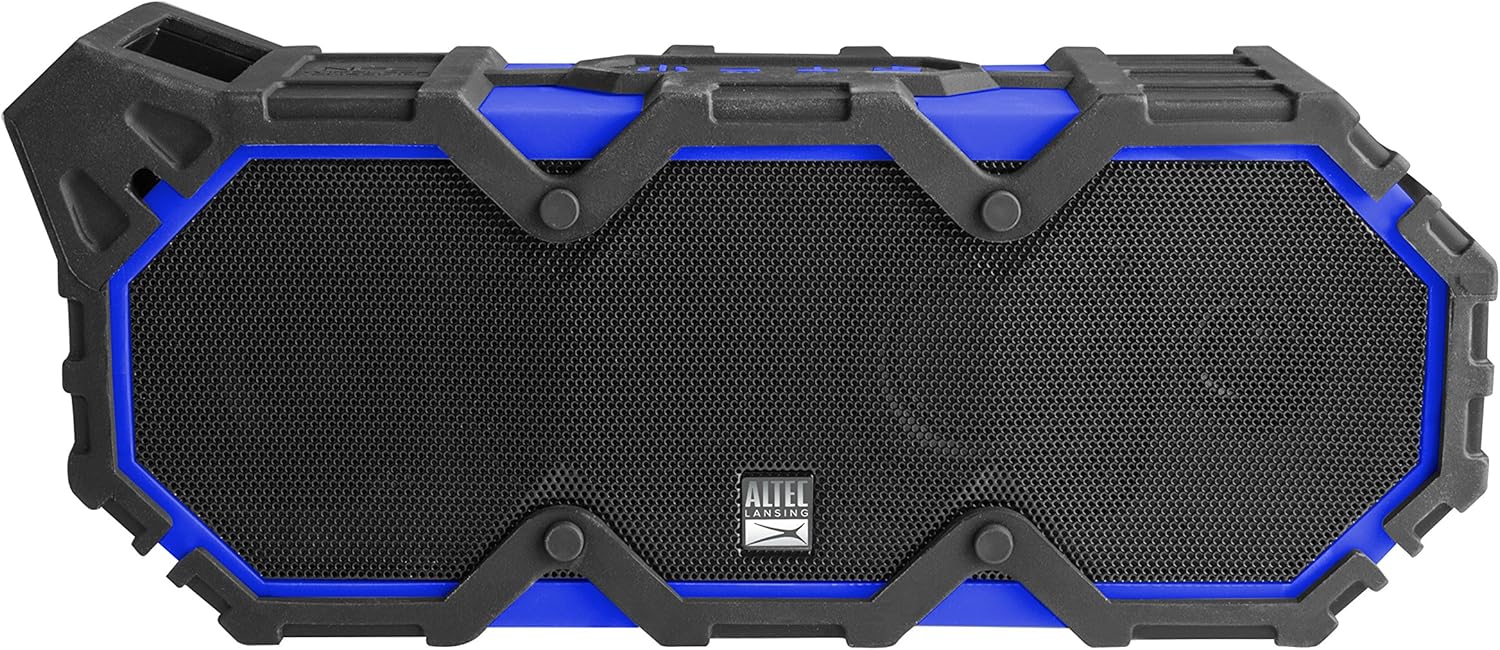
ຮູບ 1: ດ້ານຫນ້າ view of the Altec Lansing LifeJacket XL IMW789 Bluetooth Speaker.
2. ຄຸນນະສົມບັດທີ່ສໍາຄັນ
- ການເຊື່ອມຕໍ່ Bluetooth: Connects wirelessly to compatible devices up to 100 feet away.
- ການອອກແບບທົນທານ: Certified IP67 rated for waterproof, shockproof, snowproof, and dustproof performance.
- ອາຍຸແບັດເຕີຣີທີ່ຂະຫຍາຍອອກ: Provides an estimated 40 hours of audio playback on a single charge.
- Integrated Voice Assistant: Supports Siri and Google Assistant via speakerphone.
- ສຽງອຸດົມສົມບູນ: Delivers stereo sound with deep bass and clear audio.
- ການທໍາງານຂອງ Power Bank: USB port allows charging of external smart devices.
3. ສິ່ງທີ່ຢູ່ໃນກ່ອງ
- Altec Lansing LifeJacket XL IMW789 Bluetooth Speaker
- ສາຍສາກ USB
- ຄູ່ມືຜູ້ໃຊ້ (ເອກະສານນີ້)
4. ຕັ້ງຄ່າ
4.1 ກຳລັງສາກລຳໂພງ
- Locate the charging port on the side of the speaker, typically protected by a rubber flap.
- Open the rubber flap to expose the USB charging port.
- Connect the provided USB cable to the speaker's charging port and the other end to a USB power adapter (not included) or a computer's USB port.
- ຕົວຊີ້ວັດ LED ຈະສະແດງສະຖານະການສາກໄຟ. ການສາກເຕັມໃຫ້ປະມານ 40 ຊົ່ວໂມງຂອງການຫຼິ້ນ.

Figure 2: Side panel with charging and auxiliary ports.
4.2 ການຈັບຄູ່ກັບອຸປະກອນ Bluetooth
- ກວດໃຫ້ແນ່ໃຈວ່າລຳໂພງຖືກສາກເຕັມແລ້ວ.
- ກົດປຸ່ມເປີດປິດຄ້າງໄວ້ (⏻) on the speaker until the LED indicator flashes blue, indicating pairing mode.
- On your smart device (smartphone, tablet, laptop), navigate to the Bluetooth settings.
- Select "LifeJacket XL" from the list of available devices.
- ເມື່ອເຊື່ອມຕໍ່ແລ້ວ, ໄຟ LED ເທິງລຳໂພງຈະປ່ຽນເປັນສີຟ້າເຂັ້ມ.
- ດຽວນີ້ທ່ານສາມາດຫຼິ້ນສຽງຈາກອຸປະກອນຂອງທ່ານຜ່ານລຳໂພງໄດ້.
5. ຄໍາແນະນໍາການດໍາເນີນງານ
5.1 ການຄວບຄຸມພື້ນຖານ
- ປຸ່ມເປີດປິດ (⏻): ກົດຄ້າງໄວ້ເພື່ອເປີດ/ປິດ. ກົດສັ້ນໆເພື່ອຫຼິ້ນ/ຢຸດສຽງຊົ່ວຄາວ.
- ປະລິມານຂຶ້ນ (+): ກົດສັ້ນເພື່ອເພີ່ມລະດັບສຽງ.
- ປະລິມານລົງ (-): ກົດສັ້ນ Short ເພື່ອຫຼຸດລະດັບສຽງລົງ.
- Track Skip (>>): Press and hold Volume Up to skip to the next track.
- Track Back (<<): Press and hold Volume Down to go to the previous track.
- ຮັບ/ສາຍໂທ: ກົດປຸ່ມເປີດປິດສັ້ນໆໃນລະຫວ່າງການໂທເຂົ້າ.
- ກະຕຸ້ນຜູ້ຊ່ວຍສຽງ: Short press the dedicated voice assistant button (if available, refer to speaker diagram).
5.2 Using the Altec Lansing App
Download the Altec Lansing app from your device's app store to access additional features, including equalizer adjustments for customized sound profiles (Pop, Rock, Classical, Dance, etc.).
5.3 ການທໍາງານຂອງ Power Bank
The speaker features a USB-A output port (located under the rubber flap) that allows you to charge other USB-powered devices, such as smartphones or tablets, using the speaker's internal battery.
6. ບໍາລຸງຮັກສາ
- ທໍາຄວາມສະອາດ: ເຊັດລໍາໂພງດ້ວຍສຽງອ່ອນ, ງamp ຜ້າ. ຢ່າໃຊ້ສານເຄມີທີ່ຮຸນແຮງຫຼືເຄື່ອງເຮັດຄວາມສະອາດຂັດ.
- ການເປີດເຜີຍນ້ໍາ: Ensure all rubber flaps covering ports are securely closed before exposing the speaker to water. After exposure to saltwater or chlorinated water, rinse the speaker with fresh water and allow it to dry completely before charging or opening ports.
- ການເກັບຮັກສາ: ເກັບຮັກສາລຳໂພງໄວ້ໃນບ່ອນທີ່ເຢັນ, ແຫ້ງ, ຫ່າງຈາກແສງແດດໂດຍກົງ ແລະ ອຸນຫະພູມທີ່ຮ້າຍກາດ.
- ການດູແລຫມໍ້ໄຟ: For optimal battery life, charge the speaker regularly, even if not in frequent use. Avoid fully discharging the battery for extended periods.

Figure 3: The speaker is designed to float and be used in water.
7. ການແກ້ໄຂບັນຫາ
| ບັນຫາ | ສາເຫດທີ່ເປັນໄປໄດ້ | ການແກ້ໄຂ |
|---|---|---|
| ລຳໂພງບໍ່ເປີດ. | ແບັດເຕີຣີຕໍ່າ. | ສາກລຳໂພງໂດຍໃຊ້ສາຍ USB ທີ່ໃຫ້ມາ. |
| ບໍ່ສາມາດຈັບຄູ່ກັບອຸປະກອນ Bluetooth ໄດ້. | ລຳໂພງບໍ່ຢູ່ໃນໂໝດຈັບຄູ່; ອຸປະກອນໄກເກີນໄປ; ແຊກແຊງ. | Ensure speaker is in pairing mode (flashing blue LED). Move device closer to speaker. Turn off other Bluetooth devices. |
| ບໍ່ມີສຽງ ຫຼືສຽງຕໍ່າ. | ລະດັບສຽງຕ່ຳເກີນໄປໃນລຳໂພງ ຫຼື ອຸປະກອນ; ແຫຼ່ງສຽງບໍ່ຖືກຕ້ອງ. | Increase volume on both speaker and connected device. Verify correct audio output on your device. |
| ສຽງຕັດອອກ ຫຼືຖືກບິດເບືອນ. | Device too far from speaker; obstacles between devices; low battery. | Move device closer to speaker. Remove obstacles. Charge the speaker. |
8. ຂໍ້ມູນຈໍາເພາະ
- ຊື່ຕົວແບບ: IMW789-CB
- ປະເພດລຳໂພງ: ກາງແຈ້ງ
- ການເຊື່ອມຕໍ່: Bluetooth, Wi-Fi (Note: Wi-Fi connectivity may refer to app control or specific features, primary audio is Bluetooth)
- ລະດັບ Bluetooth: ສູງເຖິງ 100 ຟຸດ
- ຄວາມຕ້ານທານນ້ໍາ: IP67 (ກັນນ້ຳ, ກັນກະແທກ, ກັນຫິມະ, ກັນຝຸ່ນ)
- ຊີວິດຫມໍ້ໄຟ: Estimated 40 hours
- ແຫຼ່ງພະລັງງານ: ແບດເຕີຣີ້ໃຊ້ພະລັງງານ (ມີຫມໍ້ໄຟ Lithium Ion 1 ໜ່ວຍ)
- ໂModeດອອກສຽງ: ສະເຕຣິໂອ
- ລຳໂພງກຳລັງຜົນຜະລິດສູງສຸດ: 10 ວັດ
- ຂະໜາດ: 10 x 6.3 x 4.3 ນິ້ວ
- ນ້ໍາຫນັກລາຍການ: 4.1 ປອນ
- ຜູ້ຜະລິດ: ສາກົນ Sakar
9. ຂໍ້ມູນການຮັບປະກັນ
The Altec Lansing LifeJacket XL IMW789 Bluetooth Speaker comes with a Limited Warranty. For specific terms and conditions, please refer to the warranty card included with your product or visit the official Altec Lansing webເວັບໄຊ.
10. ການຊ່ວຍເຫຼືອລູກຄ້າ
For further assistance, technical support, or to inquire about replacement parts, please contact Altec Lansing customer service. Contact details can typically be found on the product packaging or the official Altec Lansing webເວັບໄຊ.


