1. ບົດແນະນຳ
Thank you for choosing the HTC USB Type-C Hi-Res Earphones, Model 99H20317-00. These earphones are designed to provide a high-quality audio experience with their advanced features and ergonomic design. This manual provides essential information for the proper setup, operation, maintenance, and troubleshooting of your new earphones.
ຄຸນນະສົມບັດທີ່ສໍາຄັນປະກອບມີ:
- Concert hall design for unparalleled sound.
- Larger 13mm speakers for a fuller sound profile.
- Enhanced port optimization for improved bass reproduction.
- Lighter and thinner aerospace polymer diaphragm to increase sound frequency response.
- Ergonomic design for maximum comfort during extended use.
2. ຂໍ້ມູນຄວາມປອດໄພ
Please read and follow these safety guidelines to ensure safe and optimal use of your earphones:
- ການປ້ອງກັນການໄດ້ຍິນ: ຫຼີກລ້ຽງການຟັງໃນລະດັບສຽງສູງເປັນເວລາດົນນານເພື່ອປ້ອງກັນຄວາມເສຍຫາຍການຟັງໄດ້.
- ຄວາມຮັບຮູ້ດ້ານສິ່ງແວດລ້ອມ: Do not use earphones in situations where the inability to hear ambient sounds could be dangerous, such as while driving, cycling, or walking in traffic.
- ທໍາຄວາມສະອາດ: Clean the earphones regularly with a soft, dry cloth. Do not use liquid cleaners or solvents.
- ການເປີດເຜີຍນ້ໍາ: These earphones are not waterproof. Avoid exposure to water or excessive moisture.
- ເດັກນ້ອຍ: ບໍ່ໃຫ້ເດັກນ້ອຍເຂົ້າເຖິງໄດ້ ເນື່ອງຈາກສ່ວນນ້ອຍໆທີ່ອາດເຮັດໃຫ້ເກີດອັນຕະລາຍຕໍ່ການຫາຍໃຈ.
3. ເນື້ອໃນຊຸດ
ກວດສອບວ່າລາຍການທັງຫມົດແມ່ນມີຢູ່ໃນຊຸດຂອງທ່ານ:
- HTC USB Type-C Hi-Res Earphones (Model: 99H20317-00)
- Additional ear tips (if included)
- ຄູ່ມືຜູ້ໃຊ້ (ເອກະສານນີ້)
4. ຕັ້ງຄ່າ
These earphones are designed for simple plug-and-play operation.
- ເຊື່ອມຕໍ່: Insert the USB Type-C connector of the earphones into the USB Type-C port of your compatible device (Smartphone, Laptop, Tablet).
- ການຮັບຮູ້ອຸປະກອນ: Your device should automatically recognize the earphones. If prompted, select the earphones as the audio output device.
- ປັບລະດັບສຽງ: Begin playback at a low volume and gradually increase to a comfortable listening level.
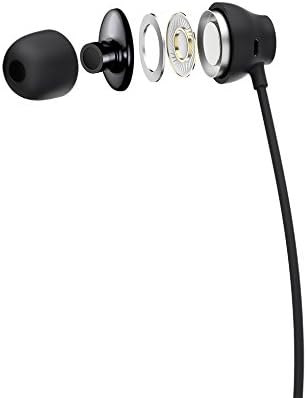
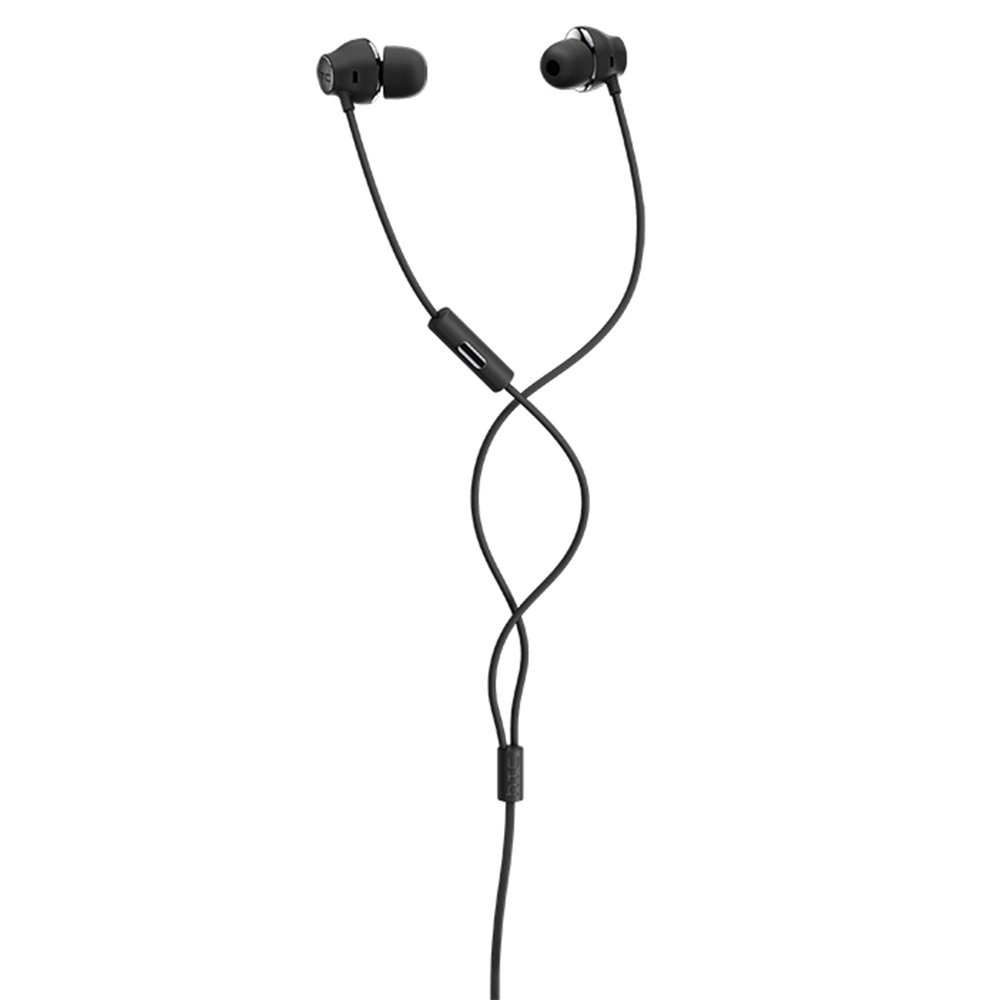
Figure 1: HTC USB Type-C Hi-Res Earphones connected to a device.
5. ຄໍາແນະນໍາການດໍາເນີນງານ
Once connected, your earphones are ready for use.
- ການຫຼິ້ນສຽງ: Play audio from your connected device. The sound will be routed through the earphones.
- ການຄຸ້ມຄອງການໂທ: For devices supporting call functions, you can typically answer/end calls using the device's interface.
- ການຄວບຄຸມແອັບ: This model supports control via an application. Refer to your device's app store for any official HTC audio control applications that may offer additional features or sound customization.
6. ການບໍາລຸງຮັກສາແລະການດູແລ
Proper care extends the lifespan of your earphones:
- ເຄັດລັບການທໍາຄວາມສະອາດຫູ: Gently remove ear tips and clean them with a mild soap solution and water. Ensure they are completely dry before reattaching.
- ການອະນາໄມຕົວຫູຟັງ: Wipe the earphone body and cable with a soft, dry, lint-free cloth. Do not use abrasive materials or harsh chemicals.
- ການເກັບຮັກສາ: ເມື່ອບໍ່ໄດ້ໃຊ້ງານ, ໃຫ້ເກັບຮັກສາຫູຟັງໄວ້ໃນບ່ອນທີ່ສະອາດ ແລະ ແຫ້ງ, ດີກວ່າຄວນເກັບໄວ້ໃນກະເປົ໋າປ້ອງກັນເພື່ອປ້ອງກັນການພັນກັນ ແລະ ຄວາມເສຍຫາຍ.
- ການຄຸ້ມຄອງສາຍໄຟ: Avoid tightly winding the cable or subjecting it to sharp bends, which can damage internal wires.
ຮູບທີ 2: ລະເບີດ view of earphone components, highlighting the 13mm speaker and aerospace polymer diaphragm.
7. ການແກ້ໄຂບັນຫາ
ຖ້າຫາກທ່ານພົບບັນຫາ, ເບິ່ງບັນຫາທົ່ວໄປດັ່ງຕໍ່ໄປນີ້ແລະການແກ້ໄຂ:
| ບັນຫາ | ສາເຫດທີ່ເປັນໄປໄດ້ | ການແກ້ໄຂ |
|---|---|---|
| ບໍ່ມີສຽງ | Earphones not properly connected; device volume too low; incorrect audio output selected on device. | Ensure the USB Type-C connector is fully inserted. Increase device volume. Check device audio settings to confirm earphones are selected as output. |
| ຄຸນນະພາບສຽງບໍ່ດີ | Dirty ear tips; damaged cable; low-quality audio source. | Clean ear tips. Inspect the cable for visible damage. Try a different audio source or file. |
| Earphones uncomfortable or fall out | ຂະໜາດປາຍຫູບໍ່ຖືກຕ້ອງ. | Try different sized ear tips (if provided) to find the best fit for your ears. |
8. ຂໍ້ມູນຈໍາເພາະ
| ຄຸນສົມບັດ | ລາຍລະອຽດ |
|---|---|
| ຍີ່ຫໍ້ | HTC |
| ໝາຍເລກຕົວແບບ | 99H20317-00 |
| ເຕັກໂນໂລຊີການເຊື່ອມຕໍ່ | ມີສາຍ (USB Type-C) |
| ຂະຫນາດລໍາໂພງ | 13 ມມ |
| ວັດສະດຸ | Synthetic leather (ear tips/housing accents) |
| ນ້ຳໜັກ | 50 ກຣາມ |
| ຂະໜາດສິນຄ້າ | 0.1 x 0.1 x 0.1 cm (packaging/shipping dimensions, actual earphone size is compact) |
| ວິທີການຄວບຄຸມ | ແອັບ |
| ຮອງຮັບ Bluetooth | ບໍ່ |
| ຕ້ອງໃຊ້ແບັດເຕີຣີ | ບໍ່ |
| ອຸປະກອນທີ່ເຂົ້າກັນໄດ້ | Smartphone, Laptop, Tablet with USB Type-C audio output |
| ສີ | ສີຂີ້ເຖົ່າເຂັ້ມ |
| ການຈັດວາງຫູ | ຫູ |
9. ການຮັບປະກັນແລະການສະຫນັບສະຫນູນ
For warranty information and technical support, please refer to the documentation provided with your purchase or visit the official HTC support webເວັບໄຊ. ຮັກສາຫຼັກຖານການຊື້ຂອງທ່ານສໍາລັບການຮ້ອງຂໍການຮັບປະກັນ.


