1. ບົດແນະນຳ
The Turtle Beach Stealth 700 is a premium wireless gaming headset designed for an immersive audio experience on PlayStation 5 and PlayStation 4 consoles. This manual provides essential information on setting up, operating, and maintaining your headset, ensuring optimal performance and longevity.

Figure 1: Turtle Beach Stealth 700 Wireless Gaming Headset
2. ສິ່ງທີ່ຢູ່ໃນກ່ອງ
Upon unboxing your Turtle Beach Stealth 700 headset, please ensure all the following components are present:
- Turtle Beach Stealth 700 Wireless Gaming Headset
- ເຄື່ອງສົ່ງສັນຍານ USB ແບບໄຮ້ສາຍ
- ສາຍສາກ USB-C
- ຄູ່ມືເລີ່ມຕົ້ນດ່ວນ / ເອກະສານ
ວິດີໂອທີ 1: ຜະລິດຕະພັນຢ່າງເປັນທາງການແລ້ວview and unboxing of the Turtle Beach Stealth 700 headset.
3. ຜະລິດຕະພັນເກີນview
Familiarize yourself with the physical components and controls of your Stealth 700 headset.
3.1 ອົງປະກອບຂອງຫູຟັງ

Figure 2: User wearing the Stealth 700 headset, demonstrating its over-ear design.
- ສາຍຫົວສາມາດປັບໄດ້: Features a synthetic leather-wrapped headband for comfort.
- ເບາະຫູ: Premium synthetic leather-wrapped ear cushions with ProSpecs glasses-friendly design to relieve pressure.
- 50mm Over-Ear Speakers: Deliver immersive surround sound and chat audio.
- High-Sensitivity Flip-Up Mic: Integrated microphone that mutes when flipped up.
3.2 ການຄວບຄຸມ
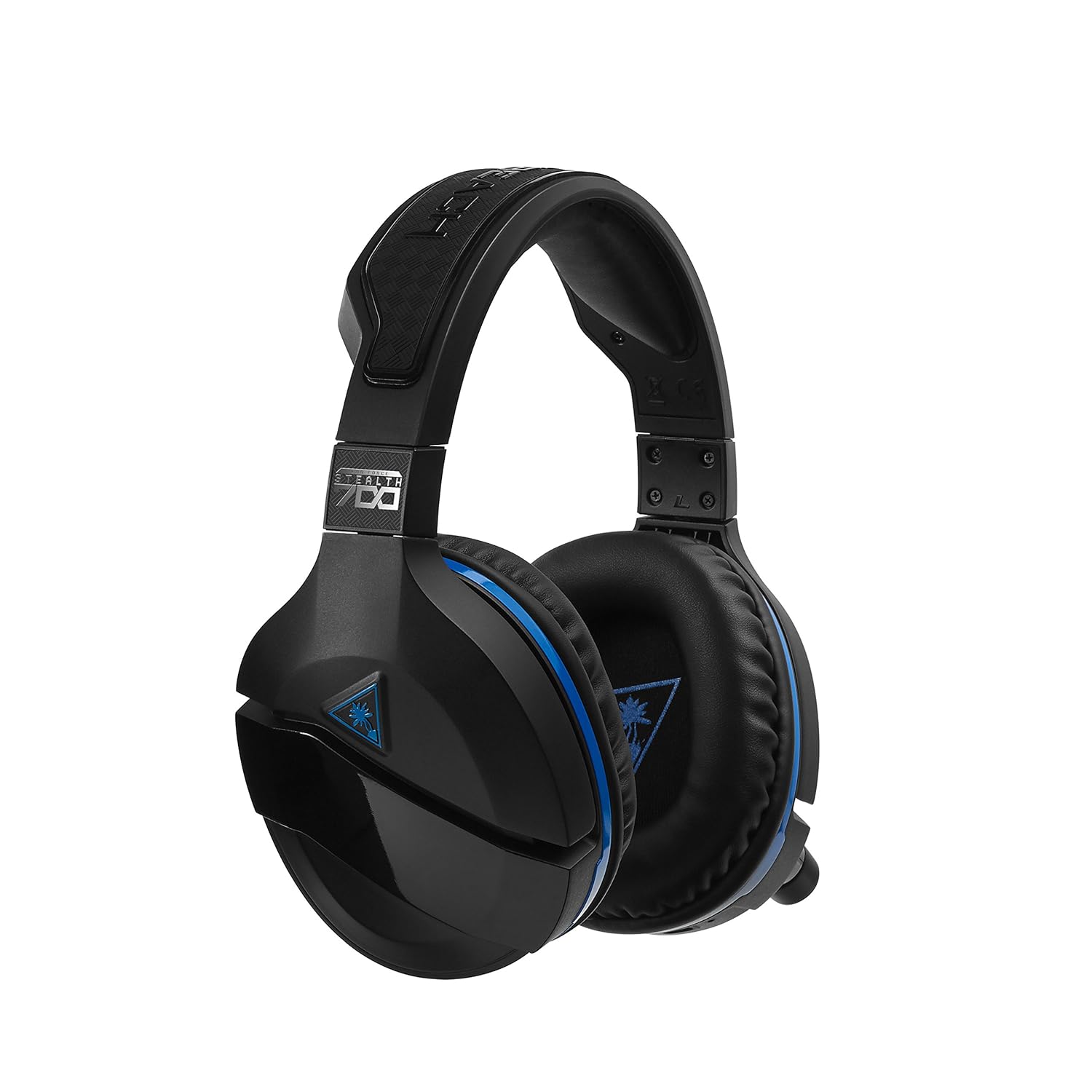
Figure 3: Right earcup controls and microphone in the down position.
- ປຸ່ມເປີດປິດ: ເປີດ/ປິດຊຸດຫູຟັງ.
- ປຸ່ມ Bluetooth: ເລີ່ມການຈັບຄູ່ Bluetooth.
- Game Volume Dial: Adjusts the overall game audio volume.
- Chat Volume Dial: Adjusts the chat audio volume independently.
- ປຸ່ມຕິດຕາມໄມໂຄຣໂຟນ: Adjusts the level of your own voice heard in the headset.
- Superhuman Hearing Button: Activates/deactivates the Superhuman Hearing sound setting.
- ປຸ່ມໂໝດ: Cycles through DTS surround sound modes and audio presets.

Figure 4: Microphone in the flipped-up (muted) position.
4. ຄໍາແນະນໍາການຕິດຕັ້ງ
Follow these steps to set up your Turtle Beach Stealth 700 headset with your PlayStation console.
4.1 ການສາກໄຟເບື້ອງຕົ້ນ
- Connect the USB-C Charging Cable to the headset and a USB power source.
- Charge the headset fully before first use (approximately 5 hours). The LED indicator will change when fully charged.
4.2 Connecting to PlayStation (Wireless)
- Plug the Wireless USB Transmitter into an available USB port on your PlayStation console.
- Power on your Stealth 700 headset by pressing and holding the Power Button until the LED illuminates.
- The headset and transmitter should automatically pair. A solid LED on both indicates a successful connection.
- ໃນ PlayStation ຂອງທ່ານ, ໃຫ້ໄປທີ່ ການຕັ້ງຄ່າ> ອຸປະກອນ> ອຸປະກອນສຽງ.
- ຕັ້ງ ອຸປະກອນປ້ອນ ກັບ ຊຸດຫູຟັງ USB (Turtle Beach Stealth 700).
- ຕັ້ງ ອຸປະກອນອອກ ກັບ ຊຸດຫູຟັງ USB (Turtle Beach Stealth 700).
- ຕັ້ງ ອອກສູ່ຫູຟັງ ກັບ ສຽງທັງ ໝົດ.
- Adjust your volume levels as desired.
4.3 Bluetooth Pairing (for Mobile Devices)
The Stealth 700 supports Bluetooth connectivity for calls, music, and the Turtle Beach Audio Hub app while gaming.
- With the headset powered on, press and hold the ປຸ່ມ Bluetooth until the headset announces "Bluetooth Pairing" and the LED flashes blue.
- On your mobile device, go to Bluetooth settings and select "Stealth 700" from the list of available devices.
- The headset will announce "Bluetooth Paired" when the connection is successful.
5. ຄໍາແນະນໍາການດໍາເນີນງານ
5.1 ການຄວບຄຸມສຽງພື້ນຖານ
- ປະລິມານເກມ: Use the upper dial on the left earcup to adjust game audio.
- Chat Volume: Use the lower dial on the left earcup to adjust chat audio.
5.2 ການນຳໃຊ້ໄມໂຄຣໂຟນ
- ເພື່ອເປີດສຽງ: Flip the microphone down.
- ເພື່ອປິດສຽງ: Flip the microphone up. The headset will provide an audible cue.
- Variable Mic Monitoring: Adjust the lower dial to control how much of your own voice you hear in the headset.
5.3 Active Noise Cancellation (ANC)
The Stealth 700 features active noise-cancellation to minimize external distractions.
- To Activate/Deactivate: Press the Power Button briefly while the headset is on. The headset will announce the status.
5.4 Superhuman Hearing
This exclusive Turtle Beach sound setting enhances critical in-game sounds like footsteps and weapon reloads.
- To Activate/Deactivate: Press the dedicated Superhuman Hearing button on the left earcup.
5.5 Audio Presets and DTS Surround Sound
Cycle through different audio presets and DTS surround sound modes for an optimized listening experience.
- To Cycle: ກົດ ປຸ່ມໂໝດ to switch between available presets (e.g., Bass Boost) and DTS Headphone:X 7.1 surround sound options.
6. Turtle Beach Audio Hub App
The Turtle Beach Audio Hub app (available for iOS and Android) allows you to customize various settings of your Stealth 700 headset via Bluetooth.
- Adjust mic monitoring levels.
- Select DTS surround sound modes.
- Choose from various audio presets, including Bass Boost.
- Enable/disable Dynamic Chat Boost.
- ຈັດການການເຊື່ອມຕໍ່ Bluetooth.
7. ບໍາລຸງຮັກສາ
Proper care ensures the longevity and performance of your headset.
- ທໍາຄວາມສະອາດ: ໃຊ້ອ່ອນ, ງamp cloth to clean the headset. Avoid harsh chemicals.
- ການເກັບຮັກສາ: ເກັບຮັກສາຊຸດຫູຟັງໄວ້ໃນບ່ອນທີ່ເຢັນ, ແຫ້ງ, ຫ່າງຈາກແສງແດດໂດຍກົງ ແລະອຸນຫະພູມທີ່ຮຸນແຮງ.
- ການດູແລຫມໍ້ໄຟ: ສໍາລັບອາຍຸຂອງຫມໍ້ໄຟທີ່ດີທີ່ສຸດ, ຫຼີກເວັ້ນການປະຖິ້ມຫມໍ້ໄຟຢ່າງເຕັມທີ່ເລື້ອຍໆ. ສາກໄຟເປັນປະຈຳ.
8. ການແກ້ໄຂບັນຫາ
If you encounter issues with your Stealth 700 headset, try the following solutions:
8.1 No Audio / Disconnection
- ກວດໃຫ້ແນ່ໃຈວ່າຊຸດຫູຟັງຖືກສາກເຕັມ ແລະເປີດເຄື່ອງແລ້ວ.
- Verify the Wireless USB Transmitter is securely plugged into the console.
- Check PlayStation audio settings (Settings > Devices > Audio Devices) to ensure the headset is selected as input/output.
- Try re-pairing the headset and transmitter by powering both off and on.
8.2 ໄມໂຄຣໂຟນບໍ່ເຮັດວຽກ
- Ensure the microphone is flipped down to unmute.
- Check PlayStation audio settings to confirm the headset is selected as the input device.
- Adjust the Mic Monitoring dial to ensure it's not set to zero.
- Test the microphone with another application or device if possible.
8.3 ບັນຫາການຈັບຄູ່ Bluetooth
- Ensure the headset is in Bluetooth pairing mode (LED flashing blue).
- Forget the "Stealth 700" device from your mobile device's Bluetooth settings and try pairing again.
- ໃຫ້ແນ່ໃຈວ່າບໍ່ມີອຸປະກອນ Bluetooth ອື່ນລົບກວນການເຊື່ອມຕໍ່.
9. ຂໍ້ມູນຈໍາເພາະ
| ຄຸນສົມບັດ | ລາຍລະອຽດ |
|---|---|
| ໝາຍເລກຕົວແບບ | TBS-3770-01 |
| ການເຊື່ອມຕໍ່ | Wireless (USB Transmitter), Bluetooth |
| ອຸປະກອນທີ່ເຂົ້າກັນໄດ້ | PlayStation 5, PlayStation 4 |
| ປະເພດໄດເວີສຽງ | ໄດນາມິກໄດເວີ |
| ຂະຫນາດລໍາໂພງ | 50ມມ |
| ຊີວິດຫມໍ້ໄຟ | ສູງສຸດ 10 ຊົ່ວໂມງ |
| ເວລາສາກໄຟ | ປະມານ. 5 ຊົ່ວໂມງ |
| ລຸ້ນ Bluetooth | 5.0 |
| ຊ່ວງ Bluetooth | 10 ແມັດ |
| ຄຸນນະສົມບັດພິເສດ | DTS Headphone:X 7.1 Surround Sound, Active Noise Cancellation, Superhuman Hearing, ProSpecs Glasses Friendly Design, Dynamic Chat Boost, Variable Mic Monitoring |
| ວັດສະດຸ | Faux Leather (ear cushions, headband) |
| ນ້ໍາຫນັກລາຍການ | 1.6 ປອນ |
10. ການຮັບປະກັນແລະການສະຫນັບສະຫນູນ
For detailed warranty information, product registration, and further technical support, please visit the official Turtle Beach webສະຖານທີ່ຢູ່ www.turtlebeach.com. You can also find FAQs and additional resources there.


