1. ຜະລິດຕະພັນເກີນview
The LinQ W735 is a versatile dynamic microphone designed for both wired and wireless operation. It features a durable metal construction, an internal shock mount, a hum-compensating coil, and a neodymium magnet. The microphone includes an on/off switch with a locking mechanism. For wireless use, it offers a range of up to 30 meters with its included receiver, which connects directly to a karaoke machine or amplifier's 6.5 mm jack input. Alternatively, a 3-meter wired connection is possible using the provided cable. The microphone is powered by AA batteries, which are included. It is designed to be insensitive to acoustic noise, boasts a high sound pressure level of over 150 dB SPL, and features a silent switch. Its cardioid polar pattern focuses on sound from the front, minimizing background noise.
1.1 ເນື້ອໃນຊຸດ
- LinQ W735 Dynamic Microphone
- Wireless Receiver (6.5 mm Jack)
- 3-meter Audio Cable (6.5 mm Jack to 6.5 mm Jack)
- AA Batteries (for microphone and receiver)

Image 1.1: LinQ W735 microphone, wireless receiver, and product packaging.
2. ຂໍ້ມູນຄວາມປອດໄພ
- Do not expose the microphone or receiver to water or excessive moisture.
- ຫຼີກລ້ຽງການຫຼຸດລົງຫຼືການອຸປະກອນທີ່ມີຜົນກະທົບທີ່ເຂັ້ມແຂງ.
- Do not attempt to disassemble or modify the microphone or receiver. This will void the warranty.
- Use only the specified AA batteries. Ensure correct polarity when inserting batteries.
- ຖອດແບດເຕີຣີອອກຖ້າອຸປະກອນຈະບໍ່ຖືກໃຊ້ເປັນໄລຍະເວລາເພີ່ມເຕີມເພື່ອປ້ອງກັນການຮົ່ວໄຫຼ.
- ຮັກສາຫມໍ້ໄຟໃຫ້ໄກຈາກເດັກນ້ອຍ.
3. ຄຸນລັກສະນະຂອງຜະລິດຕະພັນ
- ການດໍາເນີນງານຮູບແບບຄູ່: Supports both wireless and wired connections.
- Unidirectional (Cardioid) Polar Pattern: Captures sound primarily from the front, reducing background noise.
- ການກໍ່ສ້າງທົນທານ: Features a metal microphone body for longevity.
- ການຕິດຕັ້ງຊ໊ອກພາຍໃນ: Minimizes handling noise.
- Hum-Compensating Coil & Neodymium Magnet: Enhances audio clarity.
- On/Off Switch with Lock: Prevents accidental power changes.
- ຊ່ວງໄຮ້ສາຍ: Up to 30 meters (line of sight).
- ການຈັດການ SPL ສູງ: Capable of handling sound pressure levels over 150 dB.
- ພະລັງງານຫມໍ້ໄຟ: Uses AA batteries for convenience.
4. ຕັ້ງຄ່າ
4.1 ການຕິດຕັ້ງຫມໍ້ໄຟ
- ໄມໂຄຣໂຟນ: Unscrew the bottom part of the microphone handle. Insert two AA batteries, ensuring correct polarity (+/-). Screw the handle back on securely.
- ຕົວຮັບໄຮ້ສາຍ: Open the battery compartment on the receiver. Insert one AA battery, ensuring correct polarity (+/-). Close the compartment.
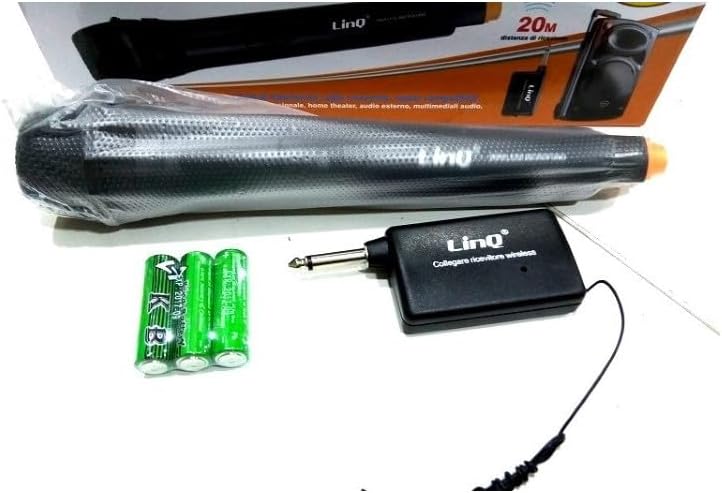
Image 4.1: LinQ W735 microphone, wireless receiver, audio cable, and AA batteries.
4.2 ເຊື່ອມຕໍ່ໄຮ້ສາຍ
- Ensure batteries are correctly installed in both the microphone and the wireless receiver.
- Insert the 6.5 mm jack of the wireless receiver directly into the microphone input of your amplifier, karaoke machine, or mixer.
- Turn on the wireless receiver.
- Slide the ON/OFF switch on the microphone to the 'ON' position.
- The microphone and receiver should automatically pair. Adjust the volume on your audio device as needed.
4.3 ສາຍເຊື່ອມຕໍ່
- Ensure batteries are installed in the microphone. The microphone requires power even in wired mode for optimal performance.
- Connect one end of the 3-meter audio cable to the microphone's output port.
- Connect the other end of the audio cable to the microphone input of your amplifier, karaoke machine, or mixer.
- Slide the ON/OFF switch on the microphone to the 'ON' position.
- Adjust the volume on your audio device as needed.
5. ຄໍາແນະນໍາການດໍາເນີນງານ
5.1 ການເປີດ/ປິດ
To power on the microphone, slide the switch located on the microphone body to the 'ON' position. To power off, slide the switch to the 'OFF' position. The switch also features a 'LOCK' position to prevent accidental power changes during use.
5.2 ຄໍາແນະນໍາການນໍາໃຊ້
- Hold the microphone approximately 2-6 inches (5-15 cm) from your mouth for optimal sound capture.
- Point the top of the microphone directly towards the sound source.
- Avoid covering the microphone grille with your hand, as this can affect sound quality.
- When using wirelessly, ensure a clear line of sight between the microphone and the receiver for best performance and range.
- Adjust the volume on your connected audio device (amplifier, mixer) to achieve the desired sound level.
6. ບໍາລຸງຮັກສາ
- ທໍາຄວາມສະອາດ: Wipe the microphone body with a soft, dry cloth. Do not use liquid cleaners or abrasive materials.
- ການເກັບຮັກສາ: Store the microphone and receiver in a cool, dry place away from direct sunlight and extreme temperatures.
- ການປ່ຽນແບັດເຕີຣີ: Replace batteries when the sound quality degrades or the microphone/receiver fails to power on. Always replace all batteries at the same time.
7. ການແກ້ໄຂບັນຫາ
| ບັນຫາ | ສາເຫດທີ່ເປັນໄປໄດ້ | ການແກ້ໄຂ |
|---|---|---|
| No sound output (Wireless) | Microphone/receiver off; Low batteries; Receiver not connected; Out of range; Volume too low. | Ensure microphone and receiver are ON. Replace batteries. Connect receiver securely. Move closer to receiver. Increase volume on audio device. |
| No sound output (Wired) | Microphone off; Cable not connected; Volume too low. | Ensure microphone is ON. Connect cable securely. Increase volume on audio device. |
| ຄຸນນະພາບສຽງບໍ່ດີ/ມີການລົບກວນ | Low batteries; Obstructions in wireless path; Other electronic interference; Incorrect microphone placement. | Replace batteries. Ensure clear line of sight. Move away from other electronic devices. Adjust microphone position. |
| Microphone not powering on | ຫມໍ້ໄຟທີ່ຕາຍແລ້ວ ຫຼືໃສ່ບໍ່ຖືກຕ້ອງ. | ປ່ຽນແບັດໃໝ່, ຮັບປະກັນການຂົ້ວທີ່ຖືກຕ້ອງ. |
8. ຂໍ້ມູນຈໍາເພາະ
| ຕົວແບບ | W735 |
| ປະເພດ | ໄມໂຄຣໂຟນໄດນາມິກ |
| ຮູບແບບຂົ້ວໂລກ | Unidirectional (Cardioid) |
| ການຕອບສະໜອງຄວາມຖີ່ | 80 - 12,000 Hz |
| ຄວາມອ່ອນໄຫວ | 1.5 mV/PA |
| Impedance ນາມ | 350 ໂອມ |
| Impedance Load ຕໍາ່ສຸດທີ່ | 1000 ໂອມ |
| ສູງສຸດ SPL | > 150 dB SPL |
| ປະເພດຕົວເຊື່ອມຕໍ່ | 6.5 mm Jack (for receiver and wired cable) |
| Range ໄຮ້ສາຍ | ເຖິງ 30 ແມັດ |
| ແຫຼ່ງພະລັງງານ | AA Batteries (2 for microphone, 1 for receiver) |
| ຂະ ໜາດ ໄມໂຄຣໂຟນ | 48 x 180 ມມ |
| ວັດສະດຸ | Metal (microphone body), ABS Plastic (receiver) |
| ການນໍາໃຊ້ທີ່ແນະນໍາ | ຮ້ອງເພງ, Karaoke |
9. ການຮັບປະກັນແລະການສະຫນັບສະຫນູນ
ສໍາລັບຂໍ້ມູນການຮັບປະກັນຫຼືການສະຫນັບສະຫນູນດ້ານວິຊາການ, ກະລຸນາເບິ່ງເອກະສານທີ່ສະຫນອງໃຫ້ໃນເວລາຊື້ຫຼືຕິດຕໍ່ຮ້ານຂາຍຍ່ອຍຂອງທ່ານ. ຮັກສາຫຼັກຖານການຊື້ຂອງທ່ານສໍາລັບການຮຽກຮ້ອງການຮັບປະກັນໃດໆ.


